# User Manual - Mentors & Coaches

# 1. Introduction to Mentors and Coaches

The Mentors and Coaches module enables the employee to have a Mentor and/or Coach assigned to them to help with learning or employee development. It also enables the Mentor and/or Coach to keep track of employee growth.

## <svg aria-label="Heading anchor" enable-background="new 0 0 20 20" height="16" role="img" viewbox="0 0 20 20" width="16" xmlns="http://www.w3.org/2000/svg"></svg>1.1 Mentoring definition

Mentorship is a longer-term relationship in which a more experienced or more knowledgeable person helps to guide a less experienced or less knowledgeable person. The mentor may be older or younger than the person being mentored, but he or she must have a certain area of expertise.

Some of the qualities of a good mentor includes the willingness to share skills, knowledge, and expertise. A good mentor is willing to teach what he/she knows and accept the mentee where they currently are in their professional development.

## <svg aria-label="Heading anchor" enable-background="new 0 0 20 20" height="16" role="img" viewbox="0 0 20 20" width="16" xmlns="http://www.w3.org/2000/svg"></svg>1.3 Coaching definition

Coaching can be seen as a short term, task-based method of directing, instructing and training a person or group of people, with the aim to achieve some goal or develop specific skills.

Some of the qualities of a good coach includes being organised, process oriented, objective, knowledgeable, patient and realistic.

## <svg aria-label="Heading anchor" enable-background="new 0 0 20 20" height="16" role="img" viewbox="0 0 20 20" width="16" xmlns="http://www.w3.org/2000/svg"></svg>1.3 Why use mentors and coaches?

The purpose of mentoring is to develop the employee not only for the current job, but also for the future. This distinction differentiates the role of the immediate manager and that of the mentor.

The purpose of coaching is to improve the employee’s performance on the job. This involves either enhancing current skills or acquiring new skills. Once the coachee successfully acquires the skills, the coach is no longer needed.

# 2. Mentors & Coaches - Administrator

***WHY:** This section assists the administrator to add mentors and coaches, set-up relationships between the mentor/coach and the employee being mentored/coached.*

***WHERE:** From the system portal, click **System Administration | Modules | Mentors and Coaches | Mentors and Coaches***

## <svg aria-label="Heading anchor" enable-background="new 0 0 20 20" height="16" role="img" viewbox="0 0 20 20" width="16" xmlns="http://www.w3.org/2000/svg"></svg>2.2 Adding a Mentor or Coach

There are 4 different types of Mentors or Coaches that can be added namely:

<div data-article-id="671659" data-workflow="false" id="bkmrk-coach-executive-coac"><div data-article-id="671659" data-workflow="false"><div><div data-step-uuid="0e037d05-4621-4442-a5ab-b4ecc5b6befa"><div><div>- Coach
- Executive Coach
- Future Mentor/Coach
- Mentor

</div></div></div></div></div></div>An external or internal mentor/coach can be added

The training to date is all Training Interventions that is linked to this person as a mentor or a coach

The Qualifications is all the Qualifications that is linked on the employee’s Learner Records

<div data-article-id="671659" data-workflow="false" id="bkmrk-2.3-set-up-the-relat"><div data-article-id="671659" data-workflow="false"><div data-step-uuid="0e037d05-4621-4442-a5ab-b4ecc5b6befa"><div></div><div>[![2.2 Adding a mentor or coach.JPG](https://signature.signifyhr.co.za/uploads/images/gallery/2023-06/scaled-1680-/Dm0Bl5edwl9JzrQP-2-2-adding-a-mentor-or-coach.JPG)](https://signature.signifyhr.co.za/uploads/images/gallery/2023-06/Dm0Bl5edwl9JzrQP-2-2-adding-a-mentor-or-coach.JPG)</div><div></div></div><div data-step-uuid="71707c47-a87f-45a0-9c54-d2f8152d259e"><span style="color: #222222; font-size: 2.8275em; font-weight: 400;">2.3 Set-up the Relationship</span></div></div></div><div data-article-id="671659" data-workflow="false" id="bkmrk-relationships-refers"><div data-article-id="671659" data-workflow="false"><div data-article-id="671659" data-workflow="false"><div data-step-uuid="71707c47-a87f-45a0-9c54-d2f8152d259e"><div><div>- Relationships refers to the Mentor/Coach, an employee and training that is linked together 
    - For the purposes of Smollan it refers to the Mentor/Coach and Employee relationship (when not referring to Learnerships)

</div><div>[![Relationship](https://signature.signifyhr.co.za/uploads/images/gallery/2023-06/scaled-1680-/34c2cSNYIl2QFaWl-untitled.png)](https://signature.signifyhr.co.za/uploads/images/gallery/2023-06/34c2cSNYIl2QFaWl-untitled.png)</div><div></div></div></div><div data-step-uuid="632e1a59-093c-4d48-b22a-89c6e4b2d31e"><div>- On this screen, new relationships can be added

</div><div></div></div></div></div></div>[![Relationship.JPG](https://signature.signifyhr.co.za/uploads/images/gallery/2023-06/scaled-1680-/oDfJSWHj78FmuVm8-relationship.JPG)](https://signature.signifyhr.co.za/uploads/images/gallery/2023-06/oDfJSWHj78FmuVm8-relationship.JPG)

<div data-article-id="671659" data-workflow="false" id="bkmrk-by-adding-a-relation"><div data-article-id="671659" data-workflow="false"><div data-step-uuid="632e1a59-093c-4d48-b22a-89c6e4b2d31e"><div></div><div>By adding a relationship to the Mentor/Coach the following is needed:</div></div></div></div><div data-article-id="671659" data-workflow="false" id="bkmrk-the-employee-that-is"><div data-article-id="671659" data-workflow="false"><div><div data-step-uuid="9d16aee1-ab0b-4e0e-b3d0-fa8e36af8657"><div><div>- The employee that is chosen from the list of employees
- The type which can be:

</div></div></div></div></div></div>The employee (this is the one used by Smollan when not referring to Learnerships)

Learnership Pipelines

Event

Training Intervention

<div data-article-id="671659" data-workflow="false" id="bkmrk-this-relationship-ca"><div data-article-id="671659" data-workflow="false"><div><div data-step-uuid="9d16aee1-ab0b-4e0e-b3d0-fa8e36af8657"><div><div>- This relationship can be made active

</div></div></div></div></div></div><div data-article-id="671659" data-workflow="false" id="bkmrk-2.4-mentors%2Fcoach-le"><div data-article-id="671659" data-workflow="false"><div data-step-uuid="71707c47-a87f-45a0-9c54-d2f8152d259e"></div><div data-step-uuid="71707c47-a87f-45a0-9c54-d2f8152d259e"><span style="color: #222222; font-size: 2.8275em; font-weight: 400;">2.4 Mentors/Coach Levels </span></div><div data-step-uuid="71707c47-a87f-45a0-9c54-d2f8152d259e"></div><div data-step-uuid="71707c47-a87f-45a0-9c54-d2f8152d259e">***WHERE:** From the system portal, click **System Administration | Modules | Mentors and Coaches | Mentor and Coach Levels***</div></div></div>On this page the following can be done:

- Add a Mentor / Coach level.
- On the Mentor/Coach level that was added, you can view the detail, edit and delete.

[![levels.JPG](https://signature.signifyhr.co.za/uploads/images/gallery/2023-06/scaled-1680-/C46sZoMnMEx9FK2o-levels.JPG)](https://signature.signifyhr.co.za/uploads/images/gallery/2023-06/C46sZoMnMEx9FK2o-levels.JPG)

- On this screen, a new Mentor / Coach level can be added.
- When adding a new Mentor/Coach level, the following is required: 
    - Level Description
    - Reference Description
    - Whether the level is the default value.

[![Coach levels.JPG](https://signature.signifyhr.co.za/uploads/images/gallery/2023-06/scaled-1680-/gRcnmgzhFO7ftx5u-coach-levels.JPG)](https://signature.signifyhr.co.za/uploads/images/gallery/2023-06/gRcnmgzhFO7ftx5u-coach-levels.JPG)

- When viewing the detail of the level, the following information is displayed

[![Levels Detail.JPG](https://signature.signifyhr.co.za/uploads/images/gallery/2023-06/scaled-1680-/3FQsg8jmfrYSQ5KF-levels-detail.JPG)](https://signature.signifyhr.co.za/uploads/images/gallery/2023-06/3FQsg8jmfrYSQ5KF-levels-detail.JPG)

<div data-article-id="671659" data-workflow="false" id="bkmrk--3"><div><div data-step-uuid="9d16aee1-ab0b-4e0e-b3d0-fa8e36af8657"><div><div></div></div></div></div></div>

# 3.1 LMS Portal

***WHY:** This section assists the mentors and coaches to view the employees assigned to them, add new comments, setup the coaching plans and do a coaching assessment. The employees can view their comments and coaching plans.*

***WHERE:** On the **LMS Portal**, click **Mentors and Coaches***

## <svg aria-label="Heading anchor" enable-background="new 0 0 20 20" height="16" role="img" viewbox="0 0 20 20" width="16" xmlns="http://www.w3.org/2000/svg"></svg>3.2 Mentor/Coach View

<div data-article-id="672097" data-workflow="false" id="bkmrk-on-the-lms-portal%2C-t"><div data-article-id="672097" data-workflow="false"><div data-step-uuid="b7c1528b-331b-43e4-8350-f055c60c6a68"><div>- On the LMS Portal, the Mentors &amp; Coaches will be available only for the employee that is setup to be a Mentor or Coach.

</div><div>[![mentor_coach view.JPG](https://signature.signifyhr.co.za/uploads/images/gallery/2023-06/scaled-1680-/4GnDbbSX5oxevEyg-mentor-coach-view.JPG)](https://signature.signifyhr.co.za/uploads/images/gallery/2023-06/4GnDbbSX5oxevEyg-mentor-coach-view.JPG)</div></div><div data-step-uuid="24bb77d8-8923-4bf8-b5e2-fd1cc8c5ea14"><div><div>- When clicking on the comments or goals links, either the comments or the goals pages will open - depending on the link you choose.
- A new comment can be added or an existing comment viewed when selecting the comments link.

</div><div></div><div><span style="color: #222222; font-size: 2.8275em; font-weight: 400;">3.3 Adding or Viewing Comments</span></div></div></div></div></div><div data-article-id="672097" data-workflow="false" id="bkmrk-to-add-a-new-comment"><div data-article-id="672097" data-workflow="false"><div><div data-step-uuid="f5ba9def-7465-4a35-8625-0a8350194437"><div><div>- To add a new comment, click on the Comments icon.
- When adding a comment, the following screen opens:

</div><div>[![comment.JPG](https://signature.signifyhr.co.za/uploads/images/gallery/2023-06/scaled-1680-/p9SZ7nueP2tbC5DI-comment.JPG)](https://signature.signifyhr.co.za/uploads/images/gallery/2023-06/p9SZ7nueP2tbC5DI-comment.JPG)</div><div>[![add comment.JPG](https://signature.signifyhr.co.za/uploads/images/gallery/2023-06/scaled-1680-/ofzEYay2TPYxNGk1-add-comment.JPG)](https://signature.signifyhr.co.za/uploads/images/gallery/2023-06/ofzEYay2TPYxNGk1-add-comment.JPG)</div></div></div><div data-step-uuid="52c24607-faa1-487a-bbdf-c7aa35e7aee4"><div><div>- All the general comments added will be available for viewing under the Comments link (from here you can also add new comments).

</div><div>[![](http://media.screensteps.com/images/signify/672097/1/rendered/d35d7a45-e2d6-4764-b8ca-04eb286f9d6c_display.png)](http://signify.screenstepslive.com/s/10619/m/64190/l/672097-3-1-lms-portal/show_image?image_id=10266200)[![comments added.JPG](https://signature.signifyhr.co.za/uploads/images/gallery/2023-06/scaled-1680-/5LbcvQiEVbfkBgss-comments-added.JPG)](https://signature.signifyhr.co.za/uploads/images/gallery/2023-06/5LbcvQiEVbfkBgss-comments-added.JPG)</div></div></div><div data-step-uuid="00c44179-af83-4127-9887-7f22d46f438e"></div></div></div></div>## <svg aria-label="Heading anchor" enable-background="new 0 0 20 20" height="16" role="img" viewbox="0 0 20 20" width="16" xmlns="http://www.w3.org/2000/svg"></svg>3.4 Coaching Plans

<div data-article-id="672097" data-workflow="false" id="bkmrk-when-opening-the-coa"><div data-article-id="672097" data-workflow="false"><div data-article-id="672097" data-workflow="false"><div data-step-uuid="00c44179-af83-4127-9887-7f22d46f438e"><div><div>- When opening the coaching plans screen Goals - the mentor/coach will be able to view all plans the employee has completed, those that he/she is still busy with, as well as the general comments loaded.
- New development plans can also be loaded from this screen.
- The date the last change was made to any of the goals is also available on this screen.

</div><div>[![coaching plans.JPG](https://signature.signifyhr.co.za/uploads/images/gallery/2023-06/scaled-1680-/5BRjbeE4bPnvrSBd-coaching-plans.JPG)](https://signature.signifyhr.co.za/uploads/images/gallery/2023-06/5BRjbeE4bPnvrSBd-coaching-plans.JPG)</div></div></div><div data-step-uuid="70234c5c-b8ef-4b08-a85a-3451e8341ea1"><div>- To add a new goal the following fields are available for completion: 
    - Goal
    - Priority
    - Actions necessary to achieve goal
    - Support / resources needed
    - Obstacles / Concerns
    - Target date
    - New comments
    - Comments History
    - New Private Comments
    - Private Comments History
    - Completed
    - Completed Date

</div></div></div></div></div>[![Goal detail.JPG](https://signature.signifyhr.co.za/uploads/images/gallery/2023-06/scaled-1680-/NJI9yIWLYJ9Ko3sW-goal-detail.JPG)](https://signature.signifyhr.co.za/uploads/images/gallery/2023-06/NJI9yIWLYJ9Ko3sW-goal-detail.JPG)

<div data-article-id="672097" data-workflow="false" id="bkmrk-when-viewing-the-goa"><div data-article-id="672097" data-workflow="false"><div data-step-uuid="70234c5c-b8ef-4b08-a85a-3451e8341ea1"><div>- When viewing the goals more information can be viewed by clicking on the Info Tab .
- When viewing the ‘Goals in Progress’ the mentor/coach can edit the plan to either add comments or mark it as completed. (Where after it will move to the ‘Completed Plans’ section).

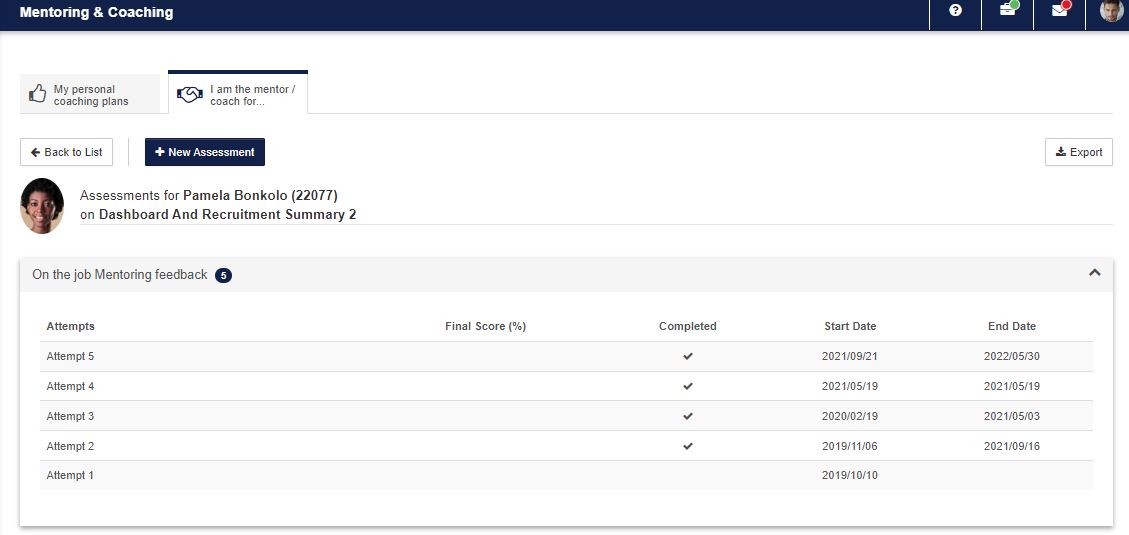
</div><div>[![](http://media.screensteps.com/images/signify/672097/1/rendered/86d55ac9-cedc-4fcc-959b-7616c33ad8a7_display.png)](http://signify.screenstepslive.com/s/10619/m/64190/l/672097-3-1-lms-portal/show_image?image_id=10266206)</div><div></div></div><div data-step-uuid="d3597390-f3eb-4dfe-a90a-eb6a7af35955"><span style="color: #222222; font-size: 2.8275em; font-weight: 400;">3.5 Coaching Assessments</span></div></div></div><div data-article-id="672097" data-workflow="false" id="bkmrk-when-clicking-on-the"><div data-article-id="672097" data-workflow="false"><div data-step-uuid="d3597390-f3eb-4dfe-a90a-eb6a7af35955"><div><div>- When clicking on the assessments icon, a screen opens enabling the mentor/coach to start a new assessment or to continue with a previous assessment.
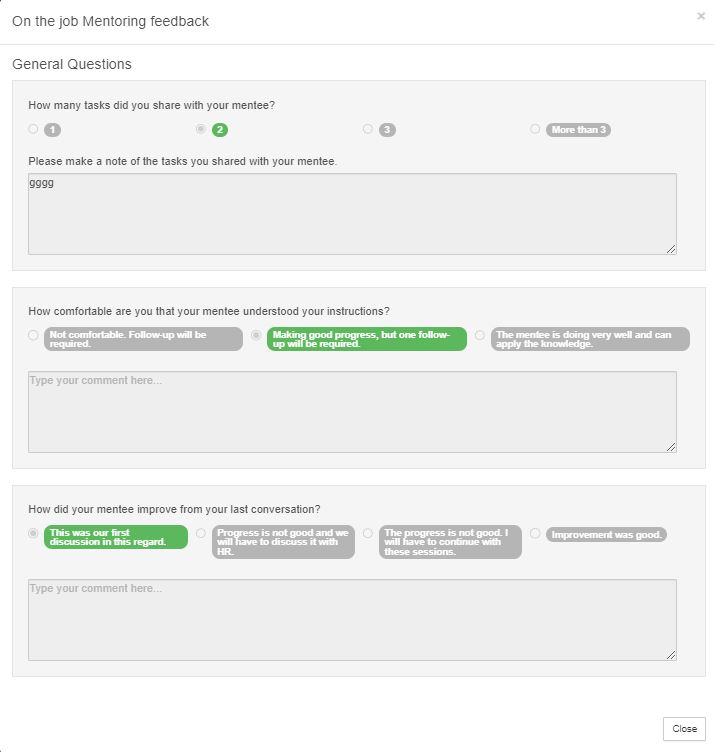
- When clicking on new assessment, choose the date of the assessment and then the assessment. (Only assessments that was created as Coaching Assessments will be listed on the screen.

</div><div>[![assessment.JPG](https://signature.signifyhr.co.za/uploads/images/gallery/2023-06/scaled-1680-/OpYUWRiKQdDcGGyp-assessment.JPG)](https://signature.signifyhr.co.za/uploads/images/gallery/2023-06/OpYUWRiKQdDcGGyp-assessment.JPG)</div><div>[![assessment in progress.JPG](https://signature.signifyhr.co.za/uploads/images/gallery/2023-06/scaled-1680-/BS3sI2YcVGNQqnPj-assessment-in-progress.JPG)](https://signature.signifyhr.co.za/uploads/images/gallery/2023-06/BS3sI2YcVGNQqnPj-assessment-in-progress.JPG)</div><div></div></div></div><div data-step-uuid="658e0b2c-4b69-42b2-9a87-c064c2f53f34"><div>- The assessment is then completed and closed
- To view the score, select the previous coaching assessment
- On this screen the Assessment with the final score can be viewed

</div></div><div data-step-uuid="779960f8-db56-47e5-87d1-3a13da2f8a23"><div><div></div><div>[![](http://media.screensteps.com/images/signify/672097/1/rendered/92a408b3-468e-43d6-97ec-42358efcb7ba_display.png)](http://signify.screenstepslive.com/s/10619/m/64190/l/672097-3-1-lms-portal/show_image?image_id=10266215)[![score.JPG](https://signature.signifyhr.co.za/uploads/images/gallery/2023-06/scaled-1680-/bwu4F7WrSltp1uYT-score.JPG)](https://signature.signifyhr.co.za/uploads/images/gallery/2023-06/bwu4F7WrSltp1uYT-score.JPG)</div></div></div></div></div>## <svg aria-label="Heading anchor" enable-background="new 0 0 20 20" height="16" role="img" viewbox="0 0 20 20" width="16" xmlns="http://www.w3.org/2000/svg"></svg>3.6 Act on behalf of a mentor/coach

<div data-article-id="672097" data-workflow="false" id="bkmrk-when-going-back-to-t"><div data-article-id="672097" data-workflow="false"><div data-article-id="672097" data-workflow="false"><div><div data-step-uuid="1b1451ec-d50d-41ca-86fa-f112e5977d25"><div><div>- When going back to the LMS you also have the option to act on behalf of a mentor or coach
- A mentor/coach can be chosen from the list

</div></div></div></div></div></div></div>[![act on behalf of.JPG](https://signature.signifyhr.co.za/uploads/images/gallery/2023-06/scaled-1680-/OajGFvCQ4tKyG7yQ-act-on-behalf-of.JPG)](https://signature.signifyhr.co.za/uploads/images/gallery/2023-06/OajGFvCQ4tKyG7yQ-act-on-behalf-of.JPG)

<div data-article-id="672097" data-workflow="false" id="bkmrk-all-employees-will-b"><div data-article-id="672097" data-workflow="false"><div><div data-step-uuid="1b1451ec-d50d-41ca-86fa-f112e5977d25"><div><div></div></div></div><div data-step-uuid="3ef85877-68e3-49f6-a188-5dc7531f2cb9"><div><div>- All employees will be seen that is linked to the mentor/coach

</div><div>[![act on behalf of 2.JPG](https://signature.signifyhr.co.za/uploads/images/gallery/2023-06/scaled-1680-/1KEWTeFQWk7HIdx6-act-on-behalf-of-2.JPG)](https://signature.signifyhr.co.za/uploads/images/gallery/2023-06/1KEWTeFQWk7HIdx6-act-on-behalf-of-2.JPG)[![](http://media.screensteps.com/images/signify/672097/1/rendered/42697a0b-5106-4d05-b001-a0b8a9ef8e3f_display.png)](http://signify.screenstepslive.com/s/10619/m/64190/l/672097-3-1-lms-portal/show_image?image_id=10266221)</div><div></div></div></div><div data-step-uuid="95a6f56a-caa9-46ee-93f1-5d63a4c0a87b"></div></div></div></div>## <svg aria-label="Heading anchor" enable-background="new 0 0 20 20" height="16" role="img" viewbox="0 0 20 20" width="16" xmlns="http://www.w3.org/2000/svg"></svg>3.7 Employee View

<div data-article-id="672097" data-workflow="false" id="bkmrk-from-the-mentor-%26-co"><div data-article-id="672097" data-workflow="false"><div><div data-step-uuid="95a6f56a-caa9-46ee-93f1-5d63a4c0a87b"><div><div>- From the Mentor &amp; Coach Plans screen the employee can view their mentoring and coaching plans.[![employee view.JPG](https://signature.signifyhr.co.za/uploads/images/gallery/2023-06/scaled-1680-/nSIUV4qEk7e25FYk-employee-view.JPG)](https://signature.signifyhr.co.za/uploads/images/gallery/2023-06/nSIUV4qEk7e25FYk-employee-view.JPG)
- Nothing can be edited from this screen.
- Clicking on the goals link will open up the coaching plans screen.

</div></div></div></div></div></div>[![employee view 2.JPG](https://signature.signifyhr.co.za/uploads/images/gallery/2023-06/scaled-1680-/CJ2QfAFIPGOhYmoG-employee-view-2.JPG)](https://signature.signifyhr.co.za/uploads/images/gallery/2023-06/CJ2QfAFIPGOhYmoG-employee-view-2.JPG)

[![employee view 3.JPG](https://signature.signifyhr.co.za/uploads/images/gallery/2023-06/scaled-1680-/44JnBozTLfc755oC-employee-view-3.JPG)](https://signature.signifyhr.co.za/uploads/images/gallery/2023-06/44JnBozTLfc755oC-employee-view-3.JPG)

<div data-article-id="672097" data-workflow="false" id="bkmrk--3"><div><div data-step-uuid="95a6f56a-caa9-46ee-93f1-5d63a4c0a87b"><div><div></div><div></div><div></div></div></div></div></div>

# 4.1 Training Interventions for Coaching Assessments

***WHY:** A Training Intervention should always be created when the end result of a task is a Learner Record. The name of the Assessment and that of the Learner Record should be exactly the same.*

***WHERE:** The path to Training Interventions List is **System Administration | Database | Training Interventions.***

<div data-article-id="672106" data-workflow="false" id="bkmrk-here-you-can-add-and"><div><div></div></div><div><div data-step-uuid="4cbb8c37-e3d8-49d9-9b82-2561926fdb71"><div><div>- Here you can add and edit Training Interventions.
- Training Interventions can also be disabled, but never deleted.
- Please note that the Pathway Step Type should be Assessment otherwise this will not be available for selection in Assessment Builder.

</div><div>[![](http://media.screensteps.com/images/signify/672106/1/rendered/91e4c518-49b8-4888-b525-9109b31064c9_display.png)<span class="preview_image">Zoom:</span>](http://signify.screenstepslive.com/s/10619/m/64190/l/672106-4-1-training-interventions-for-coaching-assessments/show_image?image_id=10266227)</div><div></div></div></div><div data-step-uuid="240459ce-ed9c-4ca6-a798-f5b5a0f13843"><div><div></div></div></div></div></div>

# 5.1 Coaching Assessments

***WHY:** The Coaching Assessment is used in Mentors and Coaches. The following section will explain how the assessment is built. Here you are able to add and edit Assessment Categories, add and edit Assessments and delete categories and assessments.*

***WHERE:** The path to Assessment Builder is **System Administration | Modules | e-Learning | Assessment Builder.***

## <svg aria-label="Heading anchor" enable-background="new 0 0 20 20" height="16" role="img" viewbox="0 0 20 20" width="16" xmlns="http://www.w3.org/2000/svg"></svg>5.2 Question List

Before an assessment can be compiled all the questions should be added to the system.

<div data-article-id="672107" data-workflow="false" id="bkmrk-select-assessment-bu"><div data-article-id="672107" data-workflow="false"><div><div data-step-uuid="40a0abce-4afe-42aa-a327-e513d6eca5cc"><div><div>- Select Assessment Builder | Question List

</div><div>[![5.2 Question List](http://media.screensteps.com/images/signify/672107/1/rendered/ff8d9464-ef7c-4a81-bf5f-743d0be88065_display.png)](http://signify.screenstepslive.com/s/10619/m/64190/l/672107-5-1-coaching-assessments/show_image?image_id=10266230)</div><div></div></div></div><div data-step-uuid="e865aeda-bb29-489b-8441-5307c1a54dc1"><div><div>- The Question Management screen opens.

</div><div>[![](http://media.screensteps.com/images/signify/672107/1/rendered/c07d5fbb-099d-40be-aec5-4c27f0e1ebc0_display.png)](http://signify.screenstepslive.com/s/10619/m/64190/l/672107-5-1-coaching-assessments/show_image?image_id=10266233)</div><div></div></div></div><div data-step-uuid="89595ac4-d252-495d-a9cd-768167ec50f8"><div><div>- From here the user can add, edit and delete categories and questions
- Answers should also be added to questions; or answer groups linked to the question.
- **Note:** Indicate on the question whether a comment box should display as well as whether the comment should be mandatory.

</div><div></div></div></div><div data-step-uuid="05c7c696-a646-4f41-9dbc-78546ed83b9c"></div></div></div></div>## <svg aria-label="Heading anchor" enable-background="new 0 0 20 20" height="16" role="img" viewbox="0 0 20 20" width="16" xmlns="http://www.w3.org/2000/svg"></svg>5.3 Answer Groups

<div data-article-id="672107" data-workflow="false" id="bkmrk-to-set-up-answer-gro"><div data-article-id="672107" data-workflow="false"><div><div data-step-uuid="05c7c696-a646-4f41-9dbc-78546ed83b9c"><div><div>- To set up Answer Groups select Assessment Builder | Answer Groups

</div><div>[![5.3 Answer Groups](http://media.screensteps.com/images/signify/672107/1/rendered/f9960d06-f1b3-453e-8d5d-717fcb5071e3_display.png)](http://signify.screenstepslive.com/s/10619/m/64190/l/672107-5-1-coaching-assessments/show_image?image_id=10266236)</div><div></div></div></div><div data-step-uuid="98cd0f15-abcd-46cf-af09-476d631e2219"><div><div>- The Answer Groups screen will display.
- From here you can create answer groups that can be added to questions.

</div><div>[![](http://media.screensteps.com/images/signify/672107/1/rendered/aa09fce8-e097-4a29-b14f-043bc350a4a8_display.png)](http://signify.screenstepslive.com/s/10619/m/64190/l/672107-5-1-coaching-assessments/show_image?image_id=10266239)</div><div></div></div></div><div data-step-uuid="dc51c7ca-5bb9-4eba-8c68-b7d37e2ccbc5"></div></div></div></div>## <svg aria-label="Heading anchor" enable-background="new 0 0 20 20" height="16" role="img" viewbox="0 0 20 20" width="16" xmlns="http://www.w3.org/2000/svg"></svg>5.4 Add Assessment Category

<div data-article-id="672107" data-workflow="false" id="bkmrk-click-on-the-root-no"><div data-article-id="672107" data-workflow="false"><div><div data-step-uuid="dc51c7ca-5bb9-4eba-8c68-b7d37e2ccbc5"><div><div>- Click on the Root node ‘eAssess Assessments’
- Then click on ‘Add Assessment Category’

</div><div>[![5.4 Add Assessment Category](http://media.screensteps.com/images/signify/672107/1/rendered/421d5264-813d-4ee7-a77f-a8fd98ca45ee_display.png)](http://signify.screenstepslive.com/s/10619/m/64190/l/672107-5-1-coaching-assessments/show_image?image_id=10266242)</div><div></div></div></div><div data-step-uuid="9f0f9bdc-ca45-411b-8fab-9c8f65e5d128"></div></div></div></div>## <svg aria-label="Heading anchor" enable-background="new 0 0 20 20" height="16" role="img" viewbox="0 0 20 20" width="16" xmlns="http://www.w3.org/2000/svg"></svg>5.5 Assessment Category Detail

<div data-article-id="672107" data-workflow="false" id="bkmrk-provide-an-%E2%80%98assessme"><div data-article-id="672107" data-workflow="false"><div><div data-step-uuid="9f0f9bdc-ca45-411b-8fab-9c8f65e5d128"><div><div>- Provide an ‘Assessment Category Description’ and click on ‘Save’

</div><div>[![5.5 Assessment Category Detail](http://media.screensteps.com/images/signify/672107/1/rendered/2cce7252-1999-4bd6-889a-162231840db7_display.png)](http://signify.screenstepslive.com/s/10619/m/64190/l/672107-5-1-coaching-assessments/show_image?image_id=10266245)</div><div></div></div></div><div data-step-uuid="54329e28-ecd5-497c-a0c0-a98f1c4fd119"></div></div></div></div>## <svg aria-label="Heading anchor" enable-background="new 0 0 20 20" height="16" role="img" viewbox="0 0 20 20" width="16" xmlns="http://www.w3.org/2000/svg"></svg>5.6 Categories

<div data-article-id="672107" data-workflow="false" id="bkmrk-to-add-a-new-categor"><div data-article-id="672107" data-workflow="false"><div><div data-step-uuid="54329e28-ecd5-497c-a0c0-a98f1c4fd119"><div><div>- To add a new category, click on ‘Add’; multiple Categories can be loaded(this is not a compulsory step).

</div><div>[![5.6 Categories](http://media.screensteps.com/images/signify/672107/1/rendered/154e7605-8cd6-491b-b24f-9506bf74ebca_display.png)](http://signify.screenstepslive.com/s/10619/m/64190/l/672107-5-1-coaching-assessments/show_image?image_id=10266248)</div><div></div></div></div><div data-step-uuid="c158bfcd-ac43-48f4-b151-932b281fac9e"></div></div></div></div>## <svg aria-label="Heading anchor" enable-background="new 0 0 20 20" height="16" role="img" viewbox="0 0 20 20" width="16" xmlns="http://www.w3.org/2000/svg"></svg>5.7 Assessments

<div data-article-id="672107" data-workflow="false" id="bkmrk-add-an-assessment.-n"><div><div data-step-uuid="c158bfcd-ac43-48f4-b151-932b281fac9e"><div><div>- Add an assessment.
- Note that the type HAS to be coaching assessment in order to be viewed from mentoring and coaching.
- Also remember that the Training Intervention should already exist before creating the assessment, should it be required that a learner record is created from the assessment. (See Training Intervention creation in the next section.)

</div><div>[![5.7 Assessments](http://media.screensteps.com/images/signify/672107/1/rendered/19893e3f-d7dc-4364-8985-85486c6dec03_display.png)<span class="preview_image">Zoom: 5.7 Assessments</span>](http://signify.screenstepslive.com/s/10619/m/64190/l/672107-5-1-coaching-assessments/show_image?image_id=10266251)</div><div></div></div></div><div data-step-uuid="3ec483c6-9101-4fbb-afa9-979f4b5fdf78"><div><div>- After the assessment has been created, Questions should be linked to the assessment from the ‘Question Section’ on the screen.

</div><div>[![](http://media.screensteps.com/images/signify/672107/1/rendered/1530456a-32ff-449b-8ca2-6f42e90bea06_display.png)<span class="preview_image">Zoom:</span>](http://signify.screenstepslive.com/s/10619/m/64190/l/672107-5-1-coaching-assessments/show_image?image_id=10266254)</div><div></div></div></div></div></div>