# 2. Mentors & Coaches - Administrator

***WHY:** This section assists the administrator to add mentors and coaches, set-up relationships between the mentor/coach and the employee being mentored/coached.*

***WHERE:** From the system portal, click **System Administration | Modules | Mentors and Coaches | Mentors and Coaches***

## <svg aria-label="Heading anchor" enable-background="new 0 0 20 20" height="16" role="img" viewbox="0 0 20 20" width="16" xmlns="http://www.w3.org/2000/svg"></svg>2.2 Adding a Mentor or Coach

There are 4 different types of Mentors or Coaches that can be added namely:

<div data-article-id="671659" data-workflow="false" id="bkmrk-coach-executive-coac"><div data-article-id="671659" data-workflow="false"><div><div data-step-uuid="0e037d05-4621-4442-a5ab-b4ecc5b6befa"><div><div>- Coach
- Executive Coach
- Future Mentor/Coach
- Mentor

</div></div></div></div></div></div>An external or internal mentor/coach can be added

The training to date is all Training Interventions that is linked to this person as a mentor or a coach

The Qualifications is all the Qualifications that is linked on the employee’s Learner Records

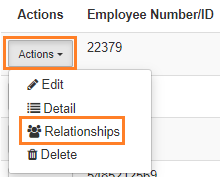
<div data-article-id="671659" data-workflow="false" id="bkmrk-2.3-set-up-the-relat"><div data-article-id="671659" data-workflow="false"><div data-step-uuid="0e037d05-4621-4442-a5ab-b4ecc5b6befa"><div></div><div>[![2.2 Adding a mentor or coach.JPG](https://signature.signifyhr.co.za/uploads/images/gallery/2023-06/scaled-1680-/Dm0Bl5edwl9JzrQP-2-2-adding-a-mentor-or-coach.JPG)](https://signature.signifyhr.co.za/uploads/images/gallery/2023-06/Dm0Bl5edwl9JzrQP-2-2-adding-a-mentor-or-coach.JPG)</div><div></div></div><div data-step-uuid="71707c47-a87f-45a0-9c54-d2f8152d259e"><span style="color: #222222; font-size: 2.8275em; font-weight: 400;">2.3 Set-up the Relationship</span></div></div></div><div data-article-id="671659" data-workflow="false" id="bkmrk-relationships-refers"><div data-article-id="671659" data-workflow="false"><div data-article-id="671659" data-workflow="false"><div data-step-uuid="71707c47-a87f-45a0-9c54-d2f8152d259e"><div><div>- Relationships refers to the Mentor/Coach, an employee and training that is linked together 
    - For the purposes of Smollan it refers to the Mentor/Coach and Employee relationship (when not referring to Learnerships)

</div><div>[![Relationship](https://signature.signifyhr.co.za/uploads/images/gallery/2023-06/scaled-1680-/34c2cSNYIl2QFaWl-untitled.png)](https://signature.signifyhr.co.za/uploads/images/gallery/2023-06/34c2cSNYIl2QFaWl-untitled.png)</div><div></div></div></div><div data-step-uuid="632e1a59-093c-4d48-b22a-89c6e4b2d31e"><div>- On this screen, new relationships can be added

</div><div></div></div></div></div></div>[![Relationship.JPG](https://signature.signifyhr.co.za/uploads/images/gallery/2023-06/scaled-1680-/oDfJSWHj78FmuVm8-relationship.JPG)](https://signature.signifyhr.co.za/uploads/images/gallery/2023-06/oDfJSWHj78FmuVm8-relationship.JPG)

<div data-article-id="671659" data-workflow="false" id="bkmrk-by-adding-a-relation"><div data-article-id="671659" data-workflow="false"><div data-step-uuid="632e1a59-093c-4d48-b22a-89c6e4b2d31e"><div></div><div>By adding a relationship to the Mentor/Coach the following is needed:</div></div></div></div><div data-article-id="671659" data-workflow="false" id="bkmrk-the-employee-that-is"><div data-article-id="671659" data-workflow="false"><div><div data-step-uuid="9d16aee1-ab0b-4e0e-b3d0-fa8e36af8657"><div><div>- The employee that is chosen from the list of employees
- The type which can be:

</div></div></div></div></div></div>The employee (this is the one used by Smollan when not referring to Learnerships)

Learnership Pipelines

Event

Training Intervention

<div data-article-id="671659" data-workflow="false" id="bkmrk-this-relationship-ca"><div data-article-id="671659" data-workflow="false"><div><div data-step-uuid="9d16aee1-ab0b-4e0e-b3d0-fa8e36af8657"><div><div>- This relationship can be made active

</div></div></div></div></div></div><div data-article-id="671659" data-workflow="false" id="bkmrk-2.4-mentors%2Fcoach-le"><div data-article-id="671659" data-workflow="false"><div data-step-uuid="71707c47-a87f-45a0-9c54-d2f8152d259e"></div><div data-step-uuid="71707c47-a87f-45a0-9c54-d2f8152d259e"><span style="color: #222222; font-size: 2.8275em; font-weight: 400;">2.4 Mentors/Coach Levels </span></div><div data-step-uuid="71707c47-a87f-45a0-9c54-d2f8152d259e"></div><div data-step-uuid="71707c47-a87f-45a0-9c54-d2f8152d259e">***WHERE:** From the system portal, click **System Administration | Modules | Mentors and Coaches | Mentor and Coach Levels***</div></div></div>On this page the following can be done:

- Add a Mentor / Coach level.
- On the Mentor/Coach level that was added, you can view the detail, edit and delete.

[![levels.JPG](https://signature.signifyhr.co.za/uploads/images/gallery/2023-06/scaled-1680-/C46sZoMnMEx9FK2o-levels.JPG)](https://signature.signifyhr.co.za/uploads/images/gallery/2023-06/C46sZoMnMEx9FK2o-levels.JPG)

- On this screen, a new Mentor / Coach level can be added.
- When adding a new Mentor/Coach level, the following is required: 
    - Level Description
    - Reference Description
    - Whether the level is the default value.

[![Coach levels.JPG](https://signature.signifyhr.co.za/uploads/images/gallery/2023-06/scaled-1680-/gRcnmgzhFO7ftx5u-coach-levels.JPG)](https://signature.signifyhr.co.za/uploads/images/gallery/2023-06/gRcnmgzhFO7ftx5u-coach-levels.JPG)

- When viewing the detail of the level, the following information is displayed

[![Levels Detail.JPG](https://signature.signifyhr.co.za/uploads/images/gallery/2023-06/scaled-1680-/3FQsg8jmfrYSQ5KF-levels-detail.JPG)](https://signature.signifyhr.co.za/uploads/images/gallery/2023-06/3FQsg8jmfrYSQ5KF-levels-detail.JPG)

<div data-article-id="671659" data-workflow="false" id="bkmrk--3"><div><div data-step-uuid="9d16aee1-ab0b-4e0e-b3d0-fa8e36af8657"><div><div></div></div></div></div></div>