# 3.1 LMS Portal

***WHY:** This section assists the mentors and coaches to view the employees assigned to them, add new comments, setup the coaching plans and do a coaching assessment. The employees can view their comments and coaching plans.*

***WHERE:** On the **LMS Portal**, click **Mentors and Coaches***

## <svg aria-label="Heading anchor" enable-background="new 0 0 20 20" height="16" role="img" viewbox="0 0 20 20" width="16" xmlns="http://www.w3.org/2000/svg"></svg>3.2 Mentor/Coach View

<div data-article-id="672097" data-workflow="false" id="bkmrk-on-the-lms-portal%2C-t"><div data-article-id="672097" data-workflow="false"><div data-step-uuid="b7c1528b-331b-43e4-8350-f055c60c6a68"><div>- On the LMS Portal, the Mentors &amp; Coaches will be available only for the employee that is setup to be a Mentor or Coach.

</div><div>[![mentor_coach view.JPG](https://signature.signifyhr.co.za/uploads/images/gallery/2023-06/scaled-1680-/4GnDbbSX5oxevEyg-mentor-coach-view.JPG)](https://signature.signifyhr.co.za/uploads/images/gallery/2023-06/4GnDbbSX5oxevEyg-mentor-coach-view.JPG)</div></div><div data-step-uuid="24bb77d8-8923-4bf8-b5e2-fd1cc8c5ea14"><div><div>- When clicking on the comments or goals links, either the comments or the goals pages will open - depending on the link you choose.
- A new comment can be added or an existing comment viewed when selecting the comments link.

</div><div></div><div><span style="color: #222222; font-size: 2.8275em; font-weight: 400;">3.3 Adding or Viewing Comments</span></div></div></div></div></div><div data-article-id="672097" data-workflow="false" id="bkmrk-to-add-a-new-comment"><div data-article-id="672097" data-workflow="false"><div><div data-step-uuid="f5ba9def-7465-4a35-8625-0a8350194437"><div><div>- To add a new comment, click on the Comments icon.
- When adding a comment, the following screen opens:

</div><div>[![comment.JPG](https://signature.signifyhr.co.za/uploads/images/gallery/2023-06/scaled-1680-/p9SZ7nueP2tbC5DI-comment.JPG)](https://signature.signifyhr.co.za/uploads/images/gallery/2023-06/p9SZ7nueP2tbC5DI-comment.JPG)</div><div>[![add comment.JPG](https://signature.signifyhr.co.za/uploads/images/gallery/2023-06/scaled-1680-/ofzEYay2TPYxNGk1-add-comment.JPG)](https://signature.signifyhr.co.za/uploads/images/gallery/2023-06/ofzEYay2TPYxNGk1-add-comment.JPG)</div></div></div><div data-step-uuid="52c24607-faa1-487a-bbdf-c7aa35e7aee4"><div><div>- All the general comments added will be available for viewing under the Comments link (from here you can also add new comments).

</div><div>[![](http://media.screensteps.com/images/signify/672097/1/rendered/d35d7a45-e2d6-4764-b8ca-04eb286f9d6c_display.png)](http://signify.screenstepslive.com/s/10619/m/64190/l/672097-3-1-lms-portal/show_image?image_id=10266200)[![comments added.JPG](https://signature.signifyhr.co.za/uploads/images/gallery/2023-06/scaled-1680-/5LbcvQiEVbfkBgss-comments-added.JPG)](https://signature.signifyhr.co.za/uploads/images/gallery/2023-06/5LbcvQiEVbfkBgss-comments-added.JPG)</div></div></div><div data-step-uuid="00c44179-af83-4127-9887-7f22d46f438e"></div></div></div></div>## <svg aria-label="Heading anchor" enable-background="new 0 0 20 20" height="16" role="img" viewbox="0 0 20 20" width="16" xmlns="http://www.w3.org/2000/svg"></svg>3.4 Coaching Plans

<div data-article-id="672097" data-workflow="false" id="bkmrk-when-opening-the-coa"><div data-article-id="672097" data-workflow="false"><div data-article-id="672097" data-workflow="false"><div data-step-uuid="00c44179-af83-4127-9887-7f22d46f438e"><div><div>- When opening the coaching plans screen Goals - the mentor/coach will be able to view all plans the employee has completed, those that he/she is still busy with, as well as the general comments loaded.
- New development plans can also be loaded from this screen.
- The date the last change was made to any of the goals is also available on this screen.

</div><div>[![coaching plans.JPG](https://signature.signifyhr.co.za/uploads/images/gallery/2023-06/scaled-1680-/5BRjbeE4bPnvrSBd-coaching-plans.JPG)](https://signature.signifyhr.co.za/uploads/images/gallery/2023-06/5BRjbeE4bPnvrSBd-coaching-plans.JPG)</div></div></div><div data-step-uuid="70234c5c-b8ef-4b08-a85a-3451e8341ea1"><div>- To add a new goal the following fields are available for completion: 
    - Goal
    - Priority
    - Actions necessary to achieve goal
    - Support / resources needed
    - Obstacles / Concerns
    - Target date
    - New comments
    - Comments History
    - New Private Comments
    - Private Comments History
    - Completed
    - Completed Date

</div></div></div></div></div>[![Goal detail.JPG](https://signature.signifyhr.co.za/uploads/images/gallery/2023-06/scaled-1680-/NJI9yIWLYJ9Ko3sW-goal-detail.JPG)](https://signature.signifyhr.co.za/uploads/images/gallery/2023-06/NJI9yIWLYJ9Ko3sW-goal-detail.JPG)

<div data-article-id="672097" data-workflow="false" id="bkmrk-when-viewing-the-goa"><div data-article-id="672097" data-workflow="false"><div data-step-uuid="70234c5c-b8ef-4b08-a85a-3451e8341ea1"><div>- When viewing the goals more information can be viewed by clicking on the Info Tab .
- When viewing the ‘Goals in Progress’ the mentor/coach can edit the plan to either add comments or mark it as completed. (Where after it will move to the ‘Completed Plans’ section).

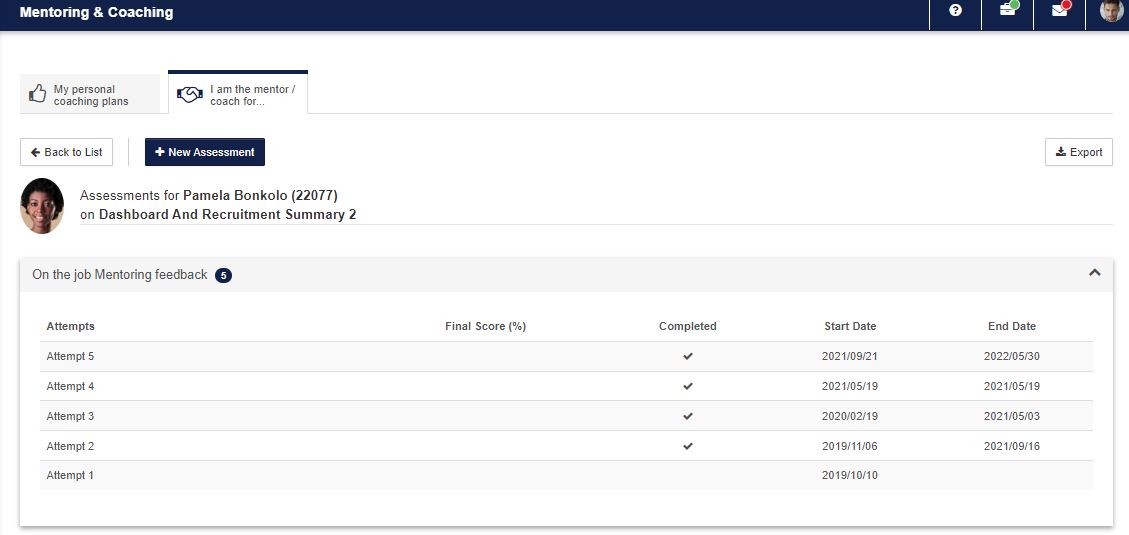
</div><div>[![](http://media.screensteps.com/images/signify/672097/1/rendered/86d55ac9-cedc-4fcc-959b-7616c33ad8a7_display.png)](http://signify.screenstepslive.com/s/10619/m/64190/l/672097-3-1-lms-portal/show_image?image_id=10266206)</div><div></div></div><div data-step-uuid="d3597390-f3eb-4dfe-a90a-eb6a7af35955"><span style="color: #222222; font-size: 2.8275em; font-weight: 400;">3.5 Coaching Assessments</span></div></div></div><div data-article-id="672097" data-workflow="false" id="bkmrk-when-clicking-on-the"><div data-article-id="672097" data-workflow="false"><div data-step-uuid="d3597390-f3eb-4dfe-a90a-eb6a7af35955"><div><div>- When clicking on the assessments icon, a screen opens enabling the mentor/coach to start a new assessment or to continue with a previous assessment.
- When clicking on new assessment, choose the date of the assessment and then the assessment. (Only assessments that was created as Coaching Assessments will be listed on the screen.

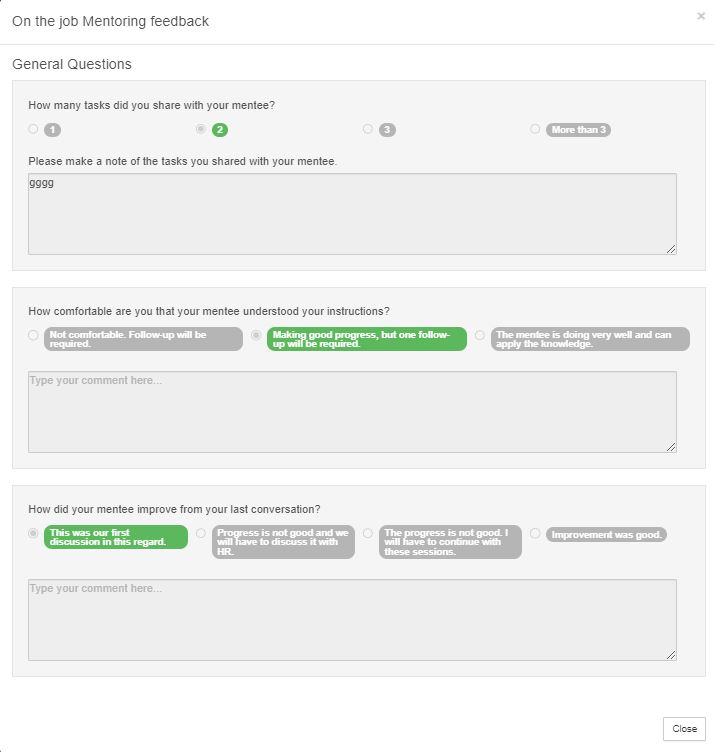
</div><div>[![assessment.JPG](https://signature.signifyhr.co.za/uploads/images/gallery/2023-06/scaled-1680-/OpYUWRiKQdDcGGyp-assessment.JPG)](https://signature.signifyhr.co.za/uploads/images/gallery/2023-06/OpYUWRiKQdDcGGyp-assessment.JPG)</div><div>[![assessment in progress.JPG](https://signature.signifyhr.co.za/uploads/images/gallery/2023-06/scaled-1680-/BS3sI2YcVGNQqnPj-assessment-in-progress.JPG)](https://signature.signifyhr.co.za/uploads/images/gallery/2023-06/BS3sI2YcVGNQqnPj-assessment-in-progress.JPG)</div><div></div></div></div><div data-step-uuid="658e0b2c-4b69-42b2-9a87-c064c2f53f34"><div>- The assessment is then completed and closed
- To view the score, select the previous coaching assessment
- On this screen the Assessment with the final score can be viewed

</div></div><div data-step-uuid="779960f8-db56-47e5-87d1-3a13da2f8a23"><div><div></div><div>[![](http://media.screensteps.com/images/signify/672097/1/rendered/92a408b3-468e-43d6-97ec-42358efcb7ba_display.png)](http://signify.screenstepslive.com/s/10619/m/64190/l/672097-3-1-lms-portal/show_image?image_id=10266215)[![score.JPG](https://signature.signifyhr.co.za/uploads/images/gallery/2023-06/scaled-1680-/bwu4F7WrSltp1uYT-score.JPG)](https://signature.signifyhr.co.za/uploads/images/gallery/2023-06/bwu4F7WrSltp1uYT-score.JPG)</div></div></div></div></div>## <svg aria-label="Heading anchor" enable-background="new 0 0 20 20" height="16" role="img" viewbox="0 0 20 20" width="16" xmlns="http://www.w3.org/2000/svg"></svg>3.6 Act on behalf of a mentor/coach

<div data-article-id="672097" data-workflow="false" id="bkmrk-when-going-back-to-t"><div data-article-id="672097" data-workflow="false"><div data-article-id="672097" data-workflow="false"><div><div data-step-uuid="1b1451ec-d50d-41ca-86fa-f112e5977d25"><div><div>- When going back to the LMS you also have the option to act on behalf of a mentor or coach
- A mentor/coach can be chosen from the list

</div></div></div></div></div></div></div>[![act on behalf of.JPG](https://signature.signifyhr.co.za/uploads/images/gallery/2023-06/scaled-1680-/OajGFvCQ4tKyG7yQ-act-on-behalf-of.JPG)](https://signature.signifyhr.co.za/uploads/images/gallery/2023-06/OajGFvCQ4tKyG7yQ-act-on-behalf-of.JPG)

<div data-article-id="672097" data-workflow="false" id="bkmrk-all-employees-will-b"><div data-article-id="672097" data-workflow="false"><div><div data-step-uuid="1b1451ec-d50d-41ca-86fa-f112e5977d25"><div><div></div></div></div><div data-step-uuid="3ef85877-68e3-49f6-a188-5dc7531f2cb9"><div><div>- All employees will be seen that is linked to the mentor/coach

</div><div>[![act on behalf of 2.JPG](https://signature.signifyhr.co.za/uploads/images/gallery/2023-06/scaled-1680-/1KEWTeFQWk7HIdx6-act-on-behalf-of-2.JPG)](https://signature.signifyhr.co.za/uploads/images/gallery/2023-06/1KEWTeFQWk7HIdx6-act-on-behalf-of-2.JPG)[![](http://media.screensteps.com/images/signify/672097/1/rendered/42697a0b-5106-4d05-b001-a0b8a9ef8e3f_display.png)](http://signify.screenstepslive.com/s/10619/m/64190/l/672097-3-1-lms-portal/show_image?image_id=10266221)</div><div></div></div></div><div data-step-uuid="95a6f56a-caa9-46ee-93f1-5d63a4c0a87b"></div></div></div></div>## <svg aria-label="Heading anchor" enable-background="new 0 0 20 20" height="16" role="img" viewbox="0 0 20 20" width="16" xmlns="http://www.w3.org/2000/svg"></svg>3.7 Employee View

<div data-article-id="672097" data-workflow="false" id="bkmrk-from-the-mentor-%26-co"><div data-article-id="672097" data-workflow="false"><div><div data-step-uuid="95a6f56a-caa9-46ee-93f1-5d63a4c0a87b"><div><div>- From the Mentor &amp; Coach Plans screen the employee can view their mentoring and coaching plans.[![employee view.JPG](https://signature.signifyhr.co.za/uploads/images/gallery/2023-06/scaled-1680-/nSIUV4qEk7e25FYk-employee-view.JPG)](https://signature.signifyhr.co.za/uploads/images/gallery/2023-06/nSIUV4qEk7e25FYk-employee-view.JPG)
- Nothing can be edited from this screen.
- Clicking on the goals link will open up the coaching plans screen.

</div></div></div></div></div></div>[![employee view 2.JPG](https://signature.signifyhr.co.za/uploads/images/gallery/2023-06/scaled-1680-/CJ2QfAFIPGOhYmoG-employee-view-2.JPG)](https://signature.signifyhr.co.za/uploads/images/gallery/2023-06/CJ2QfAFIPGOhYmoG-employee-view-2.JPG)

[![employee view 3.JPG](https://signature.signifyhr.co.za/uploads/images/gallery/2023-06/scaled-1680-/44JnBozTLfc755oC-employee-view-3.JPG)](https://signature.signifyhr.co.za/uploads/images/gallery/2023-06/44JnBozTLfc755oC-employee-view-3.JPG)

<div data-article-id="672097" data-workflow="false" id="bkmrk--3"><div><div data-step-uuid="95a6f56a-caa9-46ee-93f1-5d63a4c0a87b"><div><div></div><div></div><div></div></div></div></div></div>