# Objective-Setting Phase

[![Signify Header.png](https://signature.signifyhr.co.za/uploads/images/gallery/2025-02/scaled-1680-/emW3hfMrZ1yIDMUv-signify-header.png)](https://signature.signifyhr.co.za/uploads/images/gallery/2025-02/emW3hfMrZ1yIDMUv-signify-header.png)[![PM Phases Step 2.png](https://signature.signifyhr.co.za/uploads/images/gallery/2025-11/scaled-1680-/CohWXeeT08DADD0B-pm-phases-step-2.png)](https://signature.signifyhr.co.za/uploads/images/gallery/2025-11/CohWXeeT08DADD0B-pm-phases-step-2.png)


### The Objective-Setting Phase Explained

When creating a performance agreement, it is important to understand the **WHY**. Why is it important to set objectives?

The answer is simple: to bring **clarity**. Having a clearly outlined goal makes it easier for managers and employees alike to achieve success. For helpful tips on approaching the objective-setting phase, please visit the [<span style="text-decoration: underline;">**Before You Start**</span>](https://signature.signifyhr.co.za/books/performance-management-sq2/page/before-you-start "Before You Start") page.

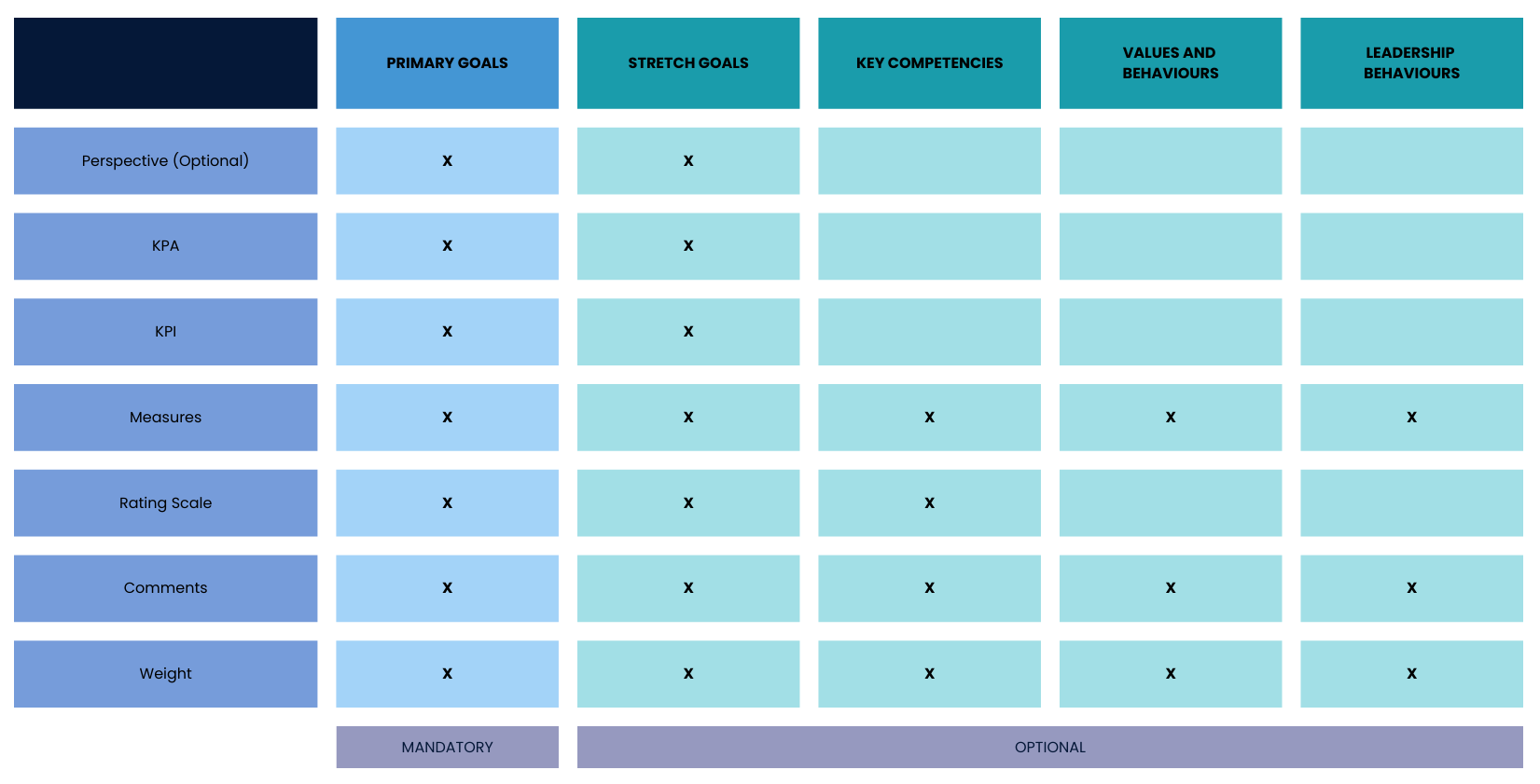
The following guide will help you through setting your objectives, and will assume you are using all of the following **sections** in a performance agreement:

- **Primary Goals**
    - Perspectives (optional) 
        - Key Performance Areas 
            - Key Performance Indicators
- **Stretch Goals (optional)**
    - Perspectives (optional) 
        - Key Performance Areas 
            - Key Performance Indicators
- **Values and Behaviours (optional)**
- **Leadership Behaviours (optional)**
- **Key Competencies (optional)**

<span style="text-align: left;">The **Performance Management** module is modular and can be configured to suit your unique performance management processes. For examples of how different combinations of review setup settings work, or of different performance management configurations, please see the [**Tips and Use Cases**](https://signature.signifyhr.co.za/books/performance-management-sq2/chapter/chapter-5-tips-and-use-cases "Tips and Use Cases") chapter.</span>

[![PM Performance agreement sections.png](https://signature.signifyhr.co.za/uploads/images/gallery/2026-01/1pjhifpctqSUdh74-pm-performance-agreement-sections.png)](https://signature.signifyhr.co.za/uploads/images/gallery/2026-01/K5dWzta8nVzbzzH4-pm-performance-agreement-sections.png)

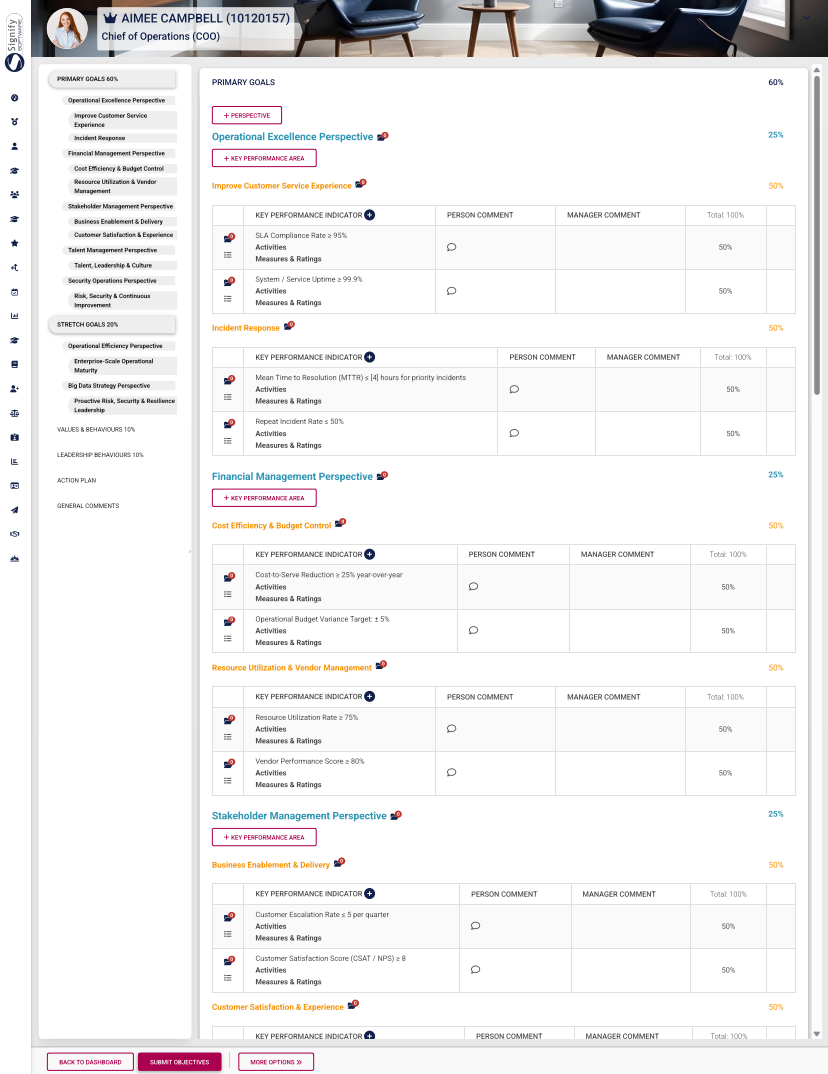
Below is an example of a complete performance agreement that uses all available sections.

- It has been populated with **perspectives**, **KPAs**, **KPIs**, and assigned **weights**.
- The **side menu** provides an overview of the performance agreement and allows easy **navigation** between its sections.

[![PM - Example of a Performance Agreement.png](https://signature.signifyhr.co.za/uploads/images/gallery/2026-01/scaled-1680-/J5SsJMMrLWd91pki-pm-example-of-a-performance-agreement.png)](https://signature.signifyhr.co.za/uploads/images/gallery/2026-01/J5SsJMMrLWd91pki-pm-example-of-a-performance-agreement.png)
### Our Example's Settings

Based on your review setup, you may be using some (or all) of the aforementioned performance agreement sections. ***Not all sections are mandatory***. If a section (such as Stretch Goals) or a feature (such as Perspectives) does not apply to your review setup, you are more than welcome to skip its tutorial and proceed to the next step.

For our example, the following review setup settings have been enabled:

[![PM Example Review Setup - Dual Participation.png](https://signature.signifyhr.co.za/uploads/images/gallery/2026-02/Y7ZiFp01ZlC5W0N7-pm-example-review-setup-dual-participation.png)](https://signature.signifyhr.co.za/uploads/images/gallery/2026-01/K5dWzta8nVzbzzH4-pm-performance-agreement-sections.png)

Additionally, the automatic distribution of item weights has been enabled for all settings:

[![PM Create Blank Agreement - Auto-distribute Weights.png](https://signature.signifyhr.co.za/uploads/images/gallery/2026-02/YpgZhXKQnhOQ8nr3-pm-create-blank-agreement-auto-distribute-weights.png)](https://signature.signifyhr.co.za/uploads/images/gallery/2026-01/K5dWzta8nVzbzzH4-pm-performance-agreement-sections.png)

The setting to add or delete items on a list (such as the Values and Behaviours list) has been disabled:

[![PM Create Blank Agreement - Add or Edit List Items.png](https://signature.signifyhr.co.za/uploads/images/gallery/2026-02/6r6dGKuAYaUbRKoA-pm-create-blank-agreement-add-or-edit-list-items.png)](https://signature.signifyhr.co.za/uploads/images/gallery/2026-01/K5dWzta8nVzbzzH4-pm-performance-agreement-sections.png)

### How to Complete the Objective-Setting Phase

Expand the following collapsible blocks to learn more.

<details id="bkmrk-primary-goals-overvi"><summary>PRIMARY GOALS</summary>

#### Primary Goals

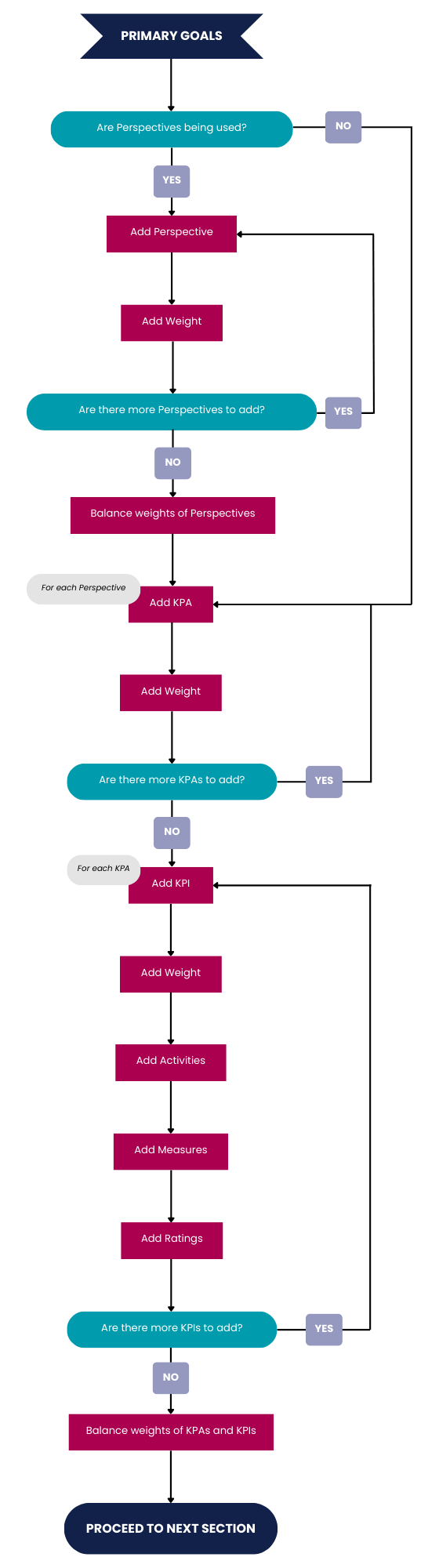
##### Overview of the process

[![PM Objective Setting - Primary Goals overview.png](https://signature.signifyhr.co.za/uploads/images/gallery/2026-02/dblItZdqbAH0KEA4-pm-objective-setting-primary-goals-overview.png)](https://signature.signifyhr.co.za/uploads/images/gallery/2026-01/UICFVpUjpoZCwiHZ-pm-objective-setting-primary-goals-overview.png)
##### Add perspectives

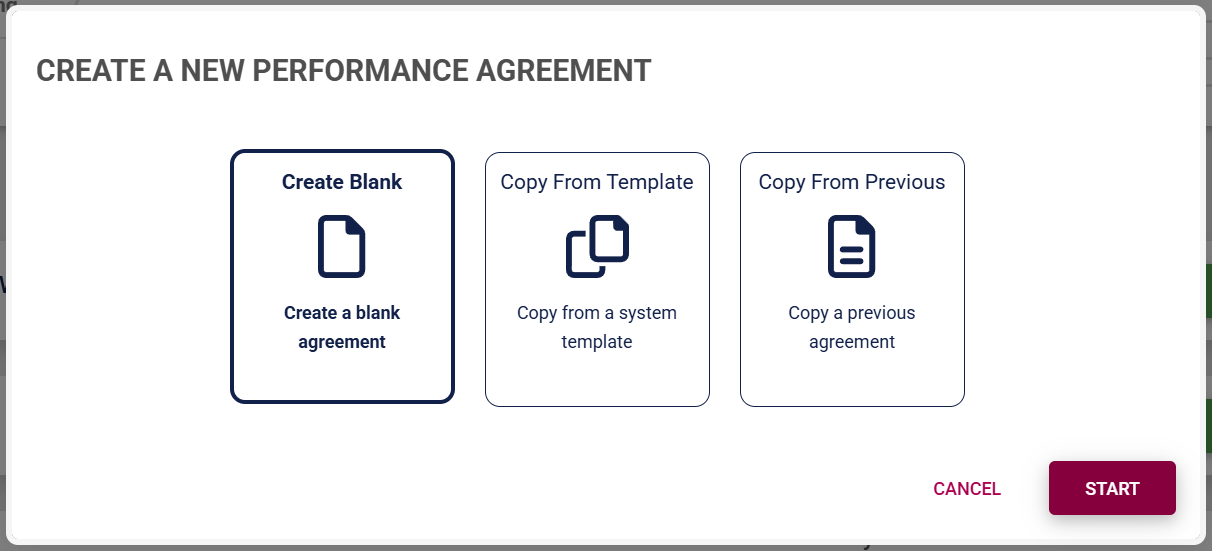
- For this tutorial, we will assume you selected **Create Blank** when creating the performance agreement.

[![PM Create PM agreement employees – Blank – Start.png](https://signature.signifyhr.co.za/uploads/images/gallery/2026-01/w6NLqkBJ2abHvZGD-pm-create-pm-agreement-employees-blank-start.png)](https://signature.signifyhr.co.za/uploads/images/gallery/2026-01/K5dWzta8nVzbzzH4-pm-performance-agreement-sections.png)
- The blank performance agreement will be populated with the sections that have been activated in the review setup's configuration. Please note, the **red headings** in the menu on the left show that information is missing, such as missing perspectives, KPAs, KPIs, or unbalanced weights. The weights of unbalanced sections will also flash red.

[![PM Create PM agreement employees – Blank – Start.png](https://media3.giphy.com/media/v1.Y2lkPTc5MGI3NjExYXV4anB6anJjd2RnbHVjNzg1aWxhcGowNjdmOTB2eHhkaHN3cWU5aiZlcD12MV9pbnRlcm5hbF9naWZfYnlfaWQmY3Q9Zw/8m9ibcg0SWuvw5JvlC/giphy.gif)](https://signature.signifyhr.co.za/uploads/images/gallery/2026-01/K5dWzta8nVzbzzH4-pm-performance-agreement-sections.png)

- Click **+PERSPECTIVE** to add a perspective.

[![PM Create Blank Agreement - Add Perspective.png](https://signature.signifyhr.co.za/uploads/images/gallery/2026-02/EVBi9a87vHnPZ99N-pm-create-blank-agreement-add-perspective.png)](https://signature.signifyhr.co.za/uploads/images/gallery/2026-01/K5dWzta8nVzbzzH4-pm-performance-agreement-sections.png)

- Select a perspective which has been loaded to the **Master Data Library**.

[![PM Create Blank Agreement - Perspective Library.png](https://signature.signifyhr.co.za/uploads/images/gallery/2026-02/CM0EVrnLXyrDvjiy-pm-create-blank-agreement-perspective-library.png)](https://signature.signifyhr.co.za/uploads/images/gallery/2026-01/K5dWzta8nVzbzzH4-pm-performance-agreement-sections.png)

- Assign a weight to the perspective, then click **SAVE ADD NEW** to continue adding more perspectives.

[![PM Create Blank Agreement - Perspective Menu.png](https://signature.signifyhr.co.za/uploads/images/gallery/2026-02/f8QdmmfHV34TFcUZ-pm-create-blank-agreement-perspective-menu.png)](https://signature.signifyhr.co.za/uploads/images/gallery/2026-01/K5dWzta8nVzbzzH4-pm-performance-agreement-sections.png)
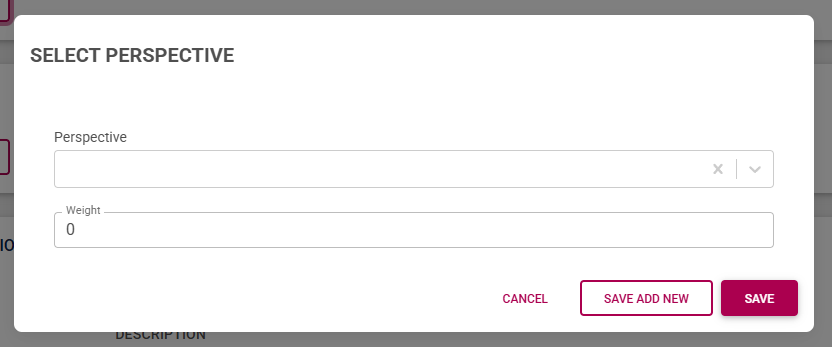
- Once you have finished adding all the perspectives, your agreement should look something like this:

[![PM Create Blank Agreement - Perspectives Added.png](https://signature.signifyhr.co.za/uploads/images/gallery/2026-02/ACjxn6C9iznn4WAT-pm-create-blank-agreement-perspectives-added.png)](https://signature.signifyhr.co.za/uploads/images/gallery/2026-01/K5dWzta8nVzbzzH4-pm-performance-agreement-sections.png)
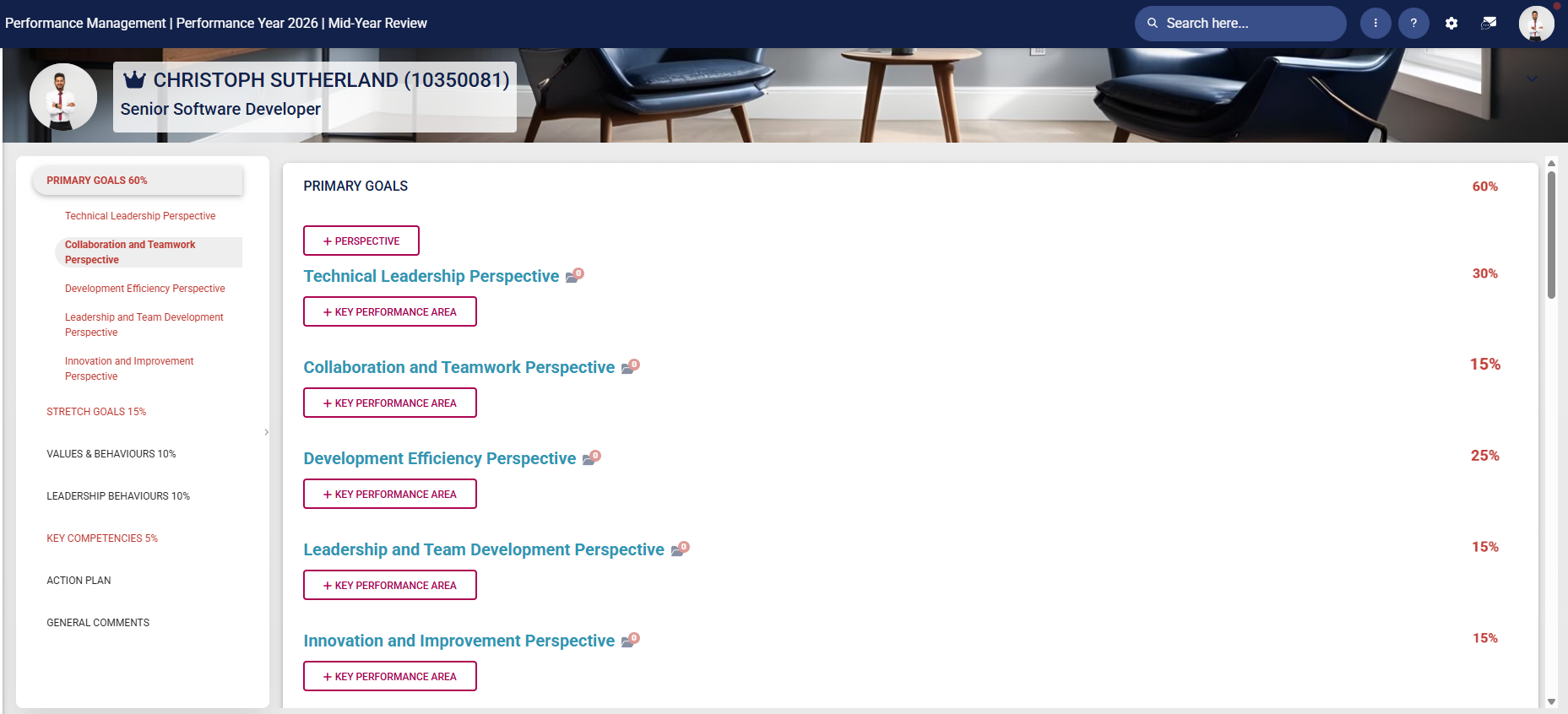
- Ensure all the perspective weights in this section add up to 100%.
- To delete a perspective, hover over its title, then click the dustbin icon.

[![PM Create Blank Agreement - Perspectives Deletion.png](https://signature.signifyhr.co.za/uploads/images/gallery/2026-02/l9QVqnMFPYueX6gD-pm-create-blank-agreement-perspectives-deletion.png)](https://signature.signifyhr.co.za/uploads/images/gallery/2026-01/K5dWzta8nVzbzzH4-pm-performance-agreement-sections.png)

- A perspective can be tagged for discussion with your manager by clicking the tag icon.

[![PM Create Blank Agreement - Tag Message.png](https://signature.signifyhr.co.za/uploads/images/gallery/2026-02/kACYPLsi3EGbLuVN-pm-create-blank-agreement-tag-message.png)](https://signature.signifyhr.co.za/uploads/images/gallery/2026-01/K5dWzta8nVzbzzH4-pm-performance-agreement-sections.png)
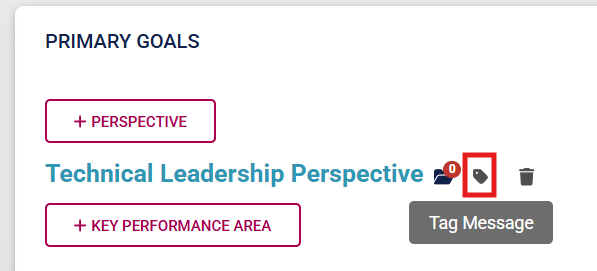
- Your manager will receive a message in their system inbox regarding your query.

[![PM Create Blank Agreement - Discussion with Manager.png](https://signature.signifyhr.co.za/uploads/images/gallery/2026-02/uqu2qALCSQrE9VJk-pm-create-blank-agreement-discussion-with-manager.png)](https://signature.signifyhr.co.za/uploads/images/gallery/2026-01/K5dWzta8nVzbzzH4-pm-performance-agreement-sections.png)

- Documents linked to a specific performance agreement item can be viewed by clicking on the folder icon.

[![PM Create Blank Agreement - View Documents.png](https://signature.signifyhr.co.za/uploads/images/gallery/2026-02/BTBJFn4sPQpGR60x-pm-create-blank-agreement-view-documents.png)](https://signature.signifyhr.co.za/uploads/images/gallery/2026-01/K5dWzta8nVzbzzH4-pm-performance-agreement-sections.png)
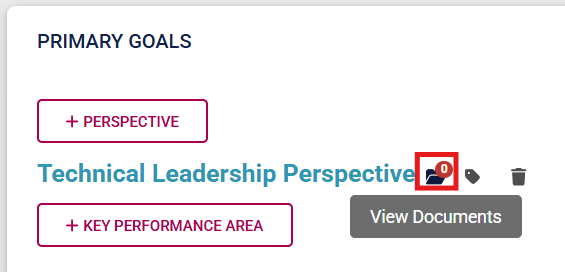
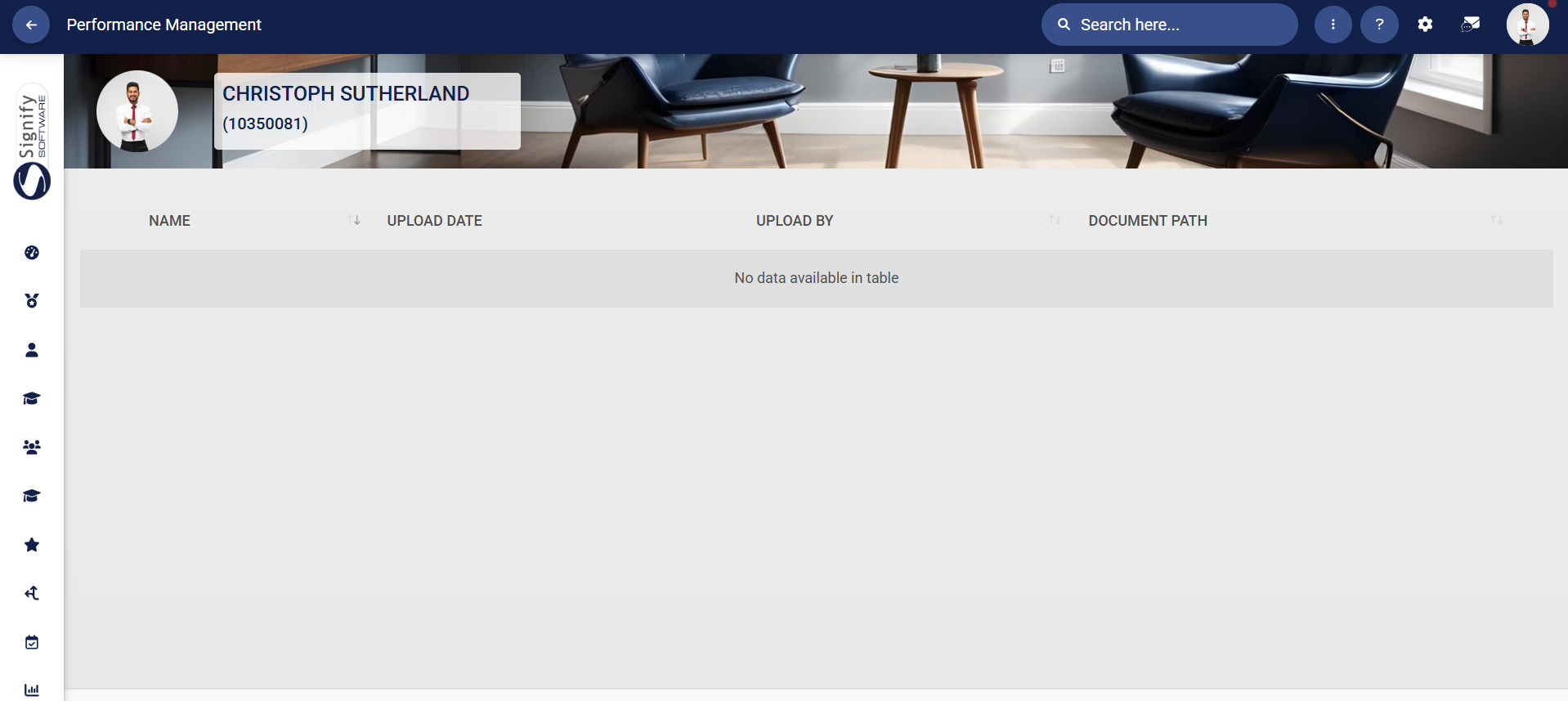
- Linked documents will display in the table on the **Documents** screen.

[![PM Create Blank Agreement - Uploaded Documents.png](https://signature.signifyhr.co.za/uploads/images/gallery/2026-02/XmhoDmPaSTHsXUEO-pm-create-blank-agreement-uploaded-documents.png)](https://signature.signifyhr.co.za/uploads/images/gallery/2026-01/K5dWzta8nVzbzzH4-pm-performance-agreement-sections.png)
##### Add KPAs

- Click **+KEY PERFORMANCE AREA** to add a KPA.

[![PM Create Blank Agreement - Add KPA.png](https://signature.signifyhr.co.za/uploads/images/gallery/2026-02/Ycf7nbv01epIQ3Ku-pm-create-blank-agreement-add-kpa.png)](https://signature.signifyhr.co.za/uploads/images/gallery/2026-01/K5dWzta8nVzbzzH4-pm-performance-agreement-sections.png)

- Either type your own KPA or select one from the **Master Data Library**.

[![PM Create Blank Agreement - KPA Menu.png](https://signature.signifyhr.co.za/uploads/images/gallery/2026-02/R8bBrfxKWirZ5Rwo-pm-create-blank-agreement-kpa-menu.png)](https://signature.signifyhr.co.za/uploads/images/gallery/2026-01/K5dWzta8nVzbzzH4-pm-performance-agreement-sections.png)

- If using **Master Data Library** items, click on the hand icon to search for a KPA.

[![PM Create Blank Agreement - KPA Library.png](https://signature.signifyhr.co.za/uploads/images/gallery/2026-02/S8yokEEzPIylybw7-pm-create-blank-agreement-kpa-library.png)](https://signature.signifyhr.co.za/uploads/images/gallery/2026-01/K5dWzta8nVzbzzH4-pm-performance-agreement-sections.png)

- Click on the KPA you would like to **link**.

[![PM Create Blank Agreement - KPA Library Menu.png](https://signature.signifyhr.co.za/uploads/images/gallery/2026-02/E1ykdJF4j1YcUEYG-pm-create-blank-agreement-kpa-library-menu.png)](https://signature.signifyhr.co.za/uploads/images/gallery/2026-01/K5dWzta8nVzbzzH4-pm-performance-agreement-sections.png)

- Assign a **weight**. Click **SAVE ADD NEW** to keep adding additional KPAs for this perspective, or **SAVE** if you are done.

[![PM Create Blank Agreement - KPA Save.png](https://signature.signifyhr.co.za/uploads/images/gallery/2026-02/LMwD5XDHoUOUeUqx-pm-create-blank-agreement-kpa-save.png)](https://signature.signifyhr.co.za/uploads/images/gallery/2026-01/K5dWzta8nVzbzzH4-pm-performance-agreement-sections.png)

- Ensure all the weights of the KPAs linked to a specific perspective add up to 100%.
- To **delete** a KPA, hover over its title, then click the dustbin icon.

[![PM Create Blank Agreement - KPA Deletion.png](https://signature.signifyhr.co.za/uploads/images/gallery/2026-02/ctHW1lz814AQ8ojX-pm-create-blank-agreement-kpa-deletion.png)](https://signature.signifyhr.co.za/uploads/images/gallery/2026-01/K5dWzta8nVzbzzH4-pm-performance-agreement-sections.png)

- A KPA can be **tagged** for discussion with your manager by clicking the tag icon.

[![PM Create Blank Agreement - KPA Tag Message.png](https://signature.signifyhr.co.za/uploads/images/gallery/2026-02/ivwDWaozN6tRoN0O-pm-create-blank-agreement-kpa-tag-message.png)](https://signature.signifyhr.co.za/uploads/images/gallery/2026-01/K5dWzta8nVzbzzH4-pm-performance-agreement-sections.png)

- Your manager will receive a message in their **system inbox** regarding your query.

[![PM Create Blank Agreement - KPA Discussion.png](https://signature.signifyhr.co.za/uploads/images/gallery/2026-02/PoeUNFBVxTf4ets9-pm-create-blank-agreement-kpa-discussion.png)](https://signature.signifyhr.co.za/uploads/images/gallery/2026-01/K5dWzta8nVzbzzH4-pm-performance-agreement-sections.png)

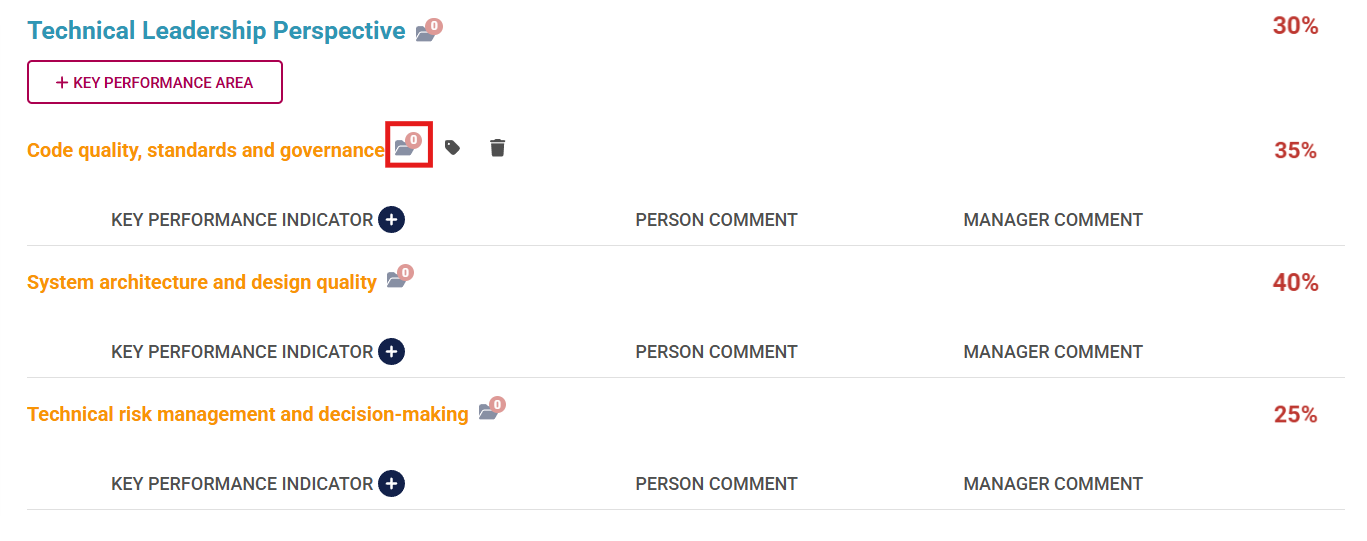
- **Documents** linked to a specific KPA can be **viewed** by clicking on the folder icon.

[![PM Create Blank Agreement - KPA View Documents.png](https://signature.signifyhr.co.za/uploads/images/gallery/2026-02/hY9UGkemRxUO6hNf-pm-create-blank-agreement-kpa-view-documents.png)](https://signature.signifyhr.co.za/uploads/images/gallery/2026-01/K5dWzta8nVzbzzH4-pm-performance-agreement-sections.png)
- Linked **documents** will **display** in the table on the **Documents** screen.

[![PM Create Blank Agreement - Uploaded Documents.png](https://signature.signifyhr.co.za/uploads/images/gallery/2026-02/XmhoDmPaSTHsXUEO-pm-create-blank-agreement-uploaded-documents.png)](https://signature.signifyhr.co.za/uploads/images/gallery/2026-01/K5dWzta8nVzbzzH4-pm-performance-agreement-sections.png)

##### Add KPIs

- Click the plus icon next to **KEY PERFORMANCE INDICATOR** to add a KPI.

[![PM Create Blank Agreement - Add KPI.png](https://signature.signifyhr.co.za/uploads/images/gallery/2026-02/f2HHGnnbPOwxzwrC-pm-create-blank-agreement-add-kpi.png)](https://signature.signifyhr.co.za/uploads/images/gallery/2026-01/K5dWzta8nVzbzzH4-pm-performance-agreement-sections.png)

- Either type your own KPI or select one from the **Master Data Library**.

[![PM Create Blank Agreement - Add KPI Menu.png](https://signature.signifyhr.co.za/uploads/images/gallery/2026-02/szKTTw38STMFklK7-pm-create-blank-agreement-add-kpi-menu.png)](https://signature.signifyhr.co.za/uploads/images/gallery/2026-01/K5dWzta8nVzbzzH4-pm-performance-agreement-sections.png)

- If using **Master Data Library** items, click on the hand icon to **search** for a KPI.

[![PM Create Blank Agreement - Add KPI from Library.png](https://signature.signifyhr.co.za/uploads/images/gallery/2026-02/FobpuMCu19vZwX65-pm-create-blank-agreement-add-kpi-from-library.png)](https://signature.signifyhr.co.za/uploads/images/gallery/2026-01/K5dWzta8nVzbzzH4-pm-performance-agreement-sections.png)
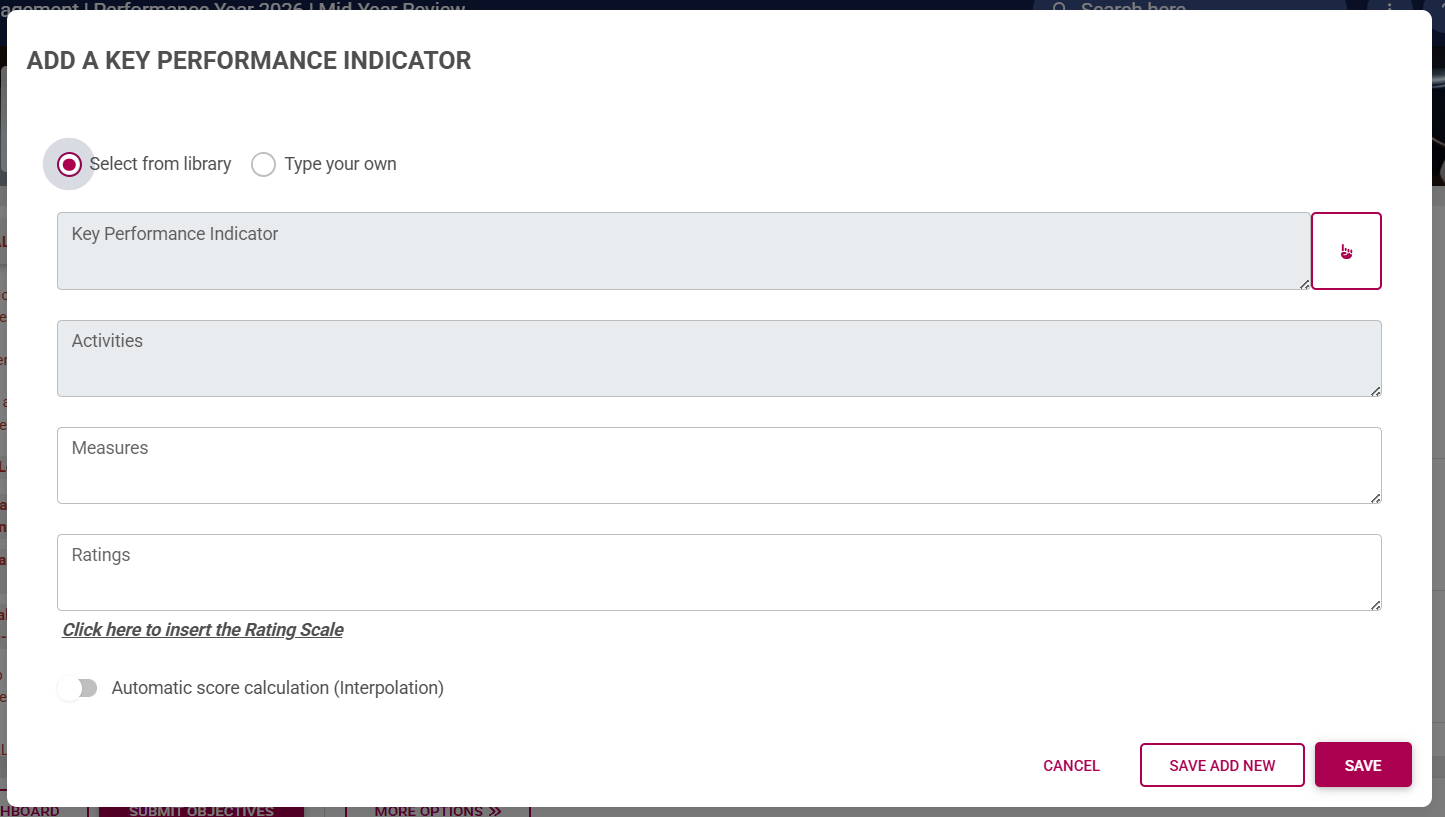
- Click on the KPI you would like to **link**.

[![PM Create Blank Agreement - Select KPI from Library.png](https://signature.signifyhr.co.za/uploads/images/gallery/2026-02/QztPDzUArnvREi2l-pm-create-blank-agreement-select-kpi-from-library.png)](https://signature.signifyhr.co.za/uploads/images/gallery/2026-01/K5dWzta8nVzbzzH4-pm-performance-agreement-sections.png)

- If the **weights are automatically distributed** (based on your review setup's settings), the KPI's weight will be calculated automatically.

[![PM Create Blank Agreement - Auto-distribute Weights.png](https://signature.signifyhr.co.za/uploads/images/gallery/2026-02/YpgZhXKQnhOQ8nr3-pm-create-blank-agreement-auto-distribute-weights.png)](https://signature.signifyhr.co.za/uploads/images/gallery/2026-01/K5dWzta8nVzbzzH4-pm-performance-agreement-sections.png)

- If this setting is switched off, you should assign a weight to this KPI. For more information on review setup settings, click [here](https://signature.signifyhr.co.za/link/2544#bkmrk-sections "Sections of a Performance Agreement").
- If a **rating scale** has been configured on your review setup's settings, you can click to insert this pre-saved rating scale, or choose to construct your own. For more information on rating scales, click [here](https://signature.signifyhr.co.za/link/2544#bkmrk-sections "Sections of a Performance Agreement").
- If **interpolation** has been activated for this review setup, you can choose to interpolate the scores of this KPI if required. 
    - For example, if the KPI requires selling more than 10 cars a month, you can use interpolation to calculate the scores of employees who sold 13, 20, 30, or 40 cars a month.
    - During the **Rating phase**, you would enter how many cars were sold, and the system would automatically calculate a rating for this KPI.
    - For more information on how this works, click [here](https://signature.signifyhr.co.za/books/performance-management-sq2/page/settings-explained-create-or-edit-review-setup#bkmrk-setting-name "Interpolation").

[![PM Create Blank Agreement - Interpolation.png](https://signature.signifyhr.co.za/uploads/images/gallery/2026-02/Fw1ZlWtAKemYl5vF-pm-create-blank-agreement-interpolation.png)](https://signature.signifyhr.co.za/uploads/images/gallery/2026-01/K5dWzta8nVzbzzH4-pm-performance-agreement-sections.png)

- Click **SAVE ADD NEW** to keep adding additional KPIs for this perspective, or **SAVE** if you are done.

[![PM Create Blank Agreement - Save KPI.png](https://signature.signifyhr.co.za/uploads/images/gallery/2026-02/gu0CfiOOtzxh4ycE-pm-create-blank-agreement-save-kpi.png)](https://signature.signifyhr.co.za/uploads/images/gallery/2026-01/K5dWzta8nVzbzzH4-pm-performance-agreement-sections.png)

- Check to ensure the KPI **weights** are **balanced** for this section. There are two possible settings for KPI weights: 
    - The **Key Performance Indicator weights must add up to 100% per Key Performance Area** setting is on, as shown in our example, and you need to adjust the weights accordingly (if the auto-distribute weights setting has been switched off).

[![PM Create Blank Agreement - Auto-distribute Weights.png](https://signature.signifyhr.co.za/uploads/images/gallery/2026-02/YpgZhXKQnhOQ8nr3-pm-create-blank-agreement-auto-distribute-weights.png)](https://signature.signifyhr.co.za/uploads/images/gallery/2026-01/K5dWzta8nVzbzzH4-pm-performance-agreement-sections.png)

***OR***

- - The **Key Performance Indicator weights must sum to 100% across the entire section** setting is on, and you need to adjust the weights accordingly (if the auto-distribute weights setting has been switched off).

***[![PM Create Blank Agreement - KPIs in Section add up to 100.png](https://signature.signifyhr.co.za/uploads/images/gallery/2026-02/54yJoQKtxG5bDMce-pm-create-blank-agreement-kpis-in-section-add-up-to-100.png)](https://signature.signifyhr.co.za/uploads/images/gallery/2026-01/K5dWzta8nVzbzzH4-pm-performance-agreement-sections.png)***

*If you are unsure which setting is active, please contact your performance management administrator.*

[![PM Create Blank Agreement - KPI Weights.png](https://signature.signifyhr.co.za/uploads/images/gallery/2026-02/IvvPtsgKvDGyli0P-pm-create-blank-agreement-kpi-weights.png)](https://signature.signifyhr.co.za/uploads/images/gallery/2026-01/K5dWzta8nVzbzzH4-pm-performance-agreement-sections.png)

- To **delete** a KPI, hover over it and click the dustbin icon.

[![PM Create Blank Agreement - Delete KPI.png](https://signature.signifyhr.co.za/uploads/images/gallery/2026-02/MlnEJ1RnSsScDc3Z-pm-create-blank-agreement-delete-kpi.png)](https://signature.signifyhr.co.za/uploads/images/gallery/2026-01/K5dWzta8nVzbzzH4-pm-performance-agreement-sections.png)
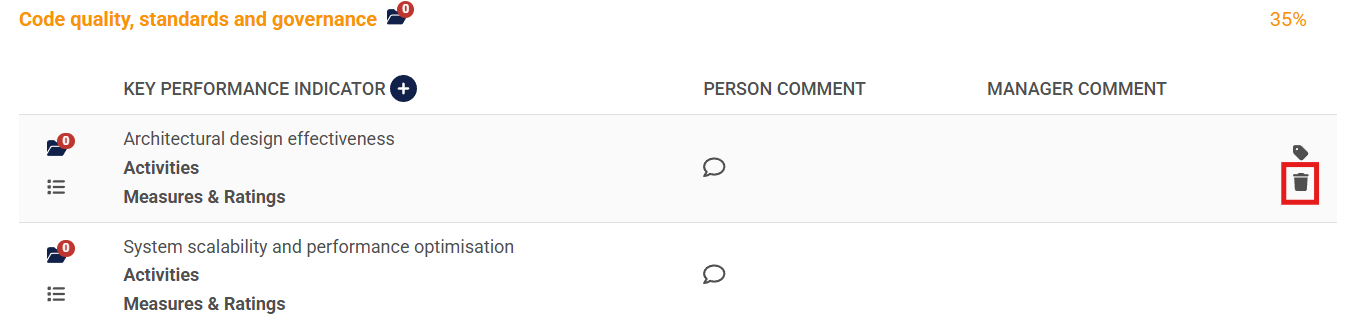
- A KPI can be **tagged** for discussion with your manager by clicking the tag icon.

[![PM Create Blank Agreement - KPI Tag Message.png](https://signature.signifyhr.co.za/uploads/images/gallery/2026-02/TMRQGCOSFUOfVYbW-pm-create-blank-agreement-kpi-tag-message.png)](https://signature.signifyhr.co.za/uploads/images/gallery/2026-01/K5dWzta8nVzbzzH4-pm-performance-agreement-sections.png)
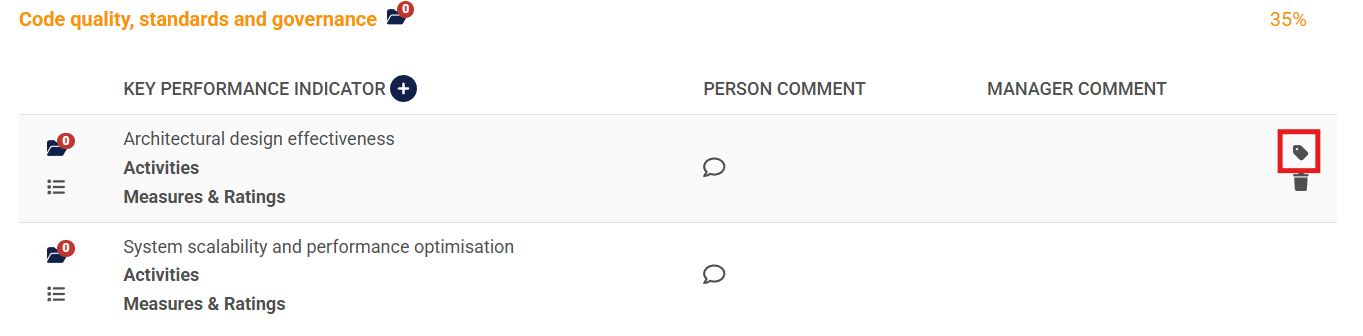
- Your manager will receive a message in their **system inbox** regarding your comment or query.

[![PM Create Blank Agreement - KPA Discussion.png](https://signature.signifyhr.co.za/uploads/images/gallery/2026-02/PoeUNFBVxTf4ets9-pm-create-blank-agreement-kpa-discussion.png)](https://signature.signifyhr.co.za/uploads/images/gallery/2026-01/K5dWzta8nVzbzzH4-pm-performance-agreement-sections.png)

- Hovering over a KPI will show its **activities**, **measures**, and **ratings**.

[![PM Create Blank Agreement - KPI Activities, Measures, Ratings.png](https://signature.signifyhr.co.za/uploads/images/gallery/2026-02/71SbiCQzkBY8LFId-pm-create-blank-agreement-kpi-activities-measures-ratings.png)](https://signature.signifyhr.co.za/uploads/images/gallery/2026-01/K5dWzta8nVzbzzH4-pm-performance-agreement-sections.png)

- **Documents** linked to a specific KPI can be **viewed** by clicking on the folder icon.

[![PM Create Blank Agreement - KPI View Documents.png](https://signature.signifyhr.co.za/uploads/images/gallery/2026-02/LRXeTLtKGqx617pn-pm-create-blank-agreement-kpi-view-documents.png)](https://signature.signifyhr.co.za/uploads/images/gallery/2026-01/K5dWzta8nVzbzzH4-pm-performance-agreement-sections.png)

- Linked **documents** will **display** in the table on the **Documents** screen.

[![PM Create Blank Agreement - KPI View Documents Screen.png](https://signature.signifyhr.co.za/uploads/images/gallery/2026-02/d22nlAt4QdyWgVoy-pm-create-blank-agreement-kpi-view-documents-screen.png)](https://signature.signifyhr.co.za/uploads/images/gallery/2026-01/K5dWzta8nVzbzzH4-pm-performance-agreement-sections.png)
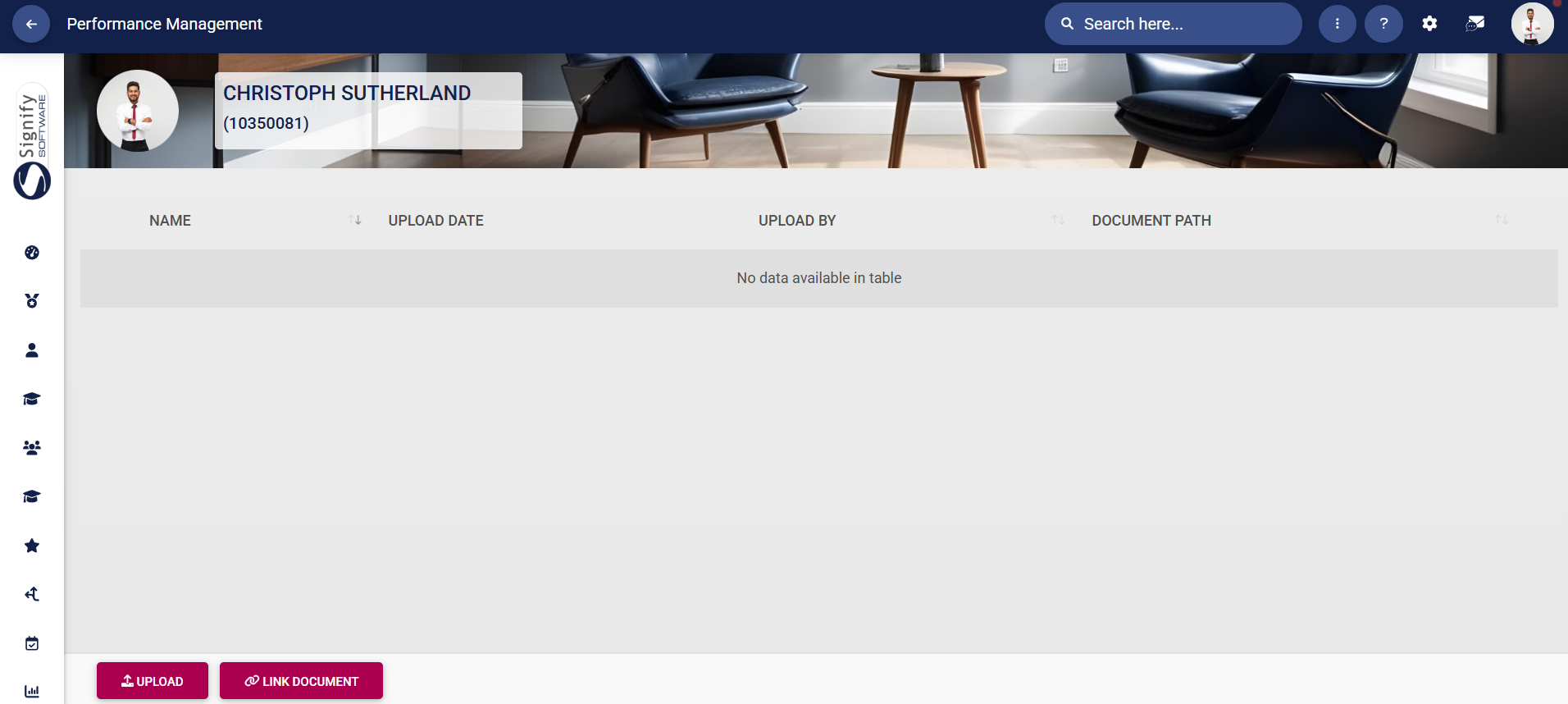
- Click **UPLOAD** to upload a document linked to a specific KPI.

[![PM Create Blank Agreement - KPI Upload Documents Screen.png](https://signature.signifyhr.co.za/uploads/images/gallery/2026-02/iDg6zRKmwDZF5rCk-pm-create-blank-agreement-kpi-upload-documents-screen.png)](https://signature.signifyhr.co.za/uploads/images/gallery/2026-01/K5dWzta8nVzbzzH4-pm-performance-agreement-sections.png)

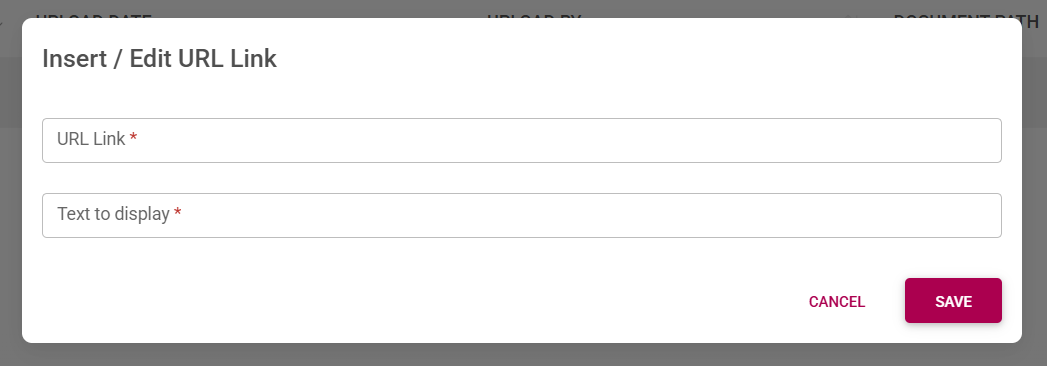
- Click **LINK DOCUMENT** to link a document from an external storage location, such as Google Drive, OneDrive, or SharePoint.

[![PM Create Blank Agreement - KPI Link Documents Screen.png](https://signature.signifyhr.co.za/uploads/images/gallery/2026-02/GmbyJfGZ6LIQthpD-pm-create-blank-agreement-kpi-link-documents-screen.png)](https://signature.signifyhr.co.za/uploads/images/gallery/2026-01/K5dWzta8nVzbzzH4-pm-performance-agreement-sections.png)
- Back on the objective setting screen, click to link an **action plan** to a specific KPI.

[![PM Create Blank Agreement - KPI Action Plan.png](https://signature.signifyhr.co.za/uploads/images/gallery/2026-02/bPpFcd8FHrVycgkr-pm-create-blank-agreement-kpi-action-plan.png)](https://signature.signifyhr.co.za/uploads/images/gallery/2026-01/K5dWzta8nVzbzzH4-pm-performance-agreement-sections.png)

- The **details** of the **action plan** can be captured on the pop-up screen.

[![PM Create Blank Agreement - KPI Action Plan Screen.png](https://signature.signifyhr.co.za/uploads/images/gallery/2026-02/ACnPEIXlLV1adKnc-pm-create-blank-agreement-kpi-action-plan-screen.png)](https://signature.signifyhr.co.za/uploads/images/gallery/2026-01/K5dWzta8nVzbzzH4-pm-performance-agreement-sections.png)

- If training is required for this KPI, a training intervention can be linked from the **Training Intervention Library**.

[![PM Create Blank Agreement - KPI Action Plan - Training Required.png](https://signature.signifyhr.co.za/uploads/images/gallery/2026-02/xNdfqB8ykko4ethp-pm-create-blank-agreement-kpi-action-plan-training-required.png)](https://signature.signifyhr.co.za/uploads/images/gallery/2026-01/K5dWzta8nVzbzzH4-pm-performance-agreement-sections.png)

- A **comment** may be added to a KPI by the manager or the employee.
- It is important to ensure your weights for this section are correct.

[![PM Performance Agreement Weights.png](https://signature.signifyhr.co.za/uploads/images/gallery/2026-03/6MXxJCerj4e8b4cY-pm-performance-agreement-weights.png)](https://signature.signifyhr.co.za/uploads/images/gallery/2026-01/K5dWzta8nVzbzzH4-pm-performance-agreement-sections.png)
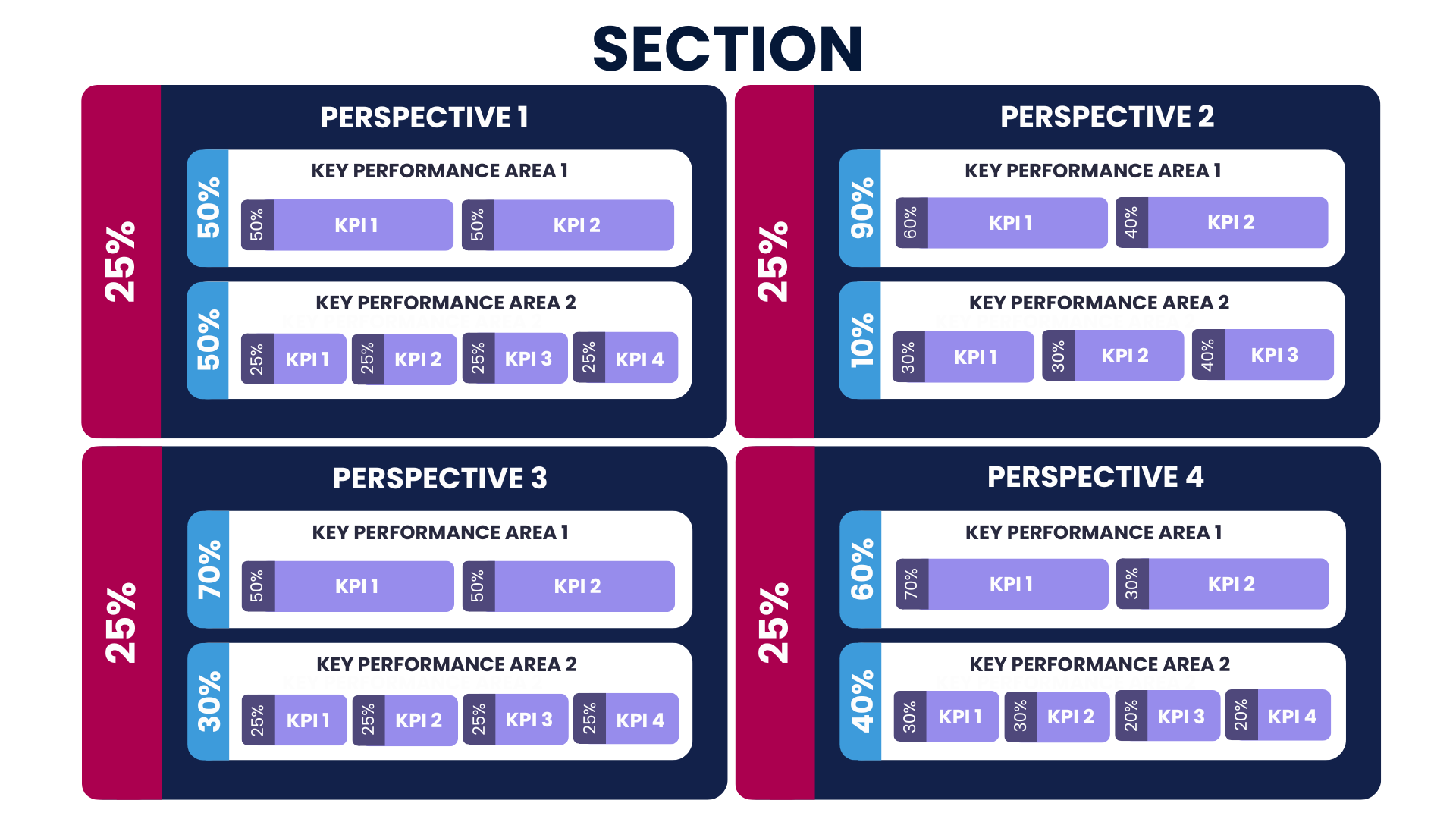
- If your weights of perspectives, KPAs, or KPIs are unbalanced, you will receive the following error message when attempting to submit your objectives:

[![PM Create Blank Agreement - Incorrect Weights at KPI or KPA level.png](https://signature.signifyhr.co.za/uploads/images/gallery/2026-02/wbnlZeU6ZKKh3sGc-pm-create-blank-agreement-incorrect-weights-at-kpi-or-kpa-level.png)](https://signature.signifyhr.co.za/uploads/images/gallery/2026-01/K5dWzta8nVzbzzH4-pm-performance-agreement-sections.png)

</details><details id="bkmrk-stretch-goals-%C2%A0"><summary>STRETCH GOALS</summary>

#### Stretch Goals

##### Overview of the process

[![PM Objective Setting - Stretch Goals overview.png](https://signature.signifyhr.co.za/uploads/images/gallery/2026-02/IKh35QjrvfGO19k4-pm-objective-setting-stretch-goals-overview.png)](https://signature.signifyhr.co.za/uploads/images/gallery/2026-01/ivWZbUVt3epHE62B-pm-objective-setting-stretch-goals-overview.png)
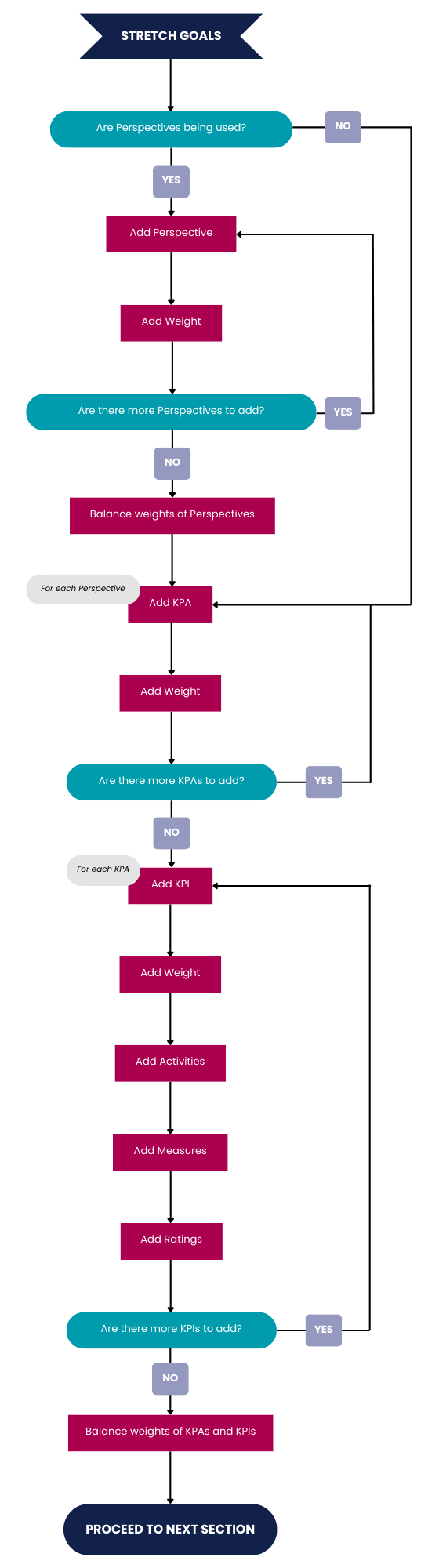
##### Add perspectives

The process for adding perspectives in the Stretch Goals section is the same as Primary Goals. Click [here](https://signature.signifyhr.co.za/books/performance-management-sq2/page/objective-setting-phase#bkmrk-add-perspectives "Add perspectives") to jump to the tutorial.

##### Add KPAs

The process for adding KPAs in the Stretch Goals section is the same as Primary Goals. Click [here](https://signature.signifyhr.co.za/books/performance-management-sq2/page/objective-setting-phase#bkmrk-add-kpas "Add KPAs") to jump to the tutorial.

##### Add KPIs

The process for adding KPIs in the Stretch Goals section is the same as Primary Goals. Click [here](https://signature.signifyhr.co.za/books/performance-management-sq2/page/objective-setting-phase#bkmrk-add-kpishttps://signature.signifyhr.co.za/books/performance-management-sq2/page/objective-setting-phase#bkmrk-add-kpis "Add KPIs") to jump to the tutorial.

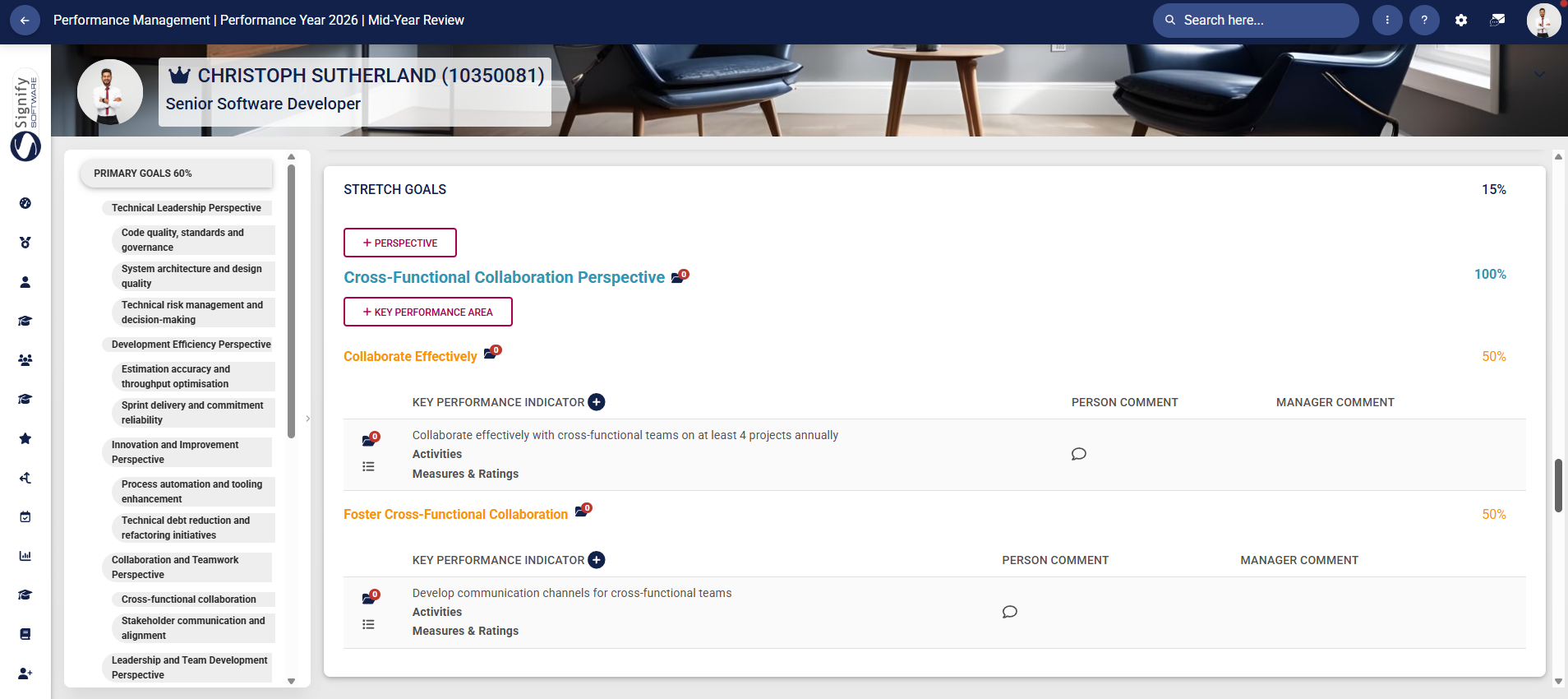
For more information regarding the settings used to configure Stretch Goals, click [here](https://signature.signifyhr.co.za/link/2544#bkmrk-stretch-goals "Stretch Goals Settings"). Once completed, your Stretch Goals section may look similar to our example below:

[![PM Create Blank Agreement - Stretch Goals.png](https://signature.signifyhr.co.za/uploads/images/gallery/2026-02/YdQnuSGFkzHEG1Pw-pm-create-blank-agreement-stretch-goals.png)](https://signature.signifyhr.co.za/uploads/images/gallery/2026-01/K5dWzta8nVzbzzH4-pm-performance-agreement-sections.png)
</details><details id="bkmrk-values-and-behaviour"><summary>VALUES AND BEHAVIOURS</summary>

#### Values and Behaviours

The objectives in this section are **automatically populated** when the performance agreement is created. For more information regarding the **settings** used to configure Values and Behaviours, click [here](https://signature.signifyhr.co.za/link/2544#bkmrk-%C2%A0-5 "Values and Behaviours Settings").

Once completed, your V**alues and Behaviours section** may look similar to our example below:

[![PM Create Blank Agreement - Values and Behaviours.png](https://signature.signifyhr.co.za/uploads/images/gallery/2026-02/3jsP7T9SwMASmqOr-pm-create-blank-agreement-values-and-behaviours.png)](https://signature.signifyhr.co.za/uploads/images/gallery/2026-01/K5dWzta8nVzbzzH4-pm-performance-agreement-sections.png)

- If the **addition or deletion** of items to the list has been enabled, you may link additional items to the performance agreement. Click [here](https://signature.signifyhr.co.za/link/2369#bkmrk-how-do-i-update-the- "How do I update the Master Data Library for Performance Management?") to find out how to update the **Master Data Library**. You can hover over an item and click the dustbin icon to **delete** it. In our example, this setting has been disabled.

[![PM Create Blank Agreement - Add or Edit List Items.png](https://signature.signifyhr.co.za/uploads/images/gallery/2026-02/6r6dGKuAYaUbRKoA-pm-create-blank-agreement-add-or-edit-list-items.png)](https://signature.signifyhr.co.za/uploads/images/gallery/2026-01/K5dWzta8nVzbzzH4-pm-performance-agreement-sections.png)

- If the **auto-distribution of weights** setting has been enabled, the system will automatically assign a weight to each item in the list. However, if this setting has been disabled, please ensure the **weights** of the items in this list add up to 100%. In our example, this setting has been enabled.

[![image.png](https://signature.signifyhr.co.za/uploads/images/gallery/2026-02/CMVERx6tfsLO65r0-image.png)](https://signature.signifyhr.co.za/uploads/images/gallery/2026-01/K5dWzta8nVzbzzH4-pm-performance-agreement-sections.png)

- A Values and Behaviours item can be **tagged** for discussion with your manager by clicking the tag icon.

[![PM Create Blank Agreement - Values and Behaviours - Tag Message.png](https://signature.signifyhr.co.za/uploads/images/gallery/2026-02/leISl0Woq4zbVkcw-pm-create-blank-agreement-values-and-behaviours-tag-message.png)](https://signature.signifyhr.co.za/uploads/images/gallery/2026-01/K5dWzta8nVzbzzH4-pm-performance-agreement-sections.png)

- Your manager will receive a message in their **system inbox** regarding your comment or query.

[![PM Create Blank Agreement - KPA Discussion.png](https://signature.signifyhr.co.za/uploads/images/gallery/2026-02/PoeUNFBVxTf4ets9-pm-create-blank-agreement-kpa-discussion.png)](https://signature.signifyhr.co.za/uploads/images/gallery/2026-01/K5dWzta8nVzbzzH4-pm-performance-agreement-sections.png)

- **Documents** linked to a specific Values and Behaviours item can be **viewed** by clicking on the folder icon.

[![PM Create Blank Agreement - Values and Behaviours - View Documents.png](https://signature.signifyhr.co.za/uploads/images/gallery/2026-02/dVm2YRdjwfHiMIFA-pm-create-blank-agreement-values-and-behaviours-view-documents.png)](https://signature.signifyhr.co.za/uploads/images/gallery/2026-01/K5dWzta8nVzbzzH4-pm-performance-agreement-sections.png)

- Linked **documents** will **display** in the table on the **Documents** screen.

[![PM Create Blank Agreement - KPI View Documents Screen.png](https://signature.signifyhr.co.za/uploads/images/gallery/2026-02/d22nlAt4QdyWgVoy-pm-create-blank-agreement-kpi-view-documents-screen.png)](https://signature.signifyhr.co.za/uploads/images/gallery/2026-01/K5dWzta8nVzbzzH4-pm-performance-agreement-sections.png)

- Click **UPLOAD** to upload a document.

[![PM Create Blank Agreement - KPI Upload Documents Screen.png](https://signature.signifyhr.co.za/uploads/images/gallery/2026-02/iDg6zRKmwDZF5rCk-pm-create-blank-agreement-kpi-upload-documents-screen.png)](https://signature.signifyhr.co.za/uploads/images/gallery/2026-01/K5dWzta8nVzbzzH4-pm-performance-agreement-sections.png)

- Click **LINK DOCUMENT** to link a document from an external storage location, such as Google Drive, OneDrive, or SharePoint.

[![PM Create Blank Agreement - KPI Link Documents Screen.png](https://signature.signifyhr.co.za/uploads/images/gallery/2026-02/GmbyJfGZ6LIQthpD-pm-create-blank-agreement-kpi-link-documents-screen.png)](https://signature.signifyhr.co.za/uploads/images/gallery/2026-01/K5dWzta8nVzbzzH4-pm-performance-agreement-sections.png)

- Back on the objective setting screen, click to link an **action plan** to a specific Values and Behaviours item.

[![PM Create Blank Agreement - Values and Behaviours - Link Action Plan.png](https://signature.signifyhr.co.za/uploads/images/gallery/2026-02/iROWsLLsg3HpTgpb-pm-create-blank-agreement-values-and-behaviours-link-action-plan.png)](https://signature.signifyhr.co.za/uploads/images/gallery/2026-01/K5dWzta8nVzbzzH4-pm-performance-agreement-sections.png)

- The **details** of the **action plan** can be captured on the pop-up screen.

[![PM Create Blank Agreement - KPI Action Plan Screen.png](https://signature.signifyhr.co.za/uploads/images/gallery/2026-02/ACnPEIXlLV1adKnc-pm-create-blank-agreement-kpi-action-plan-screen.png)](https://signature.signifyhr.co.za/uploads/images/gallery/2026-01/K5dWzta8nVzbzzH4-pm-performance-agreement-sections.png)

- If training is required for this Values and Behaviours item, a training intervention can be linked from the **Training Intervention Library**.

[![PM Create Blank Agreement - KPI Action Plan - Training Required.png](https://signature.signifyhr.co.za/uploads/images/gallery/2026-02/xNdfqB8ykko4ethp-pm-create-blank-agreement-kpi-action-plan-training-required.png)](https://signature.signifyhr.co.za/uploads/images/gallery/2026-01/K5dWzta8nVzbzzH4-pm-performance-agreement-sections.png)

- A **comment** may be added to a Value or Behaviour by the manager or the employee.

</details><details id="bkmrk-leadership-behaviour"><summary>LEADERSHIP BEHAVIOURS</summary>

#### Leadership Behaviours

The objectives in this section are **automatically populated** when the performance agreement is created. For more information regarding the **settings** used to configure Leadership Behaviours, click [here](https://signature.signifyhr.co.za/link/2544#bkmrk-leadership-behaviour "Leadership Behaviours Settings").

Once completed, your **Leadership Behaviours section** may look similar to our example below:

[![PM Create Blank Agreement - Leadership Behaviours.png](https://signature.signifyhr.co.za/uploads/images/gallery/2026-02/JQSgMRNeERKrYee6-pm-create-blank-agreement-leadership-behaviours.png)](https://signature.signifyhr.co.za/uploads/images/gallery/2026-01/K5dWzta8nVzbzzH4-pm-performance-agreement-sections.png)

- If the **addition or deletion** of items to the list has been enabled, you may link additional items to the performance agreement. Click [here](https://signature.signifyhr.co.za/link/2369#bkmrk-how-do-i-update-the- "How do I update the Master Data Library for Performance Management?") to find out how to update the **Master Data Library**. You can hover over an item and click the dustbin icon to **delete** it. In our example, this setting has been disabled.

[![PM Create Blank Agreement - Add or Edit List Items.png](https://signature.signifyhr.co.za/uploads/images/gallery/2026-02/6r6dGKuAYaUbRKoA-pm-create-blank-agreement-add-or-edit-list-items.png)](https://signature.signifyhr.co.za/uploads/images/gallery/2026-01/K5dWzta8nVzbzzH4-pm-performance-agreement-sections.png)

- If the **auto-distribution of weights** setting has been enabled, the system will automatically assign a weight to each item in the list. However, if this setting has been disabled, please ensure the **weights** of the items in this list add up to 100%. In our example, this setting has been enabled.

[![image.png](https://signature.signifyhr.co.za/uploads/images/gallery/2026-02/CMVERx6tfsLO65r0-image.png)](https://signature.signifyhr.co.za/uploads/images/gallery/2026-01/K5dWzta8nVzbzzH4-pm-performance-agreement-sections.png)

- A Leadership Behaviours item can be **tagged** for discussion with your manager by clicking the tag icon.

[![PM Create Blank Agreement - Leadership Behaviours - Tag Message.png](https://signature.signifyhr.co.za/uploads/images/gallery/2026-02/npGiLuok7a9Un1kJ-pm-create-blank-agreement-leadership-behaviours-tag-message.png)](https://signature.signifyhr.co.za/uploads/images/gallery/2026-01/K5dWzta8nVzbzzH4-pm-performance-agreement-sections.png)

- Your manager will receive a message in their **system inbox** regarding your comment or query.

[![PM Create Blank Agreement - KPA Discussion.png](https://signature.signifyhr.co.za/uploads/images/gallery/2026-02/PoeUNFBVxTf4ets9-pm-create-blank-agreement-kpa-discussion.png)](https://signature.signifyhr.co.za/uploads/images/gallery/2026-01/K5dWzta8nVzbzzH4-pm-performance-agreement-sections.png)

- **Documents** linked to a specific Leadership Behaviours item can be **viewed** by clicking on the folder icon.

[![PM Create Blank Agreement - Leadership Behaviours - View Documents.png](https://signature.signifyhr.co.za/uploads/images/gallery/2026-02/KnNpoEVVdf1pXi2F-pm-create-blank-agreement-leadership-behaviours-view-documents.png)](https://signature.signifyhr.co.za/uploads/images/gallery/2026-01/K5dWzta8nVzbzzH4-pm-performance-agreement-sections.png)

- Linked **documents** will **display** in the table on the **Documents** screen.

[![PM Create Blank Agreement - KPI View Documents Screen.png](https://signature.signifyhr.co.za/uploads/images/gallery/2026-02/d22nlAt4QdyWgVoy-pm-create-blank-agreement-kpi-view-documents-screen.png)](https://signature.signifyhr.co.za/uploads/images/gallery/2026-01/K5dWzta8nVzbzzH4-pm-performance-agreement-sections.png)

- Click **UPLOAD** to upload a document.

[![PM Create Blank Agreement - KPI Upload Documents Screen.png](https://signature.signifyhr.co.za/uploads/images/gallery/2026-02/iDg6zRKmwDZF5rCk-pm-create-blank-agreement-kpi-upload-documents-screen.png)](https://signature.signifyhr.co.za/uploads/images/gallery/2026-01/K5dWzta8nVzbzzH4-pm-performance-agreement-sections.png)

- Click **LINK DOCUMENT** to link a document from an external storage location, such as Google Drive, OneDrive, or SharePoint.

[![PM Create Blank Agreement - KPI Link Documents Screen.png](https://signature.signifyhr.co.za/uploads/images/gallery/2026-02/GmbyJfGZ6LIQthpD-pm-create-blank-agreement-kpi-link-documents-screen.png)](https://signature.signifyhr.co.za/uploads/images/gallery/2026-01/K5dWzta8nVzbzzH4-pm-performance-agreement-sections.png)

- Back on the objective setting screen, click to link an **action plan** to a specific Leadership Behaviours item.

[![PM Create Blank Agreement - Leadership Behaviours - Link Action Plan.png](https://signature.signifyhr.co.za/uploads/images/gallery/2026-02/25EPY3z4vJyhqVju-pm-create-blank-agreement-leadership-behaviours-link-action-plan.png)](https://signature.signifyhr.co.za/uploads/images/gallery/2026-01/K5dWzta8nVzbzzH4-pm-performance-agreement-sections.png)

- The **details** of the **action plan** can be captured on the pop-up screen.

[![PM Create Blank Agreement - KPI Action Plan Screen.png](https://signature.signifyhr.co.za/uploads/images/gallery/2026-02/ACnPEIXlLV1adKnc-pm-create-blank-agreement-kpi-action-plan-screen.png)](https://signature.signifyhr.co.za/uploads/images/gallery/2026-01/K5dWzta8nVzbzzH4-pm-performance-agreement-sections.png)

- If training is required for this Leadership Behaviours item, a training intervention can be linked from the **Training Intervention Library**.

[![PM Create Blank Agreement - KPI Action Plan - Training Required.png](https://signature.signifyhr.co.za/uploads/images/gallery/2026-02/xNdfqB8ykko4ethp-pm-create-blank-agreement-kpi-action-plan-training-required.png)](https://signature.signifyhr.co.za/uploads/images/gallery/2026-01/K5dWzta8nVzbzzH4-pm-performance-agreement-sections.png)

- A **comment** may be added to a Leadership Behaviour by the manager or the employee.

</details><details id="bkmrk-key-competencies-%C2%A0"><summary>KEY COMPETENCIES</summary>

#### Key Competencies

The settings governing the **Key Competencies** section is explained [here](https://signature.signifyhr.co.za/link/2544#bkmrk-key-competencies "Key Competencies Settings").

- Click to link key competencies to the performance agreement.

[![PM Create Blank Agreement - Add Key Competencies Button.png](https://signature.signifyhr.co.za/uploads/images/gallery/2026-02/OMb9FkTyCtBSxAvl-pm-create-blank-agreement-add-key-competencies-button.png)](https://signature.signifyhr.co.za/uploads/images/gallery/2026-01/K5dWzta8nVzbzzH4-pm-performance-agreement-sections.png)

- A key competency can be selected from the **Master Data Library**, or you can type your own.

[![PM Create Blank Agreement - Add Key Competencies.png](https://signature.signifyhr.co.za/uploads/images/gallery/2026-02/I9UuIKjmz29iwkj9-pm-create-blank-agreement-add-key-competencies.png)](https://signature.signifyhr.co.za/uploads/images/gallery/2026-01/K5dWzta8nVzbzzH4-pm-performance-agreement-sections.png)

- Add a **description**, appropriate **measures**, and a **rating scale** for this competency.
- Click to activate **interpolation** for this item.
- Click **SAVE ADD NEW** to add an additional item, or click **SAVE** if you are done.
- Once you have completed the key competencies section, your performance agreement may look something like this:

[![PM Create Blank Agreement - Key Competencies.png](https://signature.signifyhr.co.za/uploads/images/gallery/2026-02/nl5nJdcZH2q3j5p5-pm-create-blank-agreement-key-competencies.png)](https://signature.signifyhr.co.za/uploads/images/gallery/2026-01/K5dWzta8nVzbzzH4-pm-performance-agreement-sections.png)

- Documents may be linked to key competency items, as well as action plans.
- A comment may be added to a Key Competency by the manager or the employee.

</details><details id="bkmrk-action-plan-an-actio"><summary>ACTION PLAN</summary>

#### Action Plan

An action plan can be linked to a performance agreement, with actionable steps and milestones to track progress.

- To create an action plan, click **+ACTION.** A previous action plan item may also be copied to the current performance agreement.

[![PM Create Blank Agreement - Action Plan.png](https://signature.signifyhr.co.za/uploads/images/gallery/2026-02/ByiZOhN6JjRPykrh-pm-create-blank-agreement-action-plan.png)](https://signature.signifyhr.co.za/uploads/images/gallery/2026-01/K5dWzta8nVzbzzH4-pm-performance-agreement-sections.png)

- The **details** of the **action plan** can be captured on the pop-up screen.

[![PM Create Blank Agreement - Add Action Plan.png](https://signature.signifyhr.co.za/uploads/images/gallery/2026-02/3XXmmZdMOQtFpgSH-pm-create-blank-agreement-add-action-plan.png)](https://signature.signifyhr.co.za/uploads/images/gallery/2026-01/K5dWzta8nVzbzzH4-pm-performance-agreement-sections.png)

- If training is required for this action plan, a training intervention can be linked from the **Training Intervention Library**, or you may type your own.

[![PM Create Blank Agreement - KPI Action Plan - Training Required.png](https://signature.signifyhr.co.za/uploads/images/gallery/2026-02/xNdfqB8ykko4ethp-pm-create-blank-agreement-kpi-action-plan-training-required.png)](https://signature.signifyhr.co.za/uploads/images/gallery/2026-01/K5dWzta8nVzbzzH4-pm-performance-agreement-sections.png)

</details><details id="bkmrk-general-comments-gen"><summary>GENERAL COMMENTS</summary>

#### General Comments

General comments, from the employee as well as the manager, can be made on the performance agreement. Click **+GENERAL COMMENT** to add a new comment.

[![PM Create Blank Agreement - General Comments.png](https://signature.signifyhr.co.za/uploads/images/gallery/2026-02/BVOBSe1PPppqFuhP-pm-create-blank-agreement-general-comments.png)](https://signature.signifyhr.co.za/uploads/images/gallery/2026-01/K5dWzta8nVzbzzH4-pm-performance-agreement-sections.png)

</details>### Submitting Your Objectives

To ensure you are ready to submit your objectives, ask yourself the following questions:

- <label>  [ ]  Have you completed all the sections of the performance agreement with suitable objectives? </label>
- <label>  [ ]  Does each objective have the correct weight assigned? </label>
- <label>  [ ]  Are the weights for each section correct? </label>
- <label>  [ ]  Have you uploaded supporting documents for your objectives where needed? </label>
- <label>  [ ]  Have you added comments to your objectives where needed? </label>
- <label>  [ ]  Have you added action plans to specific objectives where needed? </label>
- <label>  [ ]  If applicable, have you added a general action plan to the performance agreement? </label>
- <label>  [ ]  If necessary, have you added general comments to the performance agreement? </label>

If you have gone through this list and double-checked your performance agreement, you can use the toolbar at the bottom of the screen to finalise your objectives:

[![PM Create Blank Agreement - Next Steps.png](https://signature.signifyhr.co.za/uploads/images/gallery/2026-02/sk3fhbd2a0Vgyrlp-pm-create-blank-agreement-next-steps.png)](https://signature.signifyhr.co.za/uploads/images/gallery/2026-01/K5dWzta8nVzbzzH4-pm-performance-agreement-sections.png)

- If you would like to edit the section weights of the performance agreement, click **EDIT SECTION WEIGHTS**.

[![PM Create Blank Agreement - Edit Section Weights.png](https://signature.signifyhr.co.za/uploads/images/gallery/2026-02/qRHZeXVkfZKhP21S-pm-create-blank-agreement-edit-section-weights.png)](https://signature.signifyhr.co.za/uploads/images/gallery/2026-01/K5dWzta8nVzbzzH4-pm-performance-agreement-sections.png)

- If you would like to view or print the performance agreement, click **VIEW/PRINT**. The performance agreement will open in a new tab.

[![PM Create Blank Agreement - View or Print.png](https://signature.signifyhr.co.za/uploads/images/gallery/2026-02/jnaj2ULHUHXMvt87-pm-create-blank-agreement-view-or-print.png)](https://signature.signifyhr.co.za/uploads/images/gallery/2026-01/K5dWzta8nVzbzzH4-pm-performance-agreement-sections.png)

- The performance agreement can be exported to Excel as a spreadsheet by clicking **EXPORT**.

[![PM Create Blank Agreement - Export to Excel.png](https://signature.signifyhr.co.za/uploads/images/gallery/2026-02/ABgalDuXidP1A6SI-pm-create-blank-agreement-export-to-excel.png)](https://signature.signifyhr.co.za/uploads/images/gallery/2026-01/K5dWzta8nVzbzzH4-pm-performance-agreement-sections.png)

- **Save** the document.

[![PM Create Blank Agreement - View or Print - Export.png](https://signature.signifyhr.co.za/uploads/images/gallery/2026-02/gafzubP1g3B01FTD-pm-create-blank-agreement-view-or-print-export.png)](https://signature.signifyhr.co.za/uploads/images/gallery/2026-01/K5dWzta8nVzbzzH4-pm-performance-agreement-sections.png)

- **Print** the document using the print dialogue.

[![PM Create Blank Agreement - Print Agreement.png](https://signature.signifyhr.co.za/uploads/images/gallery/2026-02/owOEI7daWziAtQTs-pm-create-blank-agreement-eprint-agreement.png)](https://signature.signifyhr.co.za/uploads/images/gallery/2026-01/K5dWzta8nVzbzzH4-pm-performance-agreement-sections.png)

- Back on the performance agreement screen, click **SUBMIT OBJECTIVES** if you are ready to submit the performance agreement for approval.

[![PM Create Blank Agreement - Submit Objectives.png](https://signature.signifyhr.co.za/uploads/images/gallery/2026-02/qDzUOrhsep7L6w3y-pm-create-blank-agreement-submit-objectives.png)](https://signature.signifyhr.co.za/uploads/images/gallery/2026-01/K5dWzta8nVzbzzH4-pm-performance-agreement-sections.png)

- A confirmation message will appear, indicating that your performance manager will be notified of your submission. Click the **I acknowledge &amp; agree** toggle, then click **SUBMIT**.

[![PM Create Blank Agreement - Submit Objectives Confirmation.png](https://signature.signifyhr.co.za/uploads/images/gallery/2026-02/VunOYzxtkfRVIFPD-pm-create-blank-agreement-submit-objectives-confirmation.png)](https://signature.signifyhr.co.za/uploads/images/gallery/2026-01/K5dWzta8nVzbzzH4-pm-performance-agreement-sections.png)

- The employee's **Performance Management** dashboard will indicate that they have successfully **submitted their objectives**.

[![PM Employee Dashboard](https://signature.signifyhr.co.za/uploads/images/gallery/2026-02/W4pGCOFFbrXdpQ4o-screenshot-2026-02-24-143724.png)](https://signature.signifyhr.co.za/uploads/images/gallery/2026-01/K5dWzta8nVzbzzH4-pm-performance-agreement-sections.png)

- Upon submitting their objectives, the employee's performance manager will receive the following **email** automatically:

[![PM Manager Email Received](https://signature.signifyhr.co.za/uploads/images/gallery/2026-02/es2IFuhjkViiJ9de-screenshot-2026-02-24-144252.png)](https://signature.signifyhr.co.za/uploads/images/gallery/2026-01/K5dWzta8nVzbzzH4-pm-performance-agreement-sections.png)

- If the manager navigates to their **Performance Management** dashboard, they will see that their next step is to complete the objective-setting phase. Next to the employee's performance summary, the manager can click **CONTINUE**.

[![PM Manager Dashboard](https://signature.signifyhr.co.za/uploads/images/gallery/2026-02/phA1jiUHHT9jrMD7-screenshot-2026-02-24-143805.png)](https://signature.signifyhr.co.za/uploads/images/gallery/2026-01/K5dWzta8nVzbzzH4-pm-performance-agreement-sections.png)

- The performance manager can **review** the performance agreement, make necessary edits, submit comments, initiate discussions, and adjust weights as needed.

[![PM Manager Review PM Agreement](https://signature.signifyhr.co.za/uploads/images/gallery/2026-02/HnON3w4zH7WmtqLV-screenshot-2026-02-24-143848.png)](https://signature.signifyhr.co.za/uploads/images/gallery/2026-01/K5dWzta8nVzbzzH4-pm-performance-agreement-sections.png)

- Once they have finished their reviews, they can click **SUBMIT OBJECTIVES**.

[![PM Create Blank Agreement - Submit Objectives.png](https://signature.signifyhr.co.za/uploads/images/gallery/2026-02/qDzUOrhsep7L6w3y-pm-create-blank-agreement-submit-objectives.png)](https://signature.signifyhr.co.za/uploads/images/gallery/2026-01/K5dWzta8nVzbzzH4-pm-performance-agreement-sections.png)

- A confirmation message will appear, indicating that the objectives will be locked for editing. Click the **I acknowledge &amp; agree** toggle, then click **SUBMIT**.

[![PM Manager Submit Objectives Confirmation](https://signature.signifyhr.co.za/uploads/images/gallery/2026-02/UdMjgIrWQnAztzB1-screenshot-2026-02-24-143920.png)](https://signature.signifyhr.co.za/uploads/images/gallery/2026-01/K5dWzta8nVzbzzH4-pm-performance-agreement-sections.png)

- The employee will then receive this **email**, indicating that the manager has approved their objectives:

[![PM Objectives Approved by Manager - Employee Email](https://signature.signifyhr.co.za/uploads/images/gallery/2026-02/coS40sD3cyOENQeo-screenshot-2026-02-24-144322.png)](https://signature.signifyhr.co.za/uploads/images/gallery/2026-01/K5dWzta8nVzbzzH4-pm-performance-agreement-sections.png)

- The manager's dashboard will show that the performance agreement has moved to the next phase, which is the **Check-In Phase**.

[![Screenshot 2026-02-24 152047.png](https://signature.signifyhr.co.za/uploads/images/gallery/2026-02/Aty6uBbJkqfFG4KM-screenshot-2026-02-24-152047.png)](https://signature.signifyhr.co.za/uploads/images/gallery/2026-01/K5dWzta8nVzbzzH4-pm-performance-agreement-sections.png)

### Editing Your Objectives

- The employee will be unable to **modify their objectives** unless the manager clicks **MODIFY OBJECTIVES** on their **Performance Management** dashboard. Hover over the three dots next to the employee's profile picture to access this menu.

[![PM Manager to Modify Objectives](https://signature.signifyhr.co.za/uploads/images/gallery/2026-02/OfJVWhz8077CgjWx-screenshot-2026-02-24-151650.png)](https://signature.signifyhr.co.za/uploads/images/gallery/2026-01/K5dWzta8nVzbzzH4-pm-performance-agreement-sections.png)

- Modifying the objectives will **unapprove** them, allowing the employee to **modify** and resubmit them. The manager must then **reapprove** them. Click the **I acknowledge &amp; agree** toggle, then click **SUBMIT**.

[![PM Manager to Modify Objectives Approval Screen](https://signature.signifyhr.co.za/uploads/images/gallery/2026-02/A3C2qaKEnRf4P36f-screenshot-2026-02-24-151812.png)](https://signature.signifyhr.co.za/uploads/images/gallery/2026-01/K5dWzta8nVzbzzH4-pm-performance-agreement-sections.png)

- The employee will also receive an **email** notifying them that their performance manager has modified the objective settings.

[![PM Modify Objectives Employee's Email.png](https://signature.signifyhr.co.za/uploads/images/gallery/2026-02/VpY4rcLryMgJqMJC-pm-modify-objectives-employees-email.png)](https://signature.signifyhr.co.za/uploads/images/gallery/2026-01/K5dWzta8nVzbzzH4-pm-performance-agreement-sections.png)

### Viewing or Printing the Performance Agreement

- If you would like to view or print the performance agreement, hover over the three dots next to the employee's profile picture to access this menu. Click **VIEW/PRINT**.

[![PM Manager to Modify Objectives](https://signature.signifyhr.co.za/uploads/images/gallery/2026-02/OfJVWhz8077CgjWx-screenshot-2026-02-24-151650.png)](https://signature.signifyhr.co.za/uploads/images/gallery/2026-01/K5dWzta8nVzbzzH4-pm-performance-agreement-sections.png)

- The performance agreement will open in a new tab.

[![PM Agreement - View or Print.png](https://signature.signifyhr.co.za/uploads/images/gallery/2026-02/MTfg1Ofs87wxy8o8-pm-agreement-view-or-print.png)](https://signature.signifyhr.co.za/uploads/images/gallery/2026-01/K5dWzta8nVzbzzH4-pm-performance-agreement-sections.png)

- The performance agreement can be exported to Excel as a spreadsheet by clicking **EXPORT**.

[![PM Create Blank Agreement - Export to Excel.png](https://signature.signifyhr.co.za/uploads/images/gallery/2026-02/ABgalDuXidP1A6SI-pm-create-blank-agreement-export-to-excel.png)](https://signature.signifyhr.co.za/uploads/images/gallery/2026-01/K5dWzta8nVzbzzH4-pm-performance-agreement-sections.png)

- **Save** the document.

[![PM Create Blank Agreement - View or Print - Export.png](https://signature.signifyhr.co.za/uploads/images/gallery/2026-02/gafzubP1g3B01FTD-pm-create-blank-agreement-view-or-print-export.png)](https://signature.signifyhr.co.za/uploads/images/gallery/2026-01/K5dWzta8nVzbzzH4-pm-performance-agreement-sections.png)

- **Print** the document using the print dialogue.

[![PM Create Blank Agreement - Print Agreement.png](https://signature.signifyhr.co.za/uploads/images/gallery/2026-02/owOEI7daWziAtQTs-pm-create-blank-agreement-eprint-agreement.png)](https://signature.signifyhr.co.za/uploads/images/gallery/2026-01/K5dWzta8nVzbzzH4-pm-performance-agreement-sections.png)

### Next Steps

The next phase of the performance management process has started: the **Check-In Phase**. Your performance manager may contact you to discuss your performance during a check-in. Use this time wisely and ensure check-ins happen regularly. For more information, proceed to the next part of this chapter.

[![Signify Footer.png](https://signature.signifyhr.co.za/uploads/images/gallery/2025-02/scaled-1680-/ZOt8yZwhbiGx2d6U-signify-footer.png)](https://signature.signifyhr.co.za/uploads/images/gallery/2025-02/ZOt8yZwhbiGx2d6U-signify-footer.png)