# Ratings Phase
[](https://signature.signifyhr.co.za/uploads/images/gallery/2025-02/emW3hfMrZ1yIDMUv-signify-header.png)[](https://signature.signifyhr.co.za/uploads/images/gallery/2025-11/CohWXeeT08DADD0B-pm-phases-step-2.png)
### The Ratings Phase Explained
The **Ratings Phase** of the performance management process focuses on evaluating the employee based on the objectives specified in their performance agreement. If the **dual participation** option is enabled in the review setup, both the employee and the manager will be involved in the rating process. However, if this option is disabled, only the manager will enter the details into the **Performance Management** module, while the employee will be able to review them.
For our example, the following review setup settings have been enabled:
[](https://signature.signifyhr.co.za/uploads/images/gallery/2026-01/K5dWzta8nVzbzzH4-pm-performance-agreement-sections.png)
For our example, we will assume that Emily Collins, the performance manager, and her reportee, Christoph Sutherland, will complete the **Ratings Phase** together.
[](https://signature.signifyhr.co.za/uploads/images/gallery/2026-01/K5dWzta8nVzbzzH4-pm-performance-agreement-sections.png)
Please note: since the **dual participation** setting has been activated for our example, we will explain both the employee's and the manager's roles in the process. If this setting does not apply to your review setup, you may skip the sections explaining the employee's involvement. Moreover, Emily can complete the manager rating and the final rating simultaneously. This means Emily can view Christoph's comments for each objective while she is rating him, but not his self-rating score.
### Employee Self-Rating
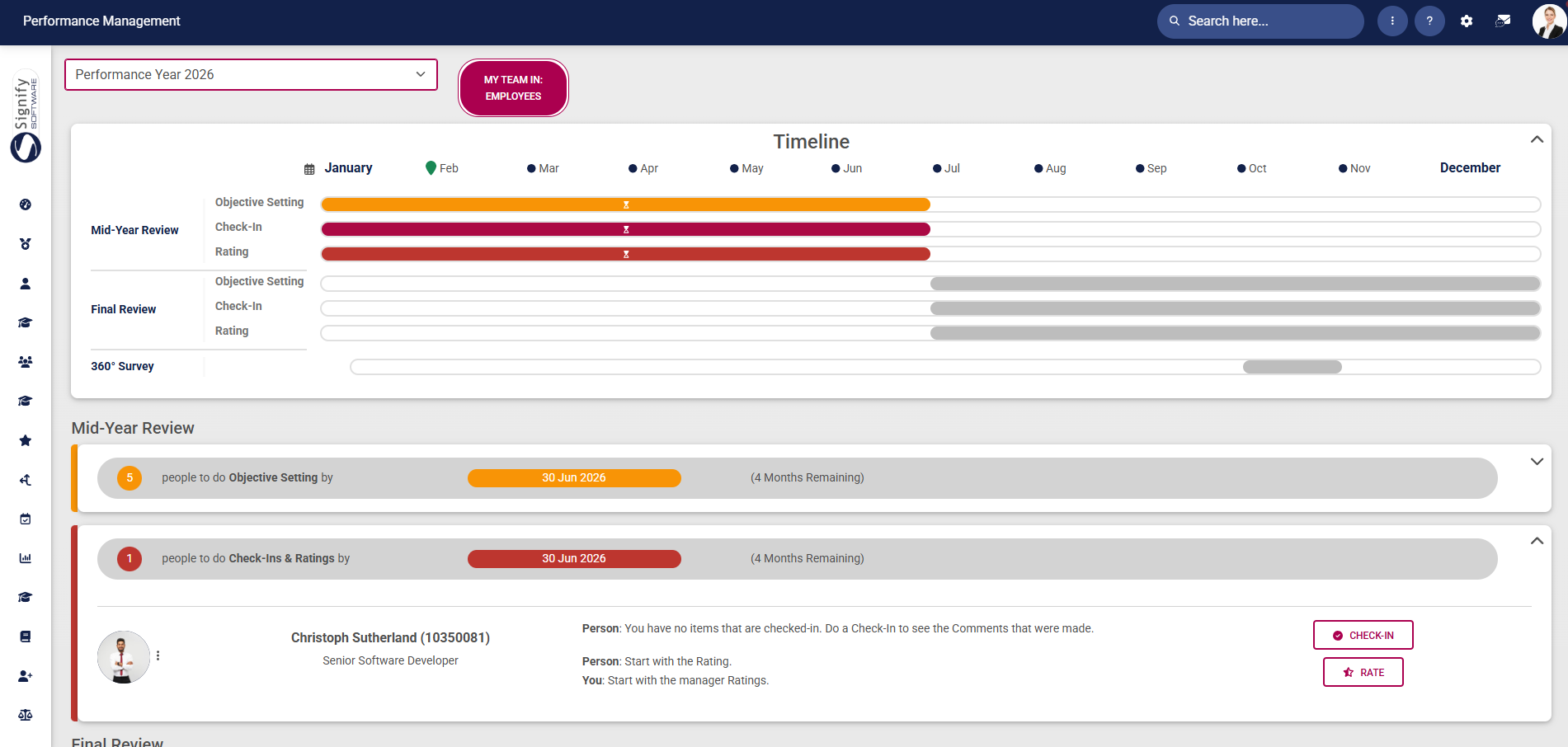
- The employee will start the **Ratings Phase** by completing their self-rating on each of their objectives. Navigate to the **Performance Management** dashboard, locate the performance agreement, and click the **RATE** button.
[](https://signature.signifyhr.co.za/uploads/images/gallery/2026-01/K5dWzta8nVzbzzH4-pm-performance-agreement-sections.png)
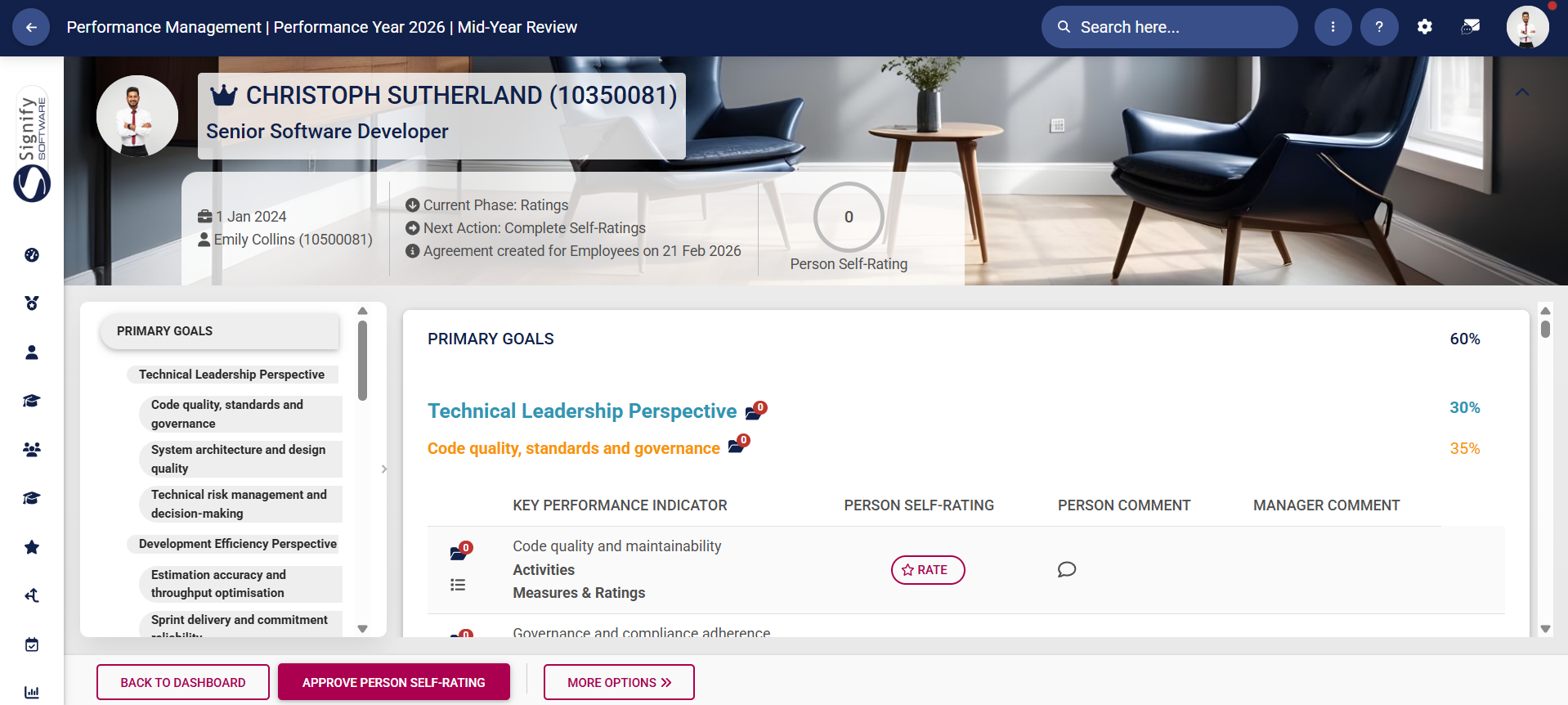
- The employee's **performance agreement** will open. The left-hand menu may be used for navigation, and the objectives are listed in the centre. The summary banner at the top of the screen shows the person's average rating based on the weights for each KPI that has been rated.
[](https://signature.signifyhr.co.za/uploads/images/gallery/2026-01/K5dWzta8nVzbzzH4-pm-performance-agreement-sections.png)
- Click here to start a **discussion** with your manager about a selected objective.
[](https://signature.signifyhr.co.za/uploads/images/gallery/2026-01/K5dWzta8nVzbzzH4-pm-performance-agreement-sections.png)
- Your manager will receive a message in their **system inbox**.
[](https://signature.signifyhr.co.za/uploads/images/gallery/2026-01/K5dWzta8nVzbzzH4-pm-performance-agreement-sections.png)
- Click **RATE** to start rating an objective.
[](https://signature.signifyhr.co.za/uploads/images/gallery/2026-01/K5dWzta8nVzbzzH4-pm-performance-agreement-sections.png)
- The **ratings menu** will appear. Click on a rating for the KPI, and add a suitable comment.
[](https://signature.signifyhr.co.za/uploads/images/gallery/2026-01/K5dWzta8nVzbzzH4-pm-performance-agreement-sections.png)
- Scrolling down will display the **historical comments** from the objective-setting and check-in phases. It can be useful to review these before submitting your KPI rating.
[](https://signature.signifyhr.co.za/uploads/images/gallery/2026-01/K5dWzta8nVzbzzH4-pm-performance-agreement-sections.png)
- If you are ready to submit your rating for this KPI, click **SAVE**.
[](https://signature.signifyhr.co.za/uploads/images/gallery/2026-01/K5dWzta8nVzbzzH4-pm-performance-agreement-sections.png)
- Your rating and comment will appear on the main ratings screen.
[](https://signature.signifyhr.co.za/uploads/images/gallery/2026-01/K5dWzta8nVzbzzH4-pm-performance-agreement-sections.png)
- As you proceed through the self-rating process, your calculated **self-rating score** in the summary banner will change based on the KPI's weight in the performance agreement.
[](https://signature.signifyhr.co.za/uploads/images/gallery/2026-01/K5dWzta8nVzbzzH4-pm-performance-agreement-sections.png)
- To modify your rating for a particular objective, click **CHANGE**.
[](https://signature.signifyhr.co.za/uploads/images/gallery/2026-01/K5dWzta8nVzbzzH4-pm-performance-agreement-sections.png)
- Update your comment or rating, then click **SAVE**.
[](https://signature.signifyhr.co.za/uploads/images/gallery/2026-01/K5dWzta8nVzbzzH4-pm-performance-agreement-sections.png)
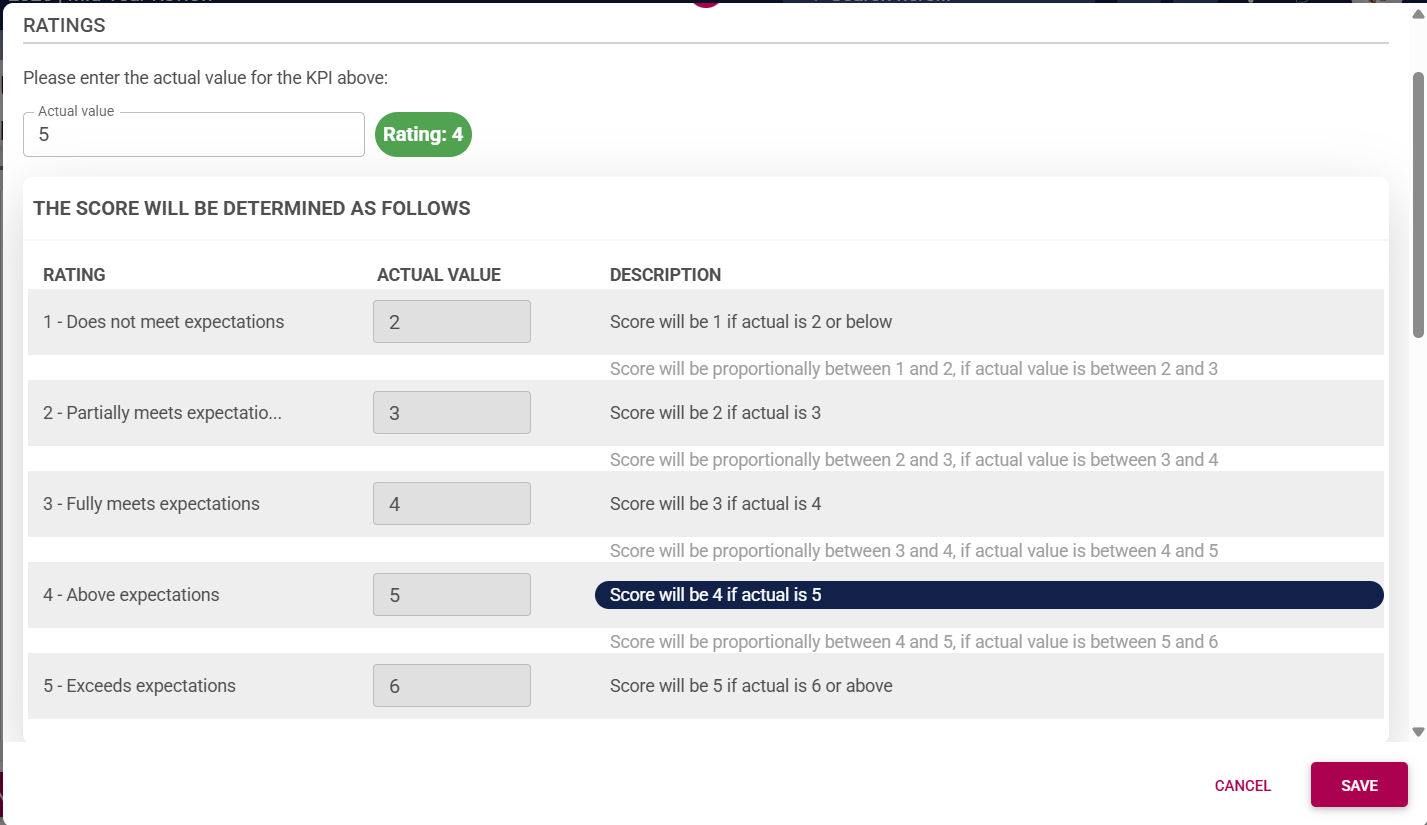
- For KPIs using **interpolation**, type in the actual value. The system will automatically calculate the rating for this objective, based on the configured interpolation rating scale.
[](https://signature.signifyhr.co.za/uploads/images/gallery/2026-01/K5dWzta8nVzbzzH4-pm-performance-agreement-sections.png)
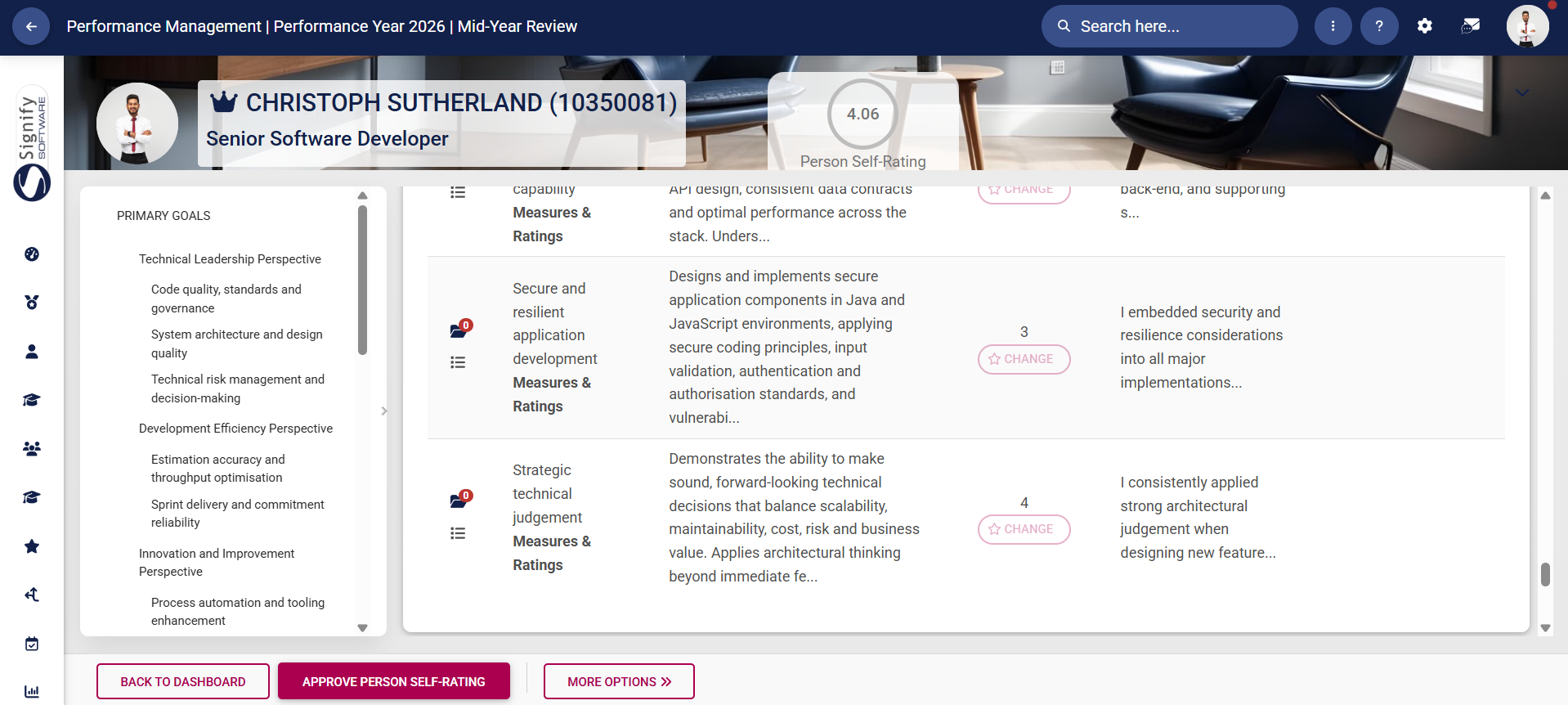
- Once you have rated each objective, click **APPROVE PERSON SELF-RATING**.
[](https://signature.signifyhr.co.za/uploads/images/gallery/2026-01/K5dWzta8nVzbzzH4-pm-performance-agreement-sections.png)
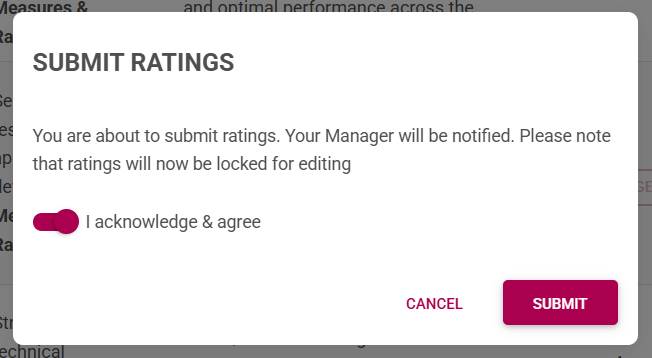
- A **warning message** will appear, notifying the employee that submitting the ratings will lock the agreement for editing and notify their manager. To proceed, click to **acknowledge and agree**, then click **SUBMIT**.
[](https://signature.signifyhr.co.za/uploads/images/gallery/2026-01/K5dWzta8nVzbzzH4-pm-performance-agreement-sections.png)
- If objectives in the agreement have **not been rated**, the employee will not be able to submit their ratings. Please review the performance agreement carefully, ensure each objective has been rated, and resubmit the self-ratings.
[](https://signature.signifyhr.co.za/uploads/images/gallery/2026-01/K5dWzta8nVzbzzH4-pm-performance-agreement-sections.png)
- The **manager** will receive an automated **email** from the system notifying them to proceed with the **manager ratings**.
[](https://signature.signifyhr.co.za/uploads/images/gallery/2026-01/K5dWzta8nVzbzzH4-pm-performance-agreement-sections.png)
- The **employee's dashboard** will show that their performance agreement status is now completed. They can click **VIEW** to review their performance agreement as they wait for their manager to complete their ratings.
[](https://signature.signifyhr.co.za/uploads/images/gallery/2026-01/K5dWzta8nVzbzzH4-pm-performance-agreement-sections.png)
- Viewing the submitted performance agreement will show the rating and comment for each objective, as well as the employee's self-rating score. To modify self-ratings, click **MODIFY PERSON'S SELF-RATING**.
[](https://signature.signifyhr.co.za/uploads/images/gallery/2026-01/K5dWzta8nVzbzzH4-pm-performance-agreement-sections.png)
- A **warning message** will ask the employee to acknowledge and agree that their manager will be notified of these changes. To proceed, click to **acknowledge and agree**, then click **SUBMIT**.
[](https://signature.signifyhr.co.za/uploads/images/gallery/2026-01/K5dWzta8nVzbzzH4-pm-performance-agreement-sections.png)
- The **manager** will receive an automated **email** from the system notifying them that the employee has **modified** their self-ratings.
[](https://signature.signifyhr.co.za/uploads/images/gallery/2026-01/K5dWzta8nVzbzzH4-pm-performance-agreement-sections.png)
### Manager Rating and Final Rating
- The manager should navigate to the **Performance Management** dashboard and find the employee's contract under the **My Team** tab. The performance agreement's status will show that the employee has submitted their self-rating, and the manager should proceed with the manager's rating.
[](https://signature.signifyhr.co.za/uploads/images/gallery/2026-01/K5dWzta8nVzbzzH4-pm-performance-agreement-sections.png)
- Click **RATE** next to the employee's performance agreement.
[](https://signature.signifyhr.co.za/uploads/images/gallery/2026-01/K5dWzta8nVzbzzH4-pm-performance-agreement-sections.png)
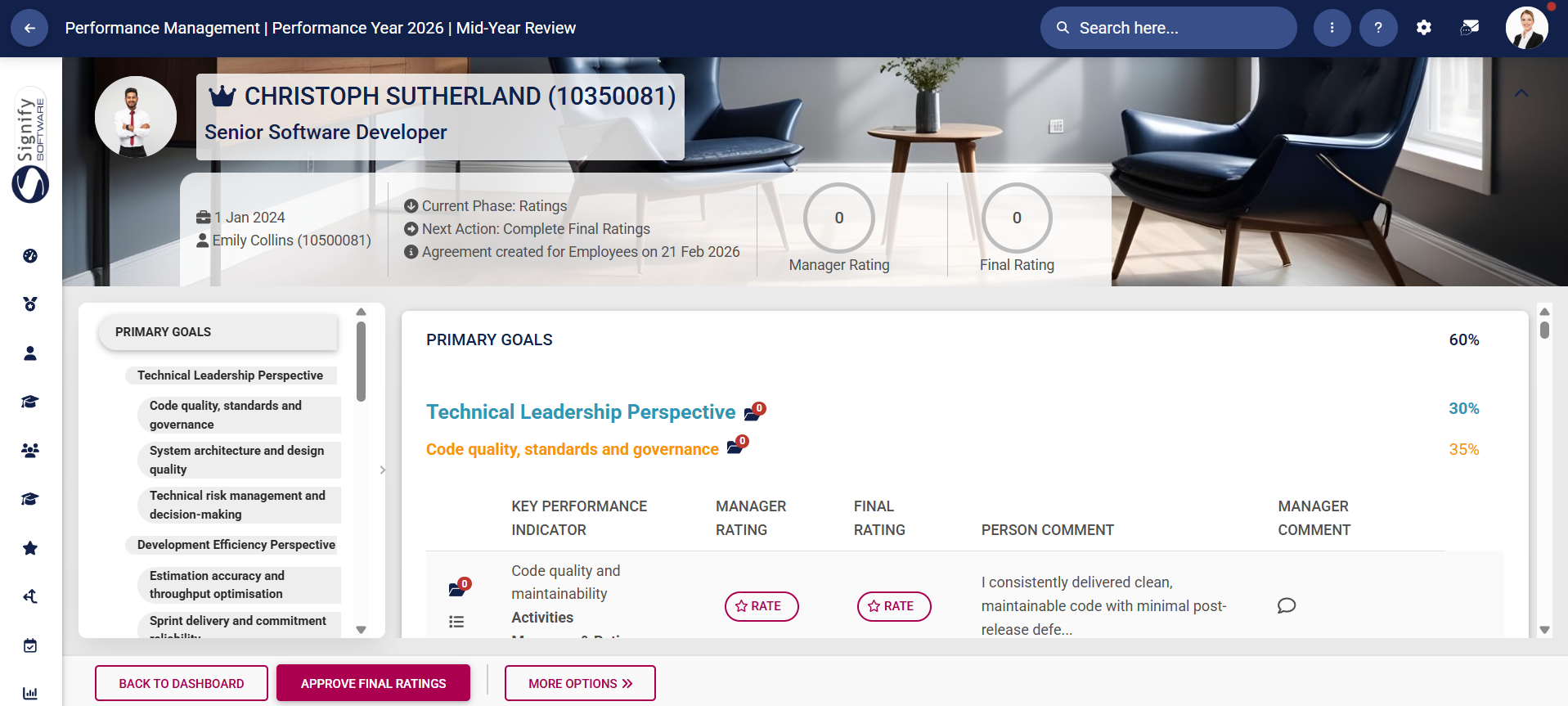
- The employee's **performance agreement** will open. The left-hand menu may be used for navigation, and the objectives are listed in the centre. The summary banner at the top of the screen shows the person's average rating based on the weights for each KPI that has been rated.
[](https://signature.signifyhr.co.za/uploads/images/gallery/2026-01/K5dWzta8nVzbzzH4-pm-performance-agreement-sections.png)
- Click here to start a **discussion** with your employee about a selected objective.
[](https://signature.signifyhr.co.za/uploads/images/gallery/2026-01/K5dWzta8nVzbzzH4-pm-performance-agreement-sections.png)
- Click **RATE** to start the manager's rating of an objective.
[](https://signature.signifyhr.co.za/uploads/images/gallery/2026-01/K5dWzta8nVzbzzH4-pm-performance-agreement-sections.png)
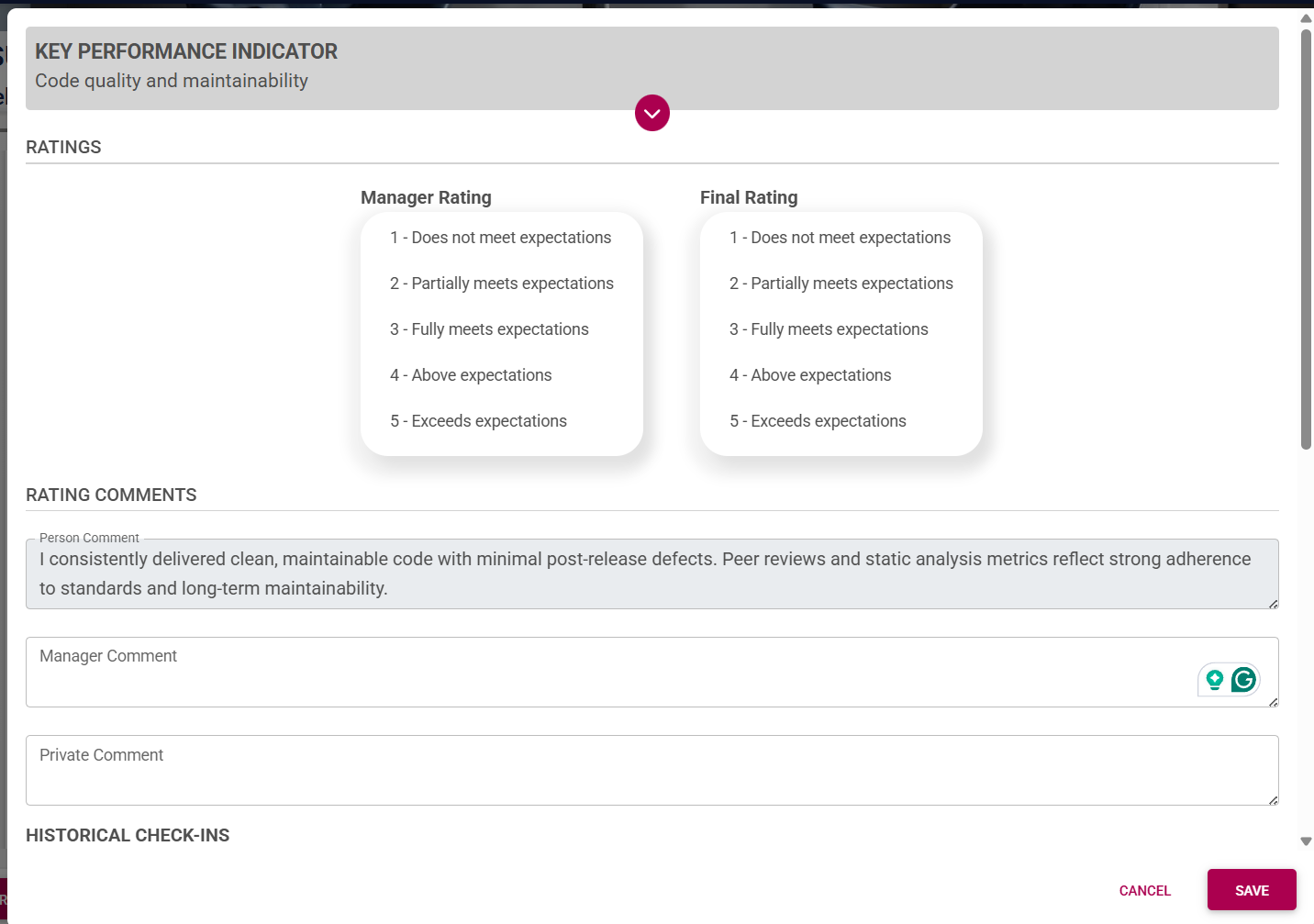
- The **ratings menu** will appear. Since the manager's rating and the final rating will be completed simultaneously, you can select a value for each rating and then provide one overall comment. Managers can also make a private comment that will not be visible to the employee.
[](https://signature.signifyhr.co.za/uploads/images/gallery/2026-01/K5dWzta8nVzbzzH4-pm-performance-agreement-sections.png)
- Scrolling down will display the **historical comments** from the objective-setting and check-in phases. It can be useful to review these before submitting your ratings. If you are ready to submit your rating for this KPI, click **SAVE**.
[](https://signature.signifyhr.co.za/uploads/images/gallery/2026-01/K5dWzta8nVzbzzH4-pm-performance-agreement-sections.png)
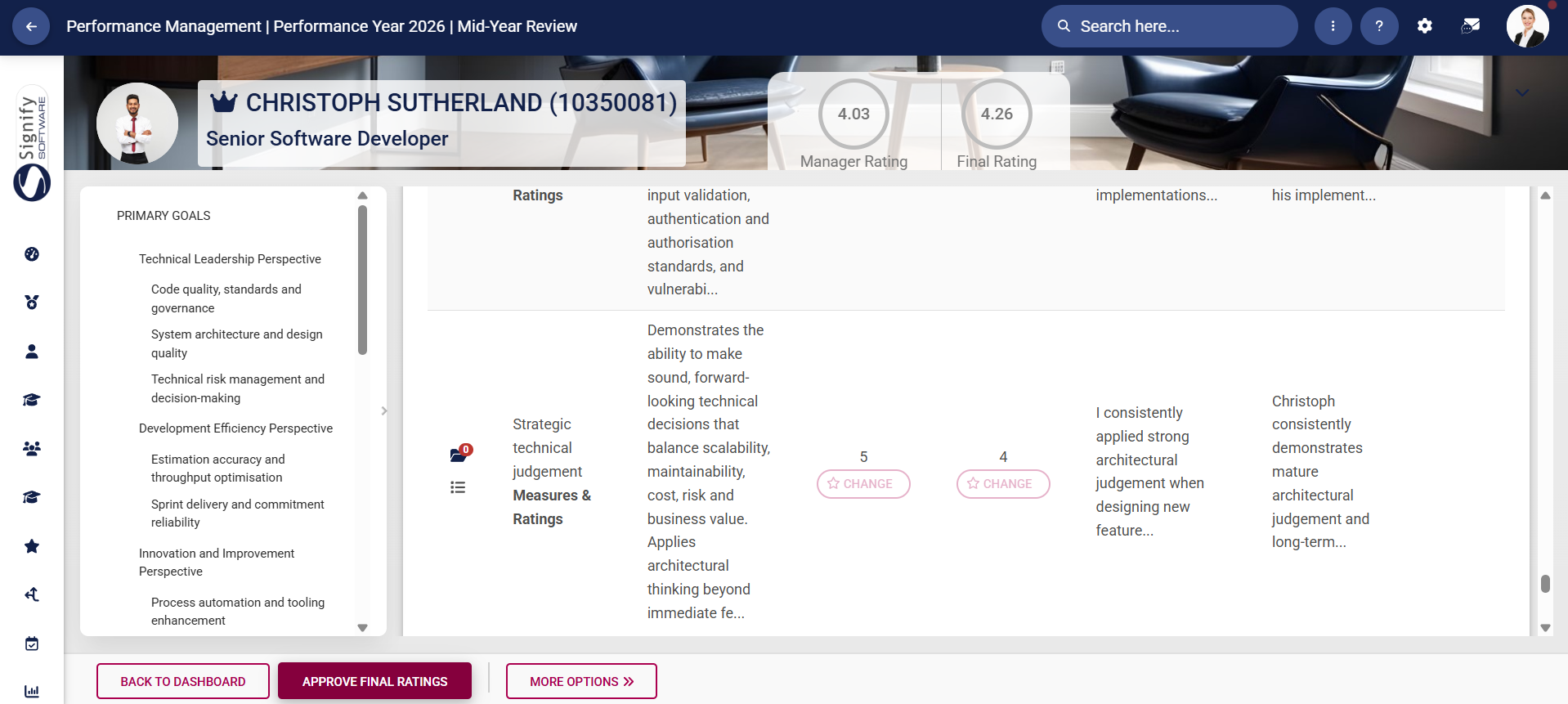
- Your ratings and comments will appear on the main ratings screen. As you proceed through the rating process, your calculated **manager rating** and **final rating** **scores** in the summary banner will change based on the KPI's weight in the performance agreement.
[](https://signature.signifyhr.co.za/uploads/images/gallery/2026-01/K5dWzta8nVzbzzH4-pm-performance-agreement-sections.png)
- To modify your rating for a particular objective, click **CHANGE**.
[](https://signature.signifyhr.co.za/uploads/images/gallery/2026-01/K5dWzta8nVzbzzH4-pm-performance-agreement-sections.png)
- Update your comment or rating, then click **SAVE**.
- For KPIs using **interpolation**, type in the actual value. The system will automatically calculate the rating for this objective, based on the configured interpolation rating scale.
[](https://signature.signifyhr.co.za/uploads/images/gallery/2026-01/K5dWzta8nVzbzzH4-pm-performance-agreement-sections.png)
- Once you have rated each objective, click **APPROVE FINAL RATING**.
[](https://signature.signifyhr.co.za/uploads/images/gallery/2026-01/K5dWzta8nVzbzzH4-pm-performance-agreement-sections.png)
- A **warning message** will appear, notifying the manager that submitting the ratings will lock the agreement for editing. To proceed, click to **acknowledge and agree**, then click **SUBMIT**.
[](https://signature.signifyhr.co.za/uploads/images/gallery/2026-01/K5dWzta8nVzbzzH4-pm-performance-agreement-sections.png)
- If you have omitted a rating for an objective, an **error message** will appear. Please review the performance agreement carefully and add the missing rating(s).
[](https://signature.signifyhr.co.za/uploads/images/gallery/2026-01/K5dWzta8nVzbzzH4-pm-performance-agreement-sections.png)
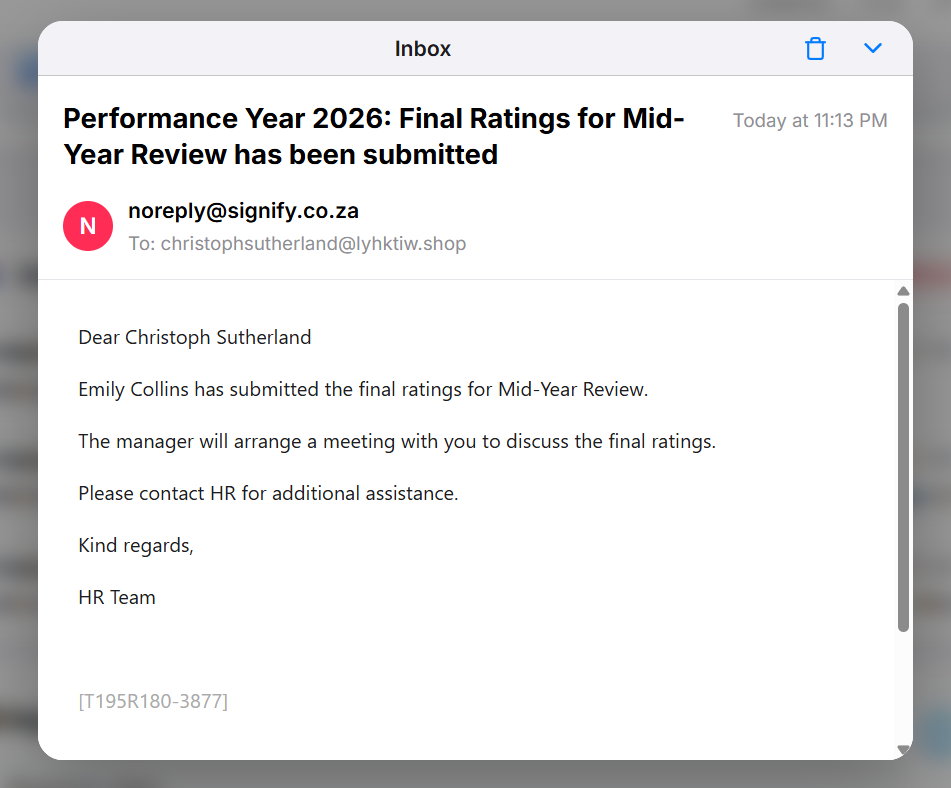
- The **employee** will receive an automated **email** from the system notifying them that their manager has submitted their **final ratings**.
[](https://signature.signifyhr.co.za/uploads/images/gallery/2026-01/K5dWzta8nVzbzzH4-pm-performance-agreement-sections.png)
- The **manager's dashboard** will show that their employee's performance agreement status is now completed. They can hover over a specific review period to view the performance agreement.
[](https://signature.signifyhr.co.za/uploads/images/gallery/2026-01/K5dWzta8nVzbzzH4-pm-performance-agreement-sections.png)
- Viewing the submitted performance agreement will show the rating and comment for each objective, as well as the three scores for this review period:
- The employee's self-rating score,
- The manager's rating, and
- The final rating.
- To modify the final ratings, click **MODIFY FINAL RATING**.
[](https://signature.signifyhr.co.za/uploads/images/gallery/2026-01/K5dWzta8nVzbzzH4-pm-performance-agreement-sections.png)
- A **warning message** will ask the manager to acknowledge and agree that the performance agreement's ratings will be unapproved. To proceed, click to **acknowledge and agree**, then click **SUBMIT**.
[](https://signature.signifyhr.co.za/uploads/images/gallery/2026-01/K5dWzta8nVzbzzH4-pm-performance-agreement-sections.png)
### Ratings Notification Emails
The system automatically sends the following emails for the **Ratings Phase**:
[](https://signature.signifyhr.co.za/uploads/images/gallery/2026-01/K5dWzta8nVzbzzH4-pm-performance-agreement-sections.png)
**[](https://signature.signifyhr.co.za/uploads/images/gallery/2026-01/K5dWzta8nVzbzzH4-pm-performance-agreement-sections.png)**
### Next Steps
The first review period of the performance management cycle has been completed. If a second review period has been created for the review year, the next phase is the **Recontracting** phase. Navigate to the next section for more information.
[](https://signature.signifyhr.co.za/uploads/images/gallery/2025-02/ZOt8yZwhbiGx2d6U-signify-footer.png)