# Re-contracting Phase

[![Signify Header.png](https://signature.signifyhr.co.za/uploads/images/gallery/2025-02/scaled-1680-/emW3hfMrZ1yIDMUv-signify-header.png)](https://signature.signifyhr.co.za/uploads/images/gallery/2025-02/emW3hfMrZ1yIDMUv-signify-header.png)

The **Recontracting Phase** is similar to the objective-setting phase described earlier, with one key difference: a performance agreement has already been completed for the current performance year, and now a new one needs to be established. This guide assumes that you do not have an existing agreement for the current review period and that you want to create a new one.

- Begin by navigating to the **Performance Management** dashboard.
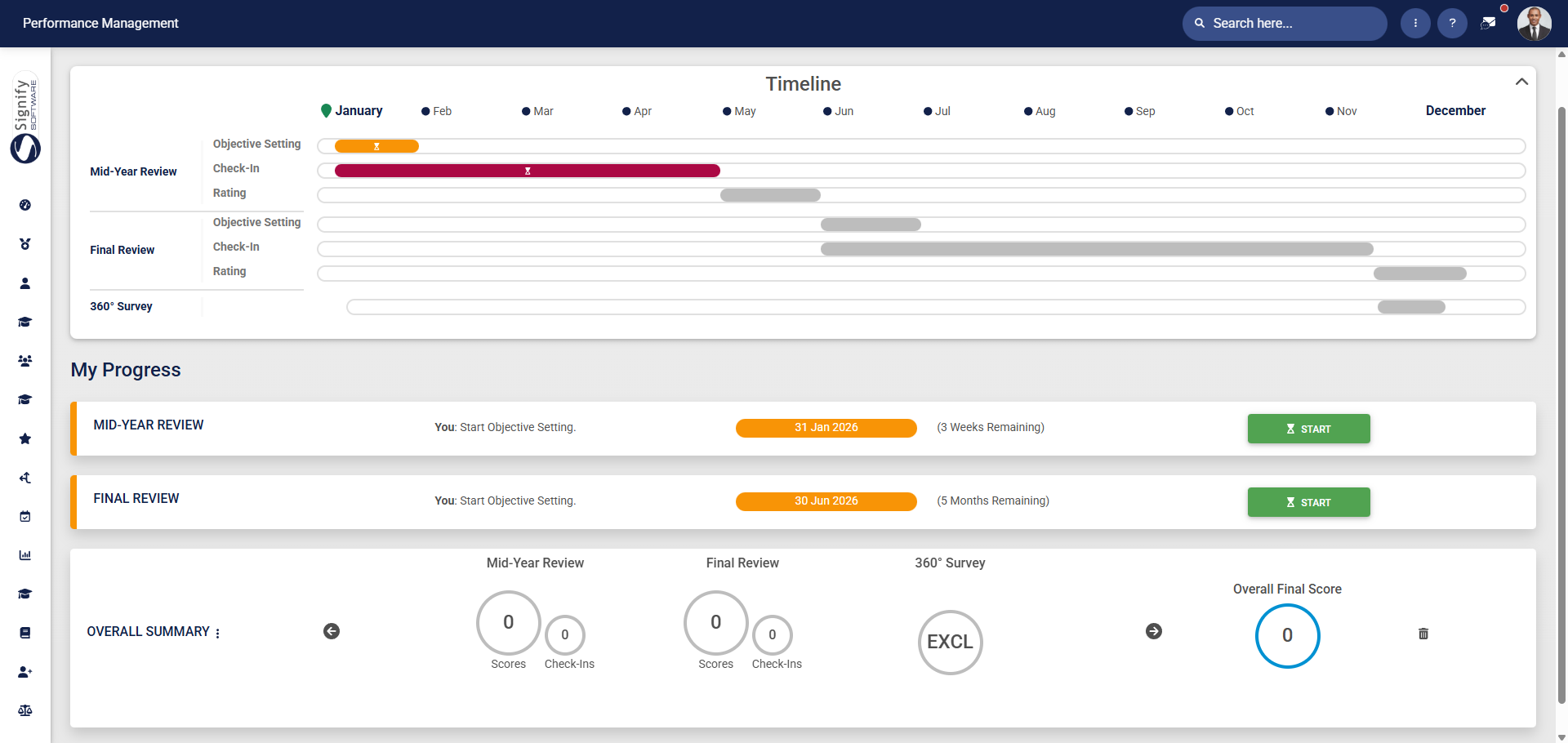
![PM Dashboard (Employee).png](https://signature.signifyhr.co.za/uploads/images/gallery/2026-01/Q1hagynMO737QZsl-pm-dashboard-employee.png)

- Click **START** to create a new performance agreement.

![PM Start creating a performance agreement.png](https://signature.signifyhr.co.za/uploads/images/gallery/2026-01/UIHAMKbQP4PvM2DL-pm-start-creating-a-performance-agreement.png)

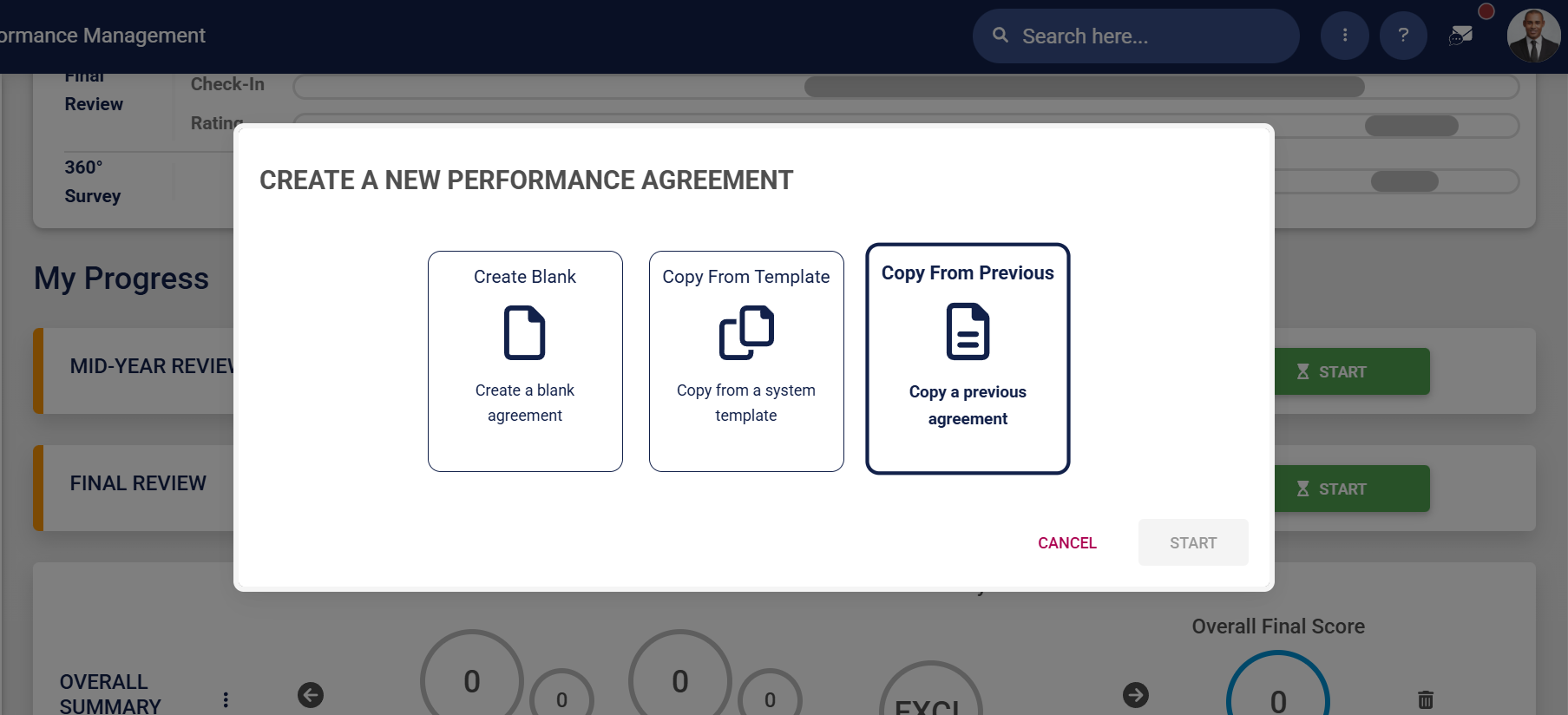
- The **Performance Management** module allows **employees** to create a performance agreement in three ways.
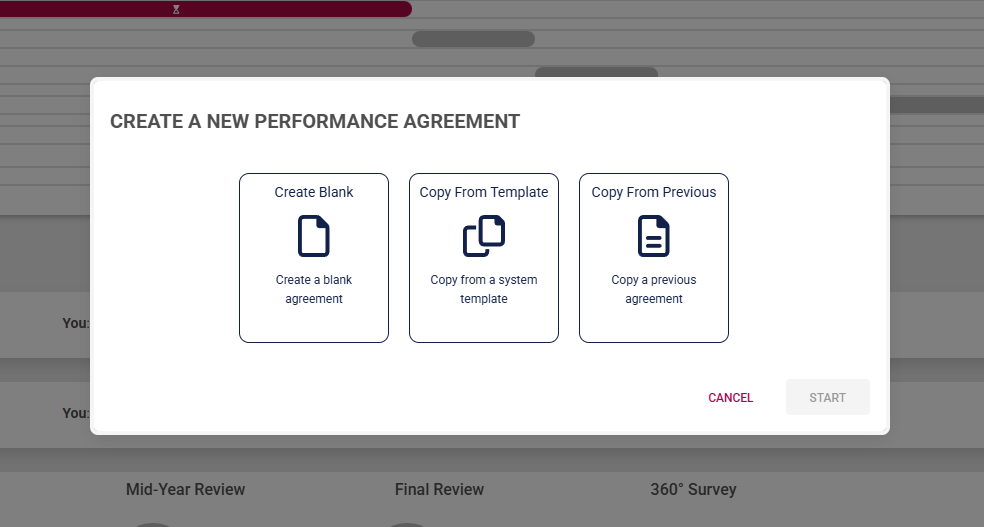
![PM Create PM agreement options for employees.png](https://signature.signifyhr.co.za/uploads/images/gallery/2026-01/Rx9o0GI3vWKD2g7r-pm-create-pm-agreement-options-for-employees.png)

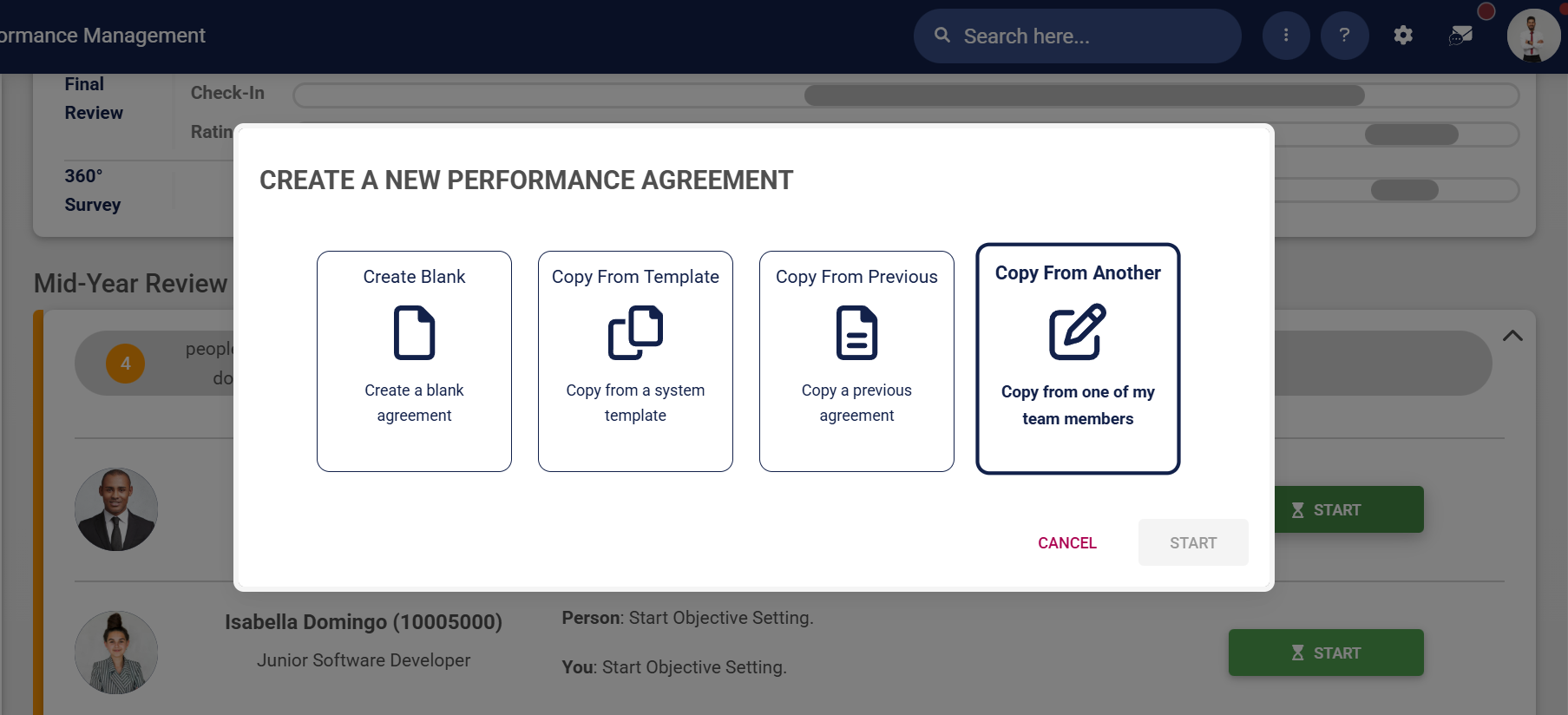
- **Managers** are offered an additional option to create a performance agreement for a reportee using a template from another team member.
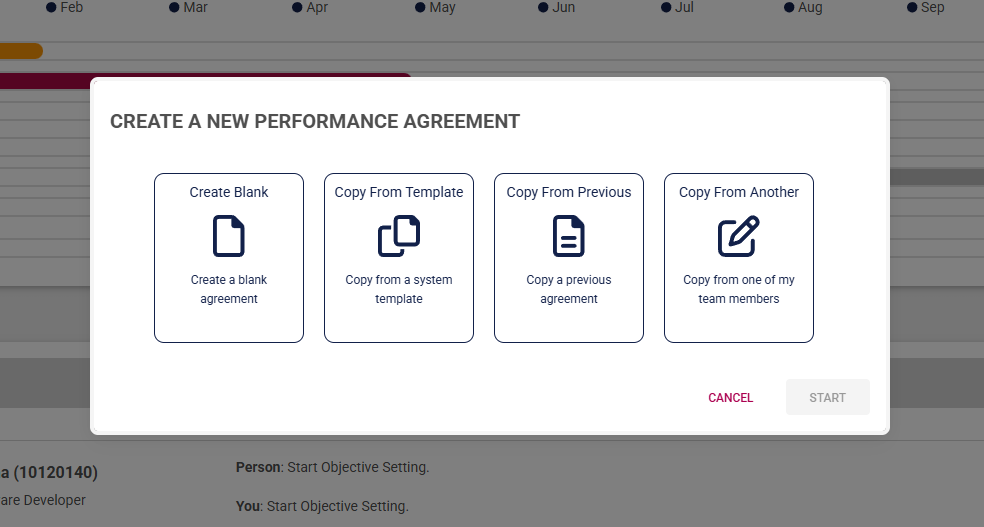
![PM Create PM agreement options for managers.png](https://signature.signifyhr.co.za/uploads/images/gallery/2026-01/UBTyjUgcts7duwJB-pm-create-pm-agreement-options-for-managers.png)

Click on the following tabs to expand the step-by-step instructions.

<details id="bkmrk-create-a-blank-agree"><summary>Create a blank agreement</summary>

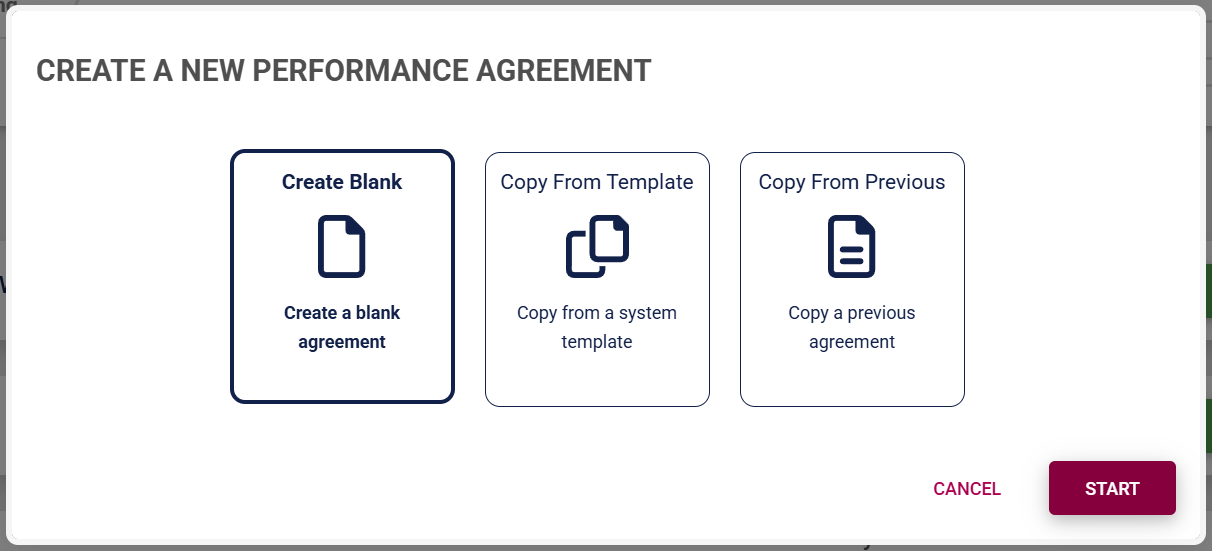
- Click **Create Blank** to start creating a performance agreement from the beginning.
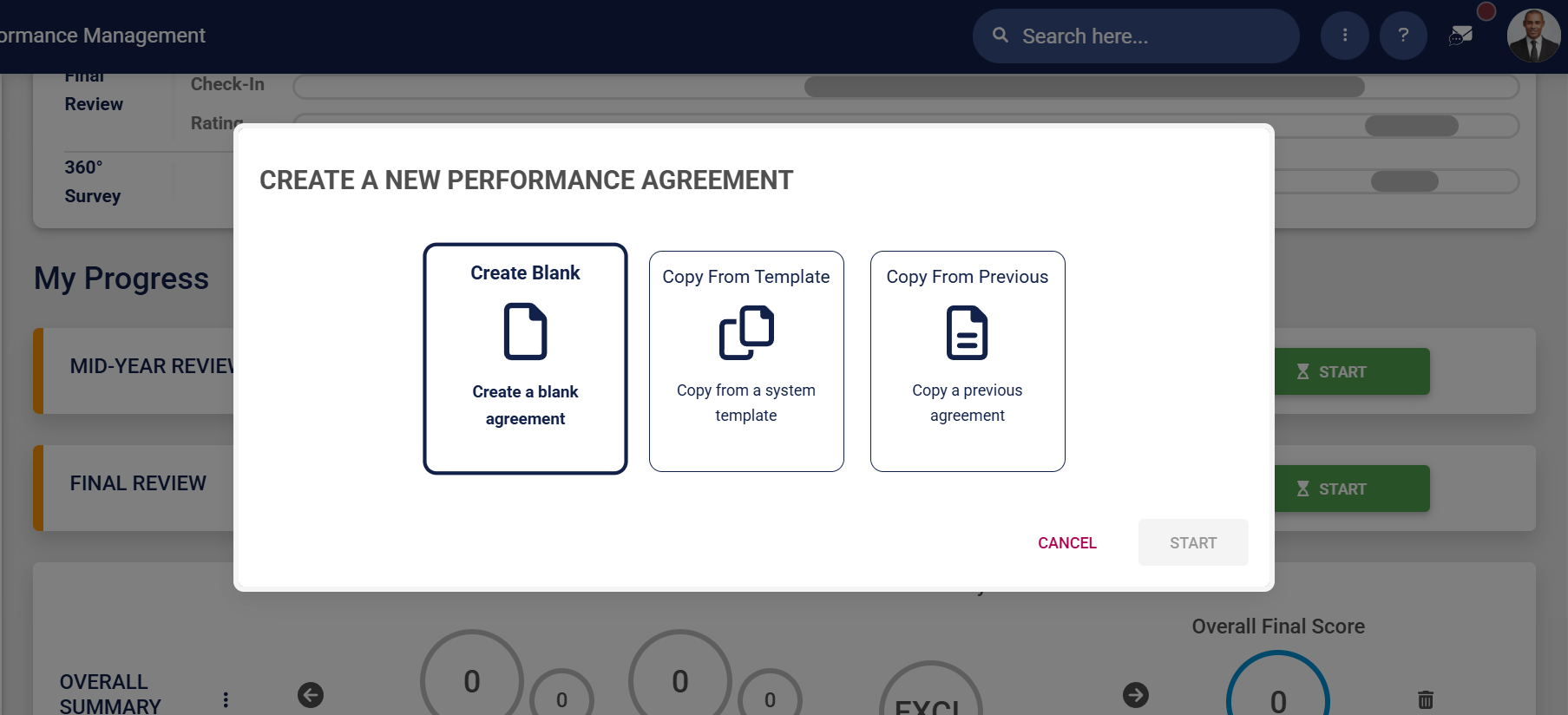
![PM Create PM agreement employees – Blank.png](https://signature.signifyhr.co.za/uploads/images/gallery/2026-01/0Xwij9aR5vNCwfSS-pm-create-pm-agreement-employees-blank.png)

- Click **START**.

![PM Create PM agreement employees – Blank – Start.png](https://signature.signifyhr.co.za/uploads/images/gallery/2026-01/w6NLqkBJ2abHvZGD-pm-create-pm-agreement-employees-blank-start.png)

- The performance agreement screen will display, showing the different sections, though it won't include any objectives at this stage. Adding objectives is covered in the next section.
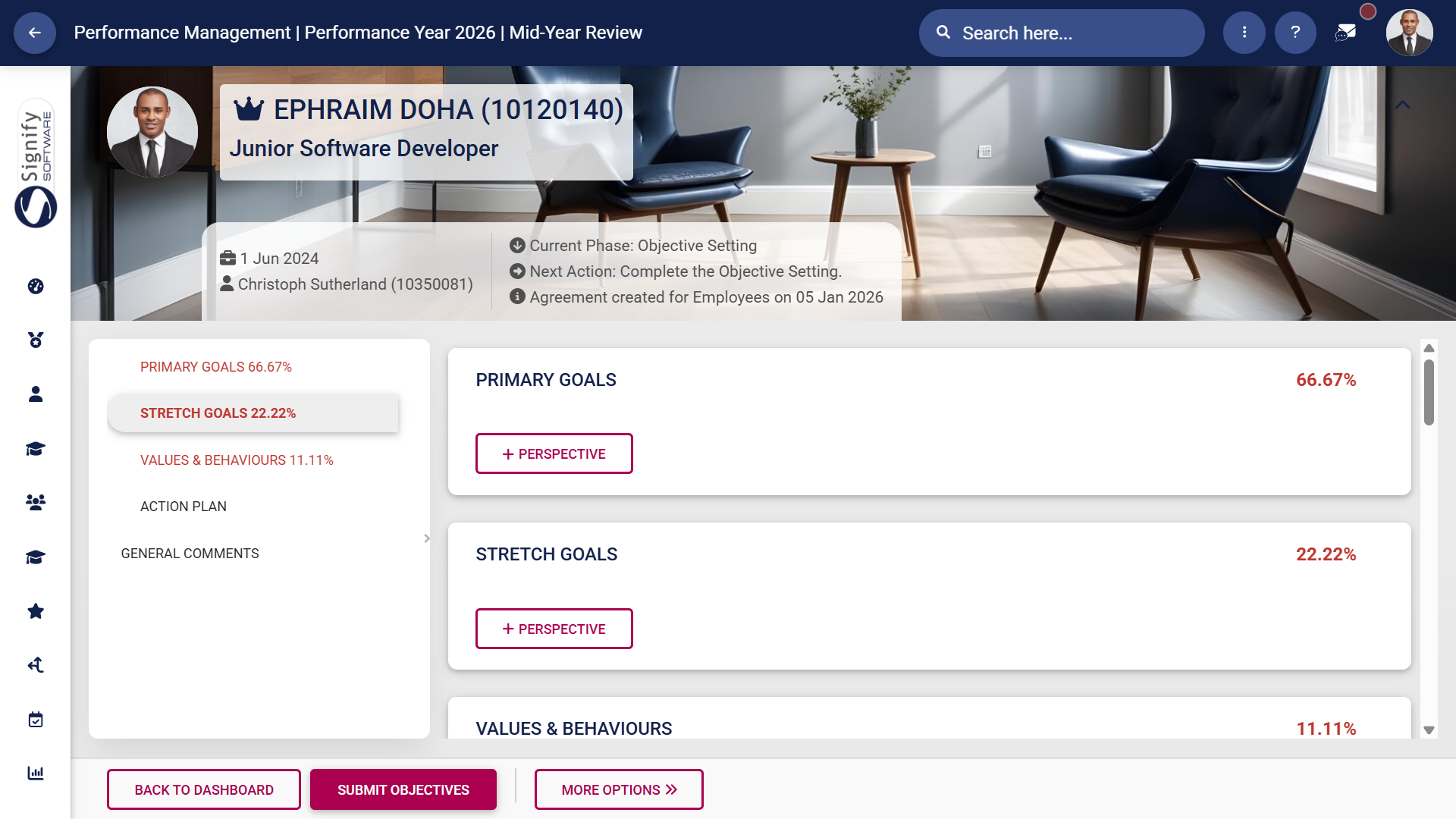
![PM Create PM agreement employees – Blank – Agreement Screen.png](https://signature.signifyhr.co.za/uploads/images/gallery/2026-01/XDGzjO45wmi1ycMO-pm-create-pm-agreement-employees-blank-agreement-screen.png)

</details><details id="bkmrk-use-a-performance-ag"><summary>Use a performance agreement template</summary>

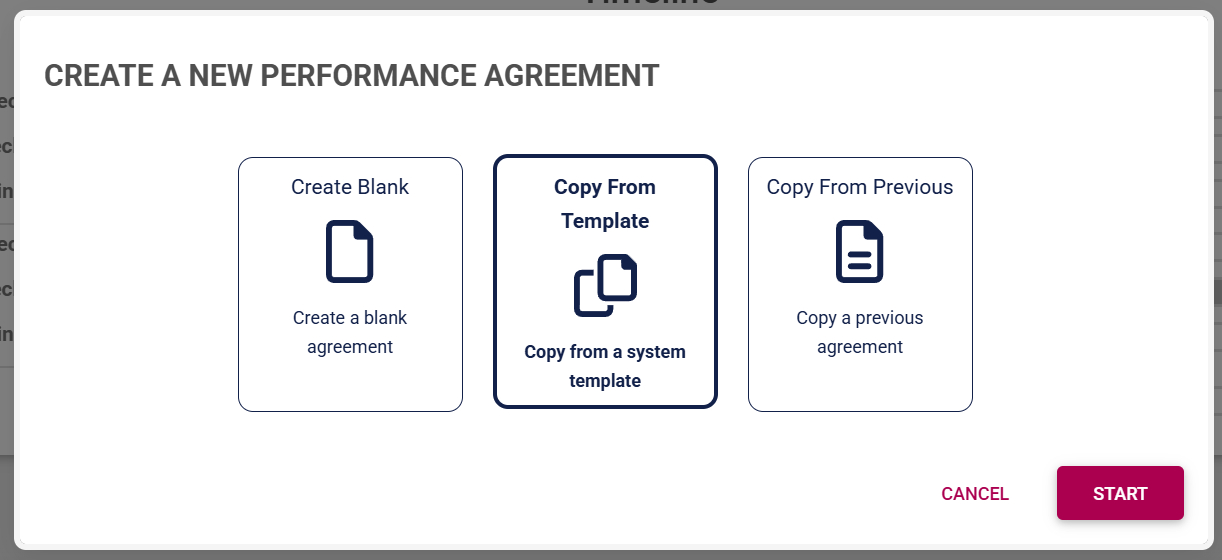
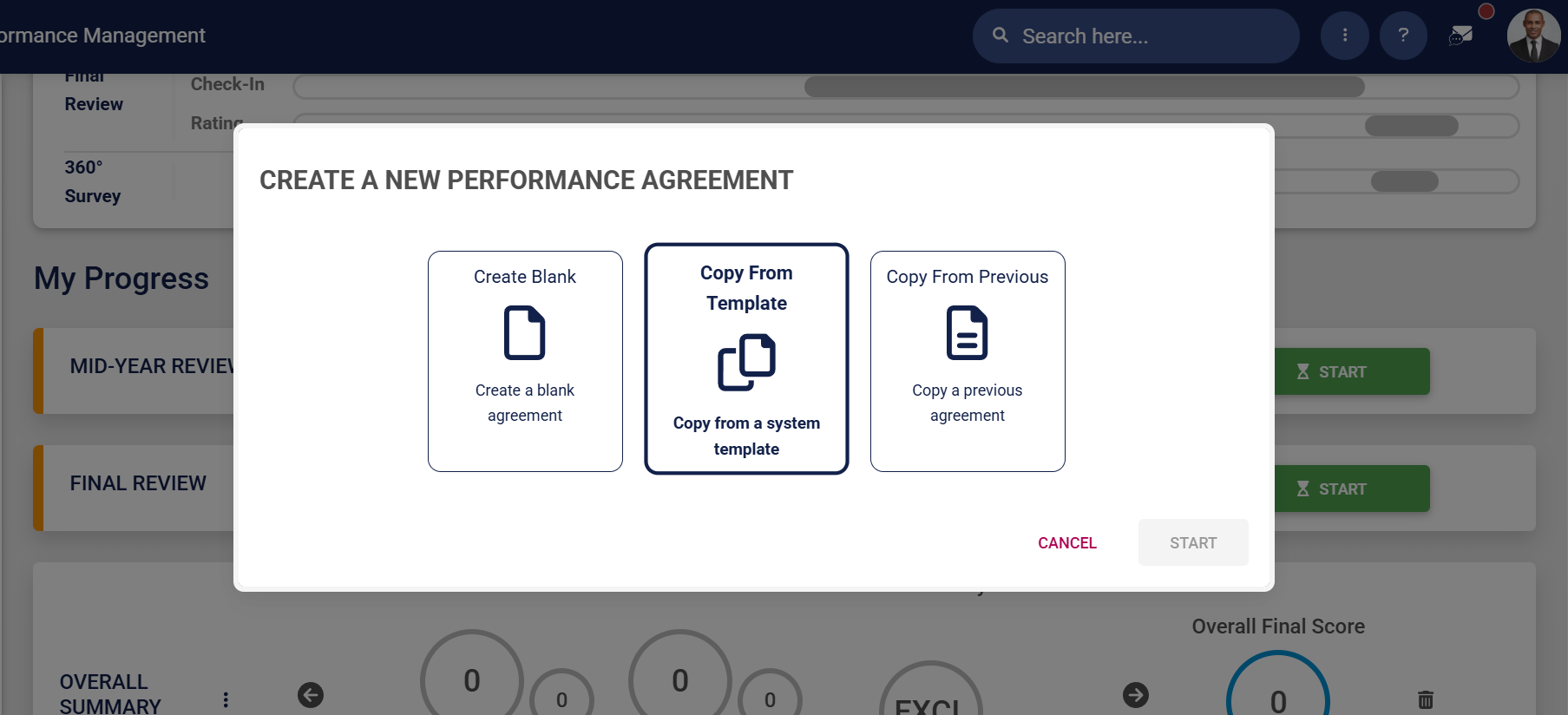
- Click **Copy From Template** to create a performance agreement based on a system template.
![PM Create PM agreement employees – Template.png](https://signature.signifyhr.co.za/uploads/images/gallery/2026-01/QmMMiriSm9KdFtKR-pm-create-pm-agreement-employees-template.png)

- Click **START**.

![PM Create PM agreement employees – Template – Start.png](https://signature.signifyhr.co.za/uploads/images/gallery/2026-01/zDSjduKEIdCRfXkx-pm-create-pm-agreement-employees-template-start.png)

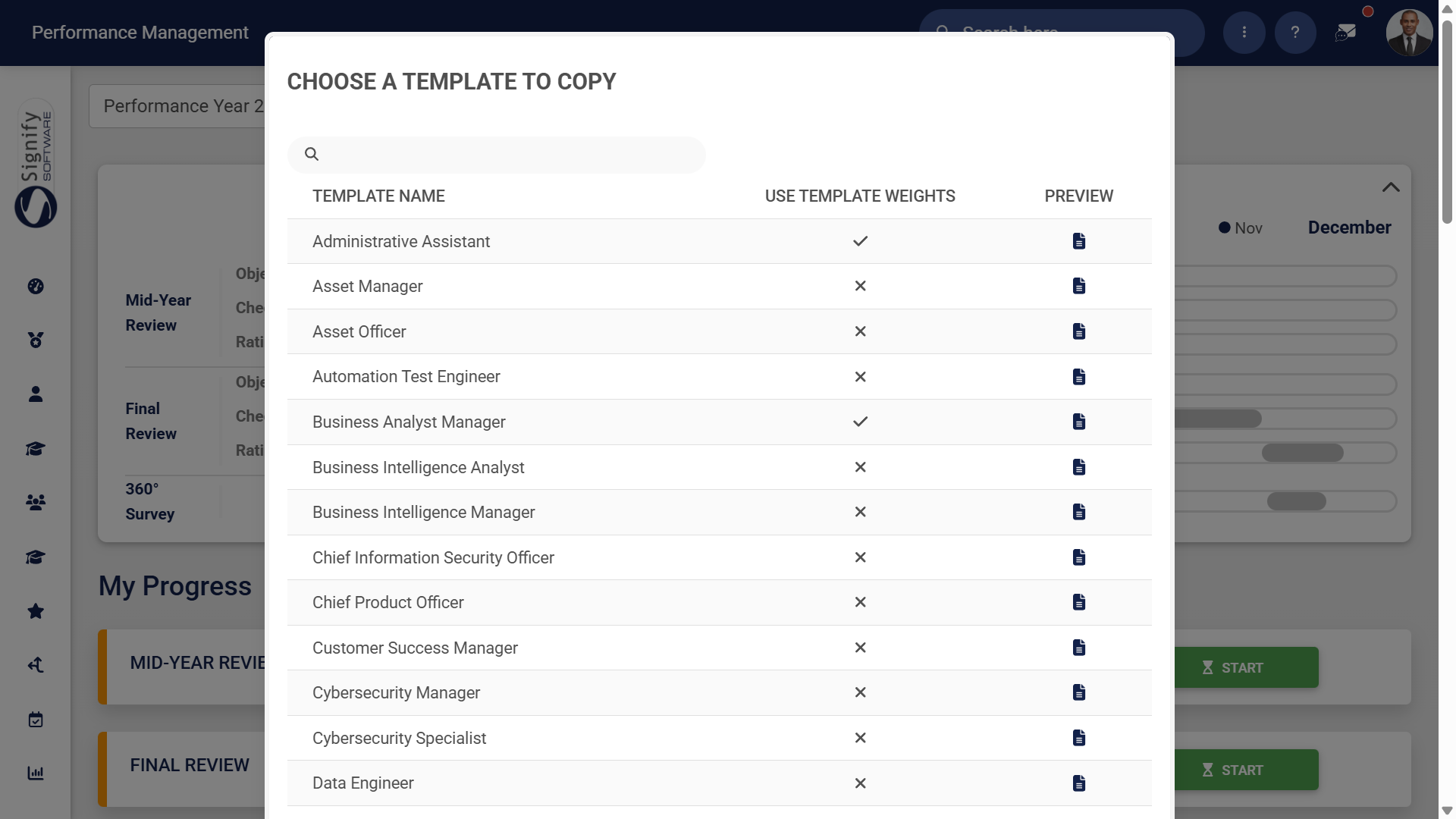
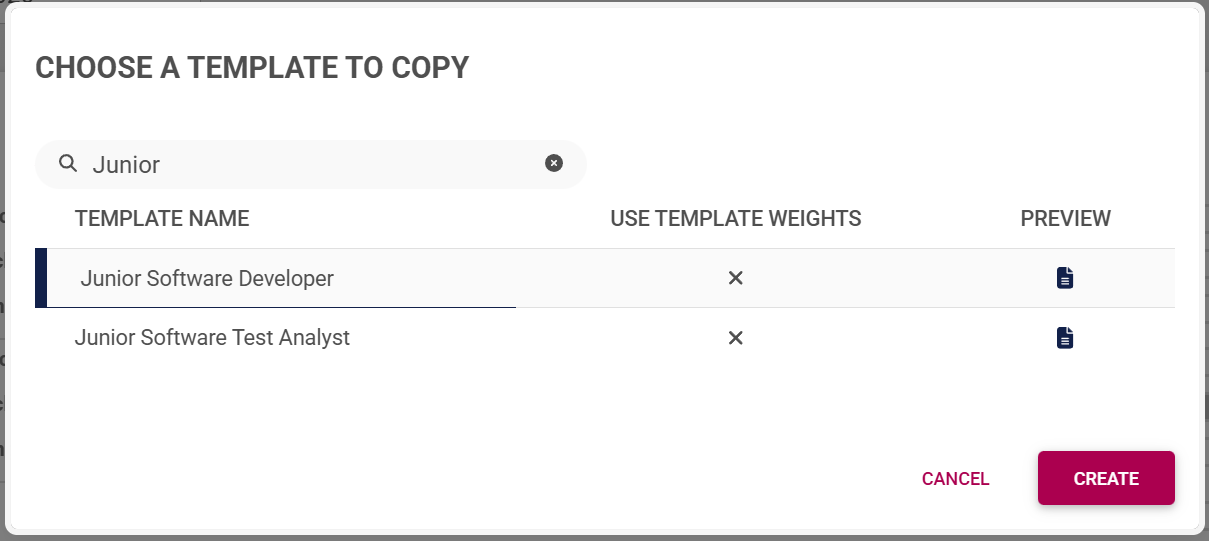
- A list of the templates currently on the system will be shown.
![PM Create PM agreement employees – Template – List.png](https://signature.signifyhr.co.za/uploads/images/gallery/2026-01/Ypf07gaxhGAnFJHk-pm-create-pm-agreement-employees-template-list.png)

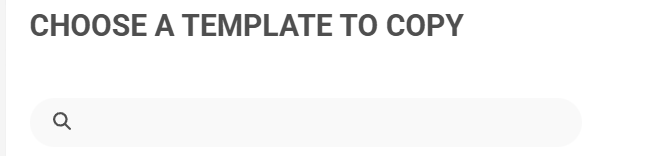
- - - Use the search bar to search for a template based on a job title or specific keywords.
![PM Create PM agreement employees – Template – Search Bar.png](https://signature.signifyhr.co.za/uploads/images/gallery/2026-01/AWqzvPY8QBQX9DrX-pm-create-pm-agreement-employees-template-search-bar.png)

- - - A **tick** will be displayed if the template's weights override the review setup's weights. A **cross** indicates that the review setup's weights will be used.

![PM Create PM agreement employees – Template – Use Template Weights.png](https://signature.signifyhr.co.za/uploads/images/gallery/2026-01/lMw8sukVaHJP4Swu-pm-create-pm-agreement-employees-template-use-template-weights.png)

- - - To ensure you select the correct template, you can preview it by clicking the icon. The preview will open in a new tab.
![PM Create PM agreement employees – Template – Preview.png](https://signature.signifyhr.co.za/uploads/images/gallery/2026-01/gactQaNiLlF6DQ0v-pm-create-pm-agreement-employees-template-preview.png)

- Choose a template you would like to copy, then click **CREATE**.
![PM Create PM agreement employees – Template – Create.png](https://signature.signifyhr.co.za/uploads/images/gallery/2026-01/T3kHzyO8dtSd2lvw-pm-create-pm-agreement-employees-template-create.png)

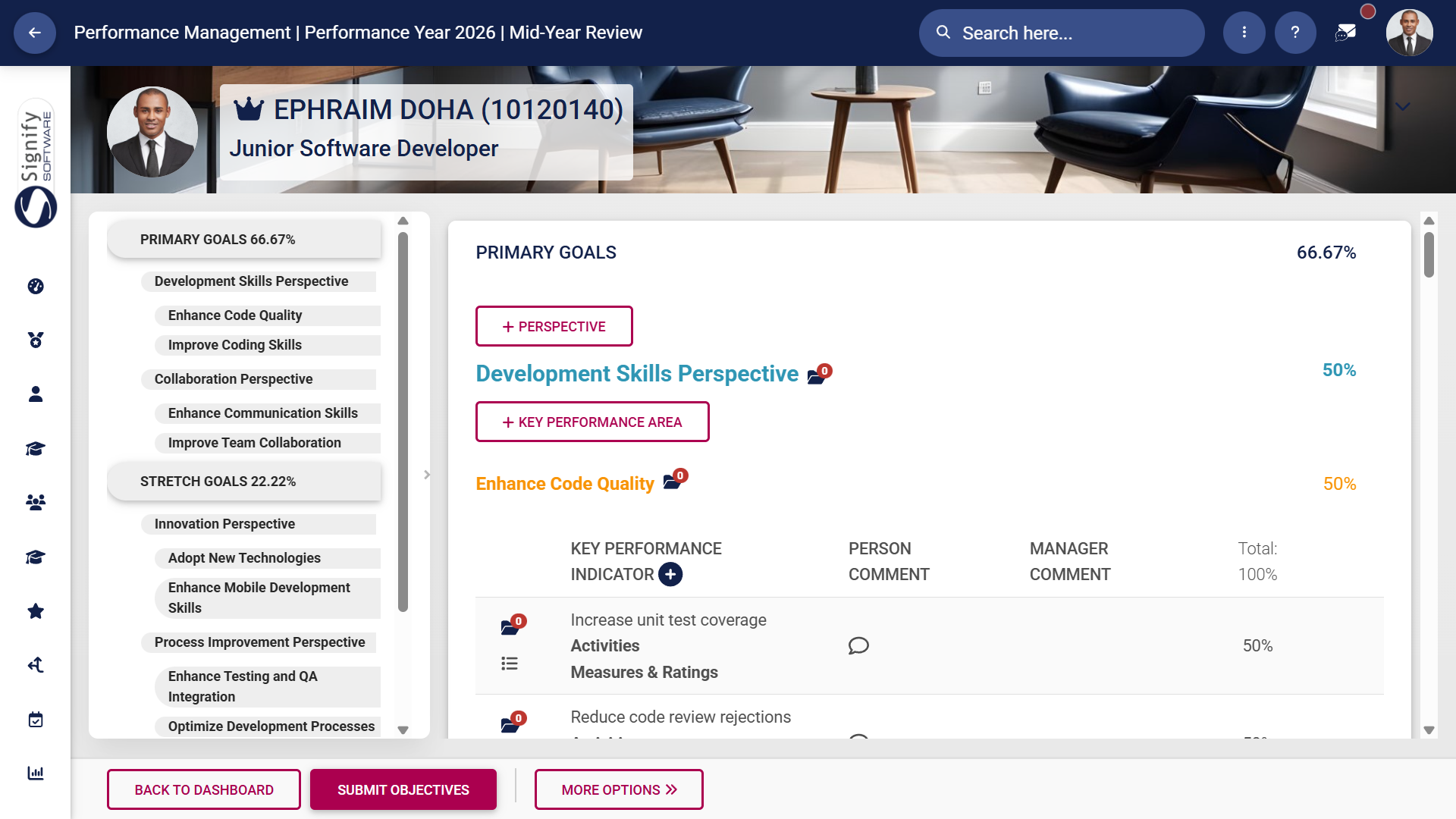
- The performance agreement screen will display, with the **Perspective**, **Key Performance Area**, and **Key Performance Indicator** fields filled in from the template.
![PM Create PM agreement employees – Template – Agreement Screen.png](https://signature.signifyhr.co.za/uploads/images/gallery/2026-01/4Gj5Dz8khGbtc7Hd-pm-create-pm-agreement-employees-template-agreement-screen.png)

</details><details id="bkmrk-copy-from-a-previous"><summary>Copy from a previous agreement</summary>

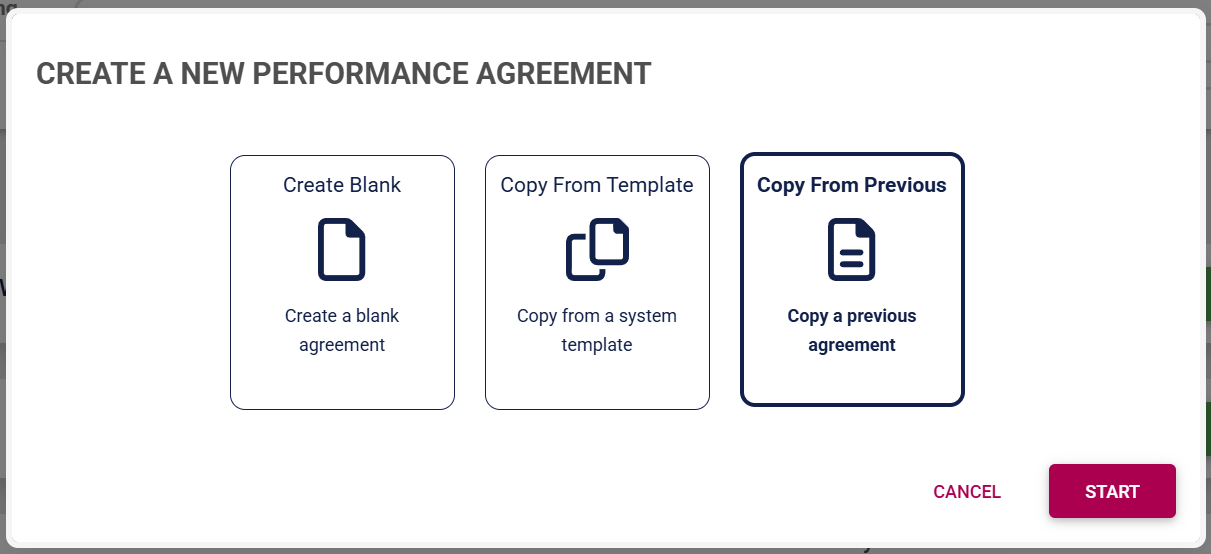
- Click **Copy From Previous** to create a performance agreement based on an agreement from a previous performance cycle.
![PM Create PM agreement employees – Previous.png](https://signature.signifyhr.co.za/uploads/images/gallery/2026-01/anF1iUHhaHJVjDz8-pm-create-pm-agreement-employees-previous.png)

- Click **START**.

![PM Create PM agreement employees – Previous – Start.png](https://signature.signifyhr.co.za/uploads/images/gallery/2026-01/Iiyt3xWZWiijd9P9-pm-create-pm-agreement-employees-previous-start.png)

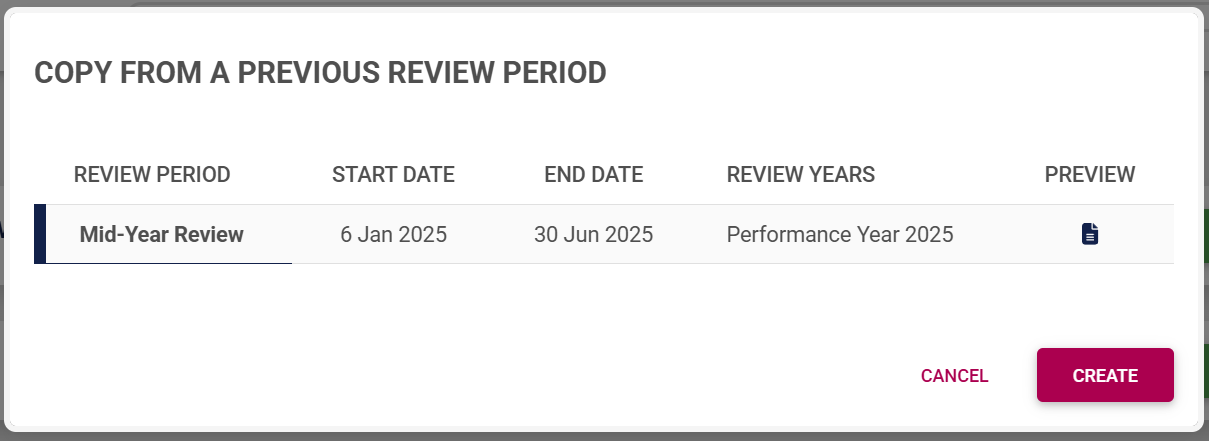
- A list of the performance agreements from previous review periods will be shown.

![PM Recontracting Phase Copy From Previous.png](https://signature.signifyhr.co.za/uploads/images/gallery/2026-02/VG1XRUxKo6zrz1UT-pm-recontracting-phase-copy-from-previous.png)

- - - To ensure you select the correct performance agreement, you can preview it by clicking the icon. The preview will open in a new tab.

![PM Create PM agreement employees – Template – Preview.png](https://signature.signifyhr.co.za/uploads/images/gallery/2026-01/gactQaNiLlF6DQ0v-pm-create-pm-agreement-employees-template-preview.png)

- Select the performance agreement you would like to copy, then click **CREATE**.
![PM Create PM agreement employees – Previous – Create.png](https://signature.signifyhr.co.za/uploads/images/gallery/2026-01/6xRnAuPpmoZzY3Jf-pm-create-pm-agreement-employees-previous-create.png)

- The performance agreement screen will display, with the **Perspective**, **Key Performance Area**, and **Key Performance Indicator** fields filled in from the previous agreement.

![PM Create PM agreement employees – Template – Agreement Screen.png](https://signature.signifyhr.co.za/uploads/images/gallery/2026-01/4Gj5Dz8khGbtc7Hd-pm-create-pm-agreement-employees-template-agreement-screen.png)

</details><details id="bkmrk-copy-an-agreement-fr"><summary>Copy an agreement from another employee (Managers only!)</summary>

- Click **Copy From Another** to create a performance agreement based on another employee's agreement.
![PM Create PM agreement employees – Another.png](https://signature.signifyhr.co.za/uploads/images/gallery/2026-01/eWEihZfNM6RP4prI-pm-create-pm-agreement-employees-another.png)

- Click **START**.

![PM Create PM agreement employees – Another - Start.png](https://signature.signifyhr.co.za/uploads/images/gallery/2026-01/qVUVG72Qg6UUjDTs-pm-create-pm-agreement-employees-another-start.png)

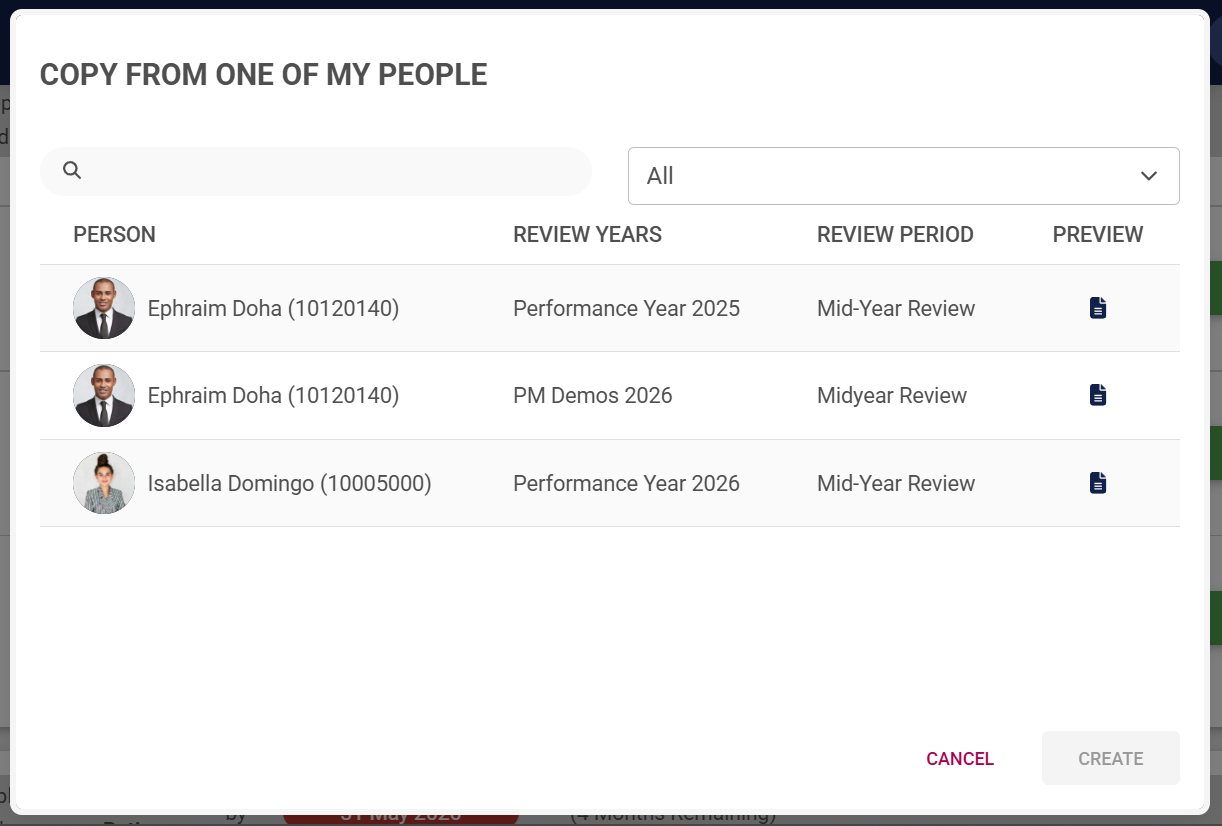
- A list of the other employees in your team's performance agreements will be shown. These agreements are from the current and previous review periods.
![PM Create PM agreement employees – Another - List.png](https://signature.signifyhr.co.za/uploads/images/gallery/2026-01/TRwGoBDBOVZUgWgt-pm-create-pm-agreement-employees-another-list.png)

- - - To ensure you select the correct performance agreement, you can preview it by clicking the icon. The preview will open in a new tab.

![PM Create PM agreement employees – Template – Preview.png](https://signature.signifyhr.co.za/uploads/images/gallery/2026-01/gactQaNiLlF6DQ0v-pm-create-pm-agreement-employees-template-preview.png)

- Select the performance agreement you would like to copy, then click **CREATE**.

![PM Create PM agreement employees – Another - Create.png](https://signature.signifyhr.co.za/uploads/images/gallery/2026-01/iJIGNnZ0kIx6GC42-pm-create-pm-agreement-employees-another-create.png)

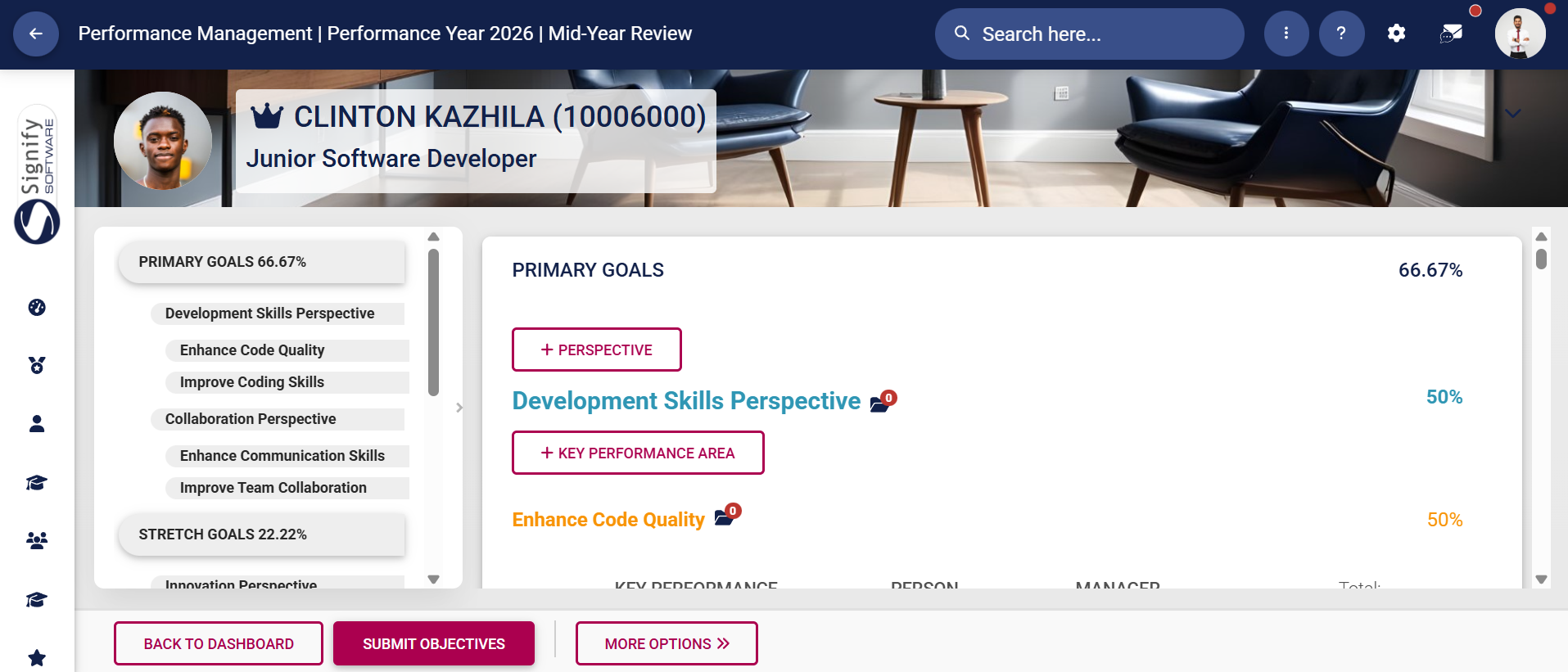
- The performance agreement screen will display, with the **Perspective**, **Key Performance Area**, and **Key Performance Indicator** fields filled in from the other employee's performance agreement.
![PM Create PM agreement employees – Another - Agreement.png](https://signature.signifyhr.co.za/uploads/images/gallery/2026-01/qj3wwQ0CZJUy3ltJ-pm-create-pm-agreement-employees-another-agreement.png)

</details>[![Signify Footer.png](https://signature.signifyhr.co.za/uploads/images/gallery/2025-02/scaled-1680-/ZOt8yZwhbiGx2d6U-signify-footer.png)](https://signature.signifyhr.co.za/uploads/images/gallery/2025-02/ZOt8yZwhbiGx2d6U-signify-footer.png)