# Chapter 3: Product setup and administration

# Performance Management Product Setup and Configuration

#####  

##### Diagram for Performance Management Setup

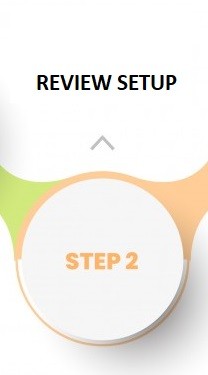
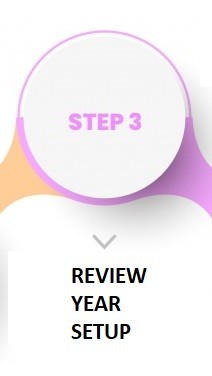
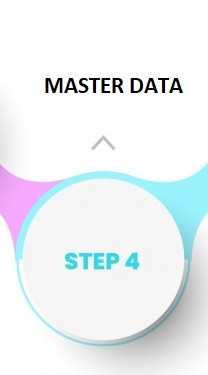
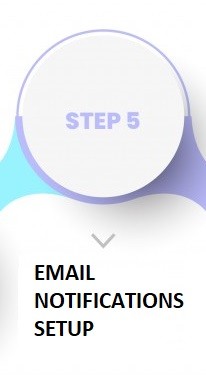
**<span style="color: #993366;">The diagram below shows the steps to configure the Performance Management Product. Click on the step images in the diagram for easy access to the sections in the document.</span>**

**<span style="color: #993366;">Note: Only steps 1 to 4 is mandatory for the Performance Management Product setup.</span>**

<table border="1" id="bkmrk-" style="width: 100%; border-collapse: collapse;"><tbody><tr><td style="width: 16.6667%;">[![Step 1 - People Group.jpg](https://signature.signifyhr.co.za/uploads/images/gallery/2022-10/scaled-1680-/3ygEcSAaTEIsLAny-step-1-people-group.jpg)](https://signature.signifyhr.co.za/link/1394#bkmrk-what-the-performance)</td><td style="width: 16.6667%;">[![Step 2 - Review Setup.jpg](https://signature.signifyhr.co.za/uploads/images/gallery/2022-10/scaled-1680-/HsUmQzbfzBZNsQLa-step-2-review-setup.jpg)](https://signature.signifyhr.co.za/link/1394#bkmrk-step-2%3A-review-setup-0)</td><td style="width: 16.6667%;">[![Step 3 - Review Year.jpg](https://signature.signifyhr.co.za/uploads/images/gallery/2022-10/scaled-1680-/eFB9rV59xsaU4J2s-step-3-review-year.jpg)](https://signature.signifyhr.co.za/link/1394#bkmrk-step-3%3A-review-years)</td><td style="width: 16.6667%;">[![Step 4 - Master Data.jpg](https://signature.signifyhr.co.za/uploads/images/gallery/2022-10/scaled-1680-/nNbk6Dhcqkn6lok7-step-4-master-data.jpg)](https://signature.signifyhr.co.za/link/1394#bkmrk-master-data-0)</td><td style="width: 16.6667%;">[![Step 5 - Email Notification Setup.jpg](https://signature.signifyhr.co.za/uploads/images/gallery/2022-10/scaled-1680-/B3tvQzwIyrvJcbs6-step-5-email-notification-setup.jpg)](https://signature.signifyhr.co.za/link/1394#bkmrk-email-notification-m)</td><td style="width: 16.6667%;">[![Step 6 - Translation.jpg](https://signature.signifyhr.co.za/uploads/images/gallery/2022-10/scaled-1680-/W1pyOMDslK8dPtza-step-6-translation.jpg)](https://signature.signifyhr.co.za/link/1394#bkmrk-system-terminology-a)</td></tr></tbody></table>

[![image-1646899329856.png](https://signature.signifyhr.co.za/uploads/images/gallery/2022-03/scaled-1680-/9Cunlm3wOO4eS9B3-image-1646899329856.png)](https://signature.signifyhr.co.za/uploads/images/gallery/2022-03/9Cunlm3wOO4eS9B3-image-1646899329856.png)

**Summary of the Product Setup:**

- Create a [**People Group**](https://signature.signifyhr.co.za/link/1394#bkmrk-what-the-performance) as the target audience for the product
- Do the Performance Management configuration 
    - - How to access the Product Configuration pages
        - How to create **[Review Setups](https://signature.signifyhr.co.za/link/1394#bkmrk-step-2%3A-review-setup-0)**
        - How to create a **[Review Year](https://signature.signifyhr.co.za/link/1394#bkmrk-step-3%3A-review-years)** and link the Review Setup(s)
- Populate Performance Management [**master data**](https://signature.signifyhr.co.za/link/1394#bkmrk-master-data-0)
- Customise Performance Management [**email notifications**](https://signature.signifyhr.co.za/link/1394#bkmrk-email-notification-m)
- Customise **[system terminology and messages](https://signature.signifyhr.co.za/link/1394#bkmrk-system-terminology-a)** using the Translation Module

<div id="bkmrk--0">
</div>##### [![image-1664896078728.png](https://signature.signifyhr.co.za/uploads/images/gallery/2022-10/scaled-1680-/FUVAJ6QPX5ZSj4yl-image-1664896078728.png)](https://signature.signifyhr.co.za/uploads/images/gallery/2022-10/FUVAJ6QPX5ZSj4yl-image-1664896078728.png)

###  

### **<span style="background-color: #ffffff; color: #993366;">PEOPLE GROUPS</span>**

##### [![image-1664896078728.png](https://signature.signifyhr.co.za/uploads/images/gallery/2022-10/scaled-1680-/FUVAJ6QPX5ZSj4yl-image-1664896078728.png)](https://signature.signifyhr.co.za/uploads/images/gallery/2022-10/FUVAJ6QPX5ZSj4yl-image-1664896078728.png)

The management of performance does not always apply to all employees in a company. Use the following steps to define your target audience. In the following section you will be required to link the target audience to a performance year.

- From the System Settings menu, select **People Groups**.

[![image-1646997387353.png](https://signature.signifyhr.co.za/uploads/images/gallery/2022-03/scaled-1680-/JEQRo1eR0ES1EarV-image-1646997387353.png)](https://signature.signifyhr.co.za/uploads/images/gallery/2022-03/JEQRo1eR0ES1EarV-image-1646997387353.png)

<div id="bkmrk-click-%2Bnew-people-gr">- Click **+NEW PEOPLE GROUP** to add a new People Group. Name it appropriately.

</div>[![image-1646997010017.png](https://signature.signifyhr.co.za/uploads/images/gallery/2022-03/scaled-1680-/6JrAkFgkmUxkfRMU-image-1646997010017.png)](https://signature.signifyhr.co.za/uploads/images/gallery/2022-03/6JrAkFgkmUxkfRMU-image-1646997010017.png)

- Activate the group when ready - probably only after adding all relevant people.

[![image-1646997033042.png](https://signature.signifyhr.co.za/uploads/images/gallery/2022-03/scaled-1680-/jvAsoGn58slspeqs-image-1646997033042.png)](https://signature.signifyhr.co.za/uploads/images/gallery/2022-03/jvAsoGn58slspeqs-image-1646997033042.png)

- Click **(LINK) PEOPLE** to link people from the HR database to become the product's target audience.

[![image-1646997102327.png](https://signature.signifyhr.co.za/uploads/images/gallery/2022-03/scaled-1680-/0CDEfHMJwQUD1vHl-image-1646997102327.png)](https://signature.signifyhr.co.za/uploads/images/gallery/2022-03/0CDEfHMJwQUD1vHl-image-1646997102327.png)

<span style="background-color: #993366; color: #ffffff;">[ **BACK TO TOP** ](https://signature.signifyhr.co.za/link/1394#bkmrk-page-title)</span>

[![image-1664896078728.png](https://signature.signifyhr.co.za/uploads/images/gallery/2022-10/scaled-1680-/FUVAJ6QPX5ZSj4yl-image-1664896078728.png)](https://signature.signifyhr.co.za/uploads/images/gallery/2022-10/FUVAJ6QPX5ZSj4yl-image-1664896078728.png)

###  

### **<span style="background-color: #ffffff; color: #993366;">REVIEW SETUP</span>**

##### [![image-1664896078728.png](https://signature.signifyhr.co.za/uploads/images/gallery/2022-10/scaled-1680-/FUVAJ6QPX5ZSj4yl-image-1664896078728.png)](https://signature.signifyhr.co.za/uploads/images/gallery/2022-10/FUVAJ6QPX5ZSj4yl-image-1664896078728.png)

Setting up the Performance Management product consists of the following steps.

1. Doing the product's setup: 
    - The Review Setup - **HOW** a performance contract will function in terms of periods, sections, etc.
    - The Review Years Setup - How a review will function in a **SPECIFIC** performance year.

<div id="bkmrk--10"></div>#### Activate the Product

- Open **Product Setup** from the System Settings menu.

<div id="bkmrk--11"></div>[![image-1646997414915.png](https://signature.signifyhr.co.za/uploads/images/gallery/2022-03/scaled-1680-/LIcaad1yjwLDN0RE-image-1646997414915.png)](https://signature.signifyhr.co.za/uploads/images/gallery/2022-03/LIcaad1yjwLDN0RE-image-1646997414915.png)

- Click Performance Management's **Product Setup** option.

<div id="bkmrk--12"></div><div id="bkmrk--14">[![image-1646986946291.png](https://signature.signifyhr.co.za/uploads/images/gallery/2022-03/scaled-1680-/dgfeRPY9f9q4dvJY-image-1646986946291.png)](https://signature.signifyhr.co.za/uploads/images/gallery/2022-03/dgfeRPY9f9q4dvJY-image-1646986946291.png)</div><div id="bkmrk--15"></div>##### **Create a Review Setup**

<div id="bkmrk-in-this-section%2C-we-">In this section, we describe <span style="text-decoration: underline;">how</span> a typical performance contract will function.</div><div id="bkmrk--16"></div>[![image-1646987901092.png](https://signature.signifyhr.co.za/uploads/images/gallery/2022-03/scaled-1680-/qADYBNWB2rZg2Ior-image-1646987901092.png)](https://signature.signifyhr.co.za/uploads/images/gallery/2022-03/qADYBNWB2rZg2Ior-image-1646987901092.png)

- Click **+REVIEW SETUP.**
- Populate the Details screen.

[![image-1646988033104.png](https://signature.signifyhr.co.za/uploads/images/gallery/2022-03/scaled-1680-/UD1bRx9He2UkVBvR-image-1646988033104.png)](https://signature.signifyhr.co.za/uploads/images/gallery/2022-03/UD1bRx9He2UkVBvR-image-1646988033104.png)

See below for the field definitions.

<table border="1" id="bkmrk-setting-options-purp" style="width: 100%; border-collapse: collapse; background-color: 64;"><tbody><tr><td style="width: 32.2222%;">##### **Setting**

</td><td style="width: 13.3335%;">##### **Options**

</td><td style="width: 54.4444%;">##### **Purpose** 

</td></tr><tr><td style="width: 32.2222%;">**Name**</td><td style="width: 13.3335%;"> </td><td style="width: 54.4444%;">The review setup's name is be used for all subsequent settings. Choose a descriptive name e.g., Salaried Employees in Grades 10 and Up.</td></tr><tr><td style="width: 32.2222%;">**Dual Approval**

</td><td style="width: 13.3335%;">**OFF**

</td><td style="width: 54.4444%;">The manager can create and approve the contract, and do the rating of objectives without the participation of the employee.

</td></tr><tr><td style="width: 32.2222%;"></td><td style="width: 13.3335%;"><span style="font-family: -apple-system, BlinkMacSystemFont, 'Segoe UI', Oxygen, Ubuntu, Roboto, Cantarell, 'Fira Sans', 'Droid Sans', 'Helvetica Neue', sans-serif; font-size: 14px; font-style: normal; font-variant-ligatures: normal; font-variant-caps: normal; font-weight: 400;">**ON**</span>

</td><td style="width: 54.4444%;">The manager can create an employee's contract, but submission and rating of the objectives require the participation of the employee.

</td></tr><tr><td style="width: 32.2222%;">**<span style="font-family: -apple-system, BlinkMacSystemFont, 'Segoe UI', Oxygen, Ubuntu, Roboto, Cantarell, 'Fira Sans', 'Droid Sans', 'Helvetica Neue', sans-serif; font-size: 14px; font-style: normal; font-variant-ligatures: normal; font-variant-caps: normal;">Allow a manager to override who will approve and rate</span>**

</td><td style="width: 13.3335%;">**OFF**</td><td style="width: 54.4444%;">**<span style="font-family: -apple-system, BlinkMacSystemFont, 'Segoe UI', Oxygen, Ubuntu, Roboto, Cantarell, 'Fira Sans', 'Droid Sans', 'Helvetica Neue', sans-serif; font-size: 14px; font-style: normal; font-variant-ligatures: normal; font-variant-caps: normal;">and Dual Approval = ON</span>**

Managers and employees must participate in performance contracting.

</td></tr><tr><td style="width: 32.2222%;"><span style="font-family: -apple-system, BlinkMacSystemFont, 'Segoe UI', Oxygen, Ubuntu, Roboto, Cantarell, 'Fira Sans', 'Droid Sans', 'Helvetica Neue', sans-serif; font-size: 14px; font-style: normal; font-variant-ligatures: normal; font-variant-caps: normal; font-weight: 400;"> </span>

</td><td style="width: 13.3335%;"><span style="font-family: -apple-system, BlinkMacSystemFont, 'Segoe UI', Oxygen, Ubuntu, Roboto, Cantarell, 'Fira Sans', 'Droid Sans', 'Helvetica Neue', sans-serif; font-size: 14px; font-style: normal; font-variant-ligatures: normal; font-variant-caps: normal; font-weight: 400;">**ON  
</span>

</td><td style="width: 54.4444%;">**<span style="font-family: -apple-system, BlinkMacSystemFont, 'Segoe UI', Oxygen, Ubuntu, Roboto, Cantarell, 'Fira Sans', 'Droid Sans', 'Helvetica Neue', sans-serif; font-size: 14px; font-style: normal; font-variant-ligatures: normal; font-variant-caps: normal;">and Dual Approval = ON</span>**

<span style="font-family: -apple-system, BlinkMacSystemFont, 'Segoe UI', Oxygen, Ubuntu, Roboto, Cantarell, 'Fira Sans', 'Droid Sans', 'Helvetica Neue', sans-serif; font-size: 14px; font-style: normal; font-variant-ligatures: normal; font-variant-caps: normal; font-weight: 400;">When a manager creates a new performance contract for an employee, the manager will have the opportunity to cancel the employee's participation, i.e., the manager can create, approve, and rate objectives without the participation of the employee.</span>

</td></tr><tr><td style="width: 32.2222%;">**<span style="font-family: -apple-system, BlinkMacSystemFont, 'Segoe UI', Oxygen, Ubuntu, Roboto, Cantarell, 'Fira Sans', 'Droid Sans', 'Helvetica Neue', sans-serif; font-size: 14px; font-style: normal; font-variant-ligatures: normal; font-variant-caps: normal;">Allow managers and employees to edit review survey scores</span><span style="font-family: -apple-system, BlinkMacSystemFont, 'Segoe UI', Oxygen, Ubuntu, Roboto, Cantarell, 'Fira Sans', 'Droid Sans', 'Helvetica Neue', sans-serif; font-size: 14px; font-style: normal; font-variant-ligatures: normal; font-variant-caps: normal;">  
</span>**

</td><td style="width: 13.3335%;"><span style="font-family: -apple-system, BlinkMacSystemFont, 'Segoe UI', Oxygen, Ubuntu, Roboto, Cantarell, 'Fira Sans', 'Droid Sans', 'Helvetica Neue', sans-serif; font-size: 14px; font-style: normal; font-variant-ligatures: normal; font-variant-caps: normal; font-weight: 400;">**OFF**</span>

</td><td style="width: 54.4444%;">Managers and employees can type in the employee's survey score, if a review survey is part of the review setup.

</td></tr><tr><td style="width: 32.2222%;"> </td><td style="width: 13.3335%;"><span style="font-family: -apple-system, BlinkMacSystemFont, 'Segoe UI', Oxygen, Ubuntu, Roboto, Cantarell, 'Fira Sans', 'Droid Sans', 'Helvetica Neue', sans-serif; font-size: 14px; font-style: normal; font-variant-ligatures: normal; font-variant-caps: normal; font-weight: 400;">**ON**</span>

</td><td style="width: 54.4444%;">Only the manager can type in the employee's survey score, if a review survey is part of the review setup.

</td></tr><tr><td style="width: 32.2222%;">**Description**

</td><td style="width: 13.3335%;"><span style="font-family: -apple-system, BlinkMacSystemFont, 'Segoe UI', Oxygen, Ubuntu, Roboto, Cantarell, 'Fira Sans', 'Droid Sans', 'Helvetica Neue', sans-serif; font-size: 14px; font-style: normal; font-variant-ligatures: normal; font-variant-caps: normal; font-weight: 400;"> </span>

</td><td style="width: 54.4444%;">Further clarification of the name of the review setup.

</td></tr><tr><td style="width: 32.2222%;">**Allow Perspectives**

</td><td style="width: 13.3335%;">**<span style="font-family: -apple-system, BlinkMacSystemFont, 'Segoe UI', Oxygen, Ubuntu, Roboto, Cantarell, 'Fira Sans', 'Droid Sans', 'Helvetica Neue', sans-serif; font-size: 14px; font-style: normal; font-variant-ligatures: normal; font-variant-caps: normal;">OFF</span>**

</td><td style="width: 54.4444%;">The KPA and Stretch Targets sections will allow the direct adding of KPAs and KPIs, without the need for a perspective grouping level.

</td></tr><tr><td style="width: 32.2222%;"></td><td style="width: 13.3335%;">**<span style="font-family: -apple-system, BlinkMacSystemFont, 'Segoe UI', Oxygen, Ubuntu, Roboto, Cantarell, 'Fira Sans', 'Droid Sans', 'Helvetica Neue', sans-serif; font-size: 14px; font-style: normal; font-variant-ligatures: normal; font-variant-caps: normal;">ON</span>**

</td><td style="width: 54.4444%;">The KPA and Stretch Targets sections will require a perspective level to be added before allowing KPAs and KPIs to be loaded.

</td></tr><tr><td style="width: 32.2222%;">**The next review period can only start when the previous one has been completed**

</td><td style="width: 13.3335%;">**<span style="font-family: -apple-system, BlinkMacSystemFont, 'Segoe UI', Oxygen, Ubuntu, Roboto, Cantarell, 'Fira Sans', 'Droid Sans', 'Helvetica Neue', sans-serif; font-size: 14px; font-style: normal; font-variant-ligatures: normal; font-variant-caps: normal;"> OFF</span>**

</td><td style="width: 54.4444%;">An employee can work on all review periods at once. Not recommended.

</td></tr><tr><td style="width: 32.2222%;"> </td><td style="width: 13.3335%;">**<span style="font-family: -apple-system, BlinkMacSystemFont, 'Segoe UI', Oxygen, Ubuntu, Roboto, Cantarell, 'Fira Sans', 'Droid Sans', 'Helvetica Neue', sans-serif; font-size: 14px; font-style: normal; font-variant-ligatures: normal; font-variant-caps: normal;">ON</span>**

</td><td style="width: 54.4444%;">An implicit control mechanism with which to ensure that one review period is completed (submitted, rated, and approved) before the next can be opened.

This control is in addition to the Review Years - Review Periods in which individual dates for each review period phase (e.g., Setting of Objectives, Rating, etc.) are stipulated.

</td></tr><tr><td style="width: 32.2222%;">**Self-ratings and manager's personal ratings should be submitted before the final rating can be completed**</td><td style="width: 13.3335%;"><span style="font-family: -apple-system, BlinkMacSystemFont, 'Segoe UI', Oxygen, Ubuntu, Roboto, Cantarell, 'Fira Sans', 'Droid Sans', 'Helvetica Neue', sans-serif; font-size: 14px; font-style: normal; font-variant-ligatures: normal; font-variant-caps: normal; font-weight: 400;"> **OFF**</span>

</td><td style="width: 54.4444%;">The manager only needs to load the review period's final objective ratings before approving the review period.

</td></tr><tr><td style="width: 32.2222%;"> </td><td style="width: 13.3335%;">**<span style="font-family: -apple-system, BlinkMacSystemFont, 'Segoe UI', Oxygen, Ubuntu, Roboto, Cantarell, 'Fira Sans', 'Droid Sans', 'Helvetica Neue', sans-serif; font-size: 14px; font-style: normal; font-variant-ligatures: normal; font-variant-caps: normal;">ON</span>**

</td><td style="width: 54.4444%;">The employee must complete their objective self-rating and the manager must complete their own rating of the employee's objectives before the manager can load and approve the final objective ratings.

</td></tr></tbody></table>

<div id="bkmrk--17"></div>- Navigate to **Review Items.**
- Click **+REVIEW PERIOD** to load review items as needed

[![image-1646992979282.png](https://signature.signifyhr.co.za/uploads/images/gallery/2022-03/scaled-1680-/2vWAftXnlSbb8H7l-image-1646992979282.png)](https://signature.signifyhr.co.za/uploads/images/gallery/2022-03/2vWAftXnlSbb8H7l-image-1646992979282.png)

<p class="callout info">Each review period added implies a period for which objectives can be loaded across the sections Key Performance Areas (mandatory), Stretch Targets (optional), Values &amp; Behaviours (optional), Leadership Behaviours (optional) and Key Competency (optional).</p>

<p class="callout info">Each review survey added implies a separate score (for whatever was measured) in addition to the performance agreement's review periods.</p>

<p class="callout warning">Ensure you create all the review periods and review survey (if applicable) BEFORE linking to the Review Years. All periods added after linking will not show on the performance dashboards and may cause those contracts to be re-created.</p>

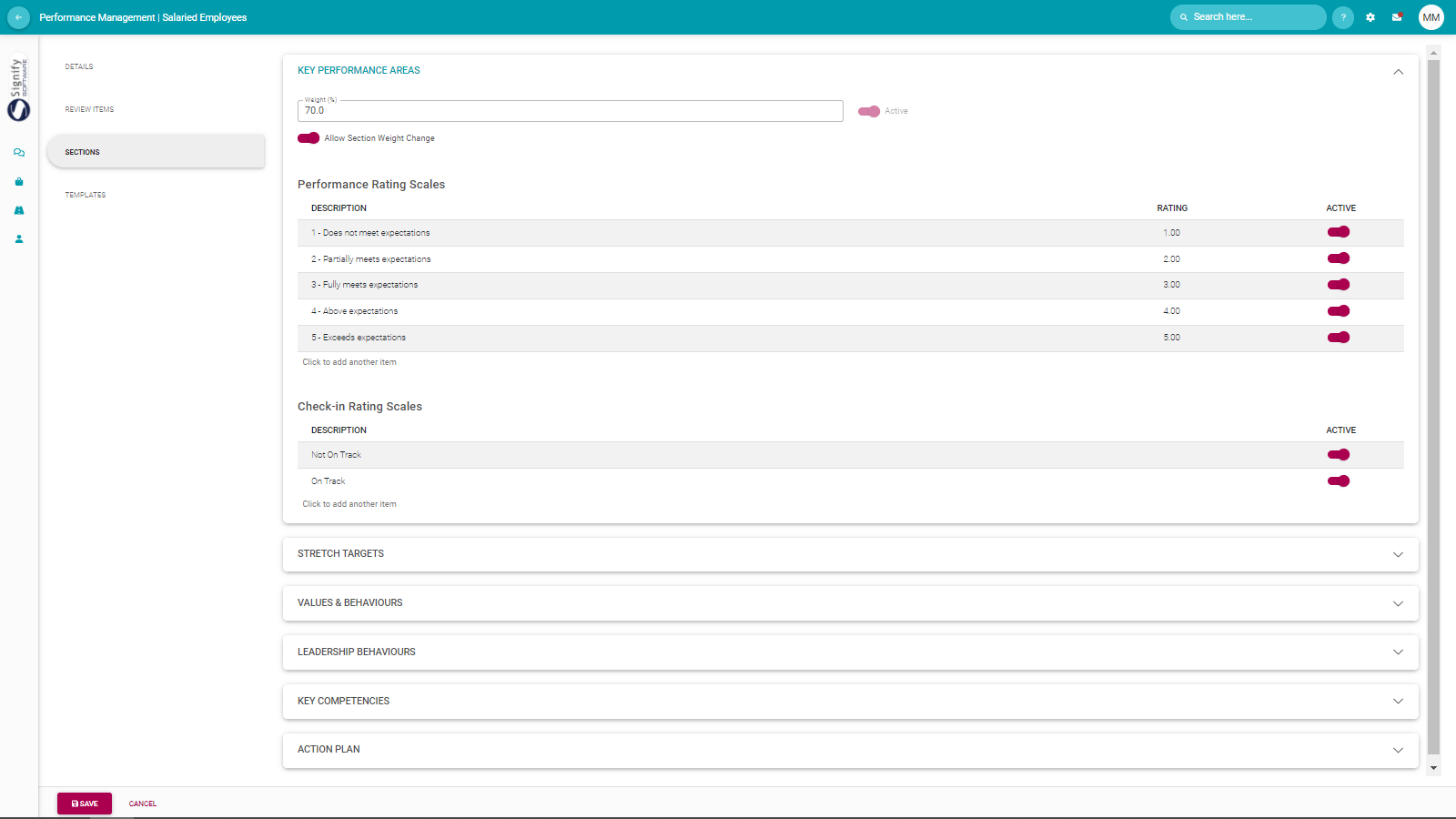
<div id="bkmrk--20"></div><div id="bkmrk-navigate-to-sections">- Navigate to **Sections.**
- Configure the sections using the guidelines below.
- Click **SAVE** when done.

</div><div id="bkmrk--21"></div>[![image-1646993249967.png](https://signature.signifyhr.co.za/uploads/images/gallery/2022-03/scaled-1680-/D5uES7HeXOMbMUTr-image-1646993249967.png)](https://signature.signifyhr.co.za/uploads/images/gallery/2022-03/D5uES7HeXOMbMUTr-image-1646993249967.png)

Most sections require one or more of the following decisions:

<p class="callout success">Active or not</p>

<p class="callout success">Relative weight percentage  
[![image-1646993397715.png](https://signature.signifyhr.co.za/uploads/images/gallery/2022-03/scaled-1680-/pktNh9jiBbKmA23r-image-1646993397715.png)](https://signature.signifyhr.co.za/uploads/images/gallery/2022-03/pktNh9jiBbKmA23r-image-1646993397715.png)</p>

<p class="callout success">Can an employee/manager change the section weight while contracting?  
[![image-1646993417420.png](https://signature.signifyhr.co.za/uploads/images/gallery/2022-03/scaled-1680-/8Np4UjQ8qmfUVJyR-image-1646993417420.png)](https://signature.signifyhr.co.za/uploads/images/gallery/2022-03/8Np4UjQ8qmfUVJyR-image-1646993417420.png)</p>

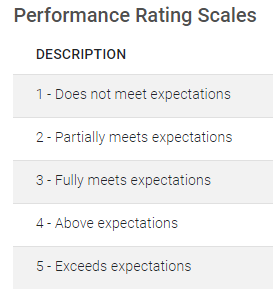
<p class="callout success">Description of the rating scale to be used when scoring the objectives in this section  
[![image-1646993379036.png](https://signature.signifyhr.co.za/uploads/images/gallery/2022-03/scaled-1680-/br4l2vhqz7QCQMk7-image-1646993379036.png)](https://signature.signifyhr.co.za/uploads/images/gallery/2022-03/br4l2vhqz7QCQMk7-image-1646993379036.png)</p>
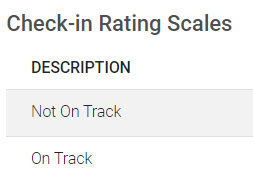
<p class="callout success">Rating scale for the section if check-ins are allowed on its objectives.  
[![image-1646993467982.png](https://signature.signifyhr.co.za/uploads/images/gallery/2022-03/scaled-1680-/kGEIZaVyVi7N7Yxs-image-1646993467982.png)](https://signature.signifyhr.co.za/uploads/images/gallery/2022-03/kGEIZaVyVi7N7Yxs-image-1646993467982.png)</p>
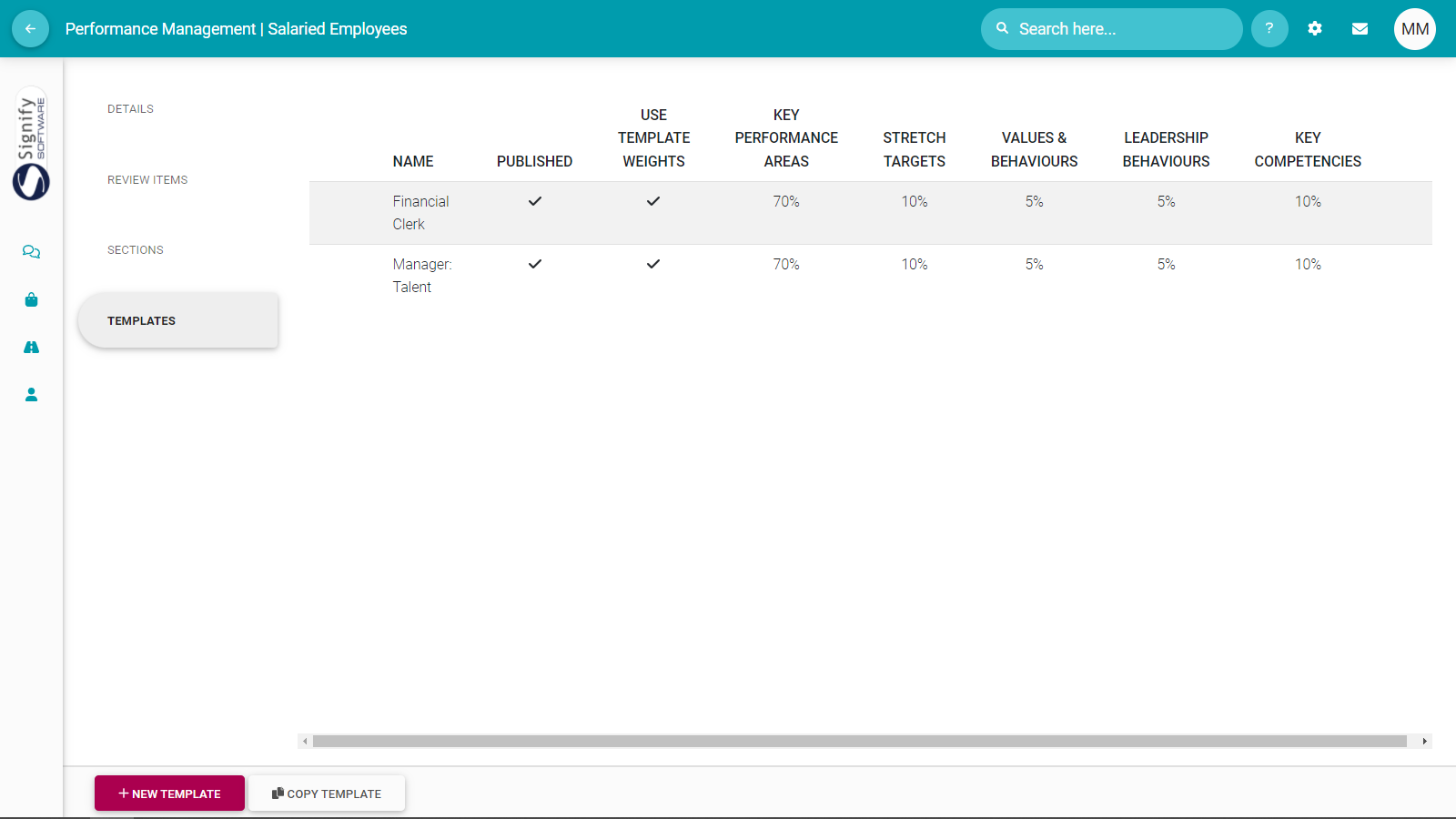
<div id="bkmrk-navigate-to-template">- Navigate to **Templates.**
- Click **+NEW TEMPLATE** to load performance agreement templates from which employees and managers can choose when creating their contracts.

</div><div id="bkmrk--23"></div>[![image-1646993676273.png](https://signature.signifyhr.co.za/uploads/images/gallery/2022-03/scaled-1680-/YQyrszugs2rEiCpe-image-1646993676273.png)](https://signature.signifyhr.co.za/uploads/images/gallery/2022-03/YQyrszugs2rEiCpe-image-1646993676273.png)

For each template created, ensure the following is in place:

<p class="callout success">Template created with a descriptive name e.g., Engineering - Financial Clerk - Salaried - Gr10. The more templates you create and the smaller their differences the more descriptive their names should be.</p>

<p class="callout success">The template is published (made visible to employees) when ready.</p>

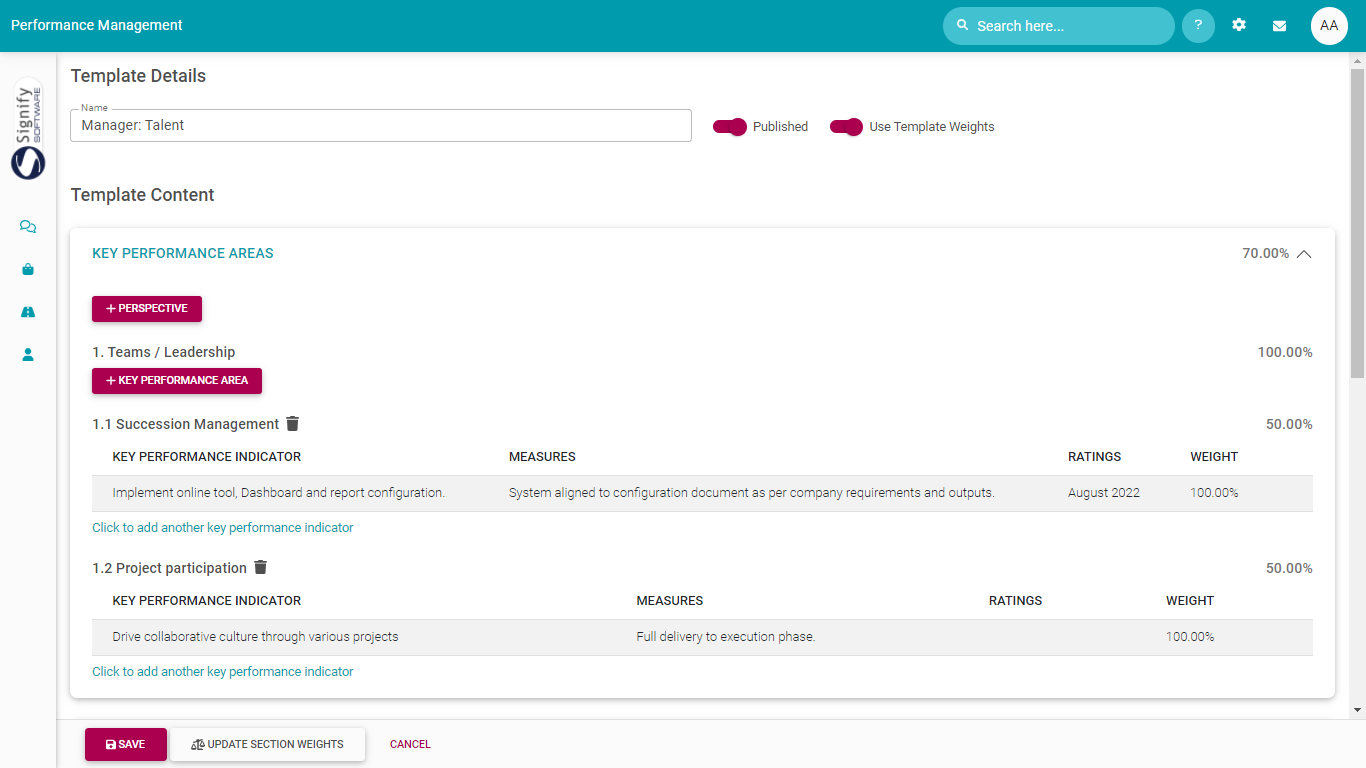
<p class="callout success">Stipulate if the company's default section weights are used, or if the weights assigned to sections in the template get precedence.  
[![image-1646994033070.png](https://signature.signifyhr.co.za/uploads/images/gallery/2022-03/scaled-1680-/uIPYusHHTVPmltsh-image-1646994033070.png)](https://signature.signifyhr.co.za/uploads/images/gallery/2022-03/uIPYusHHTVPmltsh-image-1646994033070.png)</p>

<p class="callout success">Sections contain appropriately described objectives.</p>

[![image-1645604704235.png](https://signature.signifyhr.co.za/uploads/images/gallery/2022-02/scaled-1680-/2Hu9LtnFMR7PpCEl-image-1645604704235.png)](https://signature.signifyhr.co.za/uploads/images/gallery/2022-02/2Hu9LtnFMR7PpCEl-image-1645604704235.png)

<span style="background-color: #993366; color: #ffffff;">[ **BACK TO TOP** ](https://signature.signifyhr.co.za/link/1394#bkmrk-page-title)</span>

[![image-1664896078728.png](https://signature.signifyhr.co.za/uploads/images/gallery/2022-10/scaled-1680-/FUVAJ6QPX5ZSj4yl-image-1664896078728.png)](https://signature.signifyhr.co.za/uploads/images/gallery/2022-10/FUVAJ6QPX5ZSj4yl-image-1664896078728.png)

###  

### **<span style="background-color: #ffffff; color: #993366;">REVIEW YEARS</span>**

##### [![image-1664896078728.png](https://signature.signifyhr.co.za/uploads/images/gallery/2022-10/scaled-1680-/FUVAJ6QPX5ZSj4yl-image-1664896078728.png)](https://signature.signifyhr.co.za/uploads/images/gallery/2022-10/FUVAJ6QPX5ZSj4yl-image-1664896078728.png)

In this section, we will see how a general performance review (created above) will function in a <span style="text-decoration: underline;">specific</span> performance year.

- Click the **Review Years** tab.
- Click **+REVIEW YEAR** to add a new performance/review year.

[![image-1646994271840.png](https://signature.signifyhr.co.za/uploads/images/gallery/2022-03/scaled-1680-/isc3QIEqabW4cyjq-image-1646994271840.png)](https://signature.signifyhr.co.za/uploads/images/gallery/2022-03/isc3QIEqabW4cyjq-image-1646994271840.png)
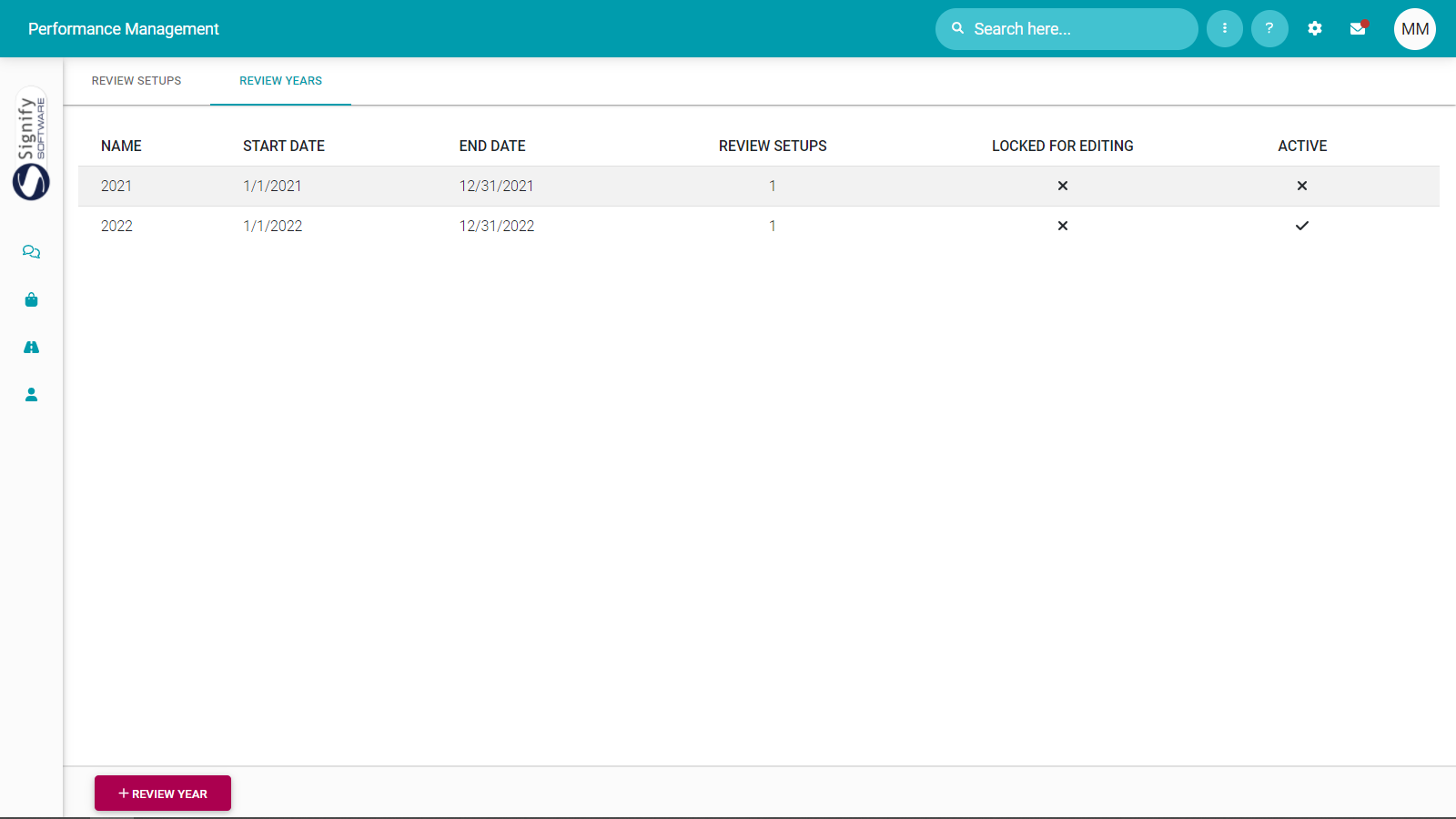
- Provide the basic details for the new performance year under the Details tab.

[![image-1646994550886.png](https://signature.signifyhr.co.za/uploads/images/gallery/2022-03/scaled-1680-/r8EXhzhNtLR9F0Ms-image-1646994550886.png)](https://signature.signifyhr.co.za/uploads/images/gallery/2022-03/r8EXhzhNtLR9F0Ms-image-1646994550886.png)
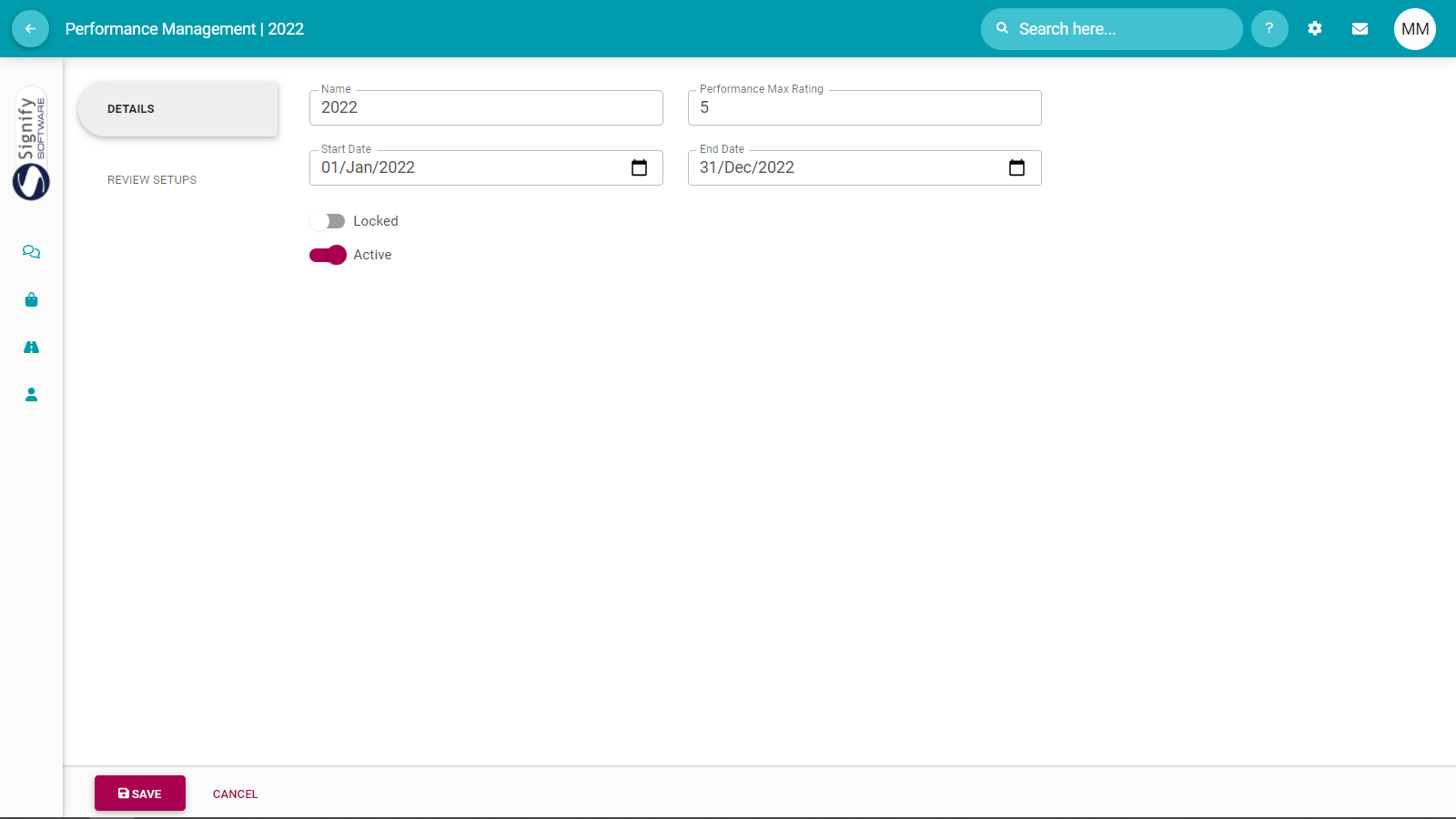
See below for the field descriptions.

<table border="1" id="bkmrk-setting-options-purp-0" style="width: 100%; border-collapse: collapse; height: 606px;"><tbody><tr style="height: 64px;"><td style="width: 32.2222%; height: 64px;">##### **Setting**

</td><td style="width: 13.3335%; height: 64px;">##### **Options**

</td><td style="width: 54.4444%; height: 64px;">##### **Purpose**

</td></tr><tr style="height: 131px;"><td style="width: 32.2222%; height: 131px;">**Name**</td><td style="width: 13.3335%; height: 131px;"> </td><td style="width: 54.4444%; height: 131px;">A descriptive name for the performance year or performance cycle.

Examples are:

- 2022
- 2022 - Academic Staff
- 2022 - Support Staff

</td></tr><tr style="height: 66px;"><td style="width: 32.2222%; height: 66px;">**Max Performance Rating**

</td><td style="width: 13.3335%; height: 66px;"> </td><td style="width: 54.4444%; height: 66px;">Although an extended rating scale can be created for each section, this setting determines the maximum value a rating scale will have in this performance year.</td></tr><tr style="height: 57px;"><td style="width: 32.2222%; height: 57px;">**Start Date**

**End Date**

</td><td style="width: 13.3335%; height: 57px;"> </td><td style="width: 54.4444%; height: 57px;">The range of the performance year.</td></tr><tr style="height: 124px;"><td style="width: 32.2222%; height: 124px;">**Locked**

</td><td style="width: 13.3335%; height: 124px;">**ON**</td><td style="width: 54.4444%; height: 124px;">This performance year is temporarily (e.g., to do system maintenance) or permanently (e.g., once the performance year has been closed out) locked.

Users are not able to create new contracts or work on existing contracts.

</td></tr><tr style="height: 35px;"><td style="width: 32.2222%; height: 35px;"></td><td style="width: 13.3335%; height: 35px;">**OFF**</td><td style="width: 54.4444%; height: 35px;">This performance year is available for existing and new contracts.</td></tr><tr style="height: 49px;"><td style="width: 32.2222%; height: 49px;">**Active**

</td><td style="width: 13.3335%; height: 49px;">**ON**</td><td style="width: 54.4444%; height: 49px;">This performance year is available when employees created new contracts.</td></tr><tr style="height: 80px;"><td style="width: 32.2222%; height: 80px;"></td><td style="width: 13.3335%; height: 80px;">**OFF**</td><td style="width: 54.4444%; height: 80px;">This performance year is not active.

Users are not able to create new contracts or work on existing contracts.

</td></tr></tbody></table>

- Navigate to **Review Setups**.
- Click **+REVIEW SETUP** to link a Review Setup (from the ones created earlier) to this Performance Year.

[![image-1646995081514.png](https://signature.signifyhr.co.za/uploads/images/gallery/2022-03/scaled-1680-/jqyDbQGSPOWyTb2a-image-1646995081514.png)](https://signature.signifyhr.co.za/uploads/images/gallery/2022-03/jqyDbQGSPOWyTb2a-image-1646995081514.png)

**Define the Review Periods and Phases for the Performance Year**

- With the review setup (e.g., containing the agreement sections) now linked to a performance year, give the details of each review period's phases in the context of the current performance year.

[![image-1646995204171.png](https://signature.signifyhr.co.za/uploads/images/gallery/2022-03/scaled-1680-/a6ZVkiwR0K73om8i-image-1646995204171.png)](https://signature.signifyhr.co.za/uploads/images/gallery/2022-03/a6ZVkiwR0K73om8i-image-1646995204171.png)

For each review period and its phases, pay attention to the following:

<p class="callout success">The review period's date range e.g., if it is an annual, bi-annual, or quarterly contract.</p>

<p class="callout success">The dates of each phase in a review period. These dates will determine when a phase becomes available to employees.</p>

<p class="callout success">For each review period, if its Check-in phase is active or not.</p>

<p class="callout success">Don't forget about the Value Survey dates.</p>

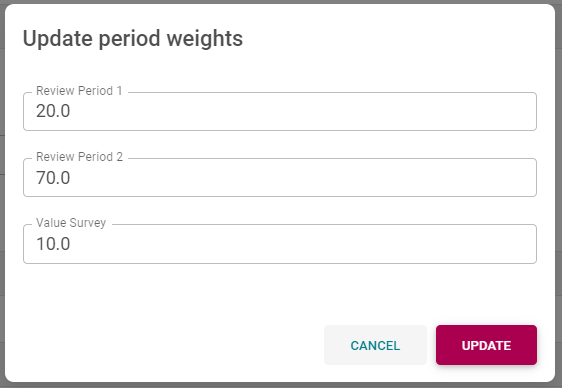
<p class="callout success">Click **UPDATE PERIOD WEIGHTS** at the bottom of the screen to stipulate the relative importance of the review periods and value survey.  
[![image-1646996127366.png](https://signature.signifyhr.co.za/uploads/images/gallery/2022-03/scaled-1680-/MJwM7ra2qEOWkpty-image-1646996127366.png)](https://signature.signifyhr.co.za/uploads/images/gallery/2022-03/MJwM7ra2qEOWkpty-image-1646996127366.png)</p>

[![image-1646996113439.png](https://signature.signifyhr.co.za/uploads/images/gallery/2022-03/scaled-1680-/UHfFY9xXaO62IPZk-image-1646996113439.png)](https://signature.signifyhr.co.za/uploads/images/gallery/2022-03/UHfFY9xXaO62IPZk-image-1646996113439.png)

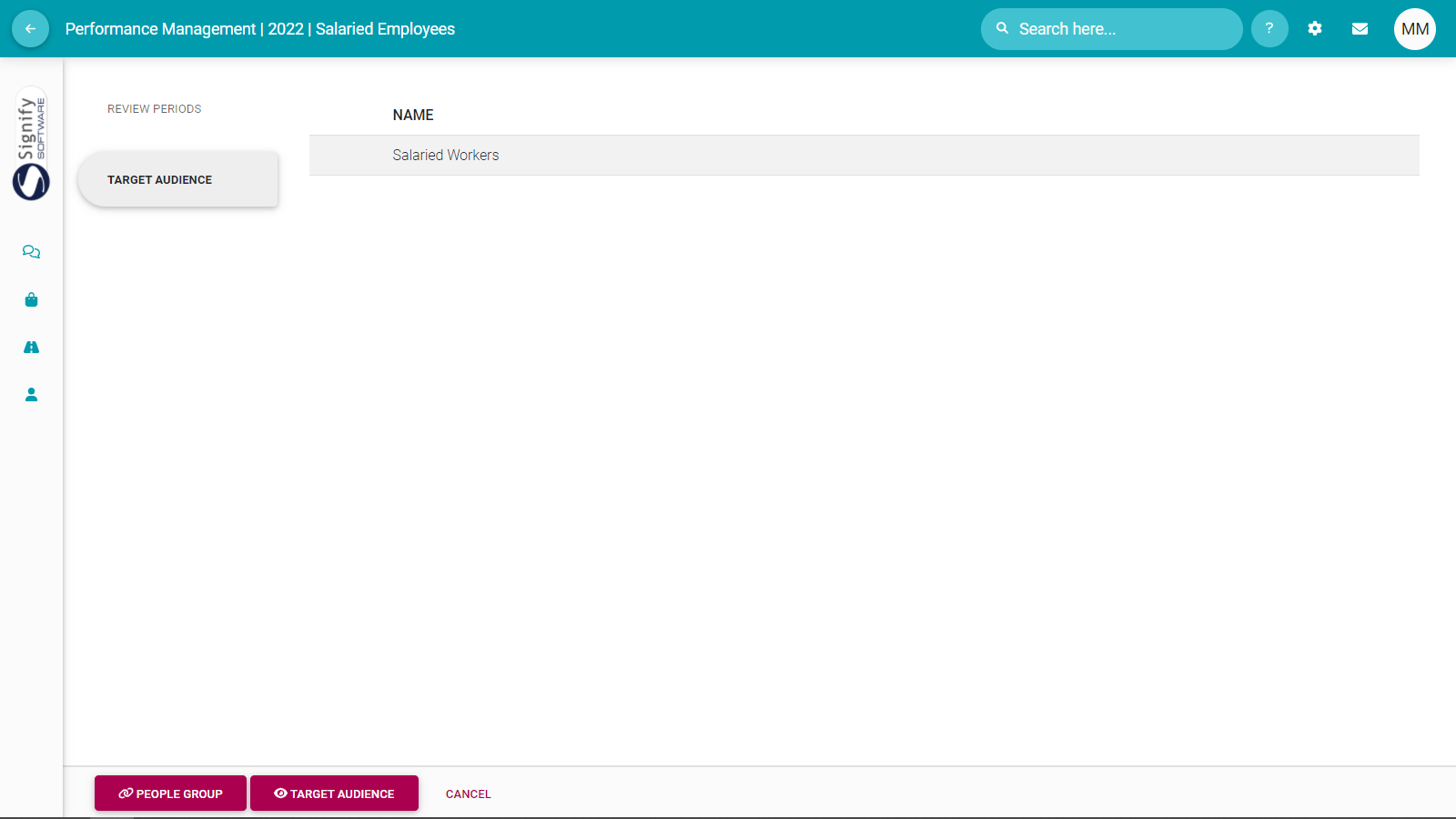
- Click **(LINK) PEOPLE GROUP** to link a target audience to this performance year from the predefined People Groups.
- View who is part of the Target Audience (i.e., the selected People Group) by clicking **(VIEW) TARGET AUDIENCE.**

[![image-1646996343424.png](https://signature.signifyhr.co.za/uploads/images/gallery/2022-03/scaled-1680-/xL6iAIleUy5IHohl-image-1646996343424.png)](https://signature.signifyhr.co.za/uploads/images/gallery/2022-03/xL6iAIleUy5IHohl-image-1646996343424.png)
<span style="background-color: #993366; color: #ffffff;">[ **BACK TO TOP** ](https://signature.signifyhr.co.za/link/1394#bkmrk-page-title)</span>

[![image-1664896078728.png](https://signature.signifyhr.co.za/uploads/images/gallery/2022-10/scaled-1680-/FUVAJ6QPX5ZSj4yl-image-1664896078728.png)](https://signature.signifyhr.co.za/uploads/images/gallery/2022-10/FUVAJ6QPX5ZSj4yl-image-1664896078728.png)

###  

### **<span style="color: #993366;">MASTER DATA</span>**

##### [![image-1664896078728.png](https://signature.signifyhr.co.za/uploads/images/gallery/2022-10/scaled-1680-/FUVAJ6QPX5ZSj4yl-image-1664896078728.png)](https://signature.signifyhr.co.za/uploads/images/gallery/2022-10/FUVAJ6QPX5ZSj4yl-image-1664896078728.png)

Master data comprises all company-specific information contained in dropdowns, lookups, and customer-specific messages.

- Open the system's Master Data.

[![image-1646997442451.png](https://signature.signifyhr.co.za/uploads/images/gallery/2022-03/scaled-1680-/HLr2vr2dAw7UvroI-image-1646997442451.png)](https://signature.signifyhr.co.za/uploads/images/gallery/2022-03/HLr2vr2dAw7UvroI-image-1646997442451.png)
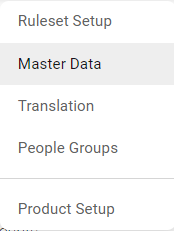
- Locate and click **SectionItems** under the Performance Management Primary Product column.

[![image-1646997573856.png](https://signature.signifyhr.co.za/uploads/images/gallery/2022-03/scaled-1680-/qqu7iE93NQKEDFbK-image-1646997573856.png)](https://signature.signifyhr.co.za/uploads/images/gallery/2022-03/qqu7iE93NQKEDFbK-image-1646997573856.png)
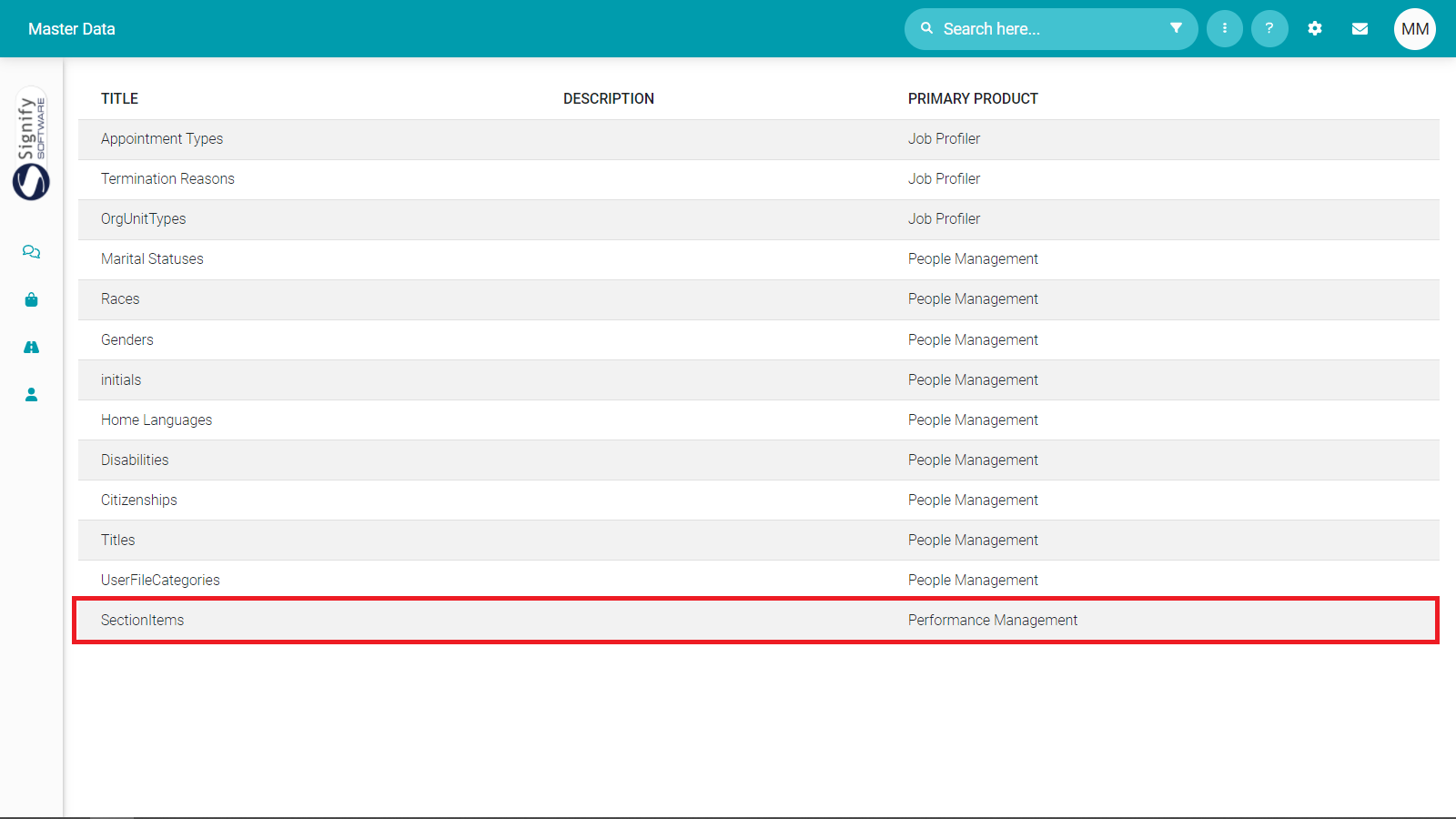
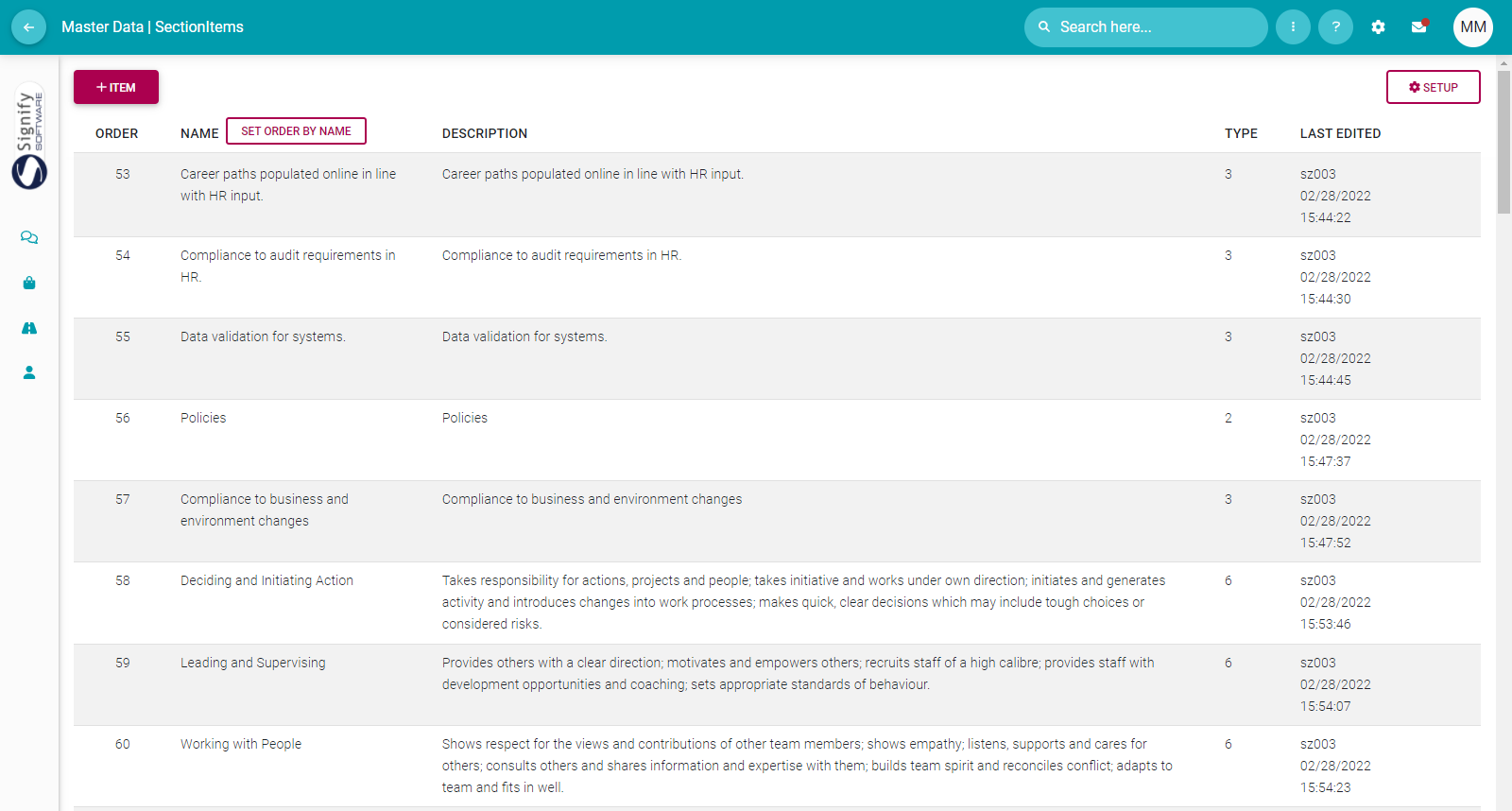
- Add all required library items e.g.: 
    - Perspectives (Type 1)
    - Key Performance Areas (Type 2)
    - Key Performance Indicators (Type 3)
    - Leadership Behaviours (Type 4)
    - Values &amp; Behaviours (Type 5)
    - Key Competencies (Type 6)

[![image-1646998147526.png](https://signature.signifyhr.co.za/uploads/images/gallery/2022-03/scaled-1680-/4Qs43bUalgkD9RjF-image-1646998147526.png)](https://signature.signifyhr.co.za/uploads/images/gallery/2022-03/4Qs43bUalgkD9RjF-image-1646998147526.png)
<span style="background-color: #993366; color: #ffffff;">[ **BACK TO TOP** ](https://signature.signifyhr.co.za/link/1394#bkmrk-page-title)</span>

[![image-1664896078728.png](https://signature.signifyhr.co.za/uploads/images/gallery/2022-10/scaled-1680-/FUVAJ6QPX5ZSj4yl-image-1664896078728.png)](https://signature.signifyhr.co.za/uploads/images/gallery/2022-10/FUVAJ6QPX5ZSj4yl-image-1664896078728.png)

###  

### **<span style="color: #993366;">EMAIL NOTIFICATIONS</span>**

##### [![image-1664896078728.png](https://signature.signifyhr.co.za/uploads/images/gallery/2022-10/scaled-1680-/FUVAJ6QPX5ZSj4yl-image-1664896078728.png)](https://signature.signifyhr.co.za/uploads/images/gallery/2022-10/FUVAJ6QPX5ZSj4yl-image-1664896078728.png)

Performance Management email notifications can be activated and customised.

- From the System Settings menu, select **Ruleset | Notifications**.

Below is the list of email templates available:

<table id="bkmrk-nr-name-description-" style="width: 856px; height: 966px;" width="100"><tbody><tr><td style="width: 41.2969px;">**Nr**

</td><td style="width: 240.688px;">**Name**

</td><td style="width: 356.047px;">**Description**

</td><td style="width: 170.969px;">**Default Active (Yes/No)**

</td></tr><tr><td style="width: 41.2969px;">1

</td><td style="width: 240.688px;">Objective Settings Approved By Person

</td><td style="width: 356.047px;">A person submitted the objective settings of an agreement.

</td><td style="width: 170.969px;"></td></tr><tr><td style="width: 41.2969px;">2

</td><td style="width: 240.688px;">Objective Settings Approved By Manager

</td><td style="width: 356.047px;">A person submitted the objective settings of an agreement.

</td><td style="width: 170.969px;"></td></tr><tr><td style="width: 41.2969px;">3

</td><td style="width: 240.688px;">Objective Settings Modified By Person

</td><td style="width: 356.047px;">A person modified the objective settings of an agreement.

</td><td style="width: 170.969px;"></td></tr><tr><td style="width: 41.2969px;">4

</td><td style="width: 240.688px;">Objective Settings Modified By Manager

</td><td style="width: 356.047px;">A manager modified the objective settings of an agreement

</td><td style="width: 170.969px;"></td></tr><tr><td style="width: 41.2969px;">5

</td><td style="width: 240.688px;">Objective Settings Deadline For Person

</td><td style="width: 356.047px;">Notification sent as reminder of the objective settings deadline.

</td><td style="width: 170.969px;"></td></tr><tr><td style="width: 41.2969px;">6

</td><td style="width: 240.688px;">Objective Settings Deadline For Manager

</td><td style="width: 356.047px;">Notification sent as reminder of the objective settings deadline.

</td><td style="width: 170.969px;"></td></tr><tr><td style="width: 41.2969px;">7

</td><td style="width: 240.688px;">Check-In Phase Started

</td><td style="width: 356.047px;">When the start date of the check-ins has been reached.

</td><td style="width: 170.969px;"></td></tr><tr><td style="width: 41.2969px;">8

</td><td style="width: 240.688px;">Check-In Deadline For Person

</td><td style="width: 356.047px;">Notification sent as reminder of the Check-In deadline.

</td><td style="width: 170.969px;"></td></tr><tr><td style="width: 41.2969px;">9

</td><td style="width: 240.688px;">Check-In Deadline For Manager

</td><td style="width: 356.047px;">Notification sent as reminder of the Check-In deadline.

</td><td style="width: 170.969px;"></td></tr><tr><td style="width: 41.2969px;">10

</td><td style="width: 240.688px;">Self-Ratings Approved

</td><td style="width: 356.047px;">When a person submitted the self-ratings of an agreement

</td><td style="width: 170.969px;"></td></tr><tr><td style="width: 41.2969px;">11

</td><td style="width: 240.688px;">Manager Rating Submitted

</td><td style="width: 356.047px;">When the manager has submitted the final rating of an agreement.

</td><td style="width: 170.969px;"></td></tr><tr><td style="width: 41.2969px;">12

</td><td style="width: 240.688px;">Self-Ratings Modified By Person

</td><td style="width: 356.047px;">When a person modifies the self-ratings of an agreement.

</td><td style="width: 170.969px;"></td></tr><tr><td style="width: 41.2969px;">13

</td><td style="width: 240.688px;">Manager Ratings Modified

</td><td style="width: 356.047px;">When a manager modifies the manager rating of an agreement.

</td><td style="width: 170.969px;"></td></tr><tr><td style="width: 41.2969px;">14

</td><td style="width: 240.688px;">Ratings Deadline For Person

</td><td style="width: 356.047px;">Notification sent as reminder of the Ratings deadline.

</td><td style="width: 170.969px;"></td></tr><tr><td style="width: 41.2969px;">15

</td><td style="width: 240.688px;">Ratings Deadline For Manager

</td><td style="width: 356.047px;">Notification sent as reminder of the Ratings deadline

</td><td style="width: 170.969px;"></td></tr><tr><td style="width: 41.2969px;">16

</td><td style="width: 240.688px;">Manager Final Rating Submitted

</td><td style="width: 356.047px;">When the manager has submitted the final rating of an agreement.

</td><td style="width: 170.969px;"></td></tr><tr><td style="width: 41.2969px;">17

</td><td style="width: 240.688px;">Manager Final Rating Modified

</td><td style="width: 356.047px;">When the manager has submitted the final rating of an agreement.

</td><td style="width: 170.969px;"></td></tr></tbody></table>

<span style="background-color: #993366; color: #ffffff;">[ **BACK TO TOP** ](https://signature.signifyhr.co.za/link/1394#bkmrk-page-title)</span>

[![image-1664896078728.png](https://signature.signifyhr.co.za/uploads/images/gallery/2022-10/scaled-1680-/FUVAJ6QPX5ZSj4yl-image-1664896078728.png)](https://signature.signifyhr.co.za/uploads/images/gallery/2022-10/FUVAJ6QPX5ZSj4yl-image-1664896078728.png)

###  

### **<span style="color: #993366;">TRANSLATION</span>**

##### [![image-1664896078728.png](https://signature.signifyhr.co.za/uploads/images/gallery/2022-10/scaled-1680-/FUVAJ6QPX5ZSj4yl-image-1664896078728.png)](https://signature.signifyhr.co.za/uploads/images/gallery/2022-10/FUVAJ6QPX5ZSj4yl-image-1664896078728.png)

Translate system terminology and messages. This functionality depends on the Translation module, accessed from the System Settings.

[![image-1647003439062.png](https://signature.signifyhr.co.za/uploads/images/gallery/2022-03/scaled-1680-/iLQD4pHN1KGgSCrm-image-1647003439062.png)](https://signature.signifyhr.co.za/uploads/images/gallery/2022-03/iLQD4pHN1KGgSCrm-image-1647003439062.png)

- Locate and click **Performance Management**.

[![image-1647003504422.png](https://signature.signifyhr.co.za/uploads/images/gallery/2022-03/scaled-1680-/8uyTg2Eantbv8qLB-image-1647003504422.png)](https://signature.signifyhr.co.za/uploads/images/gallery/2022-03/8uyTg2Eantbv8qLB-image-1647003504422.png)

There is no set way of customising the system terminology except by searching for a word or phrase in the general search area. See example below.

[![image-1647003731488.png](https://signature.signifyhr.co.za/uploads/images/gallery/2022-03/scaled-1680-/b1Kv1knzxaH5UFnK-image-1647003731488.png)](https://signature.signifyhr.co.za/uploads/images/gallery/2022-03/b1Kv1knzxaH5UFnK-image-1647003731488.png)

[![image-1646899549906.png](https://signature.signifyhr.co.za/uploads/images/gallery/2022-03/scaled-1680-/RMuPbjHgrBvQlSOw-image-1646899549906.png)](https://signature.signifyhr.co.za/uploads/images/gallery/2022-03/RMuPbjHgrBvQlSOw-image-1646899549906.png)