Remember, a Check-in is not a replacement for a face-to-face discussion with your employee/manager, it is done in addition to regular discussions.
A Check-in can be done as many times during your performance cycle as is needed.
--- ### Activating the Check-in functionality Using the Check-in functionality is optional and depends on a company's configuration. If Check-ins are enabled in the system, the **CHECK-IN** button will become active when an employee's objectives have been submitted and approved - that is when the contracting phase has concluded. See the screenshot below. [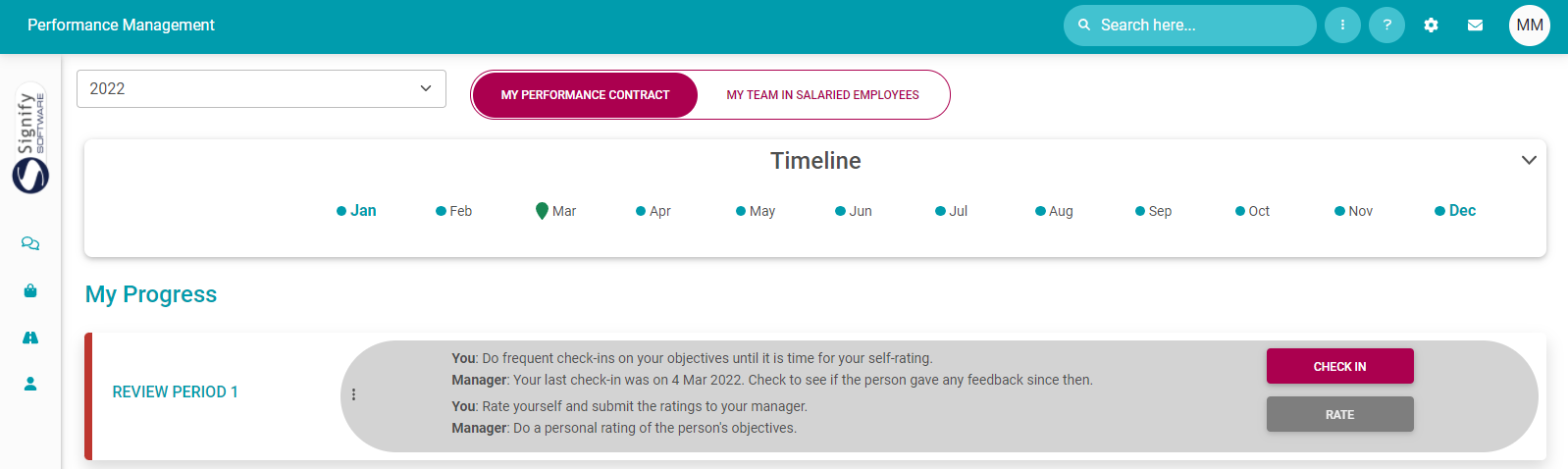](https://signature.signifyhr.co.za/uploads/images/gallery/2022-03/9fs09uONBYjzfQVb-image-1647254340538.png) --- ### Check-in statistics When the employee or manager opens the employee's check-in screen, find a summary of Check-in statistics at the top of the screen. It serves to give some indication of where to focus, and this is helpful when there are lots of objectives on a performance agreement. [](https://signature.signifyhr.co.za/uploads/images/gallery/2022-03/OKjSf7ro9EB1sAE8-image-1646389920962.png) See below for the interpretation of the numbers. [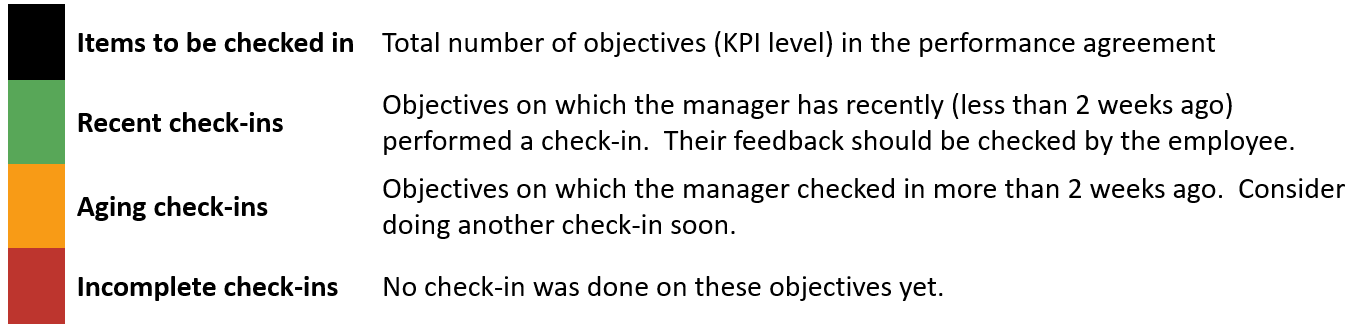](https://signature.signifyhr.co.za/uploads/images/gallery/2022-03/uo0PoSCHOMSirB3y-image-1646390640116.png) --- ### Do a Check-in (as manager) Since the bulk of the activity on the check-in screen is from the manager's side, the following screenshots are from the manager's perspective. - From the Manager's Performance Management Dashboard, locate the applicable person's contract, and click its **CHECK-IN** button. [](https://signature.signifyhr.co.za/uploads/images/gallery/2022-03/ar98CSKkbBe3dSzK-image-1646382908128.png) [](https://signature.signifyhr.co.za/uploads/images/gallery/2022-03/GXGwbsLn9AOcC5k1-image-1647254392976.png) - The Check-in screen opens, revealing:The Check-in stats at the top.
[](https://signature.signifyhr.co.za/uploads/images/gallery/2022-03/TMjedH4RelgXEFZ7-image-1646385199395.png)The standard section menu is on the left side of the screen.
[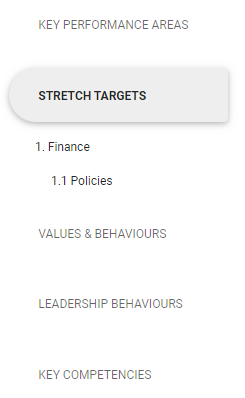](https://signature.signifyhr.co.za/uploads/images/gallery/2022-03/7cKJyW1K6JoQTE23-image-1646385223407.png)The objectives are grouped per section in the middle of the screen.
[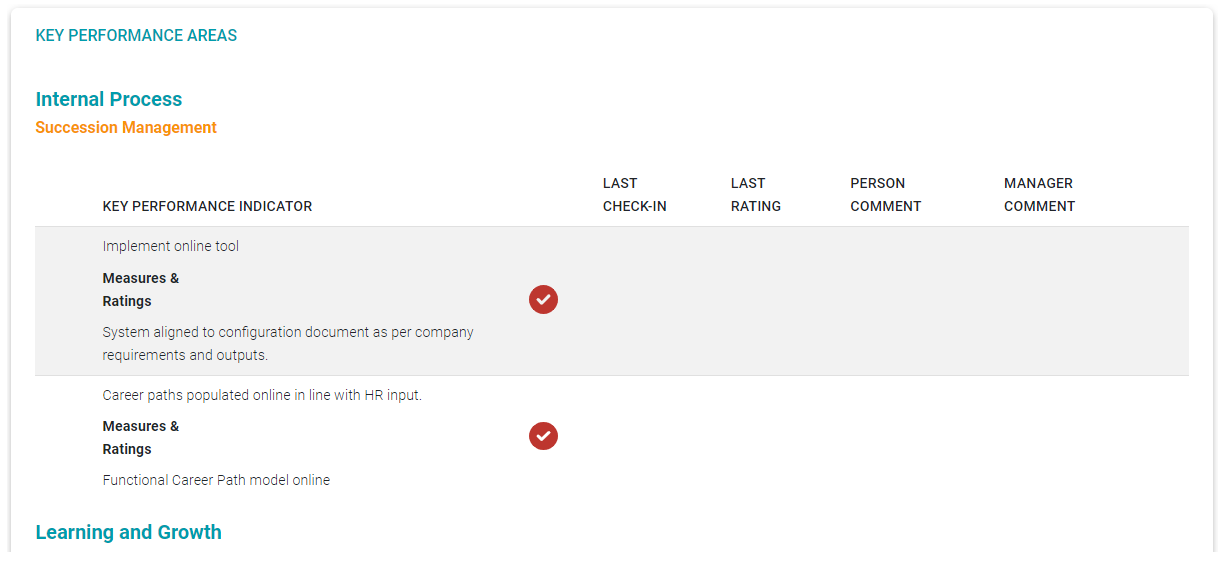](https://signature.signifyhr.co.za/uploads/images/gallery/2022-03/FTv0gaC1iKfgcOpo-image-1646385255205.png) - Locate the objective due for a Check-in, and click on its record ... [](https://signature.signifyhr.co.za/uploads/images/gallery/2022-03/grUkW8wDcE29iRLn-image-1646385771015.png) - ...to open the check-in feedback screen. [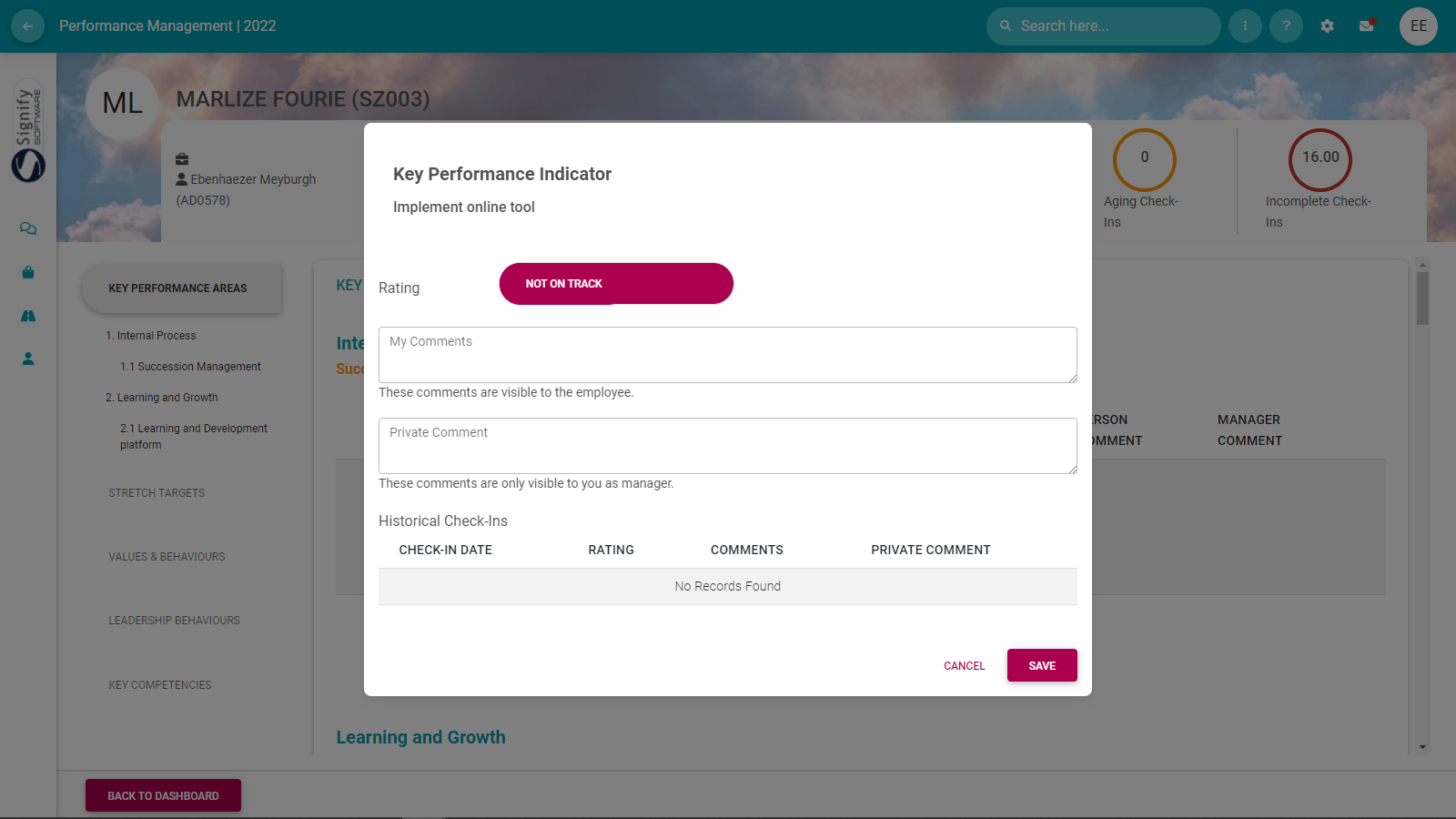](https://signature.signifyhr.co.za/uploads/images/gallery/2022-03/Ic69aylOA2oqJ2o9-image-1646385886513.png) - Provide feedback as needed.The feedback in the **My Comments** field is made available to your employee; feedback typed as **Private Comments** is not.
- Use the **Rating** toggle button to indicate current progress sentiment.Evaluating an item is not done in terms of the regular 1 to 5 (e.g.) rating scale but in the format of an **On Track**, or **Not on Track** indication.
[](https://signature.signifyhr.co.za/uploads/images/gallery/2022-03/uZ4eg05oTUVB4Ovh-image-1646388788213.png) [](https://signature.signifyhr.co.za/uploads/images/gallery/2022-03/7qGO0Ng5teK5mrx0-image-1646388825593.png) [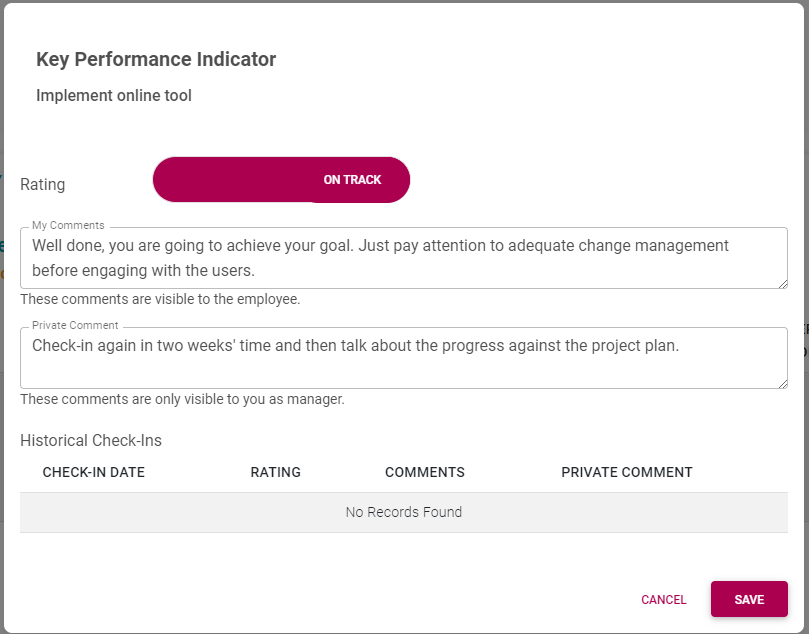](https://signature.signifyhr.co.za/uploads/images/gallery/2022-03/SuBCvpasyzSf0ITJ-image-1646386327744.png) - Click **SAVE** when done. After saving the feedback, notice how the feedback is added to the history of the objective's check-ins. [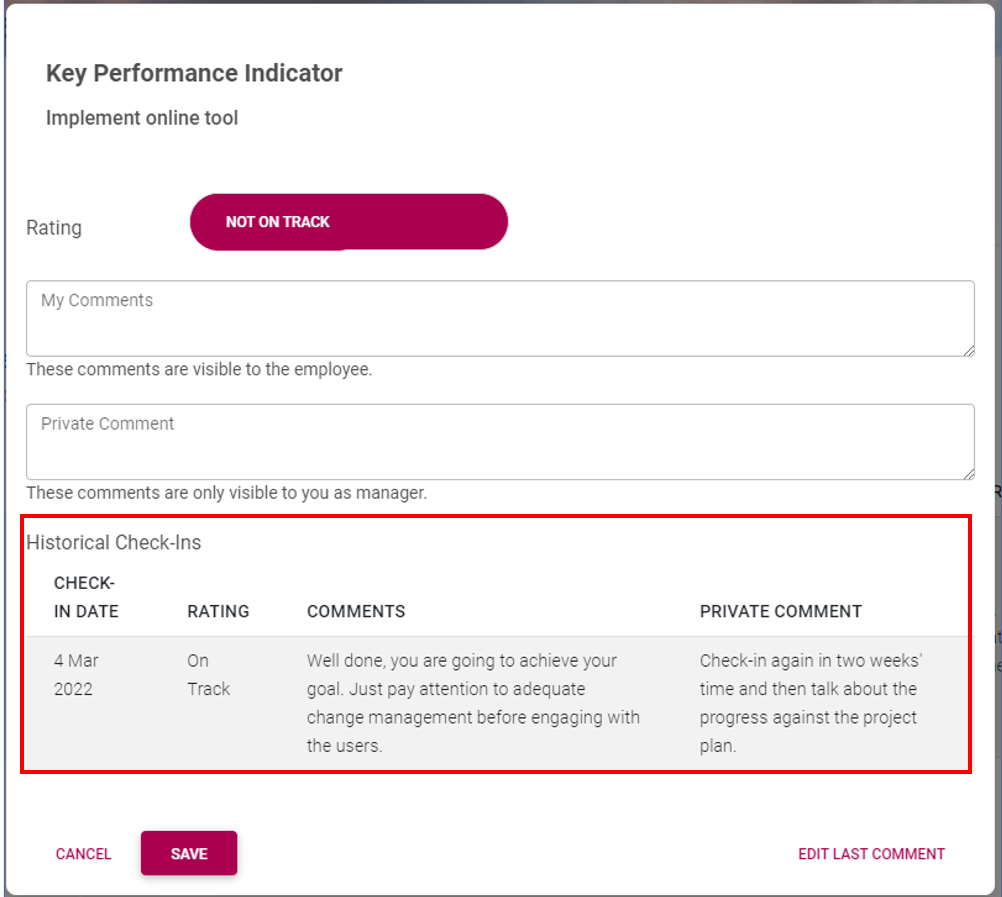](https://signature.signifyhr.co.za/uploads/images/gallery/2022-03/UsxRxIalHyOaqArT-image-1646389476034.png) - In the lower, right corner, click **EDIT LAST COMMENT** to edit the last feedback. The agreement screen is updated with objectives having had check-ins done on them. [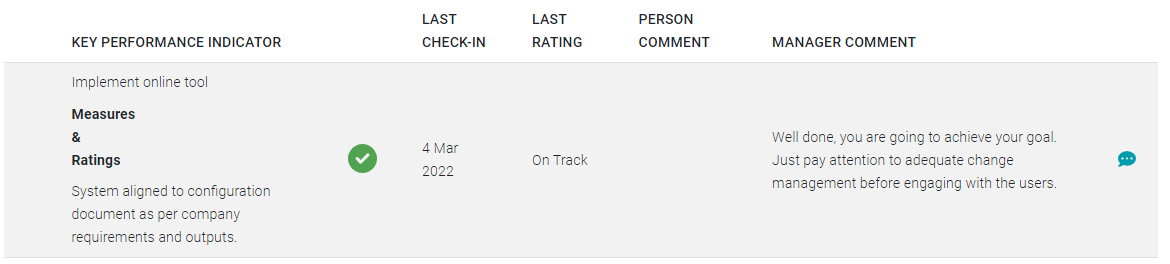](https://signature.signifyhr.co.za/uploads/images/gallery/2022-03/lLNrS6ye53YbgjdL-image-1646389817402.png) --- ### Reply on Check-in feedback (as employee) When an employee views a review period on their performance management dashboard, the presence of check-in feedback is displayed as a status message. [](https://signature.signifyhr.co.za/uploads/images/gallery/2022-03/l7oFh3q4DkQ9Utsy-image-1647254470791.png) [](https://signature.signifyhr.co.za/uploads/images/gallery/2022-03/BE1aSjBDZoPVzkz9-image-1646396696576.png) - Click **CHECK-IN** to open the check-in screen. The screen statistics are updated to reflect new entries. [](https://signature.signifyhr.co.za/uploads/images/gallery/2022-03/24WloW7pHlOyE4FC-image-1646396789631.png) The checked-in objectives are highlighted, and feedback is visible. [](https://signature.signifyhr.co.za/uploads/images/gallery/2022-03/mttQ7eXl0ONg7nTN-image-1646396883851.png) - Click on an objective's record if the employee would like to reply to the manager's feedback. [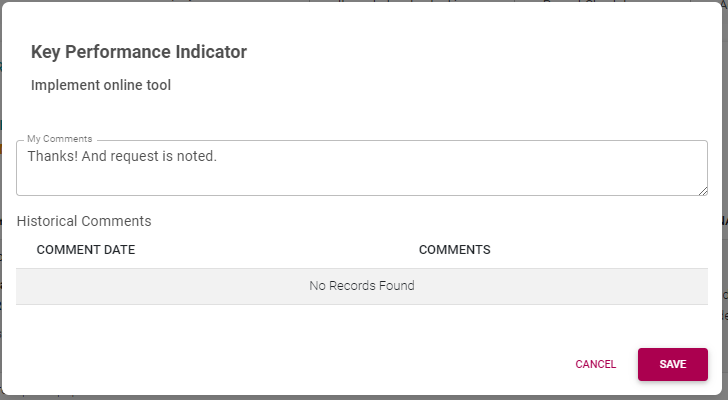](https://signature.signifyhr.co.za/uploads/images/gallery/2022-03/C5zAHXLN3BLAAbEG-image-1646396988888.png) Feedback history is updated if comments are saved. Use the **EDIT LAST COMMENT** link in the lower right corner if you'd like to edit the comment. [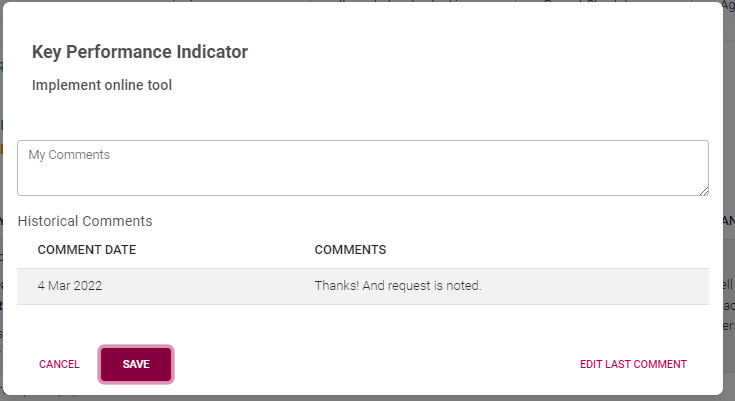](https://signature.signifyhr.co.za/uploads/images/gallery/2022-03/xSt8s1ZAyAgWf9mU-image-1646397036488.png) The Check-in screen is updated with the employee's reply. [](https://signature.signifyhr.co.za/uploads/images/gallery/2022-03/O6wiVvPzDL86q0ZW-image-1646397182017.png) - Click **BACK TO DASHBOARD** to exit the check-in screen. [](https://signature.signifyhr.co.za/uploads/images/gallery/2022-03/hlSJ2iODQbjuV6kS-image-1646397656695.png) --- ##### **Recommended further reading:** - [Glossary](https://signature.signifyhr.co.za/books/performance-management-0a0/page/95-glossary "Glossary") of terminology and definitions - [How to Use Performance Management with Success](https://signature.signifyhr.co.za/books/performance-management-0a0/page/100-how-to-make-it-a-success "100% How to Make it a Success") - [The Employee's Performance Management Dashboard](https://signature.signifyhr.co.za/books/performance-management-0a0/page/100-the-performance-management-dashboard---for-employees "100% The Performance Management Dashboard - For employees") - [Open an Existing Contract](https://signature.signifyhr.co.za/books/performance-management-0a0/page/99-the-performance-management-dashboard---open-an-existing-contract "99% The Performance Management Dashboard - Open an existing contract") - [Create a New Contract](https://signature.signifyhr.co.za/books/performance-management-0a0/page/100-the-performance-management-dashboard---create-a-new-contract "100% The Performance Management Dashboard - Create a new contract") - [Functionalities and Layout of the Performance Management Dashboard](https://signature.signifyhr.co.za/books/performance-management-0a0/page/99-the-performance-management-dashboard---functionalities-and-layout "99% The Performance Management Dashboard - Functionalities and layout") - [The Manager's Performance Management Dashboard](https://signature.signifyhr.co.za/books/performance-management-0a0/page/98-the-performance-management-dashboard---for-managers "98% The Performance Management Dashboard - for Managers") - [Overview of The Performance Agreement Screen](https://signature.signifyhr.co.za/books/performance-management-0a0/page/95-the-performance-agreement---overview "95% The Performance Agreement - Overview") - [Set your objectives - Part 1 (Working with KPAs and KPIs)](https://signature.signifyhr.co.za/books/performance-management-0a0/page/98-the-performance-agreement---set-your-objectives-part-1 "98% The Performance Agreement - Set Your Objectives PART 1") - [Set your objectives - Part 2 (Working with the other sections)](https://signature.signifyhr.co.za/books/performance-management-0a0/page/98-the-performance-agreement---set-your-objectives-part-2) - [Perform a Check-in on your Objectives](https://signature.signifyhr.co.za/books/performance-management-0a0/page/98-the-performance-agreement---check-ins "98% The Performance Agreement - Check-ins") - [Rate your objectives](https://signature.signifyhr.co.za/books/performance-management-0a0/page/0-the-performance-agreement---rating-phase "0% The Performance Agreement - Rating phase") [](https://signature.signifyhr.co.za/uploads/images/gallery/2022-03/LNJIR3mb46LRXsdR-image-1646900299519.png)