Notice how the total of their relative weights adds up to 100%.
[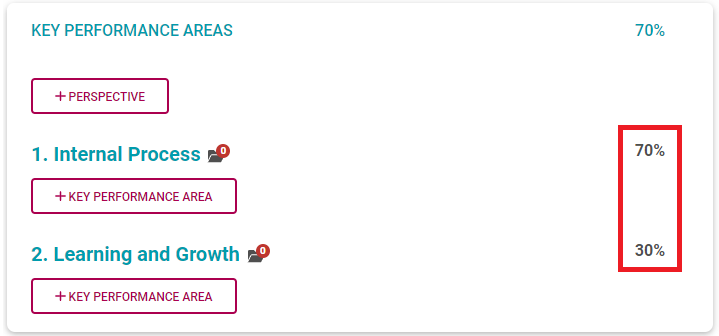](https://signature.signifyhr.co.za/uploads/images/gallery/2022-03/degJ1z7bOwaZOgwB-image-1646115381829.png) - Click **+Perspective** to open the list of available perspectives. It is a fixed list, and no custom values are permitted. - Choose the appropriate perspective and provide a suitable weight. Click **SAVE**. [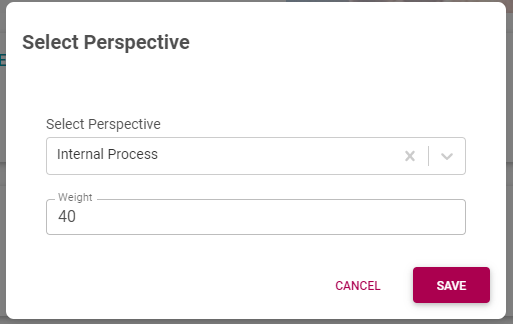](https://signature.signifyhr.co.za/uploads/images/gallery/2022-03/QwByoeDLgSg88xTU-image-1646115111061.png)If you are working on a new, blank agreement, we suggest loading all your perspectives together and assigning their weights. This way it is easier to get an overview of them before adding KPAs and KPIs, and visually easier to get their weights to total 100%.
- To delete a perspective, hover over the perspective, then locate and click its Delete icon. [](https://signature.signifyhr.co.za/uploads/images/gallery/2022-03/NHYJh6VQrYZE99u0-image-1646138533916.png) - To edit a perspective and its weight, click on the perspective. - When finished loading all the perspectives, ensure their total weight equals 100%. --- #### Key Performance Areas Level Refer to the section [The Performance Agreement - Overview](https://signature.signifyhr.co.za/books/performance-management-0a0/page/95-the-performance-agreement---overview "95% The Performance Agreement - Overview") for background on Key Performance Areas. Now we are going to focus on the KPA level. Key Performance areas (KPAs) are used to group Key Performance Indicators. Let's remove all the KPIs from our example and look at a KPA in isolation, under its parent perspective called Internal Process.Notice how the total of all the KPA weights (under one parent perspective) adds up to 100%.
[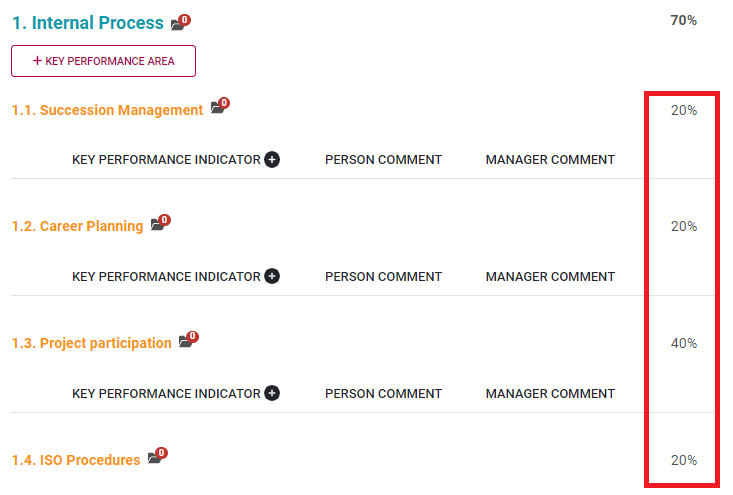](https://signature.signifyhr.co.za/uploads/images/gallery/2022-03/w9Qtk1h2j8dl4yYC-image-1646119159101.png) - Click **+Key Performance Area** to open an input screen on which two options are available. - **LIBRARY**: If you want to choose a suitable KPA from the library, click LIBRARY. Then choose the pointing finger icon to search the list of available key performance areas. [](https://signature.signifyhr.co.za/uploads/images/gallery/2022-03/fUM1JB2rJsDKRsJC-image-1646139308169.png) [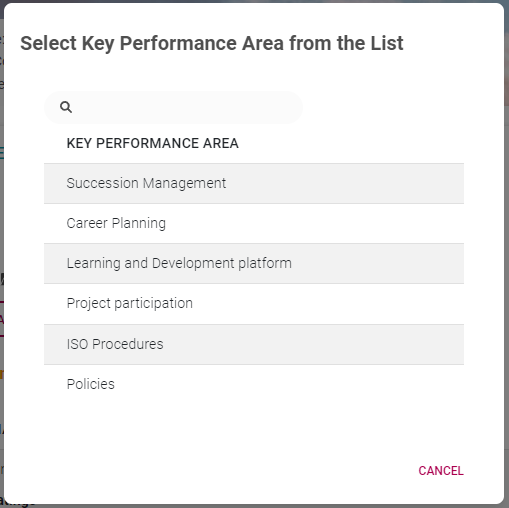](https://signature.signifyhr.co.za/uploads/images/gallery/2022-03/wehuG0FjY4Ai8MF1-image-1646139145085.png) - - **TYPE OWN:** Or click Type Own to provide your own custom KPA. - Choose or type the appropriate key performance area and provide a suitable weight. Click SAVE. [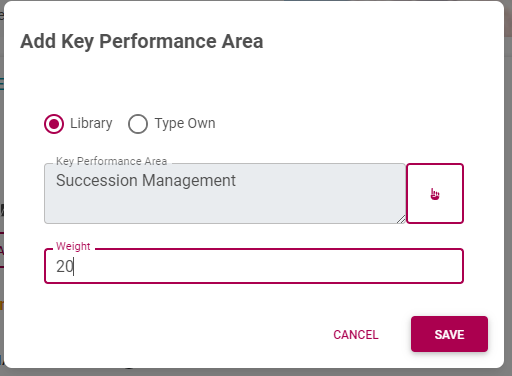](https://signature.signifyhr.co.za/uploads/images/gallery/2022-03/JAV2CqReqmLCAq02-image-1646137924499.png)If you are working on a new, blank agreement, we suggest - for a specific perspective - loading all its key performance areas and their weights at once. This way it is easier to get an overview of all the KPAs under a perspective before adding KPIs, and it's easier to get their weights to total 100%.
- To delete a KPA, hover over the KPA, then locate and click its Delete icon. [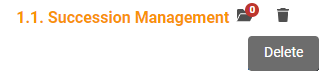](https://signature.signifyhr.co.za/uploads/images/gallery/2022-03/0X3rE4O1JRgNp9jy-image-1646138615319.png)Make sure you load each KPA under its correct parent perspective – you cannot move them later; you will have to delete the KPA record and recreate it if needed.
- To edit a key performance area and its weight, click on the Key Performance Area. - When finished loading all the key performance areas under a perspective, ensure their total weight equals 100%. --- #### Key Performance Indicator Level Refer to the section [The Performance Agreement - Overview](https://signature.signifyhr.co.za/books/performance-management-0a0/page/95-the-performance-agreement---overview "95% The Performance Agreement - Overview") for background on Key Performance Indicators. Now we are going to focus on the KPI level. There can be more than one KPI under a parent key performance area (KPA), as in the example below.Notice how the total of all the KPI weights (under one parent KPA) adds up to 100%.
[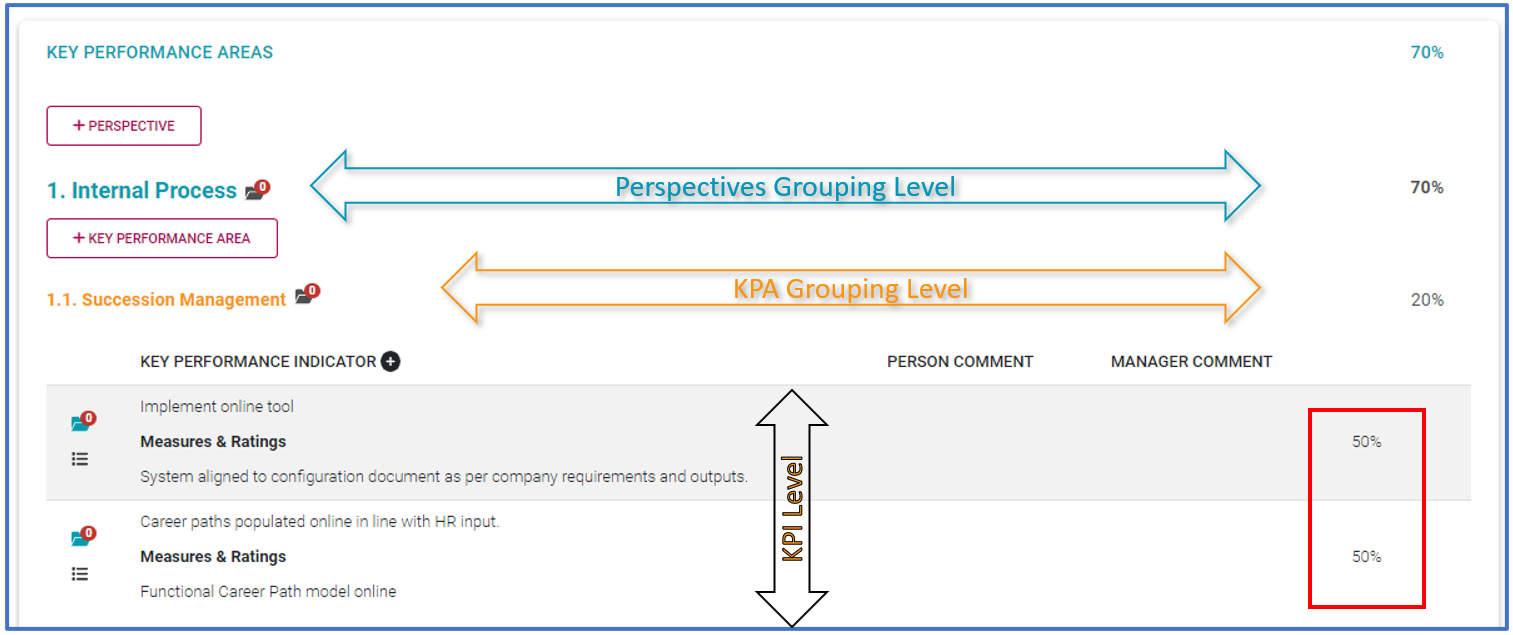](https://signature.signifyhr.co.za/uploads/images/gallery/2022-03/AH5RY3GFQ7xkWYAd-image-1646143538317.png)Make sure you load each KPI under its correct parent KPA (and perspective) – you cannot move them later, you will have to delete the KPI record and recreate it if needed.
[](https://signature.signifyhr.co.za/uploads/images/gallery/2022-03/cebm54TEDJ92IyyB-image-1646143657502.png) - Look for the little + sign next to the **KEY PERFORMANCE INDICATOR** heading. Click it to open the KPI input screen below, on which two options are available. - **LIBRARY**: If you want to choose a suitable KPI from the library, click LIBRARY. Then choose the pointing finger icon to search the list of available key performance indicators. [](https://signature.signifyhr.co.za/uploads/images/gallery/2022-03/fUM1JB2rJsDKRsJC-image-1646139308169.png) [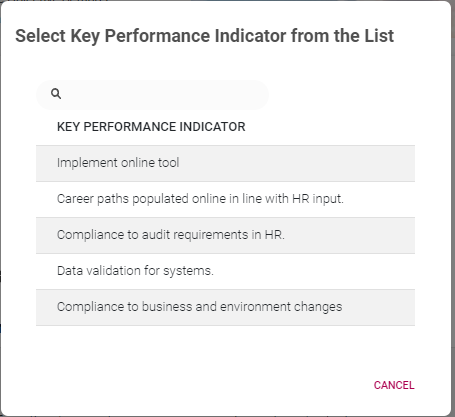](https://signature.signifyhr.co.za/uploads/images/gallery/2022-03/gICg6lWBprpiu7MM-image-1646143762260.png) - - **TYPE OWN:** Or click Type Own to provide your own custom KPI. - Choose or type the appropriate key performance indicator, along with appropriate **Measures** and **Ratings**. Remember to provide a suitable weight. Click SAVE. [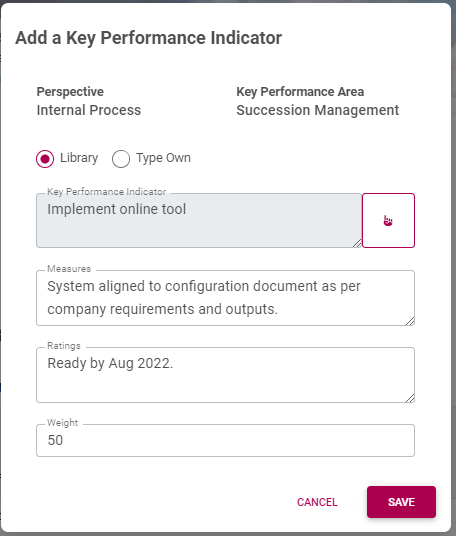](https://signature.signifyhr.co.za/uploads/images/gallery/2022-03/9kjZihtf6E8akO47-image-1646143848829.png)If you are working on a new, blank agreement, we suggest - for a specific KPA - loading all its Key Performance Indicators and their weights at once. This way it is easier to get an overview of all the KPIs under a KPA.
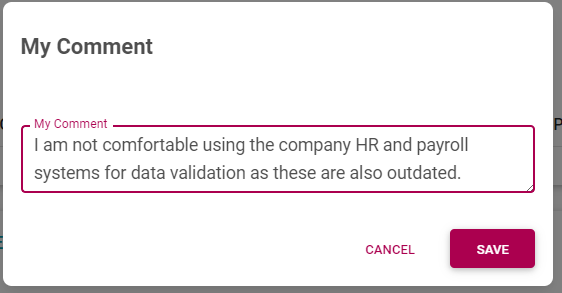
- To edit a key performance indicator and its fields, click on the Key Performance Indicator record. - To delete a KPI, hover over the KPI record, then locate and click its Delete icon. [](https://signature.signifyhr.co.za/uploads/images/gallery/2022-03/1TEqg1Op0McHIdyf-image-1646144394798.png) --- #### Now do it! Before we move on to the other sections, practice the steps above. - Add your perspectives one after the other. - Balance their % - For each perspective, add applicable KPAs. - Balance their % - For each KPA, add applicable KPIs - Balance their % --- #### What else is there? We only discussed adding the primary levels to the KPA section of the Performance Agreement. But there are a few additional functionalities to consider. ##### Person and manager comments on a KPI After adding a KPI the record is displayed on the screen. [](https://signature.signifyhr.co.za/uploads/images/gallery/2022-03/plK6TSBLy7sGQXq8-image-1646150147624.png) - But, click the record to reveal not only the information entered previously but also fields where the employee and/or their manager can provide clarifying comments. Measuring a KPI is not always straightforward - use these fields to shed light on the intention and purpose of a KPI. [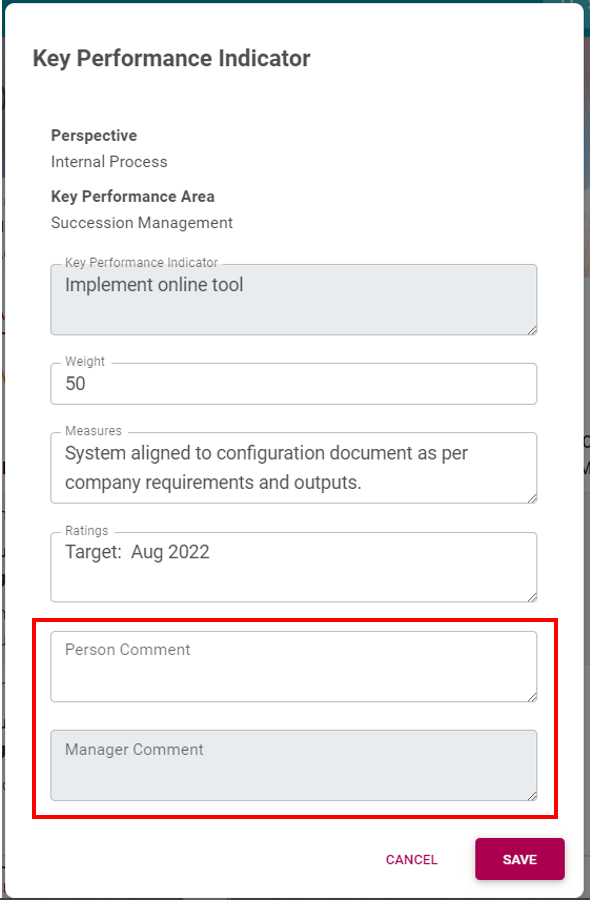](https://signature.signifyhr.co.za/uploads/images/gallery/2022-03/VyJ8UcwQLRgKk4RH-image-1646150363130.png) ##### General Comments [](https://signature.signifyhr.co.za/uploads/images/gallery/2022-03/3LeiPp2fkaFWWP2G-image-1646150522938.png) On the menu to the left of the screen, locate and click General Comments. This is a separate section, meant to be used in conjunction with all the other sections.Enter any notes, remarks, concerns, and other clarifying comments on the content contained in a Performance Agreement.
[](https://signature.signifyhr.co.za/uploads/images/gallery/2022-03/bxwH4jQB3jDSqtOI-image-1646150595219.png) - Click **SAVE**. [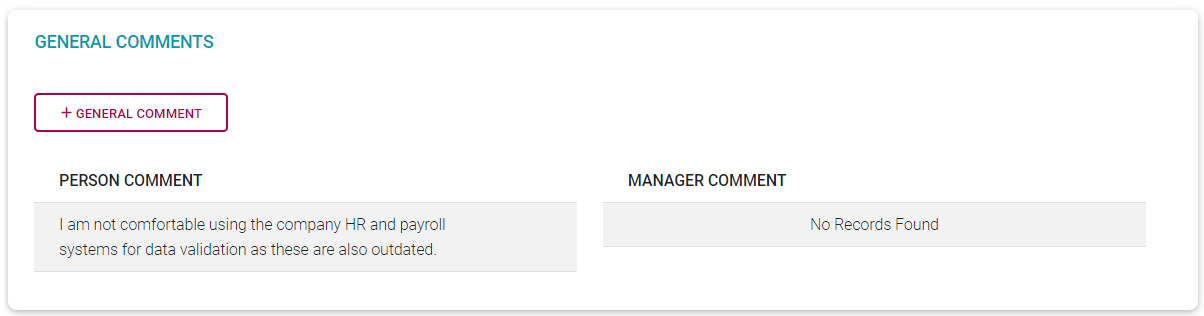](https://signature.signifyhr.co.za/uploads/images/gallery/2022-03/CbwCD0JAYLDLM5wv-image-1646150613801.png) ##### Documents Documents in support of your chosen objectives, or for omitting objectives, can be loaded on Perspective, KPA, and KPI levels. See below for the location of the Documents icons at each level. [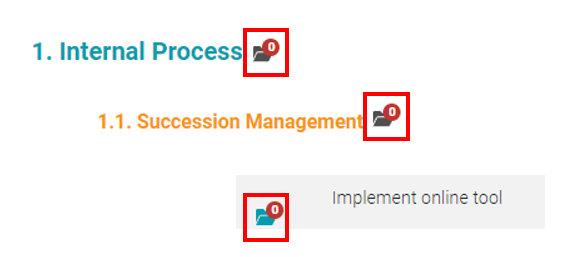](https://signature.signifyhr.co.za/uploads/images/gallery/2022-03/sw1aklIcBVDCTZWB-image-1646200741393.png) - Click the Documents icon to open the **Document View** and **Upload** screen. [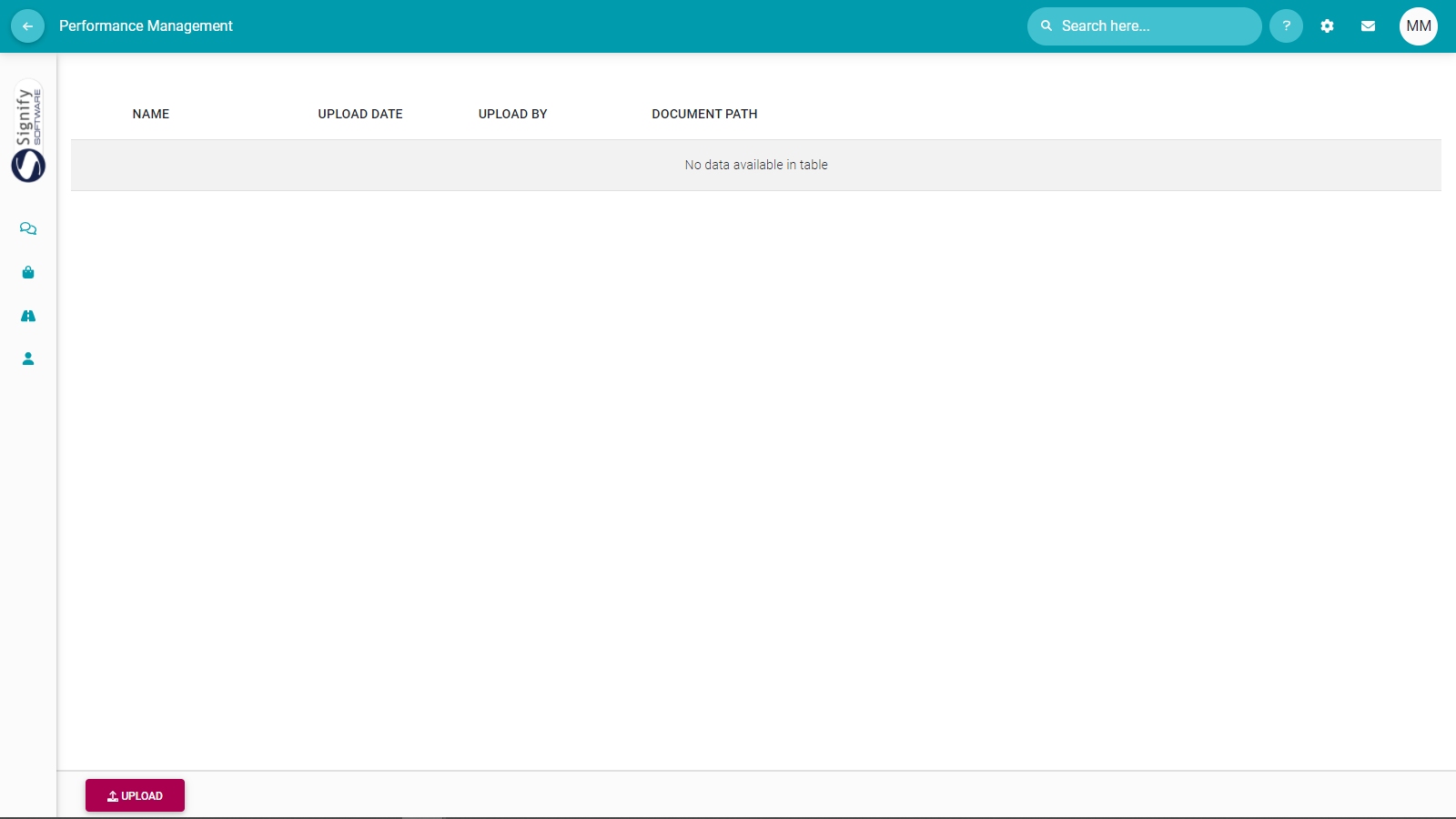](https://signature.signifyhr.co.za/uploads/images/gallery/2022-03/JlnGGfmkdJR8v28Q-image-1646200876475.png) [](https://signature.signifyhr.co.za/uploads/images/gallery/2022-03/dsZVVnolwsWS7ZfD-image-1646201037926.png) - Click the **UPLOAD** button to open a document upload screen. [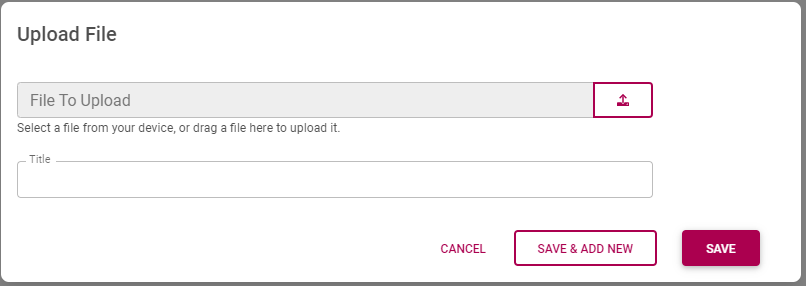](https://signature.signifyhr.co.za/uploads/images/gallery/2022-03/3JmfWZbAUFf8kyIY-image-1646201102315.png) [](https://signature.signifyhr.co.za/uploads/images/gallery/2022-03/K1xYaiX9goD7eVsd-image-1646200979371.png) - Click the **Upload** icon or drag and drop a file directly onto the Upload File screen. [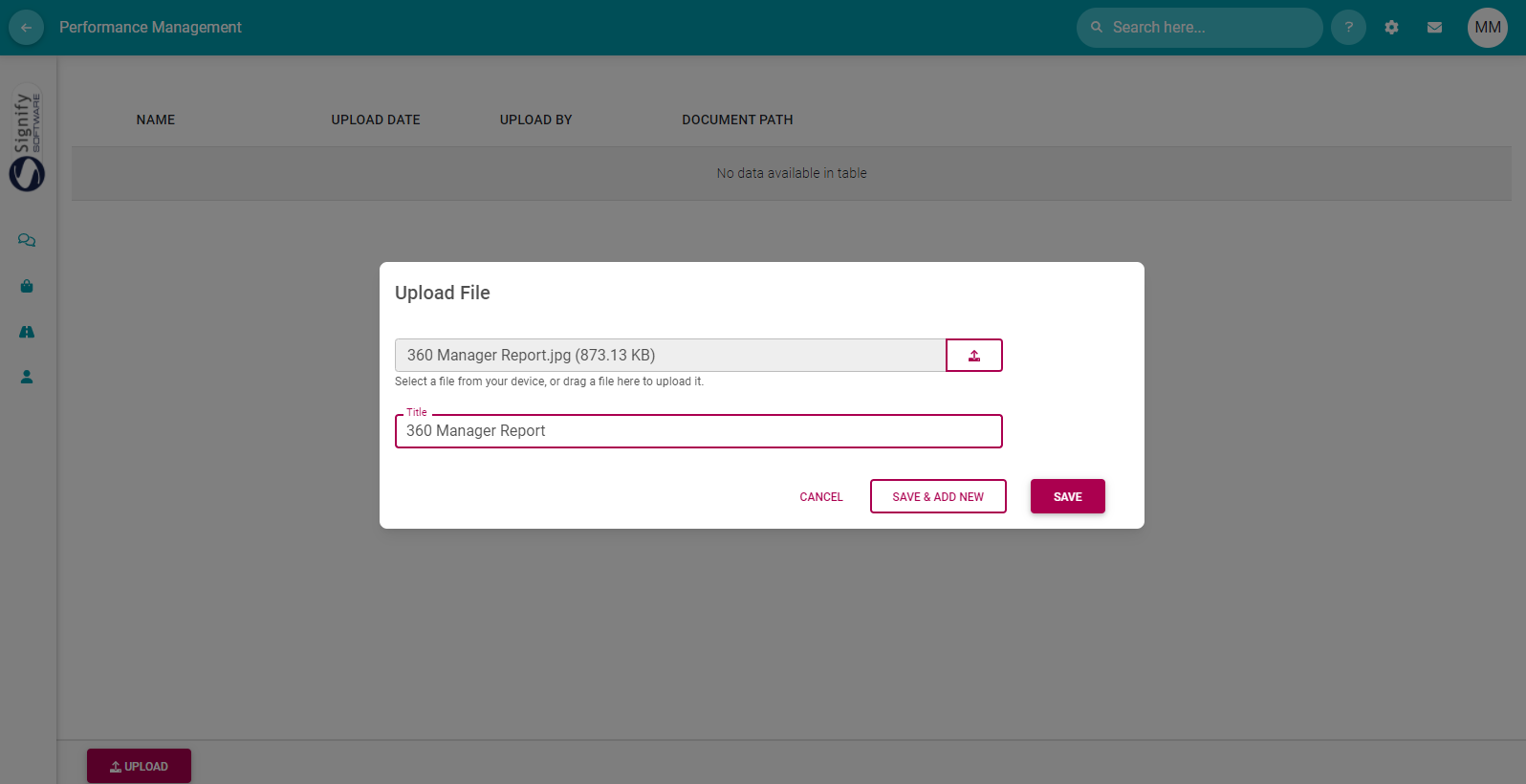](https://signature.signifyhr.co.za/uploads/images/gallery/2022-03/qwXTUS8mEyjueKil-image-1646200839444.png) - Click **SAVE**. ##### Actions on a Key Performance Indicator Listing a KPI under a KPA usually implies some form of action e.g., "Implement the online tool by...". To support achieving a KPI, additional activities might be needed e.g., "Procure funds". These actions can be loaded and linked directly to a KPI record. [](https://signature.signifyhr.co.za/uploads/images/gallery/2022-03/LtdhBJ5nzuycoMYa-image-1646202475863.png) [](https://signature.signifyhr.co.za/uploads/images/gallery/2022-03/9OSHWiQVOdEWakHU-image-1646203349470.png) - Locate and click the **More (Action Plan)** menu in a KPI's record to open an action plan screen for the KPI. [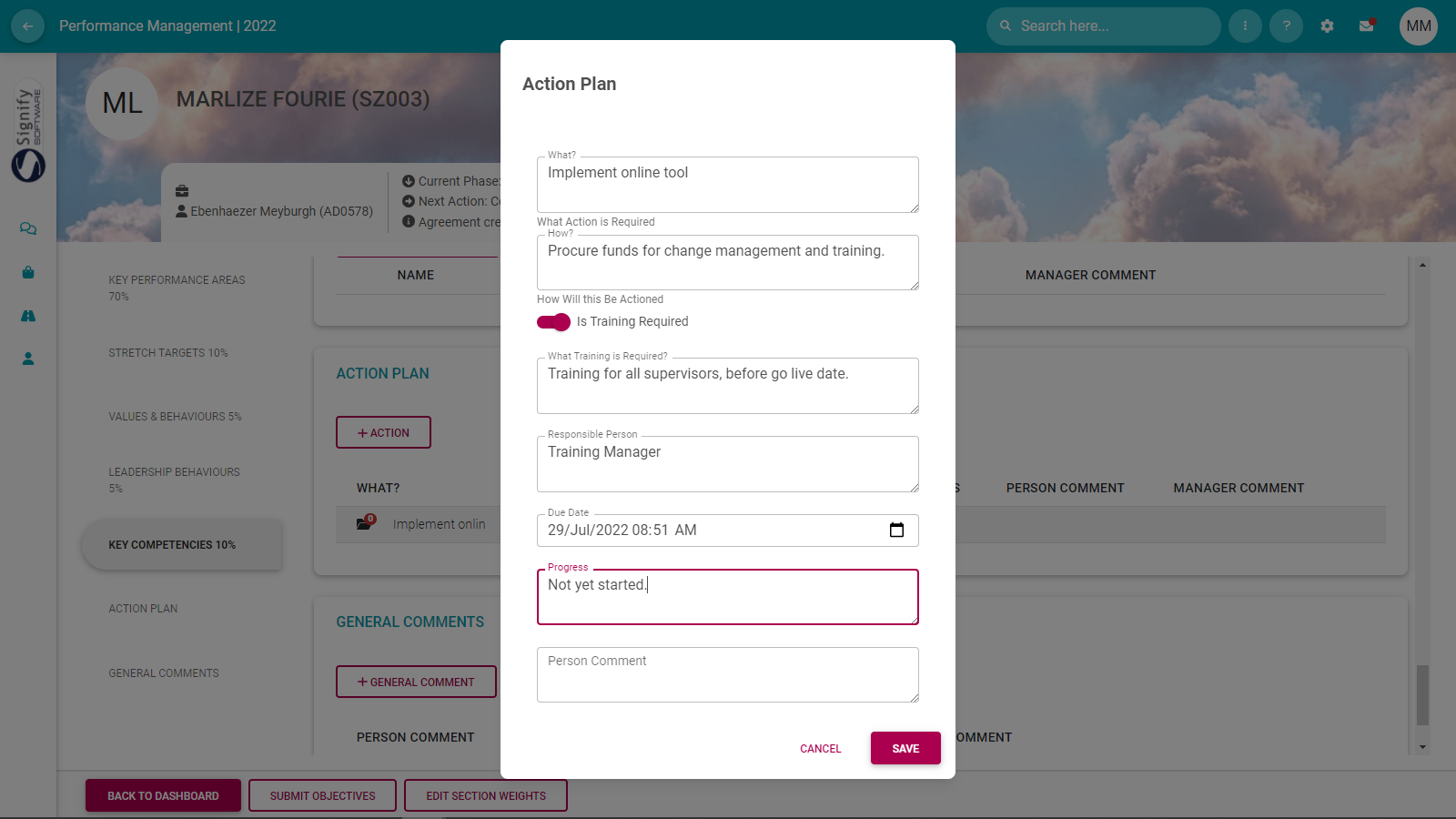](https://signature.signifyhr.co.za/uploads/images/gallery/2022-03/Js0i4VWyS76XOjap-image-1646203934668.png) Note the following about the Action Plan:The action plan can be created in support of a specific KPI.
In addition, an action plan can be an ad hoc activity in support of or flowing from the Employee's Performance agreement.
The screen contains optional training-related fields if the action plan is training focused.
[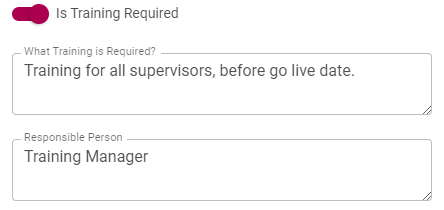](https://signature.signifyhr.co.za/uploads/images/gallery/2022-03/NmqEEPN4VtJmOEws-image-1646204266065.png) - Click **SAVE** when finished with the action plan. - On the menu to the left of the screen, click Action Plan to see where the action is listed. [](https://signature.signifyhr.co.za/uploads/images/gallery/2022-03/KUb4NZ5jrL8FRZHB-image-1646204663856.png) [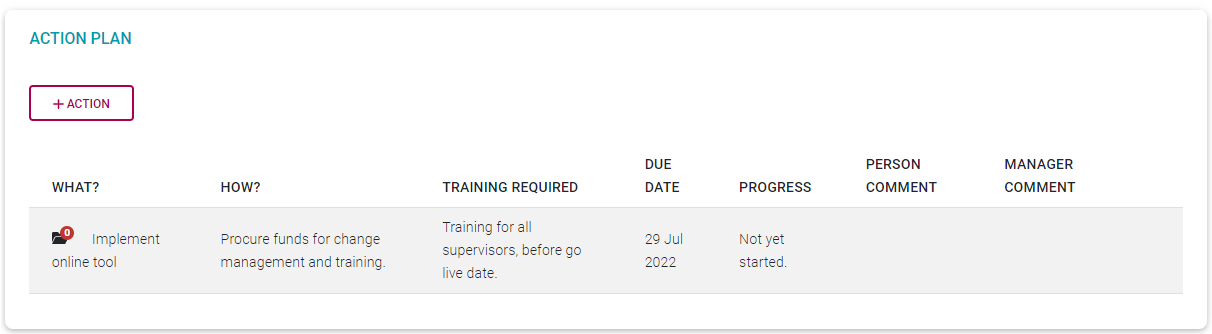](https://signature.signifyhr.co.za/uploads/images/gallery/2022-03/sC5JIUOh4y8IFWJz-image-1646204361136.png)An employee and/or manager can at any time click the action plan and provide comments and a progress update. Use the fields **Progress** and **Person Comment** (or **Manager Comment**).
--- ##### **Suggestions for building a robust Performance Agreement** - Have an up-front discussion with your manager to talk about your goals, how to measure them etc. - Focus only on the key areas of your job, don't try to cover everything. Five to eight key areas should suffice for most jobs. - Have relevant documentation at hand e.g., reports to referring to, portfolios of evidence as needed, etc. - Assume everything you list in your agreement will have to be measured in some way. Make it as practical as possible. - Use the Comments section to explain your motivations for choosing or omitting certain objectives. In a month or two you may have forgotten what your reasoning was. - If an objective is only going to become relevant in the next review period (e.g., after 6 months), list it now and get it on your agreement. You can always exclude it when doing the ratings during the review. - When building a Performance Agreement, also consider the bigger picture of an agreement that could very well be applicable for a number of years to come. - When doing the KPA and Stretch Target sections, plan your Perspective-KPA-KPIs before loading them into the system. It's easier to move things around in Excel or Word. - Don’t be in a hurry to submit your contract for approval. Sleep on your objectives and review them a couple of times before submitting them. --- ##### **Recommended further reading:** - [Glossary](https://signature.signifyhr.co.za/books/performance-management-0a0/page/95-glossary "Glossary") of terminology and definitions - [How to Use Performance Management with Success](https://signature.signifyhr.co.za/books/performance-management-0a0/page/100-how-to-make-it-a-success "100% How to Make it a Success") - [The Employee's Performance Management Dashboard](https://signature.signifyhr.co.za/books/performance-management-0a0/page/100-the-performance-management-dashboard---for-employees "100% The Performance Management Dashboard - For employees") - [Open an Existing Contract](https://signature.signifyhr.co.za/books/performance-management-0a0/page/99-the-performance-management-dashboard---open-an-existing-contract "99% The Performance Management Dashboard - Open an existing contract") - [Create a New Contract](https://signature.signifyhr.co.za/books/performance-management-0a0/page/100-the-performance-management-dashboard---create-a-new-contract "100% The Performance Management Dashboard - Create a new contract") - [Functionalities and Layout of the Performance Management Dashboard](https://signature.signifyhr.co.za/books/performance-management-0a0/page/99-the-performance-management-dashboard---functionalities-and-layout "99% The Performance Management Dashboard - Functionalities and layout") - [The Manager's Performance Management Dashboard](https://signature.signifyhr.co.za/books/performance-management-0a0/page/98-the-performance-management-dashboard---for-managers "98% The Performance Management Dashboard - for Managers") - [Overview of The Performance Agreement Screen](https://signature.signifyhr.co.za/books/performance-management-0a0/page/95-the-performance-agreement---overview "95% The Performance Agreement - Overview") - [Set your objectives - Part 1 (Working with KPAs and KPIs)](https://signature.signifyhr.co.za/books/performance-management-0a0/page/98-the-performance-agreement---set-your-objectives-part-1 "98% The Performance Agreement - Set Your Objectives PART 1") - [Set your objectives - Part 2 (Working with the other sections)](https://signature.signifyhr.co.za/books/performance-management-0a0/page/98-the-performance-agreement---set-your-objectives-part-2) - [Perform a Check-in on your Objectives](https://signature.signifyhr.co.za/books/performance-management-0a0/page/98-the-performance-agreement---check-ins "98% The Performance Agreement - Check-ins") - [Rate your objectives](https://signature.signifyhr.co.za/books/performance-management-0a0/page/0-the-performance-agreement---rating-phase "0% The Performance Agreement - Rating phase") [](https://signature.signifyhr.co.za/uploads/images/gallery/2022-03/vnyCyfRjLCYFDPbG-image-1646900112437.png)