Although the standard name for the second section of a Performance Agreement is **Stretch Targets**, note that the name can be changed to reflect company requirements.
--- ### The Stretch Targets Section #### *(Optional, dependent on company settings)* The working of this section is a carbon copy of the Key Performance Areas section and won't be discussed in depth, but you are welcome to refer to the section [The Performance Agreement - Overview](https://signature.signifyhr.co.za/books/performance-management-0a0/page/95-the-performance-agreement---overview "95% The Performance Agreement - Overview") for background on its use. There are, however, two differences to consider:The section has a different importance attached to it, as can be seen from its percentage weight allocation.
Although potentially present on all employee contracts, it does not necessarily apply to all employees. It usually applies to more senior levels of management - but this decision depends on company requirements.
[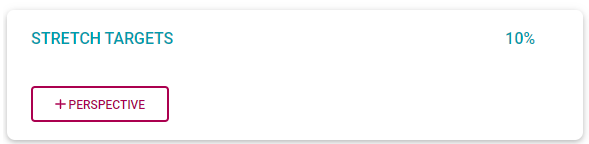](https://signature.signifyhr.co.za/uploads/images/gallery/2022-03/0el38mppYeN9gbek-image-1646207861517.png) On the side menu, click the **Stretch Targets** section. [](https://signature.signifyhr.co.za/uploads/images/gallery/2022-03/LUiXENyNsnV2eYVO-image-1646208310180.png) The layout and functioning of the Stretch Targets section are the same as that of the Key Performance section. Therefore, the suggested approach is: - Load all the required perspectives and balance their percentage weights to total 100%. - For each perspective, load its applicable KPAs and balance their percentage weights to total 100% (per perspective). - For each KPA, load its applicable KPIs and balance their percentage weights to total 100% (per KPA). ### The Values & Behaviours Section #### *(Optional, dependent on company settings)* The objectives in this section are automatically loaded when a new Performance Contract is created. See below for an example of a populated Values & behaviours section. Please refer to the section [The Performance Agreement - Overview](https://signature.signifyhr.co.za/books/performance-management-0a0/page/95-the-performance-agreement---overview "95% The Performance Agreement - Overview") for some background on its use. On the side menu, click the **Values & Behaviours** section. Note the weight allocation. [](https://signature.signifyhr.co.za/uploads/images/gallery/2022-03/3PxFz58nFJa2Kckh-image-1646226519770.png) [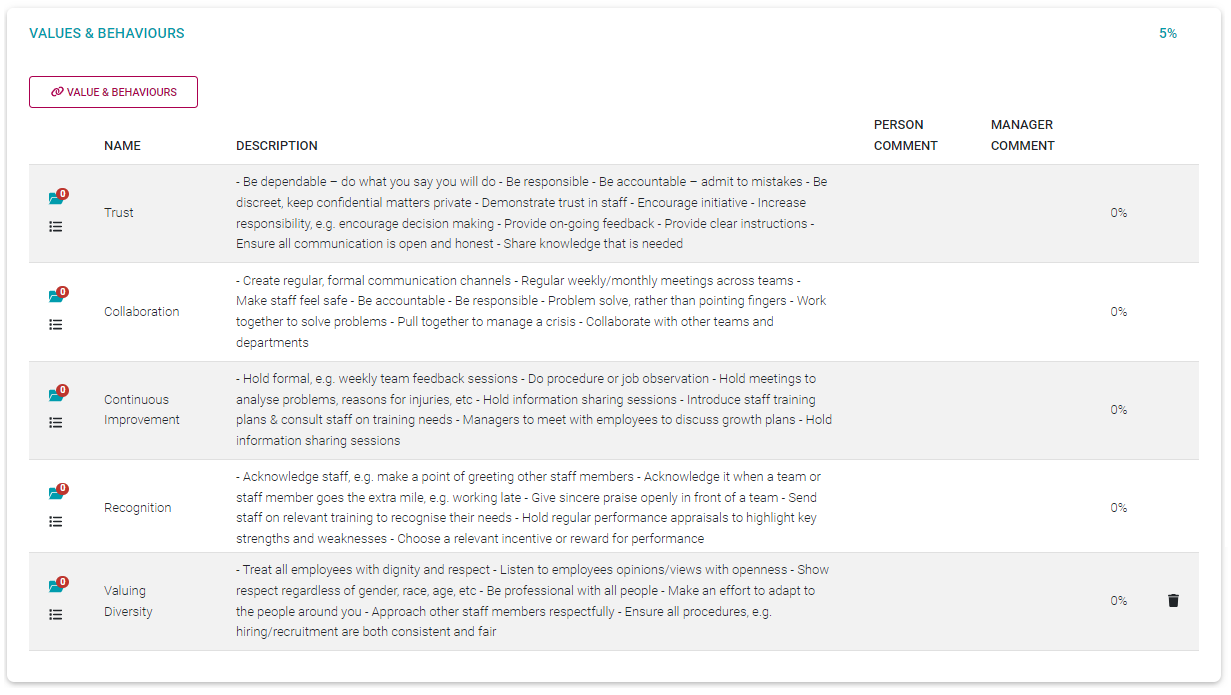](https://signature.signifyhr.co.za/uploads/images/gallery/2022-03/kSLAA9bD2cqjWehl-image-1646221257159.png) Note the following about the section.All items are pre-loaded but can be deleted as necessary, and in collaboration with your manager. Use the **Delete** icon to delete records.
[](https://signature.signifyhr.co.za/uploads/images/gallery/2022-03/noVOXyLJAqZRBPGX-image-1646222483346.png)Items not automatically loaded (e.g., because they were not part of the underlying template agreement), can be viewed and even added, by clicking the **(Link) Values & Behaviours** button in the section.
[](https://signature.signifyhr.co.za/uploads/images/gallery/2022-03/p9dSzvbfYRc0EwmI-image-1646222499025.png)Use the **MORE (ACTION PLAN)** icon to load an action specific to a Value. See [Performance Agreement - Setting Your Objectives PART 1](https://signature.signifyhr.co.za/books/performance-management-0a0/page/98-the-performance-agreement---setting-your-objectives-part-1 "Performance Agreement - Setting Your Objectives PART 1") for more details.
[](https://signature.signifyhr.co.za/uploads/images/gallery/2022-03/Fo29NCyC8DhVnwm0-image-1646222536982.png)Use the Documents icon to view and/or load documents in support of a Value.
[](https://signature.signifyhr.co.za/uploads/images/gallery/2022-03/SdrGa3Mfvg98O8gc-image-1646222736009.png)Click on a Value & Behaviour record to edit its weight and add relevant comments.
[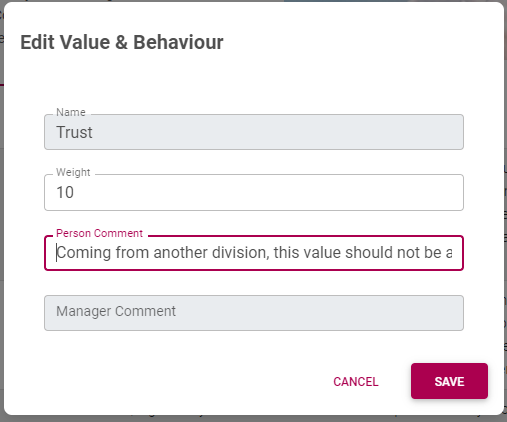](https://signature.signifyhr.co.za/uploads/images/gallery/2022-03/z8qmNxteXB1rOYEf-image-1646224452249.png) Once saved, the employee and manager comments display on the screen. [](https://signature.signifyhr.co.za/uploads/images/gallery/2022-03/Jyk4ecxrvDXSHPYQ-image-1646224522049.png) --- ### The Leadership Behaviours Section #### *(Optional, dependent on company settings)* The objectives in this section are automatically loaded when a new Performance Contract is created, and if you manage people i.e. You have employees reporting to you. See below for an example of a populated Leadership Behaviours section. Please refer to the section [The Performance Agreement - Overview](https://signature.signifyhr.co.za/books/performance-management-0a0/page/95-the-performance-agreement---overview "95% The Performance Agreement - Overview") for some background on its use. On the side menu, click the **Leadership Behaviours** section. Note the weight allocation. [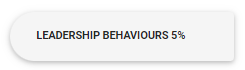](https://signature.signifyhr.co.za/uploads/images/gallery/2022-03/WdgzShXaGxrf0yBw-image-1646227146386.png) [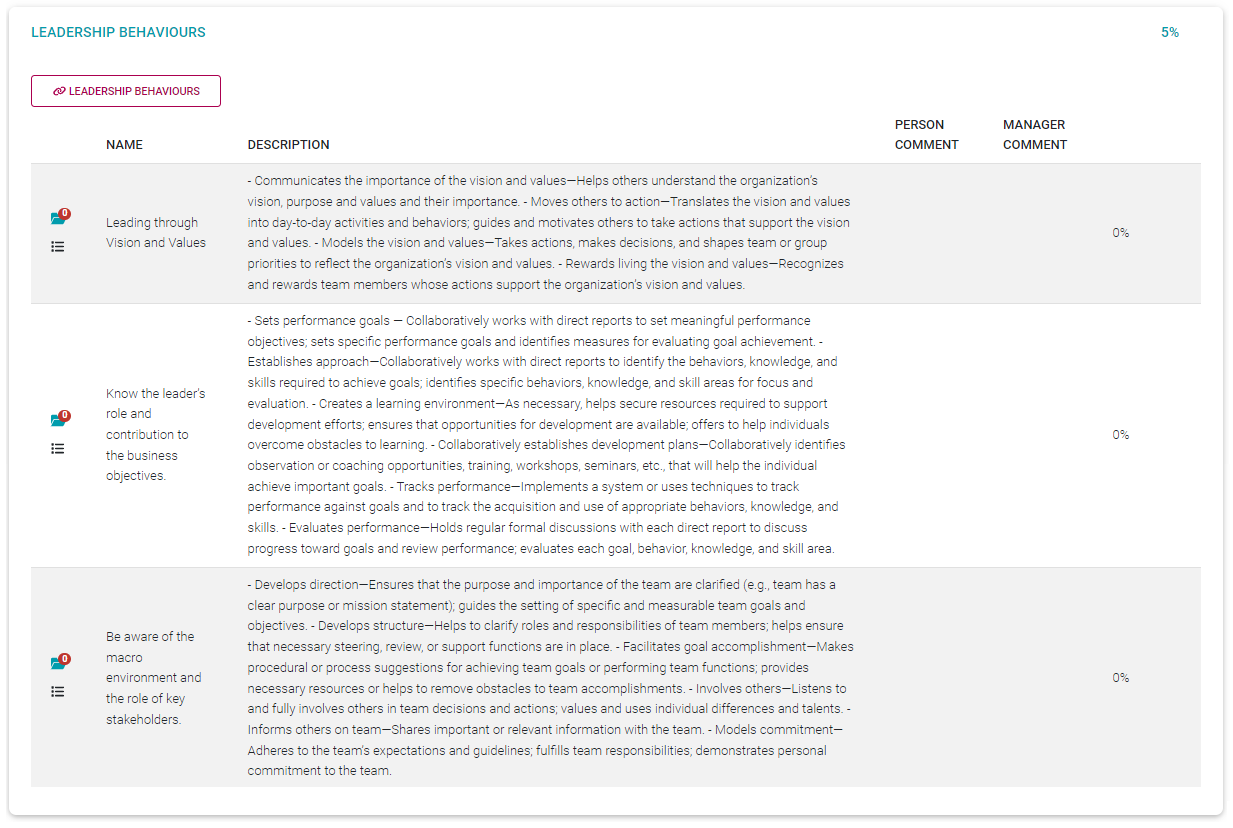](https://signature.signifyhr.co.za/uploads/images/gallery/2022-03/NrG11CnrfsTTuBQf-image-1646226175435.png) Note the following about the section.All items are pre-loaded but can be deleted as necessary, and in collaboration with your manager. Use the **Delete** icon to delete records.
[](https://signature.signifyhr.co.za/uploads/images/gallery/2022-03/noVOXyLJAqZRBPGX-image-1646222483346.png)Items not automatically loaded (e.g., because they were not part of the underlying template agreement), can be viewed and even added, by clicking the **(Link) Leadership Behaviours** button in the section.
[](https://signature.signifyhr.co.za/uploads/images/gallery/2022-03/ENLbIDekXr4Zc1TR-image-1646226303560.png)Use the **More** (also called **Action Plan**) icon to load an action specific to a Value. See [Performance Agreement - Setting Your Objectives PART 1](https://signature.signifyhr.co.za/books/performance-management-0a0/page/98-the-performance-agreement---setting-your-objectives-part-1 "Performance Agreement - Setting Your Objectives PART 1") for more details on loading actions.
[](https://signature.signifyhr.co.za/uploads/images/gallery/2022-03/Fo29NCyC8DhVnwm0-image-1646222536982.png)Use the Documents icon to view and/or load documents in support of a Value.
[](https://signature.signifyhr.co.za/uploads/images/gallery/2022-03/SdrGa3Mfvg98O8gc-image-1646222736009.png)Click on a Leadership Behaviour record to edit its weight and add relevant comments.
[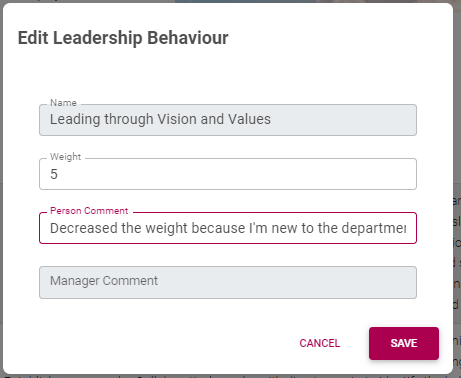](https://signature.signifyhr.co.za/uploads/images/gallery/2022-03/Q7UkaSvlFQ2wzh2e-image-1646226409374.png) Once saved, the employee and manager comments display on the screen. [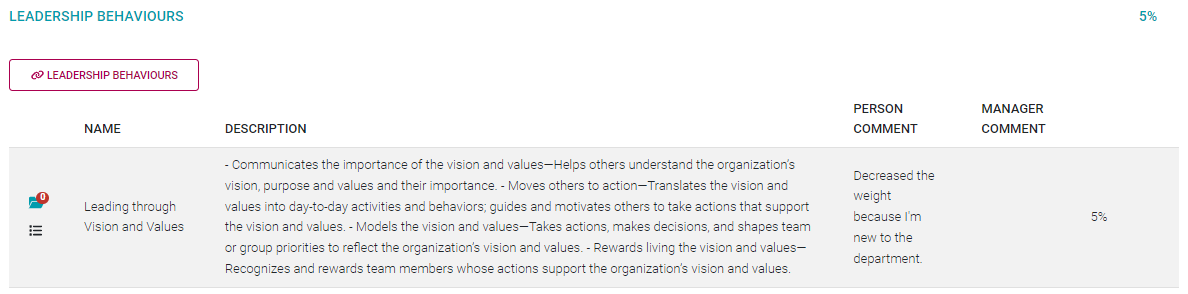](https://signature.signifyhr.co.za/uploads/images/gallery/2022-03/quBpIqhAkt7wXISu-image-1646226429237.png) --- ### The Key Competencies Section #### *(Optional, dependent on company settings)* The objectives in this section are sometimes sourced (from the employee's job profile) and automatically loaded when a new Performance Contract is created but this depends on company preferences. We are going to populate this section as if no records were pre-loaded. See below for an example of a populated Key Competencies section. Please refer to the section [The Performance Agreement - Overview](https://signature.signifyhr.co.za/books/performance-management-0a0/page/95-the-performance-agreement---overview "95% The Performance Agreement - Overview") for some background on its use. On the side menu, click the **Key Competencies** section. Note the weight allocation. [](https://signature.signifyhr.co.za/uploads/images/gallery/2022-03/xgrehoEyeyNq3jEu-image-1646227599747.png) [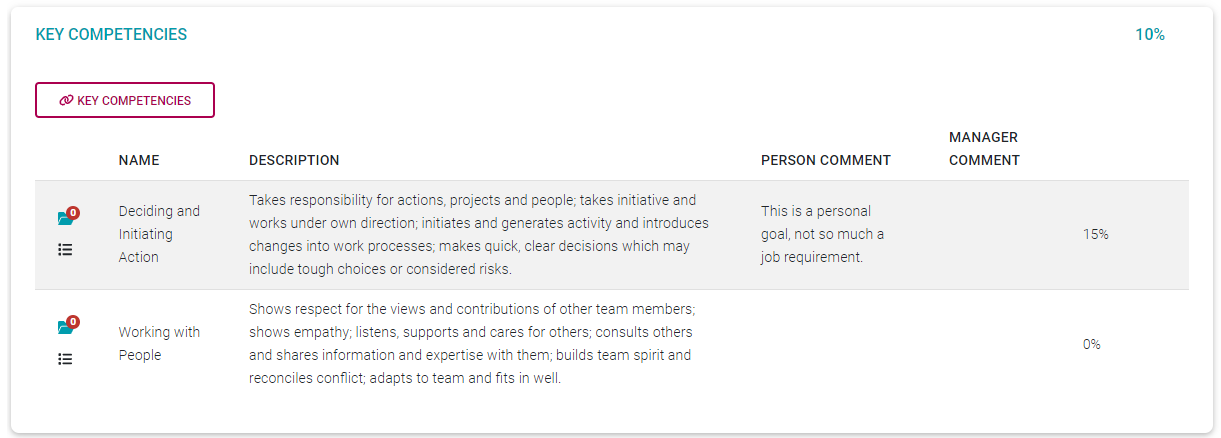](https://signature.signifyhr.co.za/uploads/images/gallery/2022-03/ufWOsWqCSfh1C6em-image-1646231640846.png) [](https://signature.signifyhr.co.za/uploads/images/gallery/2022-03/0gK0sHDhTYqsubHE-image-1646229055249.png) - Click **(Link) Key Competencies** to open a library screen with available key competencies to choose from. - Scroll through the list or use the **Search** facility at the top of the page. - Tick the check boxes of the chosen competencies and click **LINK** at the bottom of the screen. [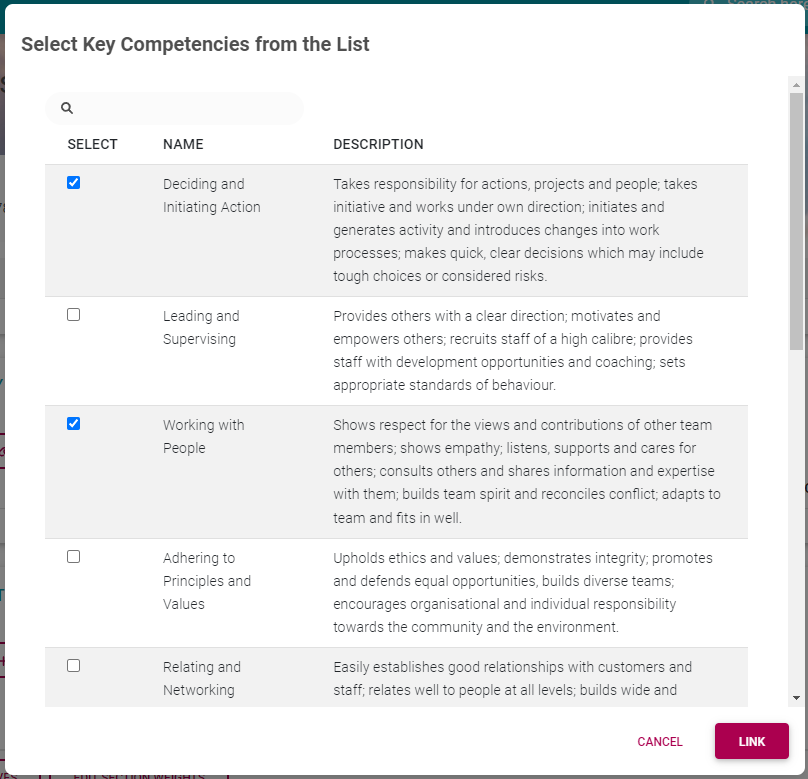](https://signature.signifyhr.co.za/uploads/images/gallery/2022-03/Y77XvICvaNI5VdOo-image-1646230055111.png) The selected key competencies are transferred to the agreement's Key Competencies section. [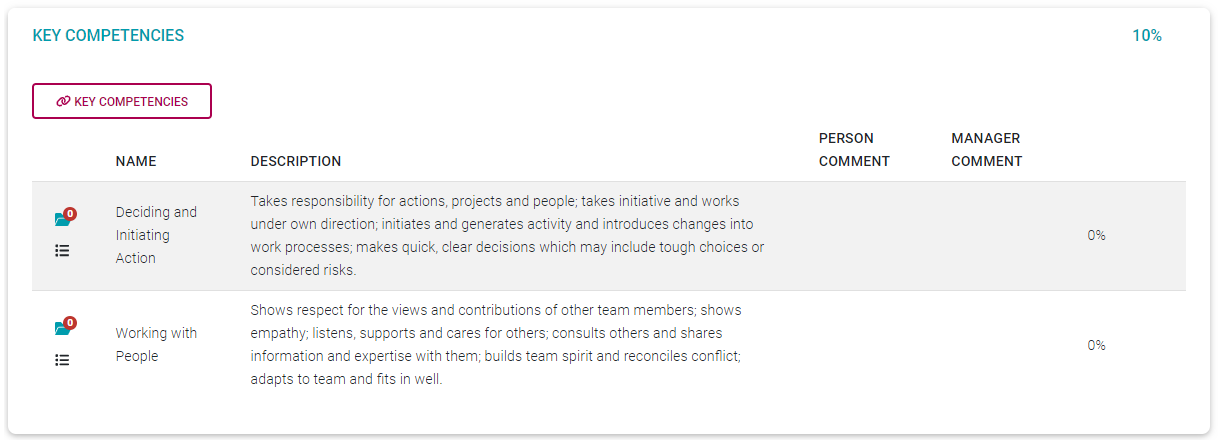](https://signature.signifyhr.co.za/uploads/images/gallery/2022-03/KlEa0CyFVZ4wa1Qz-image-1646230161456.png) - Each competency is assigned a 0% weight when initially selected. Note the following about the section's records.Use the **Delete** icon to delete records.
[](https://signature.signifyhr.co.za/uploads/images/gallery/2022-03/noVOXyLJAqZRBPGX-image-1646222483346.png)Use the **More (Action Plan)** icon to load an action specific to a Key Competency. See [Performance Agreement - Setting Your Objectives PART 1](https://signature.signifyhr.co.za/books/performance-management-0a0/page/98-the-performance-agreement---setting-your-objectives-part-1 "Performance Agreement - Setting Your Objectives PART 1") for more details on loading actions.
[](https://signature.signifyhr.co.za/uploads/images/gallery/2022-03/Fo29NCyC8DhVnwm0-image-1646222536982.png)Use the **Documents** icon to view and/or load documents in support of a Key Competency.
[](https://signature.signifyhr.co.za/uploads/images/gallery/2022-03/SdrGa3Mfvg98O8gc-image-1646222736009.png)Click on a Key Competency record to edit its weight and add relevant comments.
[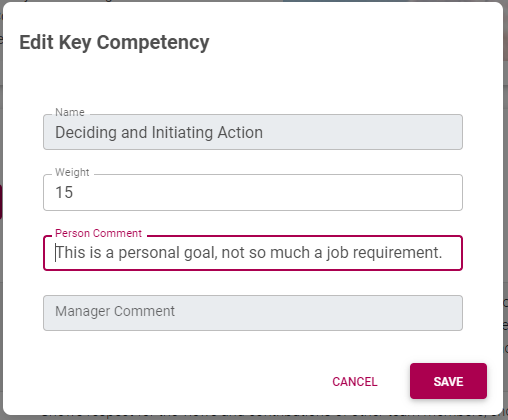](https://signature.signifyhr.co.za/uploads/images/gallery/2022-03/Uf3nhhAkM3AkP8kM-image-1646231194105.png) Once saved, the employee and manager comments display on the screen, and the weight is changed. [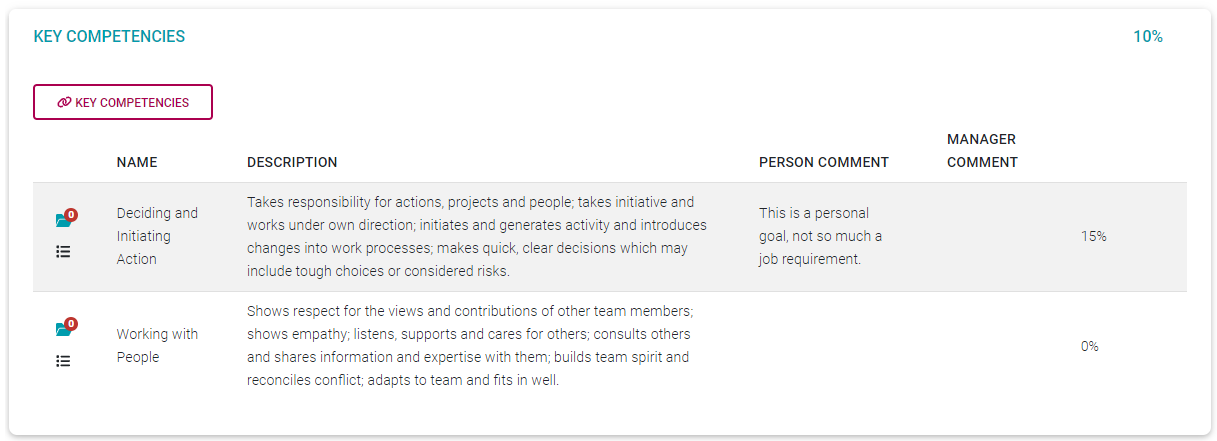](https://signature.signifyhr.co.za/uploads/images/gallery/2022-03/IXmob4mgByFLr3yp-image-1646231718987.png) --- ### Submitting Your Objectives In Parts 1 and 2 of setting your objectives, we learned how to work with each agreement section, loading objectives, and balancing weight allocations. In this section, we will learn how to finalise the sections and their objectives, and then how to submit the agreement to a manager for approval. We will approach the finalisation process via a checklist of typical questions to ask yourself.I have **populated all sections** (applicable to me) with suitable objectives.
Each objective has a **weight assigned.**
The sum total of all my **section weights = 100%**
[](https://signature.signifyhr.co.za/uploads/images/gallery/2022-03/AGAoHZ8Efr1hvn4r-image-1646232374410.png) At the bottom of the page, click **EDIT SECTION WEIGHTS** for a summary. [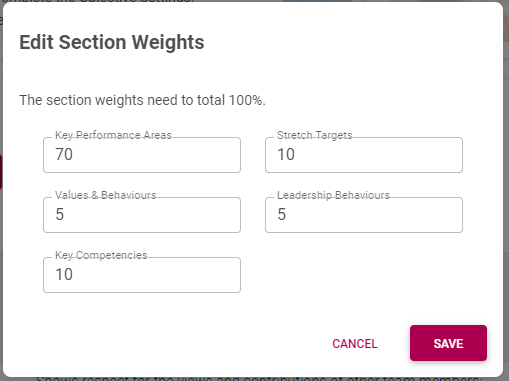](https://signature.signifyhr.co.za/uploads/images/gallery/2022-03/pA0VVRXvSUeJhhXW-image-1646232395474.png)Section by section, the sum total of **all section weights = 100%**. In the Key Performance Areas and Stretch Targets sections: - The weights of all KPIs under a parent KPA add up to 100%. - The weights of all KPAs under a parent perspective add up to 100%. - The weights of all perspectives add up to 100%.
I have uploaded appropriate **documentation** in support of my objectives - where needed.
Where applicable, appropriate **comments** have been added to objectives.
Where applicable, **objective-specific actions** were registered, due dates and responsible people assigned and progress updated.
Where applicable, **general actions** were registered, due dates and responsible people assigned, and progress updated.
**General comments** were loaded as needed.
[](https://signature.signifyhr.co.za/uploads/images/gallery/2022-03/Y7VzqakkRazFjju2-image-1646234434074.png) - If you are comfortable that the above was addressed, click **SUBMIT OBJECTIVES**. - Click the acknowledgement. - Click **SUBMIT**. [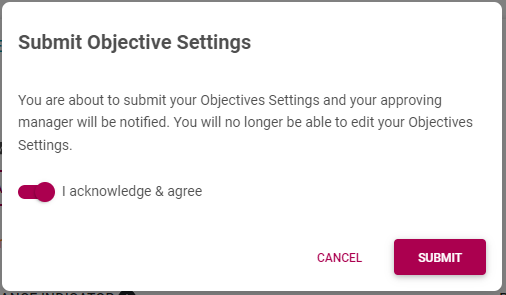](https://signature.signifyhr.co.za/uploads/images/gallery/2022-03/52ftcQxdxsH8fXDb-image-1646745401174.png) --- ### Typical Submission Messages Besides the checklist given above, the most important agreement element checked and validated by the system, is the item weights which must total 100%. With this we mean: The sum total of all **section weights = 100%** Section by section, the sum total of **all item weights = 100%**. In the Key Performance Areas and Stretch Targets sections: \- The weights of all KPIs under a parent KPA add up to 100%. \- The weights of all KPAs under a parent perspective add up to 100%. \- The weights of all perspectives add up to 100%. If any of these fails validation, expect a message like the one below. Then, check the totals of all the sections, change as needed, and submit again. [](https://signature.signifyhr.co.za/uploads/images/gallery/2022-03/UuX9sXZhCk4fEVzG-image-1646291823339.png) --- ### Beyond the Submission Submitting a performance contract to a manager kicks off a series of activities, inside the system and outside. See below for a summary of them. #### Email to the performance manager The following email (example only) will be sent to a manager when an employee has submitted his/her performance contract. [](https://signature.signifyhr.co.za/uploads/images/gallery/2022-03/9rlS84cOfKwHuKJQ-image-1647930010289.png) #### Email to the employee Upon approval of the employee's contract by the manager, the employee in his/her turn will receive the following notification (example only). [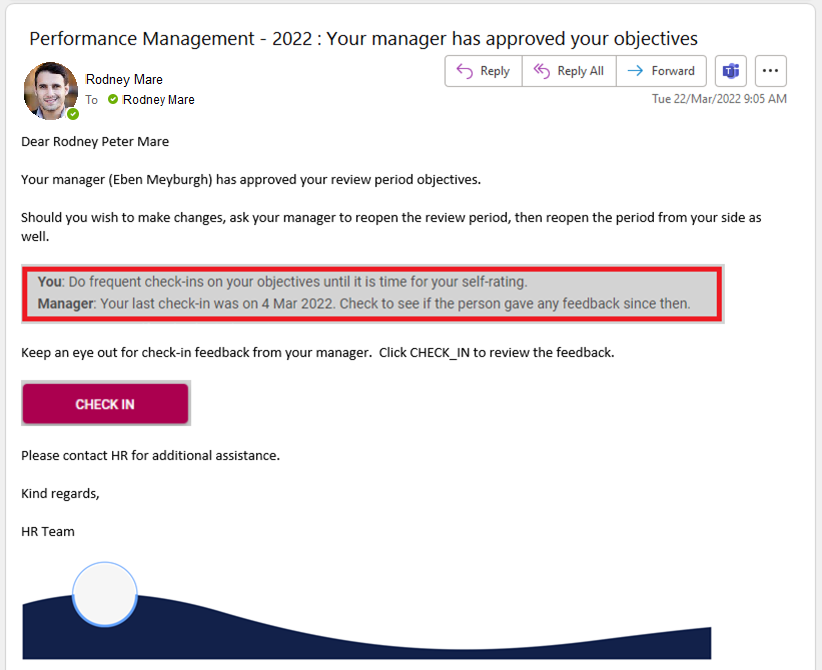](https://signature.signifyhr.co.za/uploads/images/gallery/2022-03/n8STrdKexqbVvNWQ-image-1647934724845.png) #### Contract status update Each contract has a progress status as it continues on its way to approval, review, finalisation, etc. After submitting the agreement content, the contract status on the employee's side changes as follows. [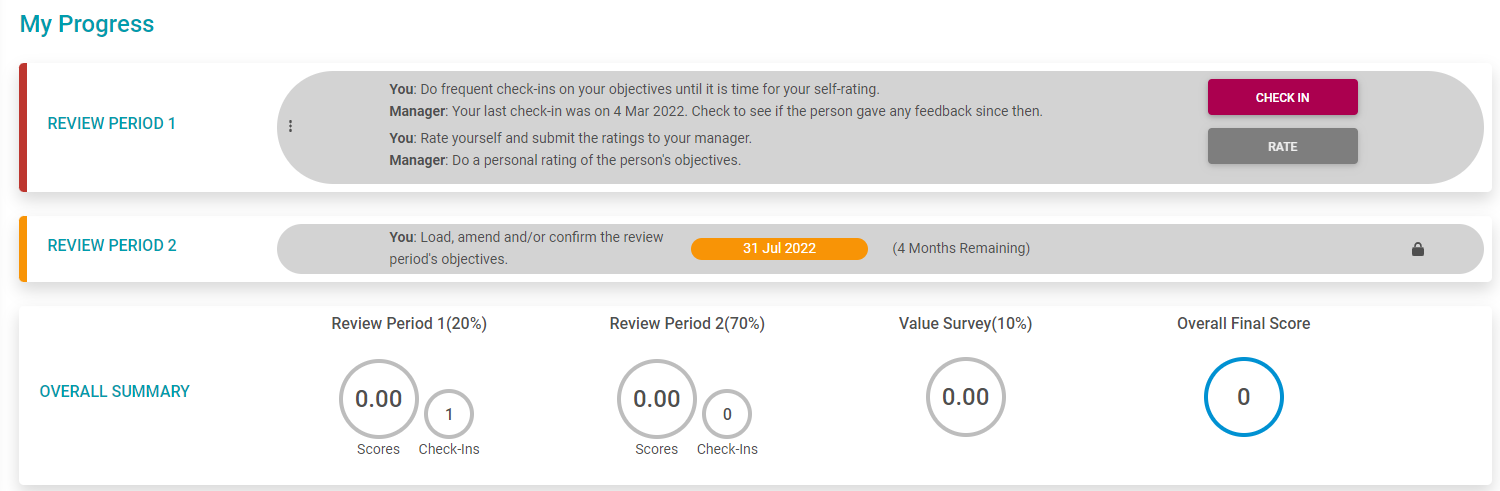](https://signature.signifyhr.co.za/uploads/images/gallery/2022-03/fk2ESWPctlIK3FX9-image-1647253998061.png) --- #### What will happen next? Expect the following to happen once you have submitted your Performance Contract.Your performance manager might call you for a meeting to discuss your objectives, their weights, how to measure them, and what their review might entail.
Your performance manager will approve your objectives and you will receive an email stating the fact.
Your Performance Agreement will allow Check-ins on your objectives. For more information, see [Doing Check-ins on your Objectives](https://signature.signifyhr.co.za/books/performance-management-0a0/page/2-check-ins "Doing Check-ins on your Objectives"). Regularly sit down with your manager and do a Check-in on your objectives.
When the time arrives, the review of your objectives will be enabled and become available.
--- #### Reopening a submitted contract Suppose you would like to make changes to your objectives after you have submitted the contract, and even after your manager has approved the objectives as well. See below for the steps to follow in each of these cases. ##### You have submitted the contract, but the manager hasn't approved it yet In this case, you can reopen the contract from your Performance Dashboard with one click. [](https://signature.signifyhr.co.za/uploads/images/gallery/2022-03/T3LCFUPdT6e73NYV-image-1646297413246.png) - Locate and click the **More** icon to open its items. [](https://signature.signifyhr.co.za/uploads/images/gallery/2022-03/dSDHG4s6TUj7r7LD-image-1647254099048.png) - Click **MODIFY OBJECTIVES**. - And wait for the confirmation message. [](https://signature.signifyhr.co.za/uploads/images/gallery/2022-03/FDpz1s0LFKF7osBd-image-1646297954961.png) The agreement is now open again as shown by the progress. [](https://signature.signifyhr.co.za/uploads/images/gallery/2022-03/Nctv1mH4rHm2A7xD-image-1647254129887.png) Since the approval of your objectives triggered a notification to your manager, the reopening of your agreement will again trigger a notification. See an example below. [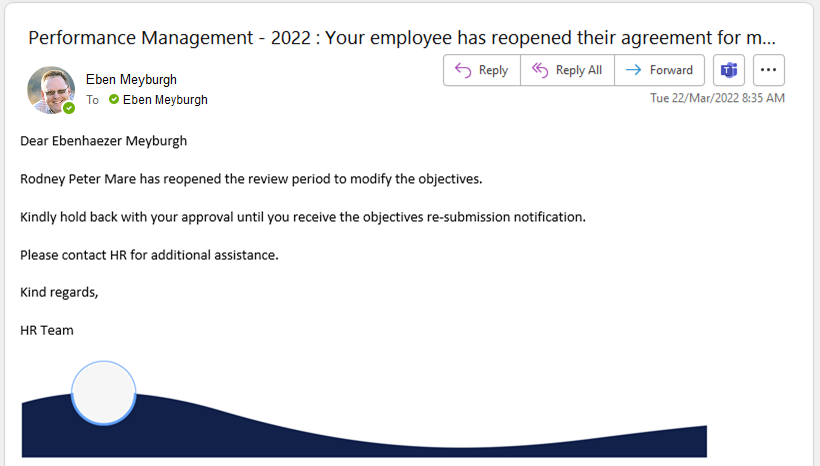](https://signature.signifyhr.co.za/uploads/images/gallery/2022-03/TDbge6pWnBwoFtcZ-image-1647933512554.png) ##### You have submitted the contract, and the manager has approved it If your contract has been submitted (by you) and approved (by your manager), then two steps are needed. - Ask your manager to open his/her Performance Dashboard and click **MODIFY OBJECTIVES** on your contract - thus cancelling the manager's approval. [](https://signature.signifyhr.co.za/uploads/images/gallery/2022-03/j5kFxjKPBKY0BA1H-image-1647254256706.png) You can expect a notification confirming the agreement's reopening, similar to the one below. [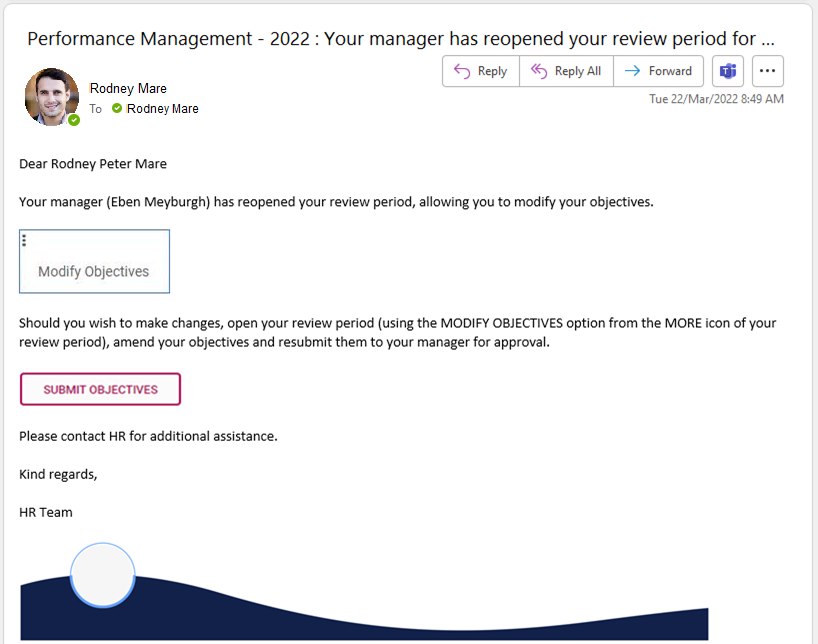](https://signature.signifyhr.co.za/uploads/images/gallery/2022-03/GJJe1wxNsKmAn1bp-image-1647934779574.png) - On your Performance Dashboard, go to the period to be opened, and click **MODIFY OBJECTIVES** - thus cancelling your submission and opening the agreement. [](https://signature.signifyhr.co.za/uploads/images/gallery/2022-03/dSDHG4s6TUj7r7LD-image-1647254099048.png) Recall that your manager will be notified of the agreement's reopening via a notification, like the one shown earlier. --- #### Changing a submitted/approved contract Initially, the employee and manager can work on the employee's objectives while the review period is still in the objective setting phase. At some stage, the employee or manager may submit or approve the objectives from their side...while the other is still making changes. If any changes are made on a submitted or approved review period, the submission/approval is automatically cancelled, and the parties will receive a notification to this effect. This is done to protect employees and managers from thinking a review period is done, while changes are still being made. If the employee's submission has been cancelled by the system, the employee can expect this notification. (Example only) [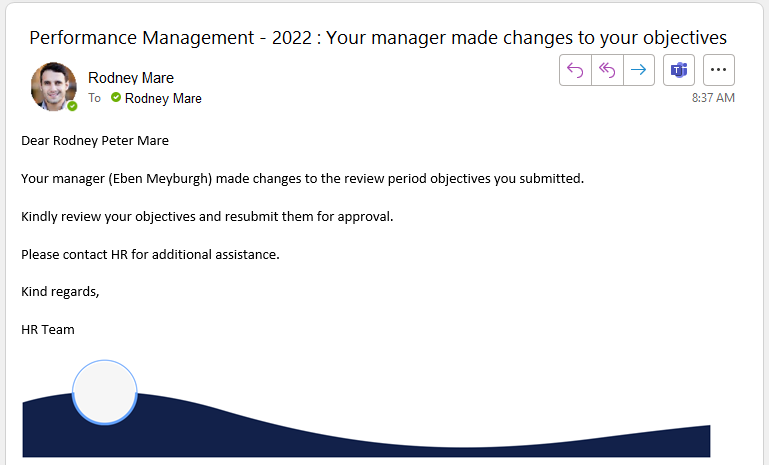](https://signature.signifyhr.co.za/uploads/images/gallery/2022-03/Y954n6YjngFk4wf1-image-1648108249690.png) If the manager's approval has been cancelled by the system, the manager can expect this notification. (Example only) [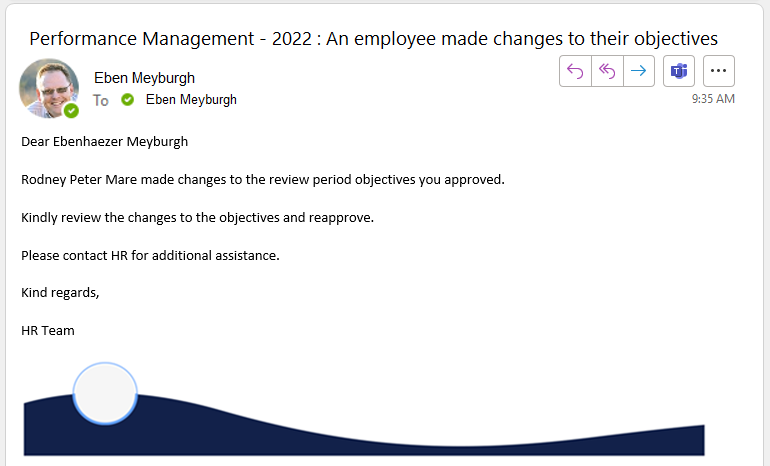](https://signature.signifyhr.co.za/uploads/images/gallery/2022-03/EcT2vJWPqh8kCvVP-image-1648107311596.png) --- ##### **Recommended further reading:** - [Glossary](https://signature.signifyhr.co.za/books/performance-management-0a0/page/95-glossary "Glossary") of terminology and definitions - [How to Use Performance Management with Success](https://signature.signifyhr.co.za/books/performance-management-0a0/page/100-how-to-make-it-a-success "100% How to Make it a Success") - [The Employee's Performance Management Dashboard](https://signature.signifyhr.co.za/books/performance-management-0a0/page/100-the-performance-management-dashboard---for-employees "100% The Performance Management Dashboard - For employees") - [Open an Existing Contract](https://signature.signifyhr.co.za/books/performance-management-0a0/page/99-the-performance-management-dashboard---open-an-existing-contract "99% The Performance Management Dashboard - Open an existing contract") - [Create a New Contract](https://signature.signifyhr.co.za/books/performance-management-0a0/page/100-the-performance-management-dashboard---create-a-new-contract "100% The Performance Management Dashboard - Create a new contract") - [Functionalities and Layout of the Performance Management Dashboard](https://signature.signifyhr.co.za/books/performance-management-0a0/page/99-the-performance-management-dashboard---functionalities-and-layout "99% The Performance Management Dashboard - Functionalities and layout") - [The Manager's Performance Management Dashboard](https://signature.signifyhr.co.za/books/performance-management-0a0/page/98-the-performance-management-dashboard---for-managers "98% The Performance Management Dashboard - for Managers") - [Overview of The Performance Agreement Screen](https://signature.signifyhr.co.za/books/performance-management-0a0/page/95-the-performance-agreement---overview "95% The Performance Agreement - Overview") - [Set your objectives - Part 1 (Working with KPAs and KPIs)](https://signature.signifyhr.co.za/books/performance-management-0a0/page/98-the-performance-agreement---set-your-objectives-part-1 "98% The Performance Agreement - Set Your Objectives PART 1") - [Set your objectives - Part 2 (Working with the other sections)](https://signature.signifyhr.co.za/books/performance-management-0a0/page/98-the-performance-agreement---set-your-objectives-part-2) - [Perform a Check-in on your Objectives](https://signature.signifyhr.co.za/books/performance-management-0a0/page/98-the-performance-agreement---check-ins "98% The Performance Agreement - Check-ins") - [Rate your objectives](https://signature.signifyhr.co.za/books/performance-management-0a0/page/0-the-performance-agreement---rating-phase "0% The Performance Agreement - Rating phase") [](https://signature.signifyhr.co.za/uploads/images/gallery/2022-03/medzFZTNqL0PJOW3-image-1646900216890.png)