# The Performance Management Dashboard - Functionalities and layout

##### **Process: Step 1**

[![image-1646899147331.jpg](https://signature.signifyhr.co.za/uploads/images/gallery/2022-03/scaled-1680-/0gjbZQV3HNrwW2T0-image-1646899147331.jpg)](https://signature.signifyhr.co.za/uploads/images/gallery/2022-03/0gjbZQV3HNrwW2T0-image-1646899147331.jpg)

[![image-1646899321731.png](https://signature.signifyhr.co.za/uploads/images/gallery/2022-03/scaled-1680-/fkHC2rB1eyWY8NB3-image-1646899321731.png)](https://signature.signifyhr.co.za/uploads/images/gallery/2022-03/fkHC2rB1eyWY8NB3-image-1646899321731.png)

##### **Lesson duration**

About 15 minutes

[![image-1646899329856.png](https://signature.signifyhr.co.za/uploads/images/gallery/2022-03/scaled-1680-/9Cunlm3wOO4eS9B3-image-1646899329856.png)](https://signature.signifyhr.co.za/uploads/images/gallery/2022-03/9Cunlm3wOO4eS9B3-image-1646899329856.png)

##### <span style="color: #993300;">What you will **learn:**</span>

- ##### How to [**switch** ](https://signature.signifyhr.co.za/link/1410#bkmrk-%232.-my-contract-%2F-my)between the employee's Performance Management Dashboard, and that of the manager.
- ##### Understand performance [**periods** and **phases**](https://signature.signifyhr.co.za/link/1410#bkmrk-%233.-the-periods-and-).
- ##### How to read your [**contract's progress**](https://signature.signifyhr.co.za/link/1410#bkmrk-%234.-the-status-of-a-), and what your next step would be.
- ##### How to '[**delete**](https://signature.signifyhr.co.za/link/1410#bkmrk-delete-objectives)' a contract's review period.
- ##### How to [**print** ](https://signature.signifyhr.co.za/link/1410#bkmrk-view-%2F-print)a contract.
- ##### Understand the [**locking** ](https://signature.signifyhr.co.za/link/1410#bkmrk-view-%2F-print)of periods and phases.

[![image-1646899343922.png](https://signature.signifyhr.co.za/uploads/images/gallery/2022-03/scaled-1680-/0BoImjMXaqUTfgAx-image-1646899343922.png)](https://signature.signifyhr.co.za/uploads/images/gallery/2022-03/0BoImjMXaqUTfgAx-image-1646899343922.png)

## Additional Functionalities on the Performance Management Dashboard

In previous pages, we discussed some of the functionalities available to employees and managers, but we focused specifically on creating a new Performance Contract.

On this page, we will highlight a few additional functionalities and the general layout of the dashboard screen. In our discussion, we will refer to the screen and pointers below.

[![image-1647253004015.png](https://signature.signifyhr.co.za/uploads/images/gallery/2022-03/scaled-1680-/5GXF5NZAKVsAoDNl-image-1647253004015.png)](https://signature.signifyhr.co.za/uploads/images/gallery/2022-03/5GXF5NZAKVsAoDNl-image-1647253004015.png)

---

### \#1. Performance years

At the top of the Performance Management Dashboard you will find a dropdown with the existing and previous performance years. The default value is the current performance year. Page back to historical contracts by choosing the applicable performance year.

[![image-1645692632694.png](https://signature.signifyhr.co.za/uploads/images/gallery/2022-02/scaled-1680-/iBsvDRiPHYAafDFI-image-1645692632694.png)](https://signature.signifyhr.co.za/uploads/images/gallery/2022-02/iBsvDRiPHYAafDFI-image-1645692632694.png)

---

### \#2. My contract / My team's contracts

The toggle button is used to easily switch between your Performance Contract, and those of your team - should you be managing a group of people.

[![image-1645692652603.png](https://signature.signifyhr.co.za/uploads/images/gallery/2022-02/scaled-1680-/u6s8amd03z8t1nSD-image-1645692652603.png)](https://signature.signifyhr.co.za/uploads/images/gallery/2022-02/u6s8amd03z8t1nSD-image-1645692652603.png)

---

### \#3. The periods and phases in my contract

[![image-1645692697805.png](https://signature.signifyhr.co.za/uploads/images/gallery/2022-02/scaled-1680-/TDhRDuOZ6750EJaN-image-1645692697805.png)](https://signature.signifyhr.co.za/uploads/images/gallery/2022-02/TDhRDuOZ6750EJaN-image-1645692697805.png)

A contract is made up of contract items of which at least one is a review period (containing your performance objectives), and an optional component e.g., a Value Survey.

[![image-1645694898262.png](https://signature.signifyhr.co.za/uploads/images/gallery/2022-02/scaled-1680-/0rMwFSkgx6nKzRkQ-image-1645694898262.png)](https://signature.signifyhr.co.za/uploads/images/gallery/2022-02/0rMwFSkgx6nKzRkQ-image-1645694898262.png)

Each review period comprises two phases: during the **Objective Setting** phase your agreement objectives are determined, and during the **Rating** phase the objectives are evaluated and scored or rated.

Optionally you may have access to a **Check-in** phase which allows the employee and manager to do ad-hoc check-ins (informal evaluations) of the employee's progress in reaching the employee's objectives.

Furthermore, each review period and its phases are time-bound, as indicated by the timeline. Some may be available for access, some may still be locked, as indicated by their grey colour.

[![image-1645695398723.png](https://signature.signifyhr.co.za/uploads/images/gallery/2022-02/scaled-1680-/Q3GZMqDulKTI6aDA-image-1645695398723.png)](https://signature.signifyhr.co.za/uploads/images/gallery/2022-02/Q3GZMqDulKTI6aDA-image-1645695398723.png)

If an employee's contract contains more than one review period, the same phases will repeat for each review period.

The optional contract item, called Value Survey above, has only one phase.

[![image-1645695665751.png](https://signature.signifyhr.co.za/uploads/images/gallery/2022-02/scaled-1680-/JNlR26W3i1rdCIEB-image-1645695665751.png)](https://signature.signifyhr.co.za/uploads/images/gallery/2022-02/JNlR26W3i1rdCIEB-image-1645695665751.png)

---

### \#4. My progress in the review periods

Together, the review periods in your performance contract form your Performance Agreement i.e., the agreement or consensus between you and your manager about your objectives for the year ahead.

Each review period goes through two formal stages (objective setting, and rating) with an optional check-in functionality or phase supporting them. A review period's status or progress must be read with the official timelines in mind. Hover on a review period's progress and date range bar to get the specific dates for a phase.

[![image-1647253085627.png](https://signature.signifyhr.co.za/uploads/images/gallery/2022-03/scaled-1680-/kXr9p4c12px0UaK5-image-1647253085627.png)](https://signature.signifyhr.co.za/uploads/images/gallery/2022-03/kXr9p4c12px0UaK5-image-1647253085627.png)

[![image-1645701773854.png](https://signature.signifyhr.co.za/uploads/images/gallery/2022-02/scaled-1680-/D2SCPl3q9aAEWgb5-image-1645701773854.png)](https://signature.signifyhr.co.za/uploads/images/gallery/2022-02/D2SCPl3q9aAEWgb5-image-1645701773854.png)

On the images above, note the following:

The instructions about your next step in a phase. Here are a few instructions from the perspective of an employee.

<p class="callout info">Load, amend and/or confirm the review period's objectives.</p>

<p class="callout info">Finish setting your objectives and submit them to your manager.</p>

<p class="callout info">Do frequent check-ins on your objectives until it is time for your self-rating.</p>

<p class="callout info">Do your self-rating and submit it to your manager.</p>

The countdown to a deadline. As you can see from the Timelines, each phase has a date range. Usually, a review period's phase is only open for changes while you are within the phase date range. Before and after the date range, a phase might be locked.

[![image-1645702482260.png](https://signature.signifyhr.co.za/uploads/images/gallery/2022-02/scaled-1680-/0ZACnfHr5oId3ou2-image-1645702482260.png)](https://signature.signifyhr.co.za/uploads/images/gallery/2022-02/0ZACnfHr5oId3ou2-image-1645702482260.png)

The action(s) that corresponds with the suggested next step. Here are some of the action buttons you can expect to see.

<table border="1" id="bkmrk-button-your-action-c" style="border-collapse: collapse; width: 100%;"><tbody><tr><td style="width: 23.9507%;">**BUTTON**</td><td style="width: 76.0493%;">**YOUR ACTION**</td></tr><tr><td style="width: 23.9507%;">[![image-1645702995085.png](https://signature.signifyhr.co.za/uploads/images/gallery/2022-02/scaled-1680-/wEdcemNRBa2TlFdQ-image-1645702995085.png)](https://signature.signifyhr.co.za/uploads/images/gallery/2022-02/wEdcemNRBa2TlFdQ-image-1645702995085.png)</td><td style="width: 76.0493%;">Click to create your Performance Contract.</td></tr><tr><td style="width: 23.9507%;">[![image-1645702978351.png](https://signature.signifyhr.co.za/uploads/images/gallery/2022-02/scaled-1680-/QxBWyfssble9d87m-image-1645702978351.png)](https://signature.signifyhr.co.za/uploads/images/gallery/2022-02/QxBWyfssble9d87m-image-1645702978351.png)</td><td style="width: 76.0493%;">Click to open your agreement's review period and then either add or amend your objectives and/or submit the objectives to your manager.</td></tr><tr><td style="width: 23.9507%;">[![image-1646716371597.png](https://signature.signifyhr.co.za/uploads/images/gallery/2022-03/scaled-1680-/RZC0957DBpFwuBCX-image-1646716371597.png)](https://signature.signifyhr.co.za/uploads/images/gallery/2022-03/RZC0957DBpFwuBCX-image-1646716371597.png)

</td><td style="width: 76.0493%;">Click to open the Check-in functionality where you and your manager can evaluate your progress against your set objectives. A check-in is a more informal evaluation of objectives to give guidance before the formal review is done.</td></tr><tr><td style="width: 23.9507%;">[![image-1646716348654.png](https://signature.signifyhr.co.za/uploads/images/gallery/2022-03/scaled-1680-/6I3fdkzx0LoO3hKi-image-1646716348654.png)](https://signature.signifyhr.co.za/uploads/images/gallery/2022-03/6I3fdkzx0LoO3hKi-image-1646716348654.png)

</td><td style="width: 76.0493%;">Click to open your review period and do a self-rating of your performance against each objective. Your self-ratings will become visible to your manager only once you submit the agreement.</td></tr><tr><td style="width: 23.9507%;">[![image-1646841130141.png](https://signature.signifyhr.co.za/uploads/images/gallery/2022-03/scaled-1680-/n4izUHD2LIPZN86U-image-1646841130141.png)](https://signature.signifyhr.co.za/uploads/images/gallery/2022-03/n4izUHD2LIPZN86U-image-1646841130141.png)

</td><td style="width: 76.0493%;">The review period was finalised and closed out. Click to view your manager's personal ratings as well as the final agreement ratings.</td></tr></tbody></table>

---

### \#5. Further actions available during a review period

Besides the usual activities during a review period, you also have access to all documents uploaded against KPIs and other objectives in the review period, and to print a copy of your review period.

- Hover over or click the **More** icon (also called **Action Plan**) to reveal any further options you may have.

[![image-1646711219850.png](https://signature.signifyhr.co.za/uploads/images/gallery/2022-03/scaled-1680-/lQfQCTD6rVyLLuVx-image-1646711219850.png)](https://signature.signifyhr.co.za/uploads/images/gallery/2022-03/lQfQCTD6rVyLLuVx-image-1646711219850.png)

#### View Documents:

All documents uploaded during the contracting period can be found here. They are available for viewing or downloading.

- Click **View Documents** from the review period's **More** (**Action Plan**) icon options.

[![image-1646310825557.png](https://signature.signifyhr.co.za/uploads/images/gallery/2022-03/scaled-1680-/BSbXdd4uIVHSQ2Oi-image-1646310825557.png)](https://signature.signifyhr.co.za/uploads/images/gallery/2022-03/BSbXdd4uIVHSQ2Oi-image-1646310825557.png)

#### View / Print:

Printing a document is standard functionality. Due to the potential size of a Performance Agreement, note the following trick to contain the size of what is going to be printed.

- Click **View / Print** from the review period's **More** icon options.
- While in print preview mode, locate and click the collapse icon to the far right of the section(s) whose content you'd like to hide when printing. For effect, we have collapsed all sections' content, retaining only the section title, percentage weight and scores - if any, and the General Comments section. See the example below.

[![image-1646312467174.png](https://signature.signifyhr.co.za/uploads/images/gallery/2022-03/scaled-1680-/bjhNQ1FRiQ3iC6HR-image-1646312467174.png)](https://signature.signifyhr.co.za/uploads/images/gallery/2022-03/bjhNQ1FRiQ3iC6HR-image-1646312467174.png)

[![image-1646312728117.png](https://signature.signifyhr.co.za/uploads/images/gallery/2022-03/scaled-1680-/xPTf6uieMy2yC7aH-image-1646312728117.png)](https://signature.signifyhr.co.za/uploads/images/gallery/2022-03/xPTf6uieMy2yC7aH-image-1646312728117.png)

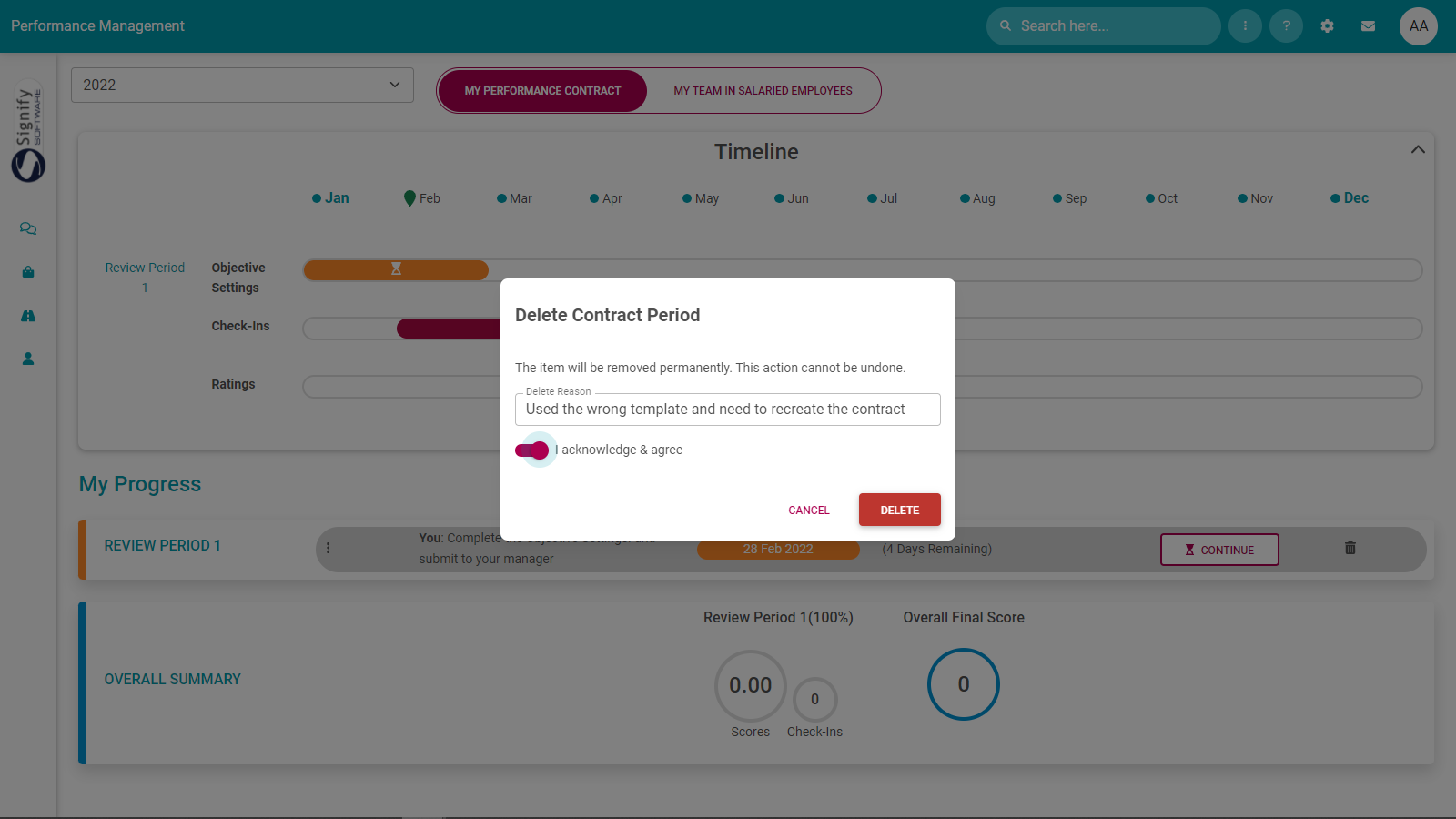
#### Delete Objectives:

<p class="callout danger">Your Performance Contract's number of review periods is fixed. Therefore, clicking the **DELETE** button below does not delete the review period; it clears out all objectives you may have loaded into any section of your agreement.</p>

[![image-1647253439971.png](https://signature.signifyhr.co.za/uploads/images/gallery/2022-03/scaled-1680-/1M912Iji8p3CYDFY-image-1647253439971.png)](https://signature.signifyhr.co.za/uploads/images/gallery/2022-03/1M912Iji8p3CYDFY-image-1647253439971.png)

- Once clicked, follow the on-screen instructions to delete the objectives.
- Note that a review period can only be deleted if it has not yet been approved.

[![image-1645621358400.png](https://signature.signifyhr.co.za/uploads/images/gallery/2022-02/scaled-1680-/bCGvpo2vpfCYYn4t-image-1645621358400.png)](https://signature.signifyhr.co.za/uploads/images/gallery/2022-02/bCGvpo2vpfCYYn4t-image-1645621358400.png)
---

### \#6. If something seems locked

[![image-1645692810973.png](https://signature.signifyhr.co.za/uploads/images/gallery/2022-02/scaled-1680-/dX40zrrSeoglaffc-image-1645692810973.png)](https://signature.signifyhr.co.za/uploads/images/gallery/2022-02/dX40zrrSeoglaffc-image-1645692810973.png)

If you find a lock symbol or icon in a review period, it means your manager or employee is busy working on the review period, either loading objectives or scoring the objectives. Only one person is allowed to work in a review period at any given moment.

---

### \#7. In summary

When a contract has been finalised, it implies the following has been done. This is shown in the Overall Summary part of the performance dashboard.

1. All the review periods have been populated with objectives - and approved by the manager.
2. All the review periods have been rated - and approved by the manager. (There is a score for each period)
3. If applicable, the scores from any additional components (e.g., a Value Survey) have been entered into the system and incorporated into the employee's contract.
4. A final overall score was calculated and is available.

[![image-1645692913161.png](https://signature.signifyhr.co.za/uploads/images/gallery/2022-02/scaled-1680-/gDgBz3d0VXJ58UjE-image-1645692913161.png)](https://signature.signifyhr.co.za/uploads/images/gallery/2022-02/gDgBz3d0VXJ58UjE-image-1645692913161.png)

---

##### **Recommended further reading**

- [Glossary](https://signature.signifyhr.co.za/books/performance-management-0a0/page/95-glossary "Glossary") of terminology and definitions
- [How to Use Performance Management with Success](https://signature.signifyhr.co.za/books/performance-management-0a0/page/100-how-to-make-it-a-success "100% How to Make it a Success")
- [The Employee's Performance Management Dashboard](https://signature.signifyhr.co.za/books/performance-management-0a0/page/100-the-performance-management-dashboard---for-employees "100% The Performance Management Dashboard - For employees")
- [Open an Existing Contract](https://signature.signifyhr.co.za/books/performance-management-0a0/page/99-the-performance-management-dashboard---open-an-existing-contract "99% The Performance Management Dashboard - Open an existing contract")
- [Create a New Contract](https://signature.signifyhr.co.za/books/performance-management-0a0/page/100-the-performance-management-dashboard---create-a-new-contract "100% The Performance Management Dashboard - Create a new contract")
- [Functionalities and Layout of the Performance Management Dashboard](https://signature.signifyhr.co.za/books/performance-management-0a0/page/99-the-performance-management-dashboard---functionalities-and-layout "99% The Performance Management Dashboard - Functionalities and layout")
- [The Manager's Performance Management Dashboard](https://signature.signifyhr.co.za/books/performance-management-0a0/page/98-the-performance-management-dashboard---for-managers "98% The Performance Management Dashboard - for Managers")
- [Overview of The Performance Agreement Screen](https://signature.signifyhr.co.za/books/performance-management-0a0/page/95-the-performance-agreement---overview "95% The Performance Agreement - Overview")
- [Set your objectives - Part 1 (Working with KPAs and KPIs)](https://signature.signifyhr.co.za/books/performance-management-0a0/page/98-the-performance-agreement---set-your-objectives-part-1 "98% The Performance Agreement - Set Your Objectives PART 1")
- [Set your objectives - Part 2 (Working with the other sections)](https://signature.signifyhr.co.za/books/performance-management-0a0/page/98-the-performance-agreement---set-your-objectives-part-2)
- [Perform a Check-in](https://signature.signifyhr.co.za/books/performance-management-0a0/page/98-the-performance-agreement---check-ins "98% The Performance Agreement - Check-ins")
- [Rate your objectives](https://signature.signifyhr.co.za/books/performance-management-0a0/page/0-the-performance-agreement---rating-phase "0% The Performance Agreement - Rating phase")

[![image-1646899796462.png](https://signature.signifyhr.co.za/uploads/images/gallery/2022-03/scaled-1680-/UlkneH0cgaVtrEkQ-image-1646899796462.png)](https://signature.signifyhr.co.za/uploads/images/gallery/2022-03/UlkneH0cgaVtrEkQ-image-1646899796462.png)