# The Performance Management Dashboard - Open an existing contract

##### **Process: Step 1**

[![image-1646899147331.jpg](https://signature.signifyhr.co.za/uploads/images/gallery/2022-03/scaled-1680-/0gjbZQV3HNrwW2T0-image-1646899147331.jpg)](https://signature.signifyhr.co.za/uploads/images/gallery/2022-03/0gjbZQV3HNrwW2T0-image-1646899147331.jpg)

[![image-1646899321731.png](https://signature.signifyhr.co.za/uploads/images/gallery/2022-03/scaled-1680-/fkHC2rB1eyWY8NB3-image-1646899321731.png)](https://signature.signifyhr.co.za/uploads/images/gallery/2022-03/fkHC2rB1eyWY8NB3-image-1646899321731.png)

##### **Lesson duration**

About 5 minutes

[![image-1646899329856.png](https://signature.signifyhr.co.za/uploads/images/gallery/2022-03/scaled-1680-/9Cunlm3wOO4eS9B3-image-1646899329856.png)](https://signature.signifyhr.co.za/uploads/images/gallery/2022-03/9Cunlm3wOO4eS9B3-image-1646899329856.png)

##### <span style="color: #993300;">What you will **learn:**</span>

<div id="bkmrk-what-is-on-the-emplo">- ##### What is on the employee's [**Performance Management Dashboard**](https://signature.signifyhr.co.za/link/1423#bkmrk-what-the-performance).
- ##### Open an [**existing** ](https://signature.signifyhr.co.za/link/1423#bkmrk-if-a-user-doesn%27t-ha)Performance Contract.

</div>##### [![image-1646899343922.png](https://signature.signifyhr.co.za/uploads/images/gallery/2022-03/scaled-1680-/0BoImjMXaqUTfgAx-image-1646899343922.png)](https://signature.signifyhr.co.za/uploads/images/gallery/2022-03/0BoImjMXaqUTfgAx-image-1646899343922.png)

<div id="bkmrk--3"></div>## Open an Existing Performance Contract

<div id="bkmrk--4"></div>### What the performance dashboard tells us...

<div id="bkmrk--5"></div><div id="bkmrk-the-dashboard-pictur">The dashboard pictured below tells us:</div><div id="bkmrk--6"></div>1. The performance cycle the employee is busy with e.g., 2022.
2. The employee's Performance Contract is displayed. As an added option, the dashboard could indicate whether the employee is a manager, managing a team of people, each having their own contract.
3. The general timelines for each period and phase of the performance year.
4. Your progress in the performance process e.g., Review Period 1.
5. The suggested next step for the user, e.g., <span style="color: #000000;">'</span>Complete the objective setting<span style="color: #000000;">'</span>.
6. The amount of time you have left to complete the current phase.
7. Whether you still have to **START** the contracting process (meaning you don't have a contract at the moment), or can just **CONTINUE** its population (if you did manage to start the contracting), or have arrived at the **CHECK-IN** and **RATE-**ing phases already.
8. The components (and their relative importance or weights) of the contract e.g., the Performance Agreement (90%) and a value survey (10%).
9. The final overall score, including all review periods and additional components e.g., a Value Survey.

[![image-1647251853099.png](https://signature.signifyhr.co.za/uploads/images/gallery/2022-03/scaled-1680-/jFmMur9UDO4LNds7-image-1647251853099.png)](https://signature.signifyhr.co.za/uploads/images/gallery/2022-03/jFmMur9UDO4LNds7-image-1647251853099.png)

---

### If an employee has an existing contract for the current performance cycle

<div id="bkmrk-if-you-have-already-">If you have already created a contract for the current performance cycle, the dashboard might feature a **CONTINUE** button at #7 (if you have not yet submitted your agreement), or **CHECK IN** and **RATE** buttons (if your agreement was already submitted and approved), and even a **VIEW** button if the agreement was fully scored and approved.</div><div id="bkmrk--8"></div>[![image-1647251891743.png](https://signature.signifyhr.co.za/uploads/images/gallery/2022-03/scaled-1680-/gjpzGFGmtlWj6h52-image-1647251891743.png)](https://signature.signifyhr.co.za/uploads/images/gallery/2022-03/gjpzGFGmtlWj6h52-image-1647251891743.png)

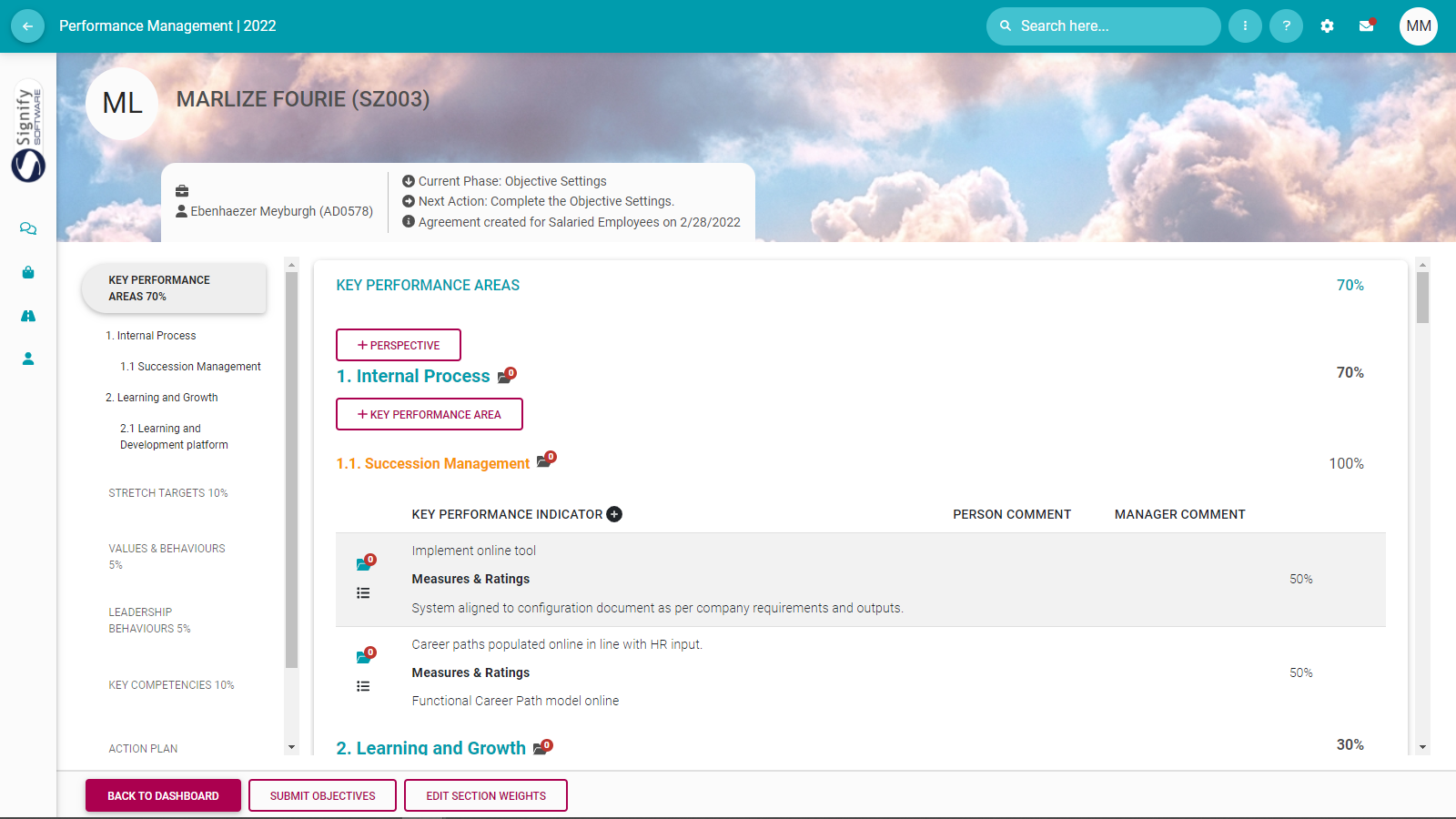
<div id="bkmrk--11"></div><div id="bkmrk-click%3A">**Click:**</div><div id="bkmrk--12"></div><p class="callout info">the **CONTINUE** button if you want to open the agreement and continue setting your objectives. The screen opens in the first review period, and you are supposed to finish listing performance objectives before submitting the agreement.  
[![image-1646634572923.png](https://signature.signifyhr.co.za/uploads/images/gallery/2022-03/scaled-1680-/DrA2z6sURT2dG1Ev-image-1646634572923.png)](https://signature.signifyhr.co.za/uploads/images/gallery/2022-03/DrA2z6sURT2dG1Ev-image-1646634572923.png)</p>
[![image-1646741388265.png](https://signature.signifyhr.co.za/uploads/images/gallery/2022-03/scaled-1680-/ZessFpdMrscD9mGK-image-1646741388265.png)](https://signature.signifyhr.co.za/uploads/images/gallery/2022-03/ZessFpdMrscD9mGK-image-1646741388265.png)

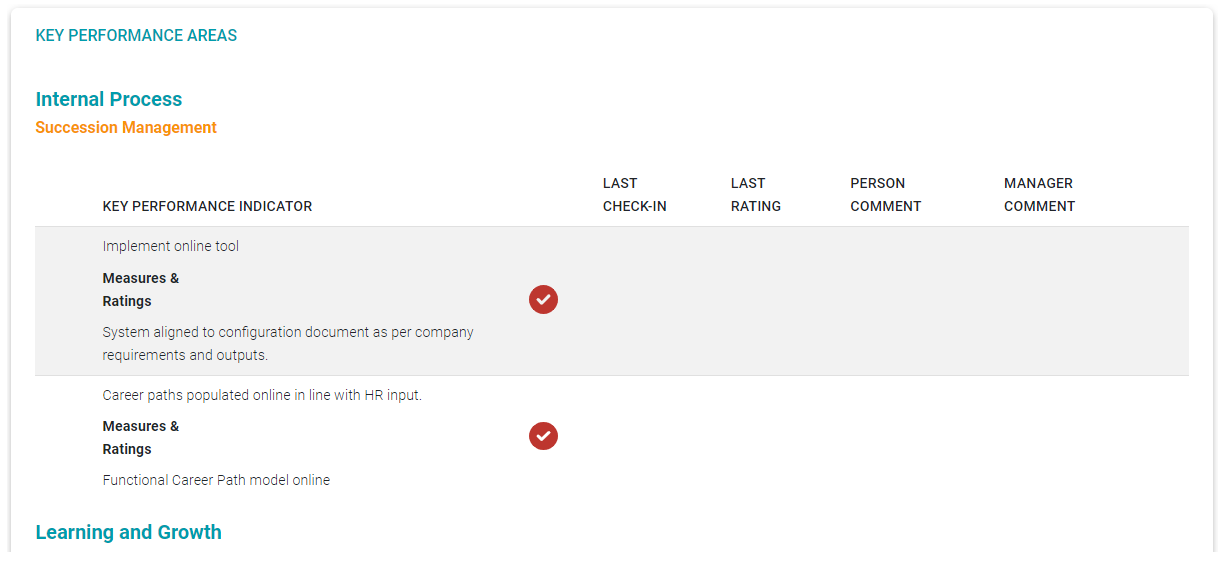
<p class="callout info">the **CHECK-IN** button if your agreement was already submitted and approved and you would like to start checking in on your objectives. (See the following section for more information)  
[![image-1646382908128.png](https://signature.signifyhr.co.za/uploads/images/gallery/2022-03/scaled-1680-/ar98CSKkbBe3dSzK-image-1646382908128.png)](https://signature.signifyhr.co.za/uploads/images/gallery/2022-03/ar98CSKkbBe3dSzK-image-1646382908128.png)</p>

[![image-1646385255205.png](https://signature.signifyhr.co.za/uploads/images/gallery/2022-03/scaled-1680-/FTv0gaC1iKfgcOpo-image-1646385255205.png)](https://signature.signifyhr.co.za/uploads/images/gallery/2022-03/FTv0gaC1iKfgcOpo-image-1646385255205.png)

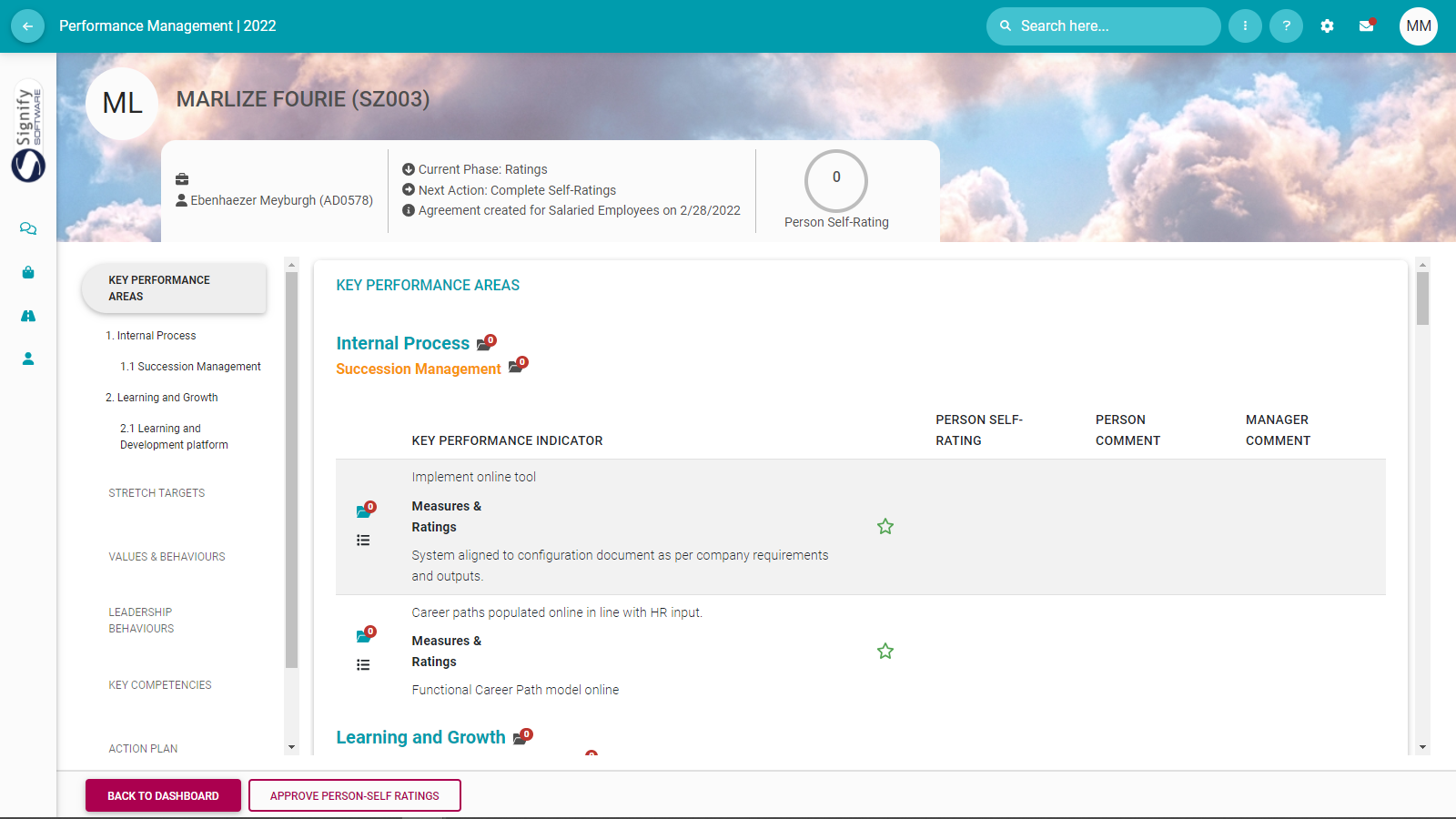
<p class="callout info">the **RATE** button if your agreement was already submitted and approved and you have moved into the rating phase of the review period. (See the following section for more information)  
[![image-1646656446910.png](https://signature.signifyhr.co.za/uploads/images/gallery/2022-03/scaled-1680-/419nsMCDTrFmRntZ-image-1646656446910.png)](https://signature.signifyhr.co.za/uploads/images/gallery/2022-03/419nsMCDTrFmRntZ-image-1646656446910.png)</p>

[![image-1646656614075.png](https://signature.signifyhr.co.za/uploads/images/gallery/2022-03/scaled-1680-/paUU0NdGNG6i2i8J-image-1646656614075.png)](https://signature.signifyhr.co.za/uploads/images/gallery/2022-03/paUU0NdGNG6i2i8J-image-1646656614075.png)

<p class="callout info">the **VIEW** button if your agreement was fully scored, submitted, and approved by your manager and is now only available for viewing.<span style="background-color: #ffff00;">  
</span>[![image-1646841010102.png](https://signature.signifyhr.co.za/uploads/images/gallery/2022-03/scaled-1680-/WIPTNPNQ68tdukQ1-image-1646841010102.png)](https://signature.signifyhr.co.za/uploads/images/gallery/2022-03/WIPTNPNQ68tdukQ1-image-1646841010102.png)</p>

<p class="callout info">When you exit the assessment period (using the **BACK TO DASHBOARD** button), you will return to the Performance Dashboard.  
[![image-1646657285663.png](https://signature.signifyhr.co.za/uploads/images/gallery/2022-03/scaled-1680-/5CkbhQOaPTtrx2IK-image-1646657285663.png)](https://signature.signifyhr.co.za/uploads/images/gallery/2022-03/5CkbhQOaPTtrx2IK-image-1646657285663.png)</p>
---

##### **Recommended further reading**

- [Glossary](https://signature.signifyhr.co.za/books/performance-management-0a0/page/95-glossary "Glossary") of terminology and definitions
- [How to Use Performance Management with Success](https://signature.signifyhr.co.za/books/performance-management-0a0/page/100-how-to-make-it-a-success "100% How to Make it a Success")
- [The Employee's Performance Management Dashboard](https://signature.signifyhr.co.za/books/performance-management-0a0/page/100-the-performance-management-dashboard---for-employees "100% The Performance Management Dashboard - For employees")
- [Open an Existing Contract](https://signature.signifyhr.co.za/books/performance-management-0a0/page/99-the-performance-management-dashboard---open-an-existing-contract "99% The Performance Management Dashboard - Open an existing contract")
- [Create a New Contract](https://signature.signifyhr.co.za/books/performance-management-0a0/page/100-the-performance-management-dashboard---create-a-new-contract "100% The Performance Management Dashboard - Create a new contract")
- [Functionalities and Layout of the Performance Management Dashboard](https://signature.signifyhr.co.za/books/performance-management-0a0/page/99-the-performance-management-dashboard---functionalities-and-layout "99% The Performance Management Dashboard - Functionalities and layout")
- [The Manager's Performance Management Dashboard](https://signature.signifyhr.co.za/books/performance-management-0a0/page/98-the-performance-management-dashboard---for-managers "98% The Performance Management Dashboard - for Managers")
- [Overview of The Performance Agreement Screen](https://signature.signifyhr.co.za/books/performance-management-0a0/page/95-the-performance-agreement---overview "95% The Performance Agreement - Overview")
- [Set your objectives - Part 1 (Working with KPAs and KPIs)](https://signature.signifyhr.co.za/books/performance-management-0a0/page/98-the-performance-agreement---set-your-objectives-part-1 "98% The Performance Agreement - Set Your Objectives PART 1")
- [Set your objectives - Part 2 (Working with the other sections)](https://signature.signifyhr.co.za/books/performance-management-0a0/page/98-the-performance-agreement---set-your-objectives-part-2)
- [Perform a Check-in](https://signature.signifyhr.co.za/books/performance-management-0a0/page/98-the-performance-agreement---check-ins "98% The Performance Agreement - Check-ins")
- [Rate your objectives](https://signature.signifyhr.co.za/books/performance-management-0a0/page/0-the-performance-agreement---rating-phase "0% The Performance Agreement - Rating phase")

[![image-1646899549906.png](https://signature.signifyhr.co.za/uploads/images/gallery/2022-03/scaled-1680-/RMuPbjHgrBvQlSOw-image-1646899549906.png)](https://signature.signifyhr.co.za/uploads/images/gallery/2022-03/RMuPbjHgrBvQlSOw-image-1646899549906.png)