# Version 9.1.105 (12 August 2024)
### Translations
#### Export to Excel message (#118605)
**Problem**
- An incorrect snack message is displayed when exporting a report.
**Solution**
- Make sure the export snack message is correct.
---
### Performance Management
#### As a Performance User, I want to see all the comments for Employees and Managers (#118556)
- Add Headings for the following sections for the ratings
- Ratings
- Rating Comments
- Person
- Manager
- Private Comment
- Historical Check-ins
- Add Historical comments for both the person and manager
- Objective Setting Comments
- Person
- Manager
#### As a Performance User, I want the on-hover pop-up to be removed and the info shown on the screen when rating (#118428)
- When the rating or check-in modal is open, show the KPI description
- Have an arrow icon with a tooltip
- When clicking on the arrow, expand the grey area and show
- Activities
- Measures
- Ratings
- When clicking the arrow again, collapse the grey area to show the KPI description
#### Bulk Create Contract Periods using review setup settings (#116832)
**Problem**
- The bulk creation of contract periods does not take into account the rules of the review setup. Currently, it only allows the creation of the next contract period if all the periods that has a start date before the one you want to create on the review setup have been final approved. This does not adhere to settings like AllowExcludingReviewItems, and RequirePreviousPeriodCompletion.
**Solution**
- Implement all the settings currently applied when allowing the creation of a contract period as implemented on the dashboard on the bulk creation.
#### Export scorecard in Excel (#108772)
**Problem**
- The agreements can only be exported in PDF
**Solution**
- New method on WebMVC.Areas.PerformanceManagement.Controllers.DashboardController to compile contract information into specific format for excel
- Extend OpenXMLService to handle specific generation of export. See ExportDataSet but possibly alter to not show search criteria etc.
- Integrate with notification service to make downloadable when ready.
---
### Master Data
#### Save & Add New Function, inherited Competency from Previous record needs to be Manually re-selected before save is successful. (#118076)
**Problem**
- When you select 'Save and Add new', when adding new master data, the select2 selects are not cleared properly. The value(s) are cleared, but it still displays the previously selected value(s). Saving after this, does nothing, as the select does technically not have a value, although it displays a value.
**Solution**
- Reset select2's by selecting the first value from the select, which is always "Select an option".
---
### My Account
#### No default Language (#118112)
**Problem**
- On a newly created ruleset, when a user goes to the "My preferences" page, no languages are displayed. This happened because none of the languages were published.
**Solution**
- Ensured that the default language is published, or at least a single language when creating/copying a ruleset.
Also, to make sure that this works for existing rulesets with no published languages. On WebMVC, if the ruleset has no active and published languages, it at least adds the current culture of the user to the list, so that something displays on the page.
---
### Competency Analysis
#### Load More appears when there is no more record to Load on the page (#118145)
**Problem**
- The Load More option displays when there is less than 10 records
**Solution**
- Make sure the option is displayed only if there are more than 10 records
#### Incorrect tooltip when rating as Manager (#112812)
**Problem**
- Incorrect tooltip is shown for Manager (Do self-assessment)
**Solution**
- Make sure that when the person is viewing as the manager, the tooltip changes to Assess Person
---
### Notifications / Inbox
#### As a product administrator, I want to see the imports for the ruleset. (#115203)
- On the notification for a user add a new tab Imports.
- Show the tab only if the user is a Performance Management, People Management or Ruleset Management Administrator
- On the tab show a list of the last 100 imports paged by 50 per page
- Add the columns
- Actions
- User
- Type
- Status
- Start Date
- End Date
- On the Action options
- Export Transactions
- Export all transactions for the import
- Export Errors
- Disabled when the import is not complete or the completed status is not Failed
- Export all errors
- Order the table by latest import first
---
### Integrations | PaySpace
#### PaySpace: Implement performance improvements (#116645)
**Problem**
- Currently, payroll connectors are processed serially meaning that each ruleset will wait for the next to complete.
- All data is always processed when pushing data to Payspace
**Solution**
- Implement threading batching no more than 10 ruleset connectors together.
- When retrieving the data that has changed only retrieve data that has changed on the last day unless the specific connector has never run then include data over all time. A functional data filter should be added to the export to select changes from any date.
---
### Notifications | Email Setup
#### Use Office 365 as SMTP server (#111461)
**Business Rules**
- When Basic Authentication is selected
- Username and Password fields are shown
- When Token-based Authentication is selected
- Client ID, Client Secret, and Tenant ID are shown
**Problem**
- The profile images of users are not imported from V9 to V8 and this caused the V8 list pages to not display images for the employees.
**Solution**
- Extend the user details export to include the profile URL from V9, in the Menu and Bulk imports add a step to import the user profile URL as the picture URL in V8
---
### People Management
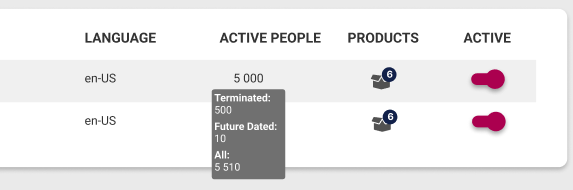
#### Show the Active People Counts on People Management and Ruleset List page (#118100)
**Business Rules**
- People Management Dashboard - Grid View
- In the slider - Active, Terminated, Future Dated, and All - add the number of people when clicking on an option
[](https://signature.signifyhr.co.za/uploads/images/gallery/2024-08/hAWFEwLnDF1wRI90-image.png)
- Ruleset Setup | List page
- Change the heading from People to Active People
- Make sure the number here is the Active People
- When hovering, show the breakdown of Terminated, Future Dated, and All in a tooltip
[](https://signature.signifyhr.co.za/uploads/images/gallery/2024-08/0jnJz0tgjkYLQ3Tr-image.png)
---
### General
#### Implement V9 secure redirects as share links in V8 (#116964)
**Problem**
- Creating short URLs or sharing links in V8 does not create a ruleset-based session for users using V10 and the user is required to login in V8 with credentials that do not exist.
**Solution**
- Implement the secure redirect mechanism developed on V9
---