# Version 9.1.108 (16 August 2024)
### Performance Management
#### Text not changed to "Calibrated" (#119122)
**Problem**
- When the contract has not yet been approved, the precalibrated score is *null.* When importing calibration it only sets the final score and because of the null does not validate against the pre-calibrated score.
**Solution**
- It was changed to always read the final score and pre-calibrated scores as 0.00 (instead of null) and changed the comparison accordingly.
#### Improve error message when importing to a period that has not been started (#119120)
**Problem**
- The error message is not clear when a period has not been started
**Solution**
- Update the message:
- - The user "\[Username\]" does not have an active agreement for the review year "\[Review Year\]" with review setup "\[Review Setup\]" for period item "\[Review Period\]"
---
### People Management - Import
#### User Import: Add additional fields to user imports (#115463)
**Problem**
- Not all fields that are required are available on the User Import
**Solution**
- Refactor user import and extend with additional fields
#### Improve the error when importing an overlapping position (#119083)
**Problem**
- The error message for an overlapping position needs to be improved
**Solution**
- Changed the message:
- "User (Username of person imported), Another appointment exists for the position between \[StartDate\] and \[EndDate\] for \[Username of person in position\]"
---
### Master Data
#### Master Data "in Use" data (#114637)
**Problem**
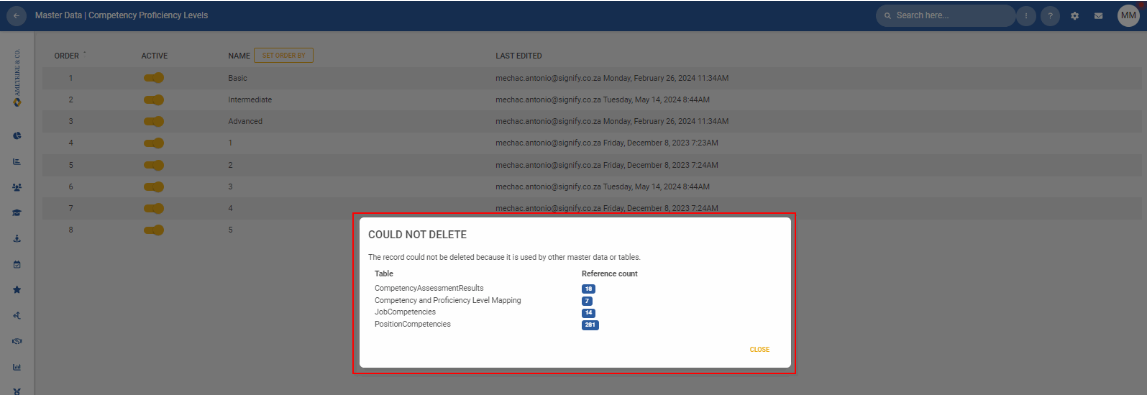
- The generic error message displays when deleting master data that is already "linked" to other data
**Solution**
- Implement a modal to inform the user why he cannot delete the master data item
[](https://signature.signifyhr.co.za/uploads/images/gallery/2024-08/z7H5VQFtFtyFvaSi-image.png)
---
### System Access
#### Enabled Disclaimer prevents ID Validation (#118639)
**Problem**
- When the disclaimer is enabled, the 2nd authentication code is not checked for validity.
**Solution**
- Run the base authentication. If successful, return the disclaimer SignInCustom. Otherwise, return the authentication result.
---
### System Menu
#### Cannot add the PDP Dashboard on the System Menu (#111669)
**On V8:**
- Add a Gear for the admin pages - Only available to the PDP Admins
[](https://signature.signifyhr.co.za/uploads/images/gallery/2024-08/Ubb79izTCO7gcGTi-image.png)
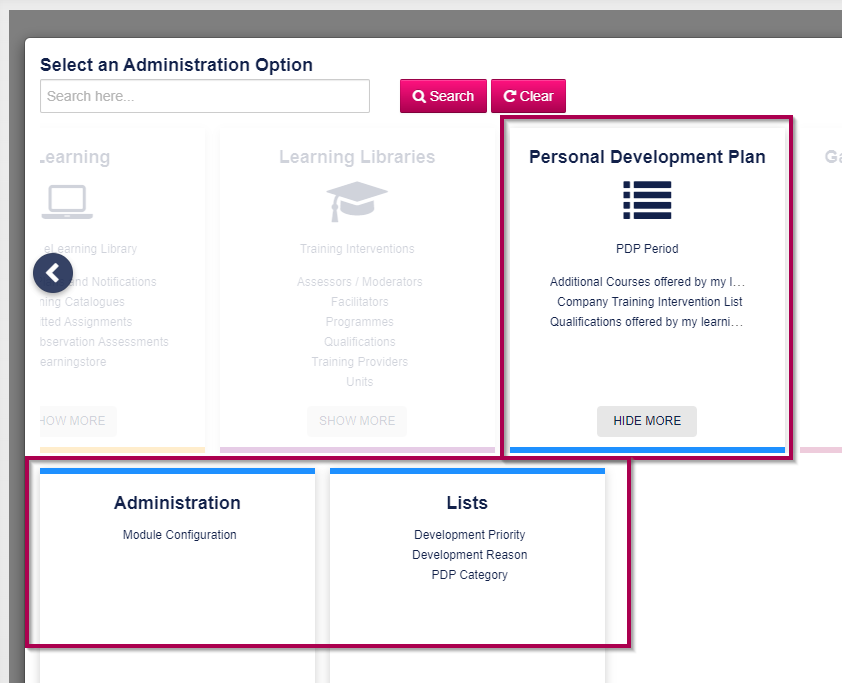
- When selected, open the PDP Admin menu:
[](https://signature.signifyhr.co.za/uploads/images/gallery/2024-08/m4vRQZuSaChcFEAB-image.png)
**V9:**
- Add a System Menu for **My PDP**
- Ruleset Setup | System Menu
- When clicking on the menu item, open the My PDP page
- Add a spanner if the logged-in user is an Admin that opens the admin pages
[](https://signature.signifyhr.co.za/uploads/images/gallery/2024-08/KEuK8tJgBESE6IdD-image.png)
---
### Kudos
#### Attempt to translate all sections relating to the Kudos functionality (#119207)
**Problem**
- Missing translations
**Solution**
- Add missing translation sections
---
### Ruleset Setup
#### System help Page not responding (#119246)
**Problem**
- User guides will show an infinite loading screen when there are multiple rulesets with overridden settings (UserGuideConfigurations)
**Solution**
- Ensure that UserGuideConfigurations are retrieved for the current ruleset only, which will prevent the infinite loading screen.
---
### Notifications (Inbox)
#### Order items by date (#118522)
**Problem**
- Please order the items so that the latest imports are shown first and ensure that it is correctly ordered as dates and not as text.
**Solution**
- Change the default sort column, and refresh the export table after successfully exporting a report
---