# Version 9.1.131 (18 November 2024)

### People Management

#### Users cannot send Kudos - People group problem (#122263)

**Problem**

- When a user does not have an active / default people group, the My Team / My Department / My Company user lists don't load.
- This is incorrect, as for those views, it does not require the user to have a people group, and it will return only relevant people based on the reporting line/org.

**Solution:**

- Removed the check to not call getUsers when a user does not have an active people group.

#### Active people indicator shows employees as Future Dated when the appointment date is in the past (#121617)

**Problem**

- When hovering over the Active People count for a newly created ruleset, the count shows that the 1 person appointed is future-dated.

**Solution**

- Ensure that the person is not seen as future-dated but active

#### Support user visible on newly created ruleset (#121931)

**Problem**

- The support user is shown on the People Management Dashboard

**Solution**

- Hide the user from the front-end

#### Fit initials into bubble (#122322)

**Problem**

- The initials do not fit in the bubbles

**Solution**

- Make the font smaller

---

### Main Dashboard

#### Update size of middle block (#122320)

**Problem**

- The My Colleagues widget is bigger than the rest

**Solution**

- Align the widget with the rest of the widgets

---

### Global Search

#### Search field loses focus (#121885)

**Problem**

- You type a few characters, and then the page reloads to show the relevant filtered data, but it loses focus, and you have to click on it again to refine your search.

**Solution**

- After the result set has been filtered, place the focus back in the search box so that you can continue to refine without having to click in the box again.

---

### Imports

#### Disabilities duplicated (#121903)

**Problem**

- When reimporting a user the disabilities are duplicated and all disabilities added on the front end are deleted
- The importation of long org codes fails at the DB level.
- When creating a new user, if there are empty disabilities in the master data, the import fails with the object reference issue.

**Solution**

- Change the domain update of disabilities when importing as disabilities in the DB are not loaded
- Correct the length of the org code in the pre-validation
- Add checks for null disabilities when creating a user

#### Add Person AppointmentEndDate to MaterialisedUsers tables (#121349)

**Problem**

- Report builder materialised users fails
- When importing
- Notification users are not created
- Performance reporting lines are not updated
- Appointments are not updated for materialised users
- User data is lost when updating appointments or reporting line data

**Solution**

- The notification did not implement batch user materialisation and appointments
- Performance management implements batch reporting line materialisation
- Report builder correct code
- Implement updates of materialised data only if changes
- Add migrations to update data across services for report builder and notifications

---

### Organisational Structure

#### Line Manager details spill off the page (#121877)

**Problem**

- With the Zoom at 90%, (values higher than 80%) the **Line Manager details** for the positions spill over the right border of the page.

**Solution**

- Wrap the text with the zoom

---

### Learning Management

#### Unable to view all Learning Portal contents once logged in using copied link (#122264)

<div id="bkmrk-problem%3A-1">**Problem**</div><div id="bkmrk-opening-pathway-shar">- Opening the pathway shared link for V10 prevents navigation to the normal learning portal

</div><div id="bkmrk--6"></div><div id="bkmrk-solution%3A-1">**Solution**</div><div id="bkmrk-the-portal-link-is-c">- The portal link is cached when opening the lms portal on V10. Adjusted the logic to only cache the link if the menu item is used and not when a shared link is used.

</div>#### Not able to link learning manage role to user (#122890)

**Problem**

- The role for Learning Administrator is not available in V9

**Solution**

- Create a Learning Administrator role

---

### Data Warehouse

#### Table consolidation and Data Dictionary cleanup (#121664)

<div id="bkmrk-problem-9">**Problem**</div>- There is data in the Data Dictionary tables across tenants
- There are unused columns in the Datawarehouse tables
- There are tables in the Datawarehouse that can be combined
- There are columns in the Data Dictionary where the content of the column is unclear  
    This requires a rename of the alias of such columns
- Column names do not appear in an expected / logical order

<div id="bkmrk-%C2%A0-14"> </div><div id="bkmrk-solution-8">**Solution**</div><div id="bkmrk-cleanup-data-so-that">- Cleanup data so that there is only Data Dictionary data in tenant 1
- Work through all columns in the Datawarehouse and identify unused columns
- Identify tables in the Datawarehouse that can be combined
- Review all columns and suggest wording where it is not clear what is stored in the column
- Order columns in a logical order
- Ensure data sources appear in their correct categories

</div>---

### Performance Management

#### Cannot submit agreement (#122734)

**Problem**

- Error when attempting to save a comment.
- The section item weight must be greater than 0.
- The section weight is, however, 5%, and the employee is still busy capturing the remainder of the information and balancing the scorecard.

**Solution**

- Skip validation for weight on values and behaviours when setting auto distribution is enabled

#### Move tooltips up for buttons on the agreement page (#118757)

**Problem**

- When you view an agreement, several buttons can be found at the bottom of the screen. Some of them display a tooltip on hover, but it sometimes gets in the way then the click is not registered.

**Solution**

- Move the tooltips to display above the buttons

#### As a Performance Administrator viewing the Review Setups, I want to have a setting to determine whether the timeline should show on Performance Dashboard for the end-user (#121303)

**Problem**

- People requested to not see the timeline on the Dashboard

**Solution**

- Add a setting to hide the timeline on the Dashboard

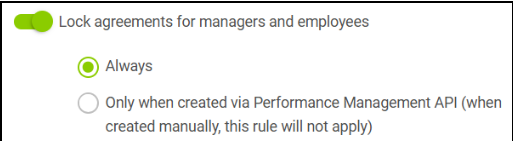
#### As a Performance Administrator viewing the Review Setups, I want to have a setting to determine whether the Agreements can be edited when using the API to create Agreements (#121302)

**Problem**

- No functionality existed to lock an agreement from editing

**Solution**

- Added new settings

[![image.png](https://signature.signifyhr.co.za/uploads/images/gallery/2024-11/scaled-1680-/GdQadNRoTb0UWiGI-image.png)](https://signature.signifyhr.co.za/uploads/images/gallery/2024-11/GdQadNRoTb0UWiGI-image.png)
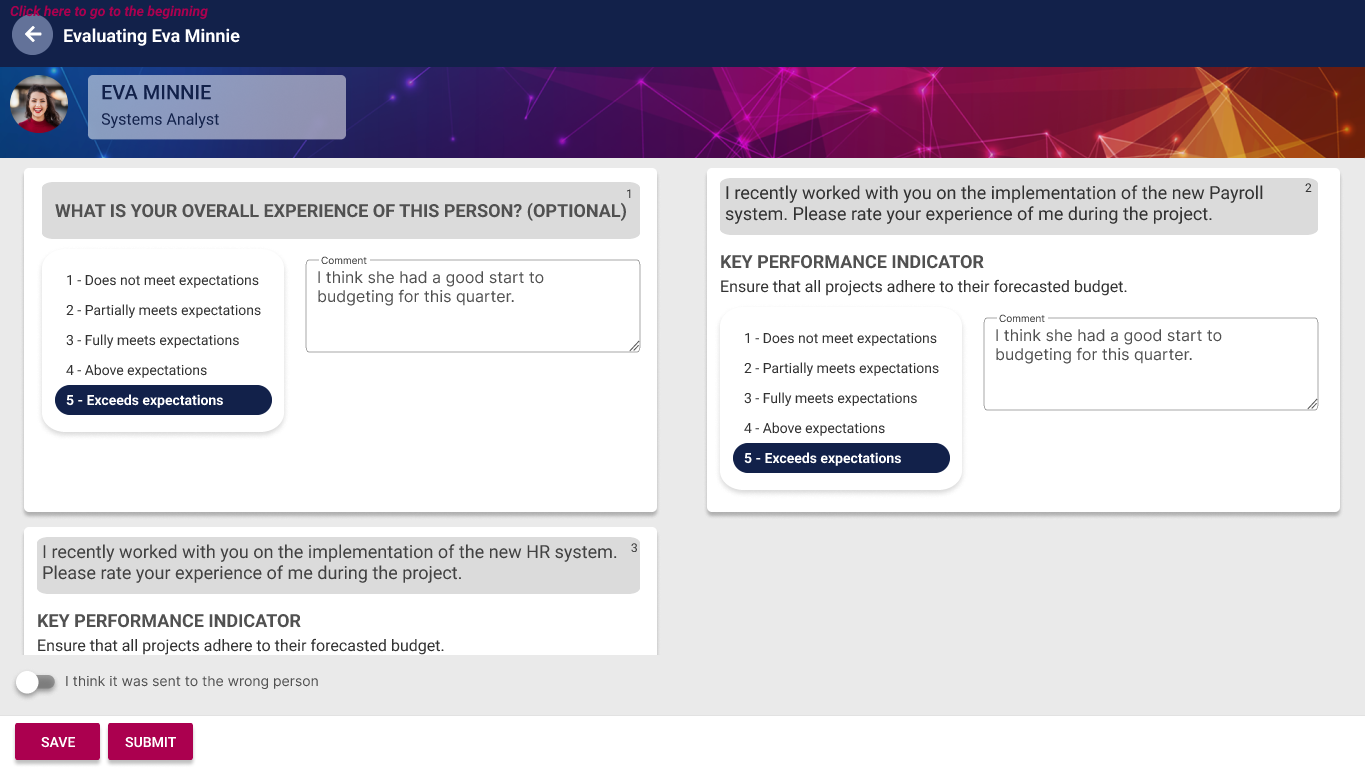
#### As a person doing the evaluation, I want a Save button to save my progress for later (#122391)

- Added a Save button before the Submit button on the evaluator page
- The Save has been added on the Back arrow as well
- This is to allow the person to add ratings and comments and then come back later

[![image.png](https://signature.signifyhr.co.za/uploads/images/gallery/2024-11/scaled-1680-/HbU7rBnBv9BYHrB6-image.png)](https://signature.signifyhr.co.za/uploads/images/gallery/2024-11/HbU7rBnBv9BYHrB6-image.png)
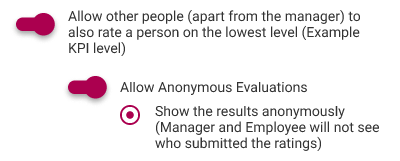
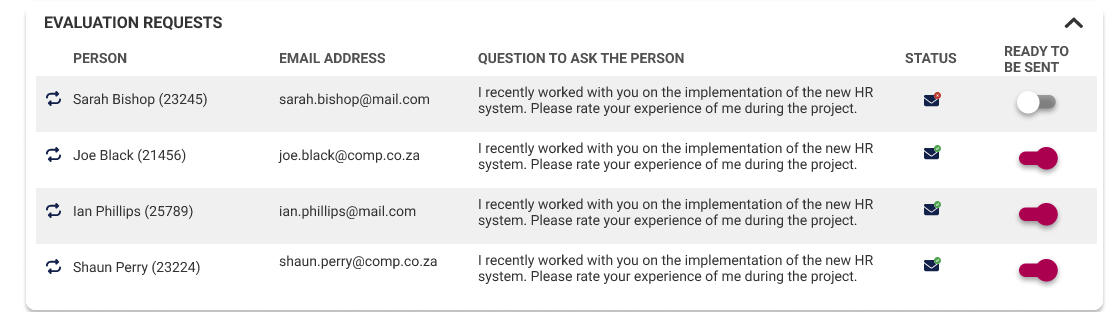
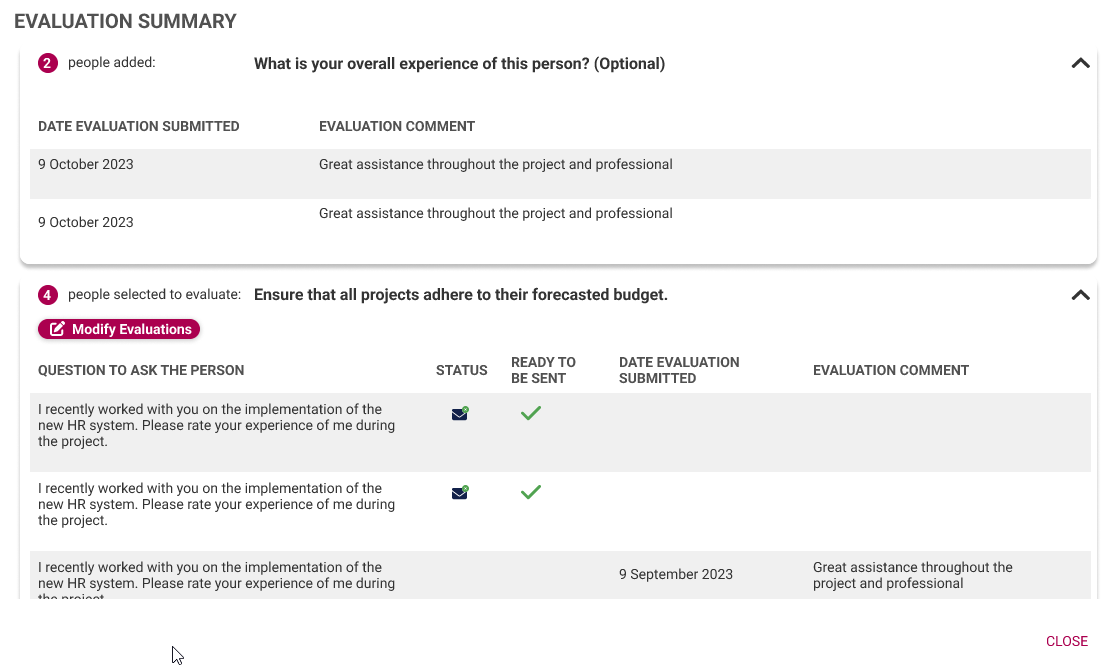
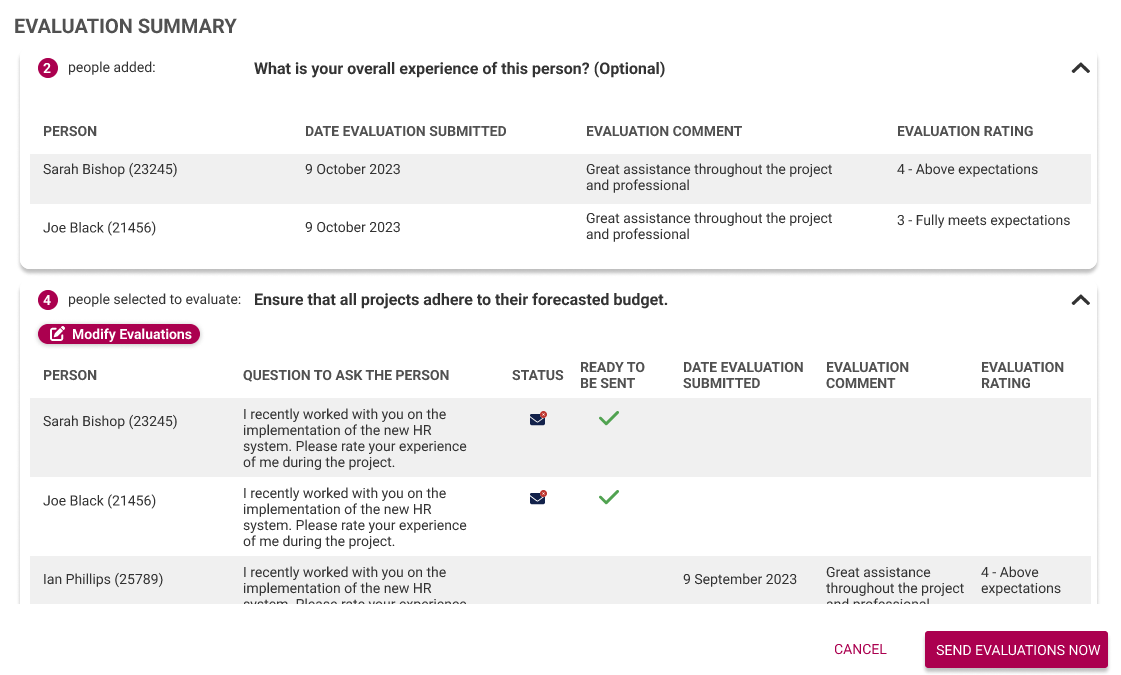
#### As an employee creating the evaluations, I want to see the people's name, surname and email (#122390)

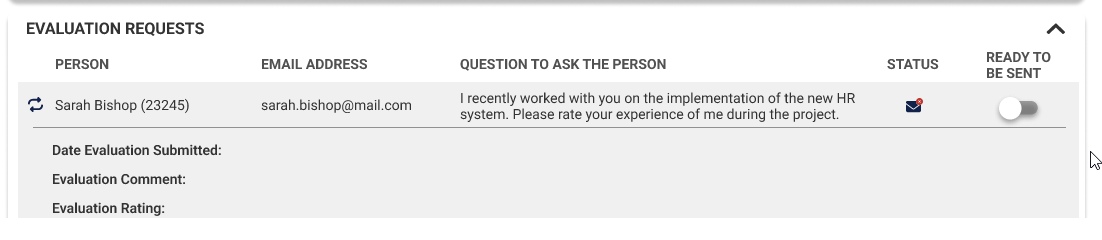
<div id="bkmrk-business-rules">**Business Rules**</div>- When the setting is enabled for the Manager and Employee not to see the results, and the employee and/or manager is creating the evaluations, the selected people's info should be shown
- Do not show the results on the create evaluation modal
- Summary modal stays as is

[![image.png](https://signature.signifyhr.co.za/uploads/images/gallery/2024-11/scaled-1680-/5dtCexsK9BCnQPc5-image.png)](https://signature.signifyhr.co.za/uploads/images/gallery/2024-11/5dtCexsK9BCnQPc5-image.png)
**Employee and Manager creating Evaluations**

[![image.png](https://signature.signifyhr.co.za/uploads/images/gallery/2024-11/scaled-1680-/HD5Dgd3q3t73Cu6K-image.png)](https://signature.signifyhr.co.za/uploads/images/gallery/2024-11/HD5Dgd3q3t73Cu6K-image.png)
**Summary**

[![image.png](https://signature.signifyhr.co.za/uploads/images/gallery/2024-11/scaled-1680-/pKN1L7g1SRLOKd5L-image.png)](https://signature.signifyhr.co.za/uploads/images/gallery/2024-11/pKN1L7g1SRLOKd5L-image.png)
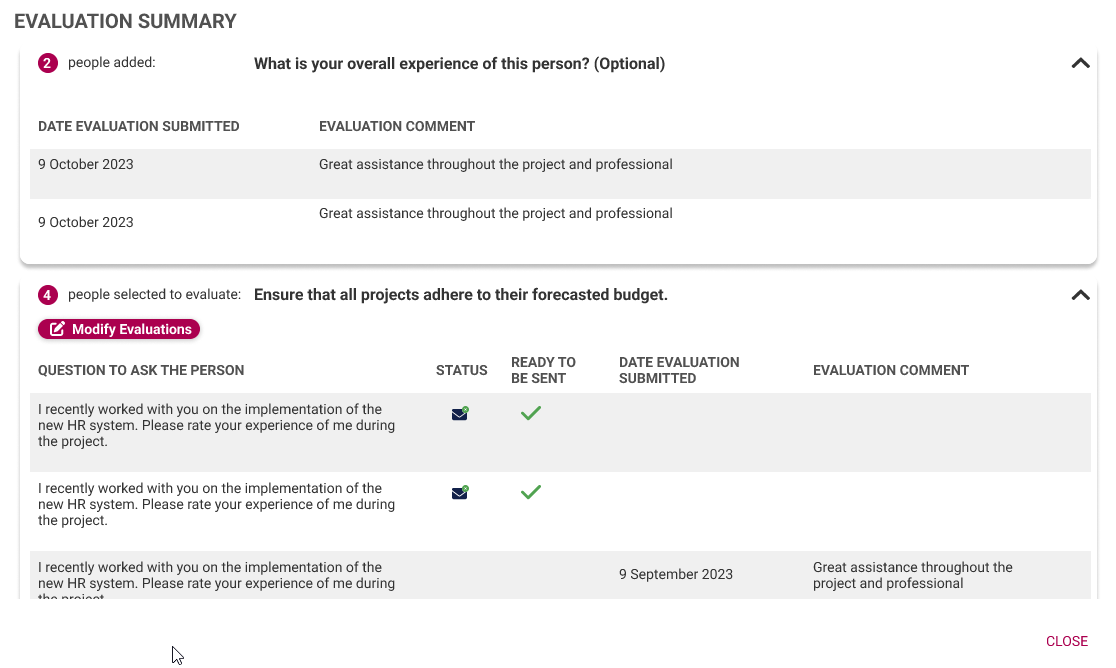
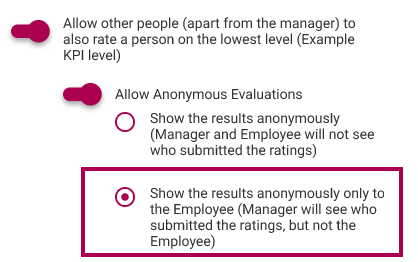
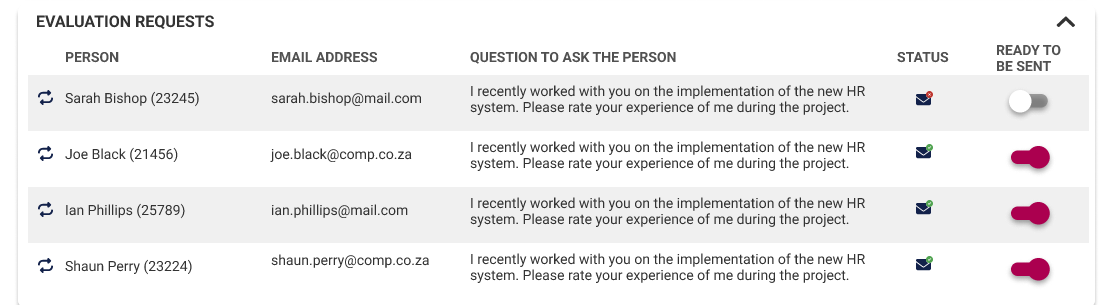
- When the setting is selected that the employee may not see the results, but the manager can, then the same as for the employee above should be implemented
- For the Manager, it stays as is

[![image.png](https://signature.signifyhr.co.za/uploads/images/gallery/2024-11/scaled-1680-/biHlEfYq9wdAKbbs-image.png)](https://signature.signifyhr.co.za/uploads/images/gallery/2024-11/biHlEfYq9wdAKbbs-image.png)
**Manager**

[![image.png](https://signature.signifyhr.co.za/uploads/images/gallery/2024-11/scaled-1680-/Q3Kd5OYXHrbRecp4-image.png)](https://signature.signifyhr.co.za/uploads/images/gallery/2024-11/Q3Kd5OYXHrbRecp4-image.png)
**Employee**

[![image.png](https://signature.signifyhr.co.za/uploads/images/gallery/2024-11/scaled-1680-/1e55JZnehcI2nKDy-image.png)](https://signature.signifyhr.co.za/uploads/images/gallery/2024-11/1e55JZnehcI2nKDy-image.png)
**Summary - Employee**

[![image.png](https://signature.signifyhr.co.za/uploads/images/gallery/2024-11/scaled-1680-/yKXy0ww5HAz5ewRs-image.png)](https://signature.signifyhr.co.za/uploads/images/gallery/2024-11/yKXy0ww5HAz5ewRs-image.png)
**Summary - Manager**

[![image.png](https://signature.signifyhr.co.za/uploads/images/gallery/2024-11/scaled-1680-/j7mD73J6FMPsERo9-image.png)](https://signature.signifyhr.co.za/uploads/images/gallery/2024-11/j7mD73J6FMPsERo9-image.png)
#### Action Label Requires Correction (#122015)

**Problem**

- When a user receives an evaluation request link via email, when the link is opened the Action Heading is displayed as ACTION.ACTION - this should be ACTION

**Solution**

- Added the translation for Action

---

### System Menu

#### The translate button on the My Heading field does not navigate the user to the Menu Heading field translation field (#121904)

**Problem**

- When clicking on the **Translate** button on the Menu Heading field, I am navigated to the first item on the translation list.

**Solution**

- Ensure that the user is taken directly to the **Menu Heading** field on the list of translations.

---

### Report Builder

### Changes to date field (#121255)

**Problem**

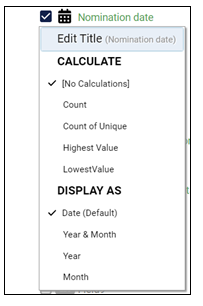
- When right-clicking on a date field in Report Builder, the following options show and there is no option for time:

[![image.png](https://signature.signifyhr.co.za/uploads/images/gallery/2024-11/scaled-1680-/6SgAw5tMFfo2yBVx-image.png)](https://signature.signifyhr.co.za/uploads/images/gallery/2024-11/6SgAw5tMFfo2yBVx-image.png)
**Solution**

- Change the current one above to Date and time (Default) 
    - This time shows as: 2024-10-07T07:30:53.8235783
    - Show as our standard date/time function, but aligned to the selected culture and timezone. In the above example it should be: 2024-10-07 9:30:58

- Add another option for Date only 
    - This option must show the date without the time component

---

### API

#### As a System Owner, I want to create an API call to import Performance Agreements from a third-party system (#121301)

<span class="TextRun SCXW256502211 BCX0" data-contrast="none" lang="EN-ZA" xml:lang="EN-ZA"><span class="NormalTextRun SCXW256502211 BCX0" data-ccp-charstyle="normaltextrun" data-ccp-charstyle-defn="{"ObjectId":"50bc7972-9db7-4b9e-a24b-fa461e89aa97|71","ClassId":1073872969,"Properties":[201342448,"1",469777841,"Calibri",469777842,"Arial",469777843,"Calibri",469777844,"Calibri",469769226,"Calibri,Arial",469775450,"normaltextrun",201340122,"1",134233614,"true",469778129,"normaltextrun",335572020,"1",469778324,"Default Paragraph Font"]}">Business Rules</span></span>

<div class="SCXW256502211 BCX0" id="bkmrk-%C2%A0an-api-call-should-"><div class="ListContainerWrapper SCXW256502211 BCX0">- <span class="TextRun SCXW256502211 BCX0" data-contrast="auto" lang="EN-ZA" xml:lang="EN-ZA"><span class="NormalTextRun SCXW256502211 BCX0"> </span><span class="NormalTextRun SCXW256502211 BCX0">An API call should be created </span><span class="NormalTextRun SCXW256502211 BCX0">to</span><span class="NormalTextRun SCXW256502211 BCX0"> import the agreements </span><span class="NormalTextRun SCXW256502211 BCX0">from a </span><span class="NormalTextRun SCXW256502211 BCX0">third-party</span><span class="NormalTextRun SCXW256502211 BCX0"> system</span></span><span class="EOP SCXW256502211 BCX0" data-ccp-props="{"335559739":0}"> </span>

</div></div><div class="SCXW256502211 BCX0" id="bkmrk-the-agreements-will-"><div class="ListContainerWrapper SCXW256502211 BCX0">- <span class="TextRun SCXW256502211 BCX0" data-contrast="auto" lang="EN-ZA" xml:lang="EN-ZA"><span class="NormalTextRun SCXW256502211 BCX0">The agreements will be imported per employee</span><span class="NormalTextRun SCXW256502211 BCX0"> for a Review Setup linked to the Review Year for</span><span class="NormalTextRun SCXW256502211 BCX0"> a</span><span class="NormalTextRun SCXW256502211 BCX0"> Review Item</span><span class="NormalTextRun SCXW256502211 BCX0"> as an Overall Approved Agreement</span></span><span class="EOP SCXW256502211 BCX0" data-ccp-props="{"335559739":0}"> </span>

</div></div><div class="SCXW256502211 BCX0" id="bkmrk-the-fields-needed-fo"><div class="ListContainerWrapper SCXW256502211 BCX0">- <span class="TextRun SCXW256502211 BCX0" data-contrast="auto" lang="EN-ZA" xml:lang="EN-ZA"><span class="NormalTextRun SCXW256502211 BCX0">The fields needed for the </span><span class="NormalTextRun SCXW256502211 BCX0">API are:</span></span><span class="EOP SCXW256502211 BCX0" data-ccp-props="{"335559739":0}"> </span>

</div><div class="ListContainerWrapper SCXW256502211 BCX0">- <span class="TextRun SCXW256502211 BCX0" data-contrast="auto" lang="EN-ZA" xml:lang="EN-ZA"><span class="NormalTextRun SCXW256502211 BCX0">Ruleset Code</span></span><span class="EOP SCXW256502211 BCX0" data-ccp-props="{"335559739":0}"> </span>

</div><div class="ListContainerWrapper SCXW256502211 BCX0">- <span class="TextRun SCXW256502211 BCX0" data-contrast="auto" lang="EN-ZA" xml:lang="EN-ZA"><span class="NormalTextRun SCXW256502211 BCX0">Username</span><span class="NormalTextRun SCXW256502211 BCX0">\*</span></span><span class="EOP SCXW256502211 BCX0" data-ccp-props="{"335559739":0}"> </span>

</div><div class="ListContainerWrapper SCXW256502211 BCX0">- <span class="TextRun SCXW256502211 BCX0" data-contrast="auto" lang="EN-ZA" xml:lang="EN-ZA"><span class="NormalTextRun SCXW256502211 BCX0">Review Year</span><span class="NormalTextRun SCXW256502211 BCX0">\*</span></span><span class="EOP SCXW256502211 BCX0" data-ccp-props="{"335559739":0}"> </span>

</div><div class="ListContainerWrapper SCXW256502211 BCX0">- <span class="TextRun SCXW256502211 BCX0" data-contrast="auto" lang="EN-ZA" xml:lang="EN-ZA"><span class="NormalTextRun SCXW256502211 BCX0">Review Setup</span><span class="NormalTextRun SCXW256502211 BCX0">\*</span></span><span class="EOP SCXW256502211 BCX0" data-ccp-props="{"335559739":0}"> </span>

</div><div class="ListContainerWrapper SCXW256502211 BCX0">- <span class="TextRun SCXW256502211 BCX0" data-contrast="auto" lang="EN-ZA" xml:lang="EN-ZA"><span class="NormalTextRun SCXW256502211 BCX0">Review Item</span><span class="NormalTextRun SCXW256502211 BCX0">\*</span></span><span class="EOP SCXW256502211 BCX0" data-ccp-props="{"335559739":0}"> </span>

</div><div class="ListContainerWrapper SCXW256502211 BCX0">- <span class="TextRun SCXW256502211 BCX0" data-contrast="auto" lang="EN-ZA" xml:lang="EN-ZA"><span class="NormalTextRun SCXW256502211 BCX0">Section</span><span class="NormalTextRun SCXW256502211 BCX0">\*</span></span><span class="EOP SCXW256502211 BCX0" data-ccp-props="{"335559739":0}"> </span>

</div><div class="ListContainerWrapper SCXW256502211 BCX0">- <span class="TextRun SCXW256502211 BCX0" data-contrast="auto" lang="EN-ZA" xml:lang="EN-ZA"><span class="NormalTextRun SCXW256502211 BCX0">Section Weight</span></span><span class="EOP SCXW256502211 BCX0" data-ccp-props="{"335559739":0}"> </span>

</div><div class="ListContainerWrapper SCXW256502211 BCX0">- <span class="TextRun SCXW256502211 BCX0" data-contrast="auto" lang="EN-ZA" xml:lang="EN-ZA"><span class="NormalTextRun SCXW256502211 BCX0">Perspective</span></span><span class="EOP SCXW256502211 BCX0" data-ccp-props="{"335559739":0}"> </span>

</div><div class="ListContainerWrapper SCXW256502211 BCX0">- <span class="TextRun SCXW256502211 BCX0" data-contrast="auto" lang="EN-ZA" xml:lang="EN-ZA"><span class="NormalTextRun SCXW256502211 BCX0">Perspective Weight</span></span><span class="EOP SCXW256502211 BCX0" data-ccp-props="{"335559739":0}"> </span>

</div><div class="ListContainerWrapper SCXW256502211 BCX0">- <span class="TextRun SCXW256502211 BCX0" data-contrast="auto" lang="EN-ZA" xml:lang="EN-ZA"><span class="NormalTextRun SCXW256502211 BCX0">Is Perspective Library Item</span></span><span class="EOP SCXW256502211 BCX0" data-ccp-props="{}"> </span>

</div><div class="ListContainerWrapper SCXW256502211 BCX0">- <span class="TextRun SCXW256502211 BCX0" data-contrast="auto" lang="EN-ZA" xml:lang="EN-ZA"><span class="NormalTextRun SCXW256502211 BCX0">KPA</span></span><span class="EOP SCXW256502211 BCX0" data-ccp-props="{}"> </span>

</div><div class="ListContainerWrapper SCXW256502211 BCX0">- <span class="TextRun SCXW256502211 BCX0" data-contrast="auto" lang="EN-ZA" xml:lang="EN-ZA"><span class="NormalTextRun SCXW256502211 BCX0">KPA Weight</span></span><span class="EOP SCXW256502211 BCX0" data-ccp-props="{}"> </span>

</div><div class="ListContainerWrapper SCXW256502211 BCX0">- <span class="TextRun SCXW256502211 BCX0" data-contrast="auto" lang="EN-ZA" xml:lang="EN-ZA"><span class="NormalTextRun SCXW256502211 BCX0">Is KPA Library Item</span></span><span class="EOP SCXW256502211 BCX0" data-ccp-props="{}"> </span>

</div><div class="ListContainerWrapper SCXW256502211 BCX0">- <span class="TextRun SCXW256502211 BCX0" data-contrast="auto" lang="EN-ZA" xml:lang="EN-ZA"><span class="NormalTextRun SCXW256502211 BCX0">KPI</span></span><span class="EOP SCXW256502211 BCX0" data-ccp-props="{}"> </span>

</div><div class="ListContainerWrapper SCXW256502211 BCX0">- <span class="TextRun SCXW256502211 BCX0" data-contrast="auto" lang="EN-ZA" xml:lang="EN-ZA"><span class="NormalTextRun SCXW256502211 BCX0">KPI Weight</span></span><span class="EOP SCXW256502211 BCX0" data-ccp-props="{}"> </span>

</div><div class="ListContainerWrapper SCXW256502211 BCX0">- <span class="TextRun SCXW256502211 BCX0" data-contrast="auto" lang="EN-ZA" xml:lang="EN-ZA"><span class="NormalTextRun SCXW256502211 BCX0">KPI Measures</span></span><span class="EOP SCXW256502211 BCX0" data-ccp-props="{}"> </span>

</div><div class="ListContainerWrapper SCXW256502211 BCX0">- <span class="TextRun SCXW256502211 BCX0" data-contrast="auto" lang="EN-ZA" xml:lang="EN-ZA"><span class="NormalTextRun SCXW256502211 BCX0">KPI Ratings</span></span><span class="EOP SCXW256502211 BCX0" data-ccp-props="{}"> </span>

</div></div><div class="SCXW256502211 BCX0" id="bkmrk-kpi-activities%C2%A0-is-k"><div class="ListContainerWrapper SCXW256502211 BCX0">- <span class="TextRun SCXW256502211 BCX0" data-contrast="auto" lang="EN-ZA" xml:lang="EN-ZA"><span class="NormalTextRun SCXW256502211 BCX0">KPI Activities</span></span><span class="EOP SCXW256502211 BCX0" data-ccp-props="{}"> </span>

</div><div class="ListContainerWrapper SCXW256502211 BCX0">- <span class="TextRun SCXW256502211 BCX0" data-contrast="auto" lang="EN-ZA" xml:lang="EN-ZA"><span class="NormalTextRun SCXW256502211 BCX0">Is KPI Library Item</span></span><span class="EOP SCXW256502211 BCX0" data-ccp-props="{}"> </span>

</div><div class="ListContainerWrapper SCXW256502211 BCX0">- <span class="TextRun SCXW256502211 BCX0" data-contrast="auto" lang="EN-ZA" xml:lang="EN-ZA"><span class="NormalTextRun SCXW256502211 BCX0">Person Rating</span><span class="NormalTextRun SCXW256502211 BCX0">\*</span></span><span class="EOP SCXW256502211 BCX0" data-ccp-props="{}"> </span>

</div><div class="ListContainerWrapper SCXW256502211 BCX0">- <span class="TextRun SCXW256502211 BCX0" data-contrast="auto" lang="EN-ZA" xml:lang="EN-ZA"><span class="NormalTextRun SCXW256502211 BCX0">Person Comment</span></span><span class="EOP SCXW256502211 BCX0" data-ccp-props="{}"> </span>

</div><div class="ListContainerWrapper SCXW256502211 BCX0">- <span class="TextRun SCXW256502211 BCX0" data-contrast="auto" lang="EN-ZA" xml:lang="EN-ZA"><span class="NormalTextRun SCXW256502211 BCX0">Manager Rating</span><span class="NormalTextRun SCXW256502211 BCX0">\*</span></span><span class="EOP SCXW256502211 BCX0" data-ccp-props="{}"> </span>

</div><div class="ListContainerWrapper SCXW256502211 BCX0">- <span class="TextRun SCXW256502211 BCX0" data-contrast="auto" lang="EN-ZA" xml:lang="EN-ZA"><span class="NormalTextRun SCXW256502211 BCX0">Manager Comment</span></span><span class="EOP SCXW256502211 BCX0" data-ccp-props="{}"> </span>

</div><div class="ListContainerWrapper SCXW256502211 BCX0">- <span class="TextRun SCXW256502211 BCX0" data-contrast="auto" lang="EN-ZA" xml:lang="EN-ZA"><span class="NormalTextRun SCXW256502211 BCX0">Final Rating</span></span><span class="EOP SCXW256502211 BCX0" data-ccp-props="{}"> </span>

</div><div class="ListContainerWrapper SCXW256502211 BCX0">- <span class="TextRun SCXW256502211 BCX0" data-contrast="auto" lang="EN-ZA" xml:lang="EN-ZA"><span class="NormalTextRun SCXW256502211 BCX0">Approved (Use Approve Contract .</span><span class="NormalTextRun SpellingErrorV2Themed SCXW256502211 BCX0">approvecontractperiod</span></span><span class="EOP SCXW256502211 BCX0" data-ccp-props="{}"> </span>

</div></div><div class="SCXW256502211 BCX0" id="bkmrk-if-there-is-no-ratin"><div class="ListContainerWrapper SCXW256502211 BCX0">- <span class="TextRun SCXW256502211 BCX0" data-contrast="auto" lang="EN-ZA" xml:lang="EN-ZA"><span class="NormalTextRun SCXW256502211 BCX0">If there is no rating, the record should be rejected</span></span><span class="EOP SCXW256502211 BCX0" data-ccp-props="{}"> </span>

</div><div class="ListContainerWrapper SCXW256502211 BCX0">- <span class="TextRun SCXW256502211 BCX0" data-contrast="auto" lang="EN-ZA" xml:lang="EN-ZA"><span class="NormalTextRun SCXW256502211 BCX0">The Manager Rating is the Final Rating</span></span><span class="EOP SCXW256502211 BCX0" data-ccp-props="{}"> </span>

</div><div class="ListContainerWrapper SCXW256502211 BCX0">- <span class="TextRun SCXW256502211 BCX0" data-contrast="auto" lang="EN-ZA" xml:lang="EN-ZA"><span class="NormalTextRun SCXW256502211 BCX0">When only the Manager Rating column has been populated, </span><span class="NormalTextRun SCXW256502211 BCX0">make the Final Rating the same as the Manager Rating</span></span><span class="EOP SCXW256502211 BCX0" data-ccp-props="{}"> </span>

</div></div><div class="SCXW256502211 BCX0" id="bkmrk-when-a-score-of-0-is"><div class="ListContainerWrapper SCXW256502211 BCX0">- <span class="TextRun SCXW256502211 BCX0" data-contrast="auto" lang="EN-ZA" xml:lang="EN-ZA"><span class="NormalTextRun SCXW256502211 BCX0">When a score of 0 is sent through the API call for a specific review item, the review item should be excluded</span></span><span class="EOP SCXW256502211 BCX0" data-ccp-props="{}"> </span>

</div></div>---

### New Development

#### HR Processes (#116458)

**User Story 1 - As a People Management Administrator accessing HR Processes from the Inbox, I want to go directly to the Product Setup**

[![image.png](https://signature.signifyhr.co.za/uploads/images/gallery/2024-11/scaled-1680-/yfcPXLsCXlczY8yc-image.png)](https://signature.signifyhr.co.za/uploads/images/gallery/2024-11/yfcPXLsCXlczY8yc-image.png)

**User Story 2 - As a person with access to the Organisational Structure, I want to have a new section for the Workflow Fallback Configuration when adding or editing an org unit**

[![image.png](https://signature.signifyhr.co.za/uploads/images/gallery/2024-11/scaled-1680-/jHcu1SPjP4Clb5H8-image.png)](https://signature.signifyhr.co.za/uploads/images/gallery/2024-11/jHcu1SPjP4Clb5H8-image.png)

**User Story 3 - As a People Management Administrator accessing HR Processes Product Setup, I want to have a section for the Workflow Fallback when adding or editing a Process Flow**

[![image.png](https://signature.signifyhr.co.za/uploads/images/gallery/2024-11/scaled-1680-/aBe6hnEWJWqX9hbD-image.png)](https://signature.signifyhr.co.za/uploads/images/gallery/2024-11/aBe6hnEWJWqX9hbD-image.png)

**User Story 4 - As a People Management Administrator accessing HR Processes Product Setup, I want to have new fields available when adding the Approval Levels for a Process Flow**

[![image.png](https://signature.signifyhr.co.za/uploads/images/gallery/2024-11/scaled-1680-/Ej5SfJdow7IfdNs7-image.png)](https://signature.signifyhr.co.za/uploads/images/gallery/2024-11/Ej5SfJdow7IfdNs7-image.png)

**User Story 5 – As an Approver, I want to be able to upload files**

[![image.png](https://signature.signifyhr.co.za/uploads/images/gallery/2024-11/scaled-1680-/WpB7t294t8IeEYXy-image.png)](https://signature.signifyhr.co.za/uploads/images/gallery/2024-11/WpB7t294t8IeEYXy-image.png)

**User Story 6 – As an Approver, I want to be able to Cancel a Request**

[![image.png](https://signature.signifyhr.co.za/uploads/images/gallery/2024-11/scaled-1680-/bGluAH4XiNV0wzuK-image.png)](https://signature.signifyhr.co.za/uploads/images/gallery/2024-11/bGluAH4XiNV0wzuK-image.png)

**User Story 7 – As an Approver, I want to be able to request more information from the previous approvers or submitted person**

[![image.png](https://signature.signifyhr.co.za/uploads/images/gallery/2024-11/scaled-1680-/bvfyfwcHFcX3nMyp-image.png)](https://signature.signifyhr.co.za/uploads/images/gallery/2024-11/bvfyfwcHFcX3nMyp-image.png)

**User Story 8 – As a Fallback Approver, I want to be able to select another approver**

[![image.png](https://signature.signifyhr.co.za/uploads/images/gallery/2024-11/scaled-1680-/ZgfFSYddnUM3kFAP-image.png)](https://signature.signifyhr.co.za/uploads/images/gallery/2024-11/ZgfFSYddnUM3kFAP-image.png)

**User Story 9 – As a Ruleset Administrator, I want to have a Notification Template for the request for more information option**

[![image.png](https://signature.signifyhr.co.za/uploads/images/gallery/2024-11/scaled-1680-/6Iu8eoAsSJQXB69F-image.png)](https://signature.signifyhr.co.za/uploads/images/gallery/2024-11/6Iu8eoAsSJQXB69F-image.png)

**User Story 10 – As a Translation Administrator, I want to have the new fields available for translation**

[![image.png](https://signature.signifyhr.co.za/uploads/images/gallery/2024-11/scaled-1680-/v02H0rCFjwhduykx-image.png)](https://signature.signifyhr.co.za/uploads/images/gallery/2024-11/v02H0rCFjwhduykx-image.png)

**User Story 11 – As a Report Builder, I want all the new fields available in the DWH**

[![image.png](https://signature.signifyhr.co.za/uploads/images/gallery/2024-11/scaled-1680-/pHJhkDB6EU4LoxT6-image.png)](https://signature.signifyhr.co.za/uploads/images/gallery/2024-11/pHJhkDB6EU4LoxT6-image.png)

**User Story 12 – As an approver, I want my approvals not to be updated at the same time if there is an approval in between**

- The approval will have to be done again if there is another approver after the first approval

**User Story 13 – As a System Owner, I want each request to have a reference number which displays on the Request and Notifications**

[![image.png](https://signature.signifyhr.co.za/uploads/images/gallery/2024-11/scaled-1680-/93CJmuvHOZ7w9HHA-image.png)](https://signature.signifyhr.co.za/uploads/images/gallery/2024-11/93CJmuvHOZ7w9HHA-image.png)

**User Story 14 – As an Approver, I want to see my Historical Approvals**

[![image.png](https://signature.signifyhr.co.za/uploads/images/gallery/2024-11/scaled-1680-/8opiGKWOBODvCm2F-image.png)](https://signature.signifyhr.co.za/uploads/images/gallery/2024-11/8opiGKWOBODvCm2F-image.png)

---