# Version 9.1.137 (13 January 2025)
#### **Performance Management**
##### Set Value Survey score to be included when importing (#119743)
**Problem**
- When calibrating value surveys, if the value survey has been excluded the calibrated score is not included in the calculation because of the survey being excluded.
- Can then only be set from the front end.
**Solution**
- Ensure when calibrating value surveys that it is included (Excluded = false).
##### \[Interpolation\] Reset the modal after entering the actual value (#121040)
**Problem**
- The rating modal was not reset after entering the actual value.
**Solution**
- Ensure modal is reset after entering value and opening modal again.
##### Nextcloud error pages is displayed when I click the Subordinates button (#124594)
**Problem**
- On environments where there are separate path bases the subordinate view URL is incorrectly calculated as
"[https://kubernetesdev.signifyhr.co.za/Spa/master/performanceManagement/Dashboard](https://kubernetesdev.signifyhr.co.za/Spa/master/performanceManagement/Dashboard)"
instead of
"[https://kubernetesdev.signifyhr.co.za/master/Spa/performanceManagement/Dashboard](https://kubernetesdev.signifyhr.co.za/master/Spa/performanceManagement/Dashboard)"
- It works if there is no pathbase eg local and uat and live
"[https://live.signifyhr.co.za/Spa/performanceManagement/Dashboard](https://live.signifyhr.co.za/Spa/performanceManagement/Dashboard)"
**Solution**
- Changed the URL generation so it correctly prepends the path base Eg 'master' before the entirety of the generated URL.
---
#### **People Management**
##### Person who is terminated on today's date should still be able to log in until midnight (#124279)
**Problem**
- A person who has been terminated, cannot log in on the termination date
**Solution**
- Change the log-out date to midnight
##### \[Profile Summary\]: Only underline on Hover (#124268)
**Problem**
- Only underline on Hover
**Solution**
- Add underline on hover.
##### \[Profile Summary\]: The Summary section does not get Docked/Pinned to the top (#124385)
**Problem**
- The Summary section does not get Docked/Pinned to the top
**Solution**
- Dock the Summary section when a user scrolls on the page
##### Issues with mobile phone numbers (#124248)
**Problem**
- There should not be a space between the numbers.
**Solution**
- Trim the contact numbers on the ListUsersExport call
---
#### **Ruleset Management**
##### Error on creation of ruleset (#124289)
**Problem**
- The support user is created before the ruleset creation completes on account and the ruleset created is consumed on the job profiler service.
- This causes the ruleset creation process to fail.
- The ruleset-created email is sent even when the ruleset fails to create
**Solution**
- Remove all the event consumers RulesetCreated
- Move work done by the consumers to a gRPC endpoint per service
- Create a new event CreateRulesetEvent with consumer CreateRulesetEventConsumer that is published after the ruleset has been created on the account service
- The new consumer calls each service to use gRPC to create the ruleset on the service
- Only once all the services have been created in the system and support users have been created
- As a final step, the notification is sent that the ruleset has been created
- The consumer has been constructed for retry only running the request that has not been completed again
##### Add functionality to retry the creation process of a ruleset which failed to create (#110754)
**Problem**
- Currently, if a ruleset fails to create, you are stuck, there is no way for you to retry it.
- This applies only to failed rulesets, and not rulesets still in the process of creating/copying.
**Solution**
- Add an option to retry the creation/copy process. When clicked, send the RulesetCreatedEventConsumer message to the failed services.
---
#### **Imports**
##### Signify Employee data import API (#122932)
**Add the option on the payroll connector to save and validate a Powershell script used for import**
- When adding a payroll connector
- - Move the payroll connector provider to the top of the modal
- Add a new provider Powershell
- When the provider type is Powershell
- Change the display of the screen and show the following fields
- Name - Textbox
- Powershell Script- Text Area
- The text area is pre-populated with a PowerShell script for import from Signify's APIs. This script servers as the base to be customised from
- Import Enabled- Toggle
- When the user saves the page the script is run without staging the data
- When the PowerShell script can run through and return data in the format to be stagged the script is valid
- Otherwise through an error
- When the manual processing button is clicked then the Powershell script will run and stage
- When more than one Powershell script is added then all the data will be stagged and processed as a single import only keeping the latest record per user should a user be returned in multiple Powershell scripts
- Each provider's connectors will be processed together and will not include other providers
- This means Payspace connectors will be grouped and Powershell connectors will be grouped and processed as a batch separately.
**Create a PowerShell connector command to process connectors of this type per the ruleset**
- Create a new command and handler- PowershellImportCommand
- - The handler retrieves all the PowerShell connectors for active rulesets
- All the connectors for a specific ruleset must be processed as a batch
- The users from multiple connectors will be stagged and imported as a single import
- Should a user be returned by multiple connectors only the latest user according to appointment data should be imported
- Log all steps in the handler as an import occurring and display the status on Notifications| Imports
- Security when running a PowerShell script
- - Consider the implementation of custom run space when running the import
- The handler should be able to be run manually for a single ruleset or per schedule for all rulesets
- - Reuse the current payroll connector job to also process PowerShell connectors
**Create SQL notification for support**
When an import runs in the background no notification informs the client if a failure has occurred during the import.
The user currently needs to go to the Notifications | Imports tab in the system to access this information.
**Solution**
When an import completes and any failures occur during the import trigger a standard system notification.
**Recipient:** Front End Import- Person who started the import
Backend Import- Send to admins of product linked to import type
**CC:**
**Email Body:**
Dear [RecipientName] [RecipientSurname],
The [ImportType] import is completed with [ErrorCount] errors.
Please follow the below link for more information
[Link To Notification | Import]
Kind Regards
HR Team
---
#### **Notifications**
##### Schedule Setup: The user can set the Once-Off custom schedule to time already passed (#96569)
**Problem**
- The user is still able to type in a time that has already passed.
**Solution**
- Added validation to test if the time is valid, if not it will be set to the minimum time
---
#### **Report Builder**
##### Date fields not shown in preferred language user is set at (#122731)
**Problem**
- Date fields not converted to user culture and language.
**Solution**
- Ensure date fields are converted to user culture and language.
##### Add different font sizes (#123391)
- Have three options for font size: Normal, Small, Extra Small.
- This must just be in the result set panel, including the headings
- It looks like the standard font size is:
[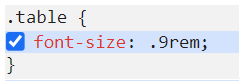](https://signature.signifyhr.co.za/uploads/images/gallery/2025-01/Ehd0oN6R5PBsRfIn-image.png)
- - Make the Small size:
[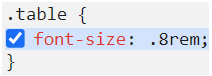](https://signature.signifyhr.co.za/uploads/images/gallery/2025-01/gBCaqKPEjbMeiXEM-image.png)

- - Make the Extra Small size:
[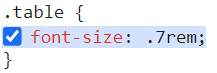](https://signature.signifyhr.co.za/uploads/images/gallery/2025-01/oA7CTDCDUKMnbU4n-image.png)
[](https://signature.signifyhr.co.za/uploads/images/gallery/2025-01/EXIROsr5cMLzz2jU-image.png)
##### Add 'Show Condensed Results' (#123390)
- Have an option to “**Show condensed results**”.
- By default, it must be selected.
- When selected, all fields and values must show the first 15 characters with a … (if it is longer than 15 characters).
- When hovering over the value, it must show the complete text/field name.
- This must preferably be done through a JavaScript function that will not cause a reload of the page, but rather change it immediately.
[](https://signature.signifyhr.co.za/uploads/images/gallery/2025-01/EXIROsr5cMLzz2jU-image.png)
##### Error when clicking View Full Report button (#124518)
**Problem**
- An error occurs when clicking the View Full Report button
**Solution**
- Fixed the issue causing the crash
---
#### **Data Warehouse**
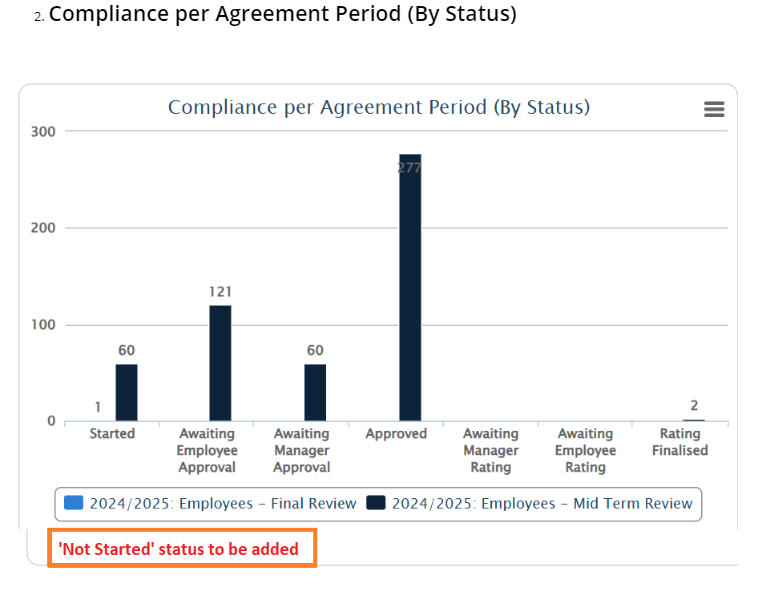
##### V10 PM Dashboards add Not Started value to the graphs (#123886)
- Add the **“Not Started”** value to the following two graphs:
- Note: Not Started means the person do not have a contract created for the Review period.
[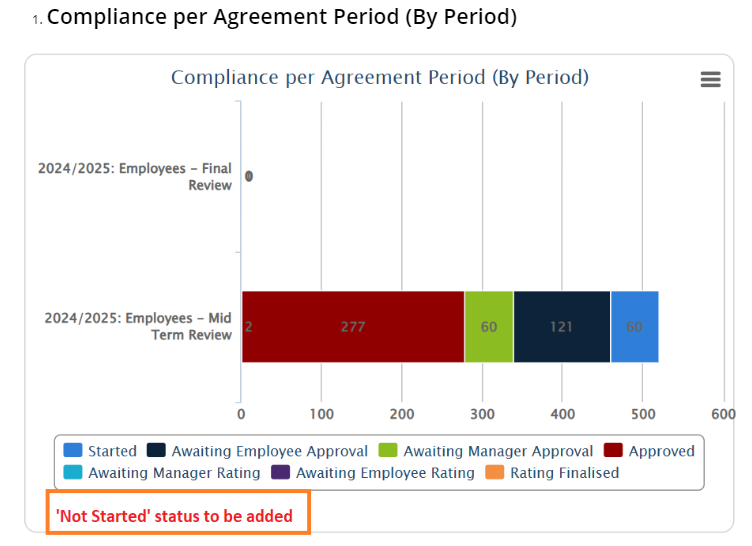](https://signature.signifyhr.co.za/uploads/images/gallery/2025-01/0zbg4cmgrKnJoF7i-image.png)
[](https://signature.signifyhr.co.za/uploads/images/gallery/2025-01/MLk052cVctOQiUB8-image.png)
---
#### **People Groups**
##### Tooltip on Org path displays "Undefined" (#124529)
**Problem**
- Tooltip on the org path displayed 'Undefined'
**Solution**
- Ensure that the tooltip displays the full org path correctly.
##### Incorrect heading for the Org path column (#124530)
**Problem**
- Incorrect heading for the Org path column
**Solution**
- Ensure the correct heading is displayed on the table for the org path column
##### Group cache not being busted when new employees are appointed/imported (#124457)
**Problem**
- It appears that the People Groups cache is not being busted when you have appointed or imported new employees.
- This means that you cannot see these new employees on the People Management dashboard.
**Solution**
- Properly clear people group cache and materialised people groups
##### The active people group set by the user on V9 is not activated as an active subgroup on V8 when clicking on the V8 module menu item (#124215)
**Problem**
- The active people group is not set as the active subgroup when opening the V8 page in V9
**Solution**
- Retrieve the active people group ID from the query string
- Select the people group from the user's assigned subgroups
- If not available then the preferred subgroup should be loaded
---
#### **Main Dashboard**
##### Performance Management Dashboard Widget not showing correct data (#125269)
**Problem**
- It seems the score and information are not displayed correctly for the user because they have two contracts.
**Solution**
- Changing the query that populates the dashboard to order the contracts if multiple exits by the display order of the review year.
- This will then allow the dashboard to display the latest data according to this ordering and secondly the start date of the cycle.
- The dashboard will also only display the latest review period for the contract details within the year.
---