# Version 9.1.157 (29 April 2025)
#### **Learning Management**
##### Delete Button for Interventions Only showing on the latest Record (#130180)
**ProblemThe**
- Delete/Trash icon is not shown for all training interventions in a cycle.
**Solution**
- Remove script and markup that only allowed the last training intervention in the list to be removed.
##### Remove sandbox on V9 (#129502)
**Problem**
- Documents that should be embedded on pathways are not working because of the sandbox rule from V9 Iframe
**Solution**
- Load sandbox rule conditionally for the MENU\_PORTAL\_USER\_LMSPORTAL module
---
#### **People Management**
##### Managers cannot see their employees in the Performance Management system (#130434)
**Problem**
- The update of the people group query causes deadlocks
**Solution**
- Only update when the status has changed, and add WITH(ROWLOCK, UPDLOCK)
- Simplify the distinct for the inserts and remove the CTE
##### Double Scroll Bar appears after navigating across Tabs (#126461)
**Problem**
- A double scrollbar was displayed on some pages due to overflow on the body.
**Solution**
- Fix the double scroll by hiding the overflow globally on the body.
##### Country/Province set as "Not Required" but is being displayed as Mandatory (#128735)
**Problem**
- The system currently shows "Country/Province" as a required field, even though it is set to "Not Required."
**Solution**
- We will update the system to ensure that the "Province" field is no longer marked as mandatory. This involves adjusting the underlying data settings and applying an update to reflect the change.
##### Add Role Permission: Manage Own Data (#124043)
P&S
---
#### **Report Builder**
##### Column order specified on the Preview is not applied to the Full Report or Exported Report (#128854)
**Problem**
- When the user rearranges the column order, especially if the rearranged columns are more than one index away from each other.
- The order is inaccurate regarding what is displayed on the frontend.
- Each time a column is reordered (Moves an index), an AJAX call is made, and all changes after it are inaccurate.
**Solution**
- Collecting all the requests the user makes by waiting for a timer to finish, each time a reorder happens, the timer is reset (to ensure all changes will be sent).
- When the timer runs out, one AJAX call is made as a batch for the Server to handle.
- The server receives a list of requests and loops through them to ensure each column reorder is processed.
- Please note that after the previous code review changes, only columns which actually moved an index are sent to the server side for processing.
##### Ordering to be aligned with the database Display Order (#129893)
**Problem**
- When creating a new report, the list of data sources does not appear in the correct order.
- It does not display according to the DisplayOrder column inside the DB.
**Solution**
- We made sure the data sources are displayed in the correct order by updating how they are retrieved.
- A sorting rule was added to ensure the list follows the intended sequence.
- Additionally, we included **DisplayOrder** in various steps where data is added or retrieved to maintain consistency.
##### 'Is in list' operator shows Values selection across all tenants (#130008)
**Problem**
- When a user creates a new report and adds fields to the filter section, selecting the "is in list" operator returns data across all tenants instead of filtering correctly.
**Solution**
- To ensure that only data from the specified TenantID and RulesetID is retrieved, these values should be added as parameters in the SQL Stored Procedure.
- The filtering condition should then be applied within the query to restrict results accordingly.
---
#### **SigniChat**
##### Datatables warning error when clicking on the <--- back button (#129666)
**Problem**
- The error occurs when viewing your chats, as not all are returned to the user.
**Solution**
- Ensure that an error does not occur and make sure that all the chats for the user are returned.
---
#### **Ruleset Management**
##### Mentoring and Coaching are not available on the System menu (#129947)
**Problem**
- Mentoring and coaching could not be enabled or disabled because it was linked to its own product code, for which a product does not yet exist.
**Solution**
- I linked the mentoring and coaching URL back to LearningManagement (to which it was previously linked anyway)
##### Redirect tabs not on the current session's ruleset to the login page (#128356)
**Problem**
- When a tab is open and a user logs into a new ruleset in the same browser on a different tab with the same domain, they receive the following.
[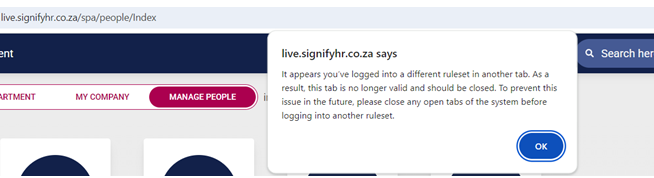](https://signature.signifyhr.co.za/uploads/images/gallery/2025-04/3cyCJrK9cxktjm1L-image.png)
- When clicking okay, the page is reloaded for the current ruleset's data.
- This is confusing for some users as they expect the other ruleset's data here.
**Solution**
- Rather than reloading the page, redirect the page to the login page of the previous ruleset on that theme
- e.g Url.ActionLink("Index", "App", new { rulesetCode = ruleset.Code, themeKey });
- Change location. Reload the following file to redirect the theme URL of the previous ruleset
---
#### **Notifications**
##### Changes to the template, not being propagated (#128679)
**Problem**
- New templates and schedules on ruleset 1 are not propagateable.
**Solution**
- Ensure new templates and schedules on ruleset 1 are propagateable.
---
#### **Imports**
##### As a person with access to Appointment History, I want to see the Start Date in Group and Company fields (#122770)
**Business Rules:**
- The Start Date in Group can be any date in the past - The imports allows this, but the front-end has validation that says that this cannot be earlier than the first appointment date. We can't expect a new client to capture the person's entire work history therefore, they should be allowed to capture a Start Date in Group that is earlier than the Start Date in Position. It cannot be after the first appointment date.
- Start Date in Company works correctly, the only validation is that it is not earlier than the Start Date in Group. We are not going to validate it against the appointment date at this time. (Currently, the Start Date in Position can be earlier than the Start Date in Company)
##### Validation Report not in the same format as the import (#128489)
**Problem**
- The columns on the import validation report did not properly group the columns (as with the import file)
**Solution**
- Properly group the columns.
---
#### **Performance Management**
##### As a person viewing the Print View of the Agreement, I want to have the More Information and Moderation sections collapsed (#128404)
- Add moderation information to Contract Print Preview, add new, more info and moderation accordions on Print Preview
##### The & symbol is displayed as "&" throughout the contract (#129768)
**Problem**
- The sanitisation that was added to all PUT | POST | PATCH requests on Webmvc to prevent malicious input values is also stripping out valid values like '&' and '>' and '<', which can be used in comments and on PM section item names.
**Solution**
- Added a list of excluded settings to the SanitizationConfiguration that will look for specific objects and then exclude specific properties from being sanitised.
---
#### **Organisational Structure**
##### Org Structure: Store calculated org path per node (#128856)
**Problem**
- Store the calculated org path per node as JobProfiler.fncCalculateOrgPath(@orgid INT) is not performant enough for larger datasets
**Solution**
- Store calculated org path in table OrgNodes table and read from this field instead of using fncCalculateOrgPath in queries throughout the system
- Create a migration to add a new column, FlattenedOrgPath, to orgnodes. Run the recursive query to update existing data
- Create a new command to update the org path of a specific node ID and its children when creating a new entity or updating an entity.
---