# Version 9.1.171 (21 July 2025)
#### **HR Processes**
##### Consecutive step approver update (#126525)
**Problem**
- When a user who is the Approver for two consecutive steps clicks to approve the first step, the second step should be automatically approved.
- Therefore, the button for the second step should be disabled and not show a hand cursor to reflect this behaviour.
**Solution**
- Adding a new list that tracks the usernames of previous individuals who have been requested to review an HR Process.
- If this user is already in the list (They were requested to review multiple times), give the second or third or nth Approve button for this user a disabled appearance/functionality.
---
#### **Learning Management**
##### \[Shared Links\] Links do not open the Pathways (#132844)
**Problem**
- Shared Pathway links don't open; instead, they display a 'Not Found' error. A malformed URL causes this.
**Solution**
- Avoid adding empty redirect URLs to the query string because it causes the query string to have duplicates.
- Duplicates create an invalid resulting URL.
##### Cycling between Cycles does not display appropriate Training Interventions (#133590)
**Problem**
- Cycle selection is not updating the training interventions on the marksheet
**Solution**
- Extended the `ListMarkSetupAsync` method in `ILearningManagementQueries` and `LearningManagementQueries` to accept an optional cycleId parameter, allowing filtering by cycle.
- Updated LearningManagementServiceV1 to use the new parameter when retrieving mark training interventions.
##### Unable to save Marks on Marksheet (#133653)
**Problem**
- No marks are displayed with the new cycle navigation when saving the marks
**Solution**
- Updated `ILearningManagementQueries` to include an optional `cycleId` parameter in `ListStudentMarksAsync`, enabling filtering of student marks by cycle.
- Modified the implementation in `LearningManagementQueries` to incorporate this new parameter in the SQL query.
---
#### **Notifications**
##### Tenant Subscription emails (#133709)
**Problem**
- The Tenant overdue / expiry emails are not getting sent out. It fails with the error "\_An invalid character was found in the mail header: '"'.
- The issue is that the Calculated / CC recipient is stored in the email to be sent table as "CustomToEmailCC": "will.madg@gmail.com", which then fails when trying to add that as an email address.
**Solution**
- Corrected the assignment of custom notification fields by using the element.Value.ToString()instead of the element.
- ToString(), ensuring the correct values are extracted.
- Added continue statements after each assignment to improve loop efficiency.
##### Sections 2 and 3 are not displaying on the Edit Help Page (#133175)
**Problem**
- The feedback label was linked to the button, making it clickable.
- The edit functionality had no save button visible, and even after being visible, it did not work for inserting
- Wording for the headers was outdated
**Solution**
- Label: Removed the for "btn-feedback" tag
- Edit functionality: Adjusted JS logic to show the relevant controls for the different stages and added logic to account for newly inserted records for UpsertUserGuideConfiguration by first saving the inserted records and then triggering the methods with their materialised IDs
- Also, replaced the forced not null statements with proper accounting for null values
---
#### **Report Builder**
##### Curl-Request - when valueStrings is null, it should return as null instead of "" (#133581)
**Problem**
- When generating the report builder curl file, if the ValueString are empty, it fails on the GRPC side
**Solution**
- Parse in NULL instead of an empty string
##### Report results API (#130102)
**Problem**
- When clients require API integration to retrieve data similar to what they see in the report of report build we need to build custom APIs for each request.
**Solution**
- Create an API to retrieve the report builder results for any Report Builder report via a single API
---
#### **Data Warehouse**
##### Stats from DWH (#132930)
**Problem**
- The Login Stats need to be added within the DWH
**Solution**
- Added the UserLoginStats datasource to the V9 Datawarehouse Package
##### Years of service report (#133024)
**Problem**
- Field YearsOfService is required as requested by the client
**Solution**
- Added new field YearsOfService within Appointments
##### Add settings to PackageSettings to disable modules (#133513)
**Problem**
- V8 and V9 require their own FullRefresh column within PackageSettings
**Solution**
- Added new fields V8FullRefresh and V9FullRefresh within PackageSettings
---
#### **Imports**
##### Exception Errors (#133141)
**Problem**
- A new change was added to log more detailed information about certain data failures, but this is not an error, and therefore, this is shown as errors on the import with a high count
**Solution**
- Add a new import type table of warnings, to log there instead of warnings, as it is not considered an import error
- Added new Command to Log Import Warnings, updated Payroll command to log warnings when needed, added migration to create the table
##### \[V9 to V8 Images\]\[End User\]\[Profile Images\] Images not being displayed across modules (#132909)
**Problem**
- The generation of the user image file name is per ruleset, and to timely to complete for the 140 rulesets on production.
- If any user cannot be found, the process fails.
**Solution**
- Refactored UpdateAllUserProfileImageFileNames to accept multiple ruleset IDs instead of a single one.
- Updated the gRPC and proto definitions accordingly across all affected services.
- Improved error handling and logging for batch updates.
---
#### **Performance Management**
##### Handle special characters on dashboard (#132067)
**Problem**
- When special characters are entered or returned, such as &, it will be shown instead of the & character
**Solution**
- Add a case to convert text and check for any special characters
- Improved and split out to a new component for sanitised text for spa pages
##### Moderated agreement not shown as moderated on dashboard (#132770)
**Problem**
- When moderation has been sent for quality assurance, no in-progress indication is shown on the dashboard
**Solution**
- Add a new check that, when sent to Quality Assurance, shows Moderation In Progress
---
#### **New Development - Performance Management**
##### Show fewer people on the Other People to Evaluate Section (#132590)
**Problem**
- When you need to evaluate others on Performance Management, the area displays:
[](https://signature.signifyhr.co.za/uploads/images/gallery/2025-07/HjSlVUrdLkxxQ56t-image.png)
**Solution**
- Show the first 5 people with a “Click to view more…” option
- When clicking, open the Evaluation page
##### Show anonymous ratings to the employee (#132553)
**New requirement**
We want staff members to see the scores as well. Essentially, what managers see, we want staff to see.
**Suggestion**
On the Anonymous setting, add another sub-setting:
[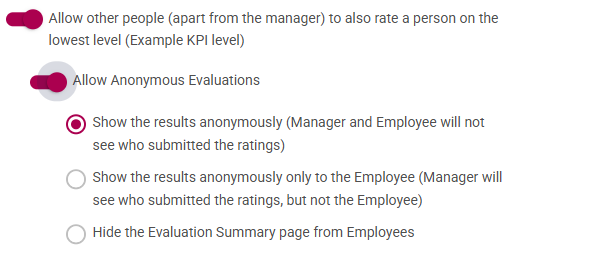](https://signature.signifyhr.co.za/uploads/images/gallery/2025-07/UjFuaDPpFoZoBNEz-image.png)
Show the comments and ratings anonymously (Manager and Employee will see the ratings and comments submitted)
---
#### **New Development - SigniChat**
##### \[Ruleset Setup\]\[Integrations\]\[Chat Bots\] Add helper text for Main Dashboard Bot Code (#116457)
- Added Helper Text for the Main Dashboard Bot Code to indicate where the Bot will display
[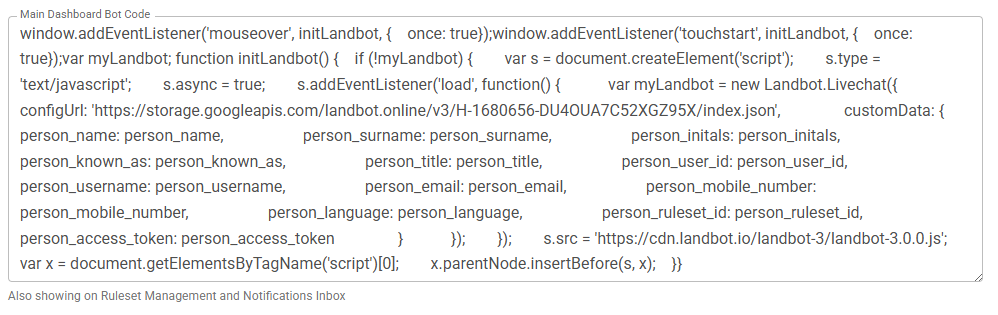](https://signature.signifyhr.co.za/uploads/images/gallery/2025-07/cGcoUgMwLOoY53Di-image.png)
- Add the Bot under the Inbox icon as well
[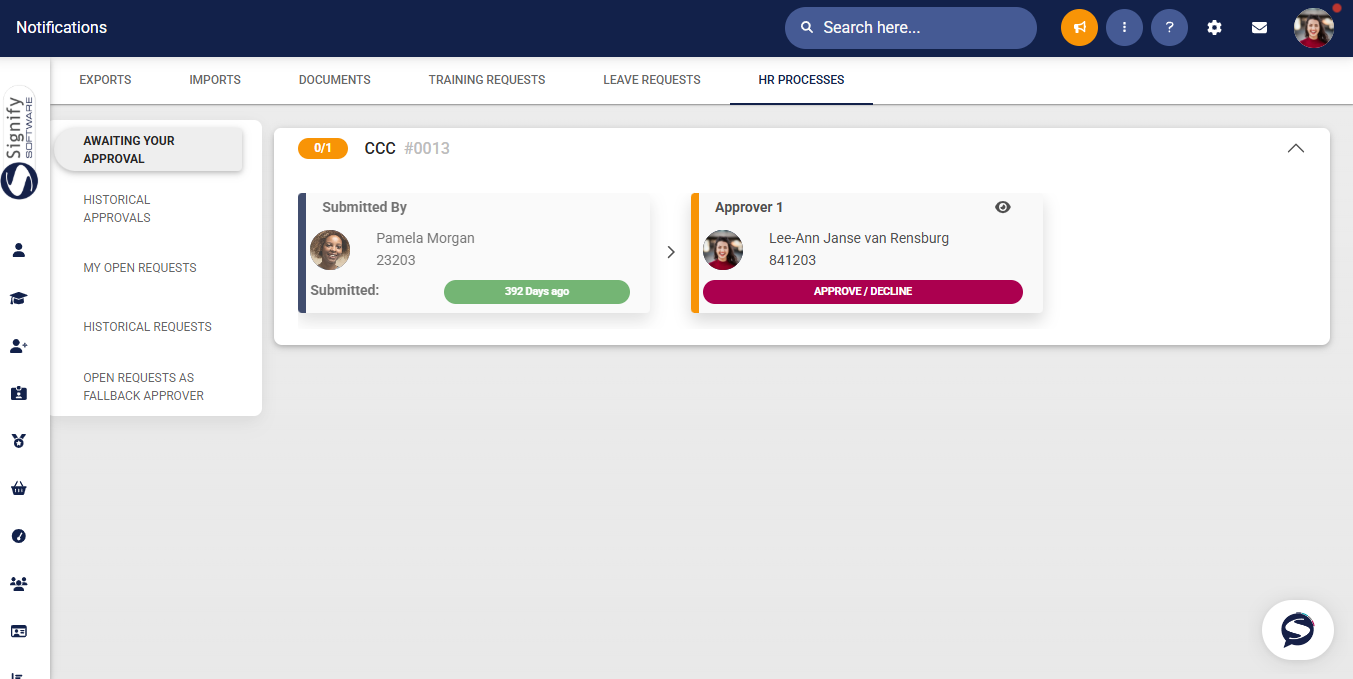](https://signature.signifyhr.co.za/uploads/images/gallery/2025-07/FvcV5wbGjCnYNAfX-image.png)
---
#### **New Development - Event Scheduling**
##### Event Scheduling: Mark Attendance (Phase 2) (#129927)
**User Story 1 – As an Event Administrator, I want to update the most relevant session’s attendance for an intake group**
- On the list of Events, click on the button to mark attendance
[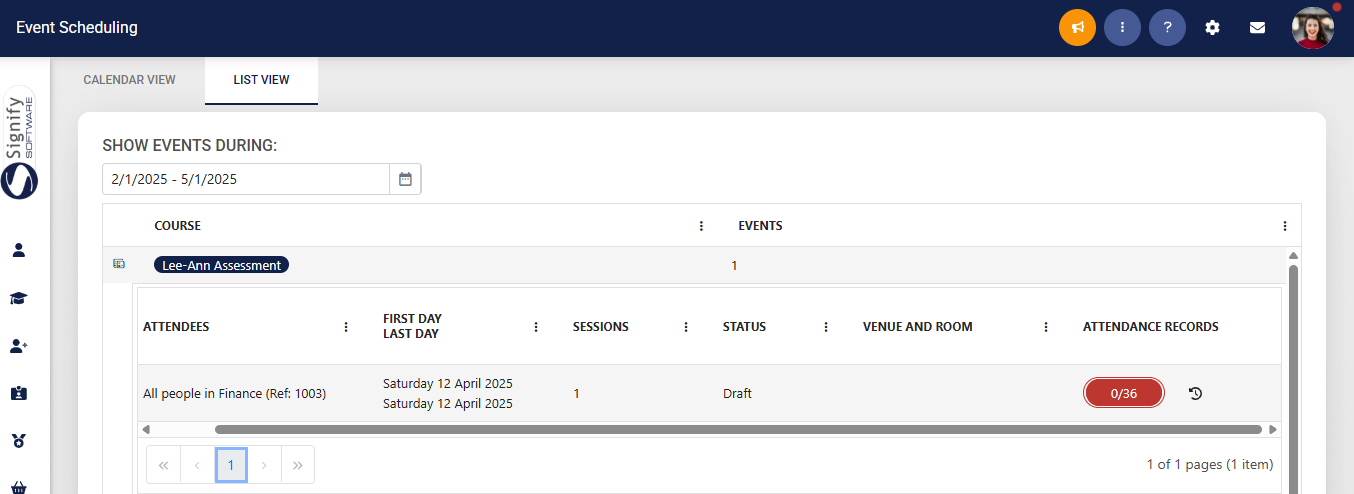](https://signature.signifyhr.co.za/uploads/images/gallery/2025-07/vrbj0qvY5OwDxFvK-image.png)
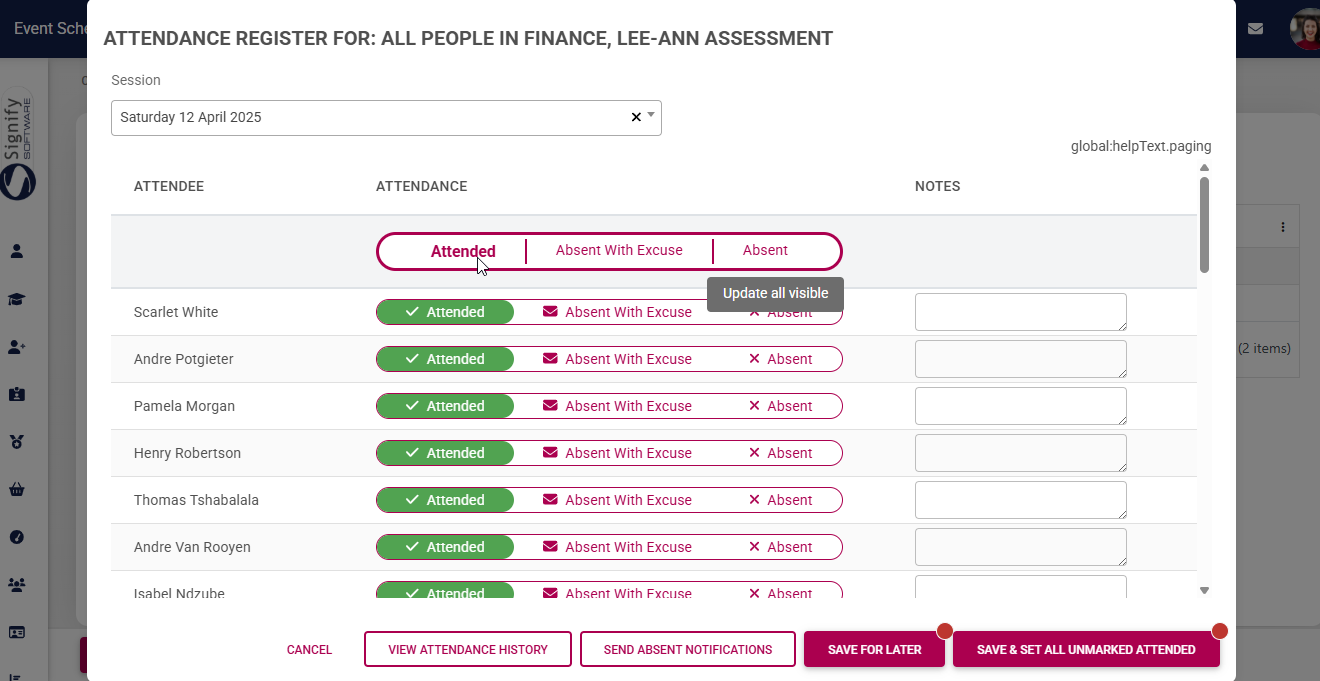
- On the next page, the attendance can be updated
- An option to mark all as Attended is available
[](https://signature.signifyhr.co.za/uploads/images/gallery/2025-07/BBsDHlj5DS9sajGu-image.png)
**User Story 2 – As an Event Administrator, I want to update the overall completion status for attendees**
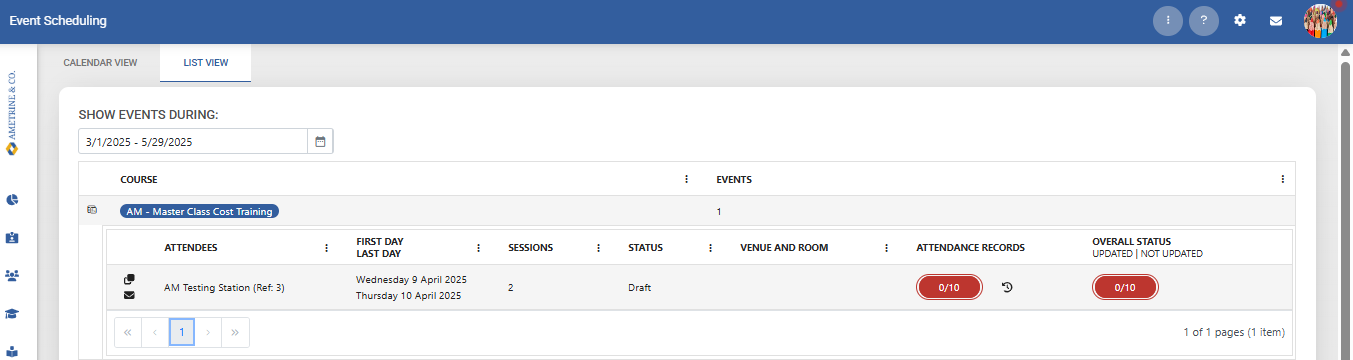
- To see the Overall Status per event, click on the button under Overall Status
[](https://signature.signifyhr.co.za/uploads/images/gallery/2025-07/V3cRmaShTs9WRBUw-image.png)
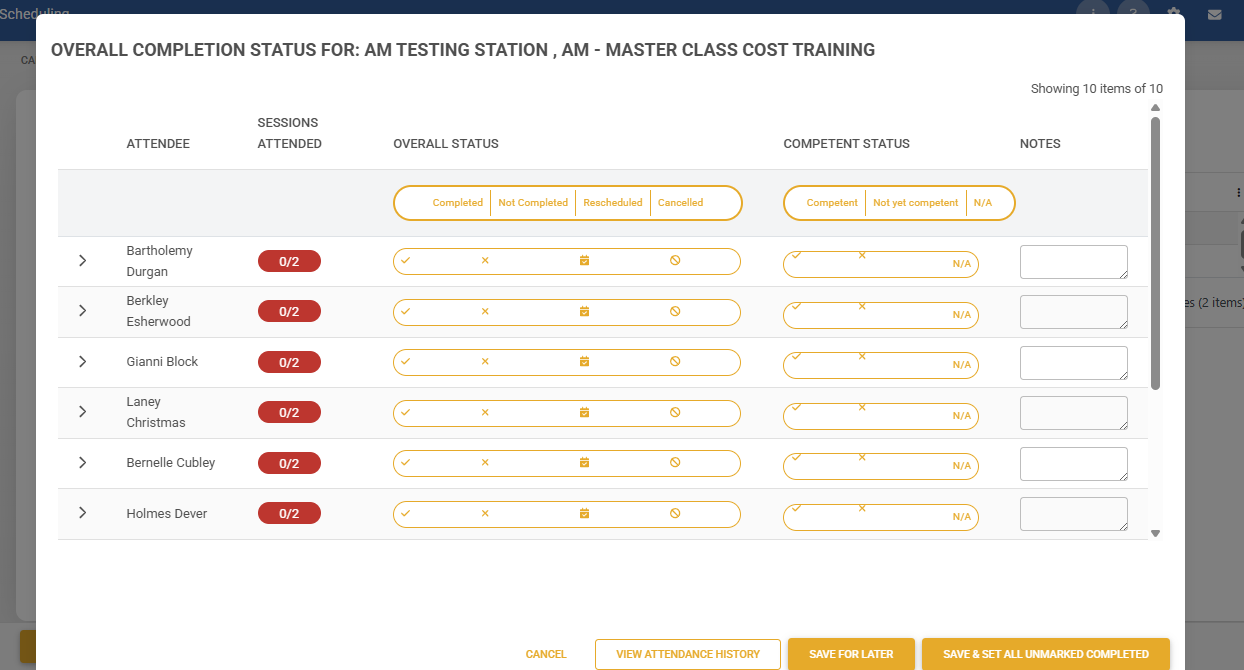
- Sessions attended are shown
- Overall Status can be updated
- An option to mark all as completed is available
- The Competent Status is also available
[](https://signature.signifyhr.co.za/uploads/images/gallery/2025-07/eupho7kH4XFiZH7y-image.png)
**User Story 3 – As an Event Administrator, I want to see the event costs per attendee and update the cost**
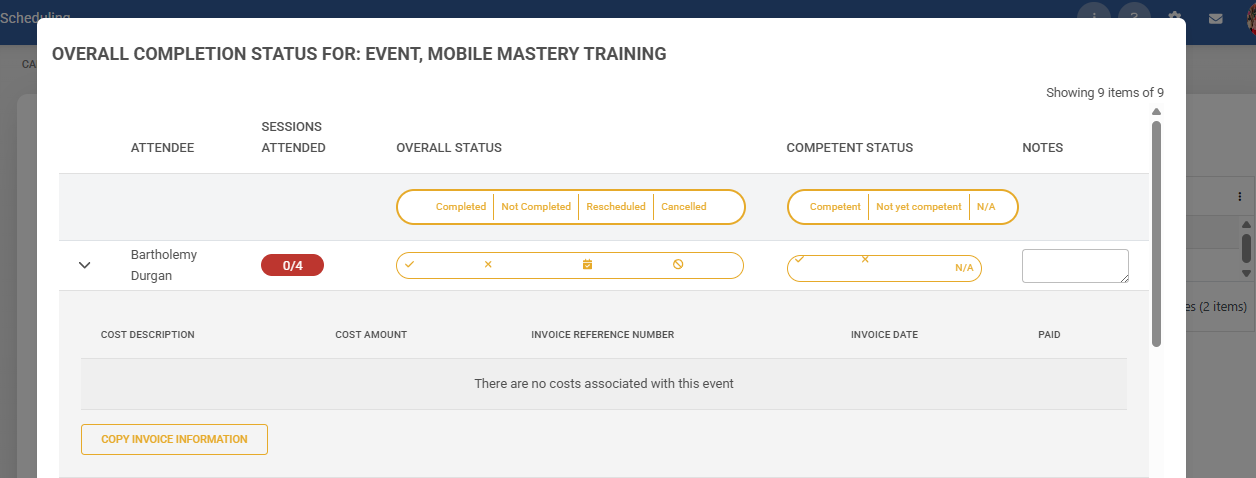
- The Training Intervention cost can be updated (if applicable - dependent on the Event Costs settings)
[](https://signature.signifyhr.co.za/uploads/images/gallery/2025-07/sO0GspdjIpz0k3gB-image.png)
**User Story 4 – As an Event Administrator, I want to view the historical attendance register**
- On the list of events, select the View Attendance History icon
[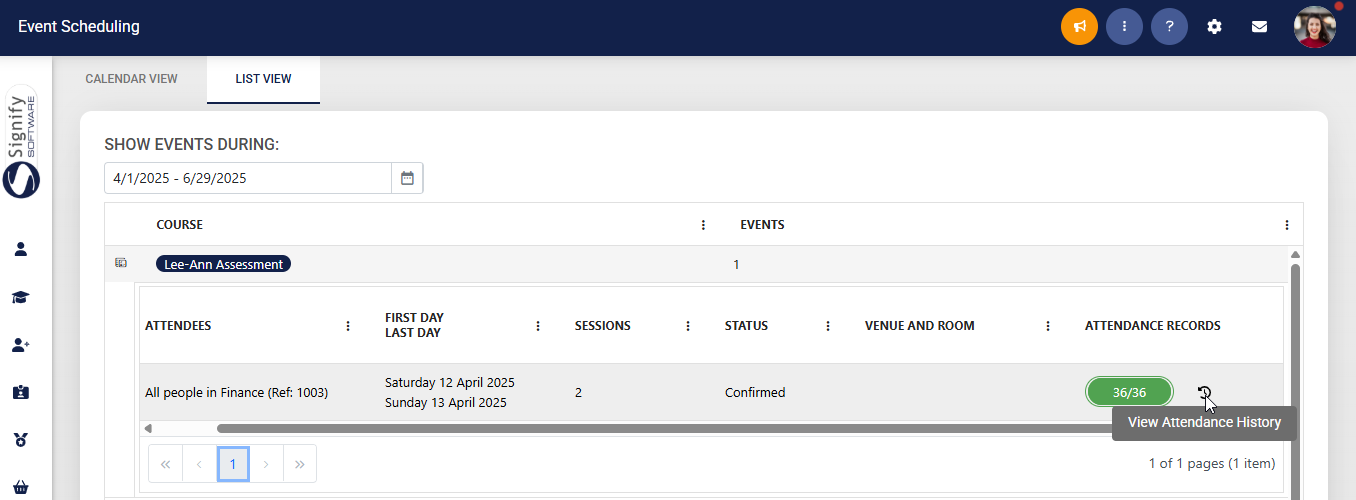](https://signature.signifyhr.co.za/uploads/images/gallery/2025-07/vncgJnaAF1JbMgGH-image.png)
- From here, the attendance for the sessions is shown
- A session can be updated
**User Story 5 – As an Event Administrator viewing the historical attendance register, I want to add a session**
TBC
**User Story 6 – As an Event Administrator viewing the historical attendance register, I want to add a new attendee**
TBC
---