# Version 9.1.99 (15 July 2024)
### People Management
#### Technical: The index page makes excessive calls (TP#116776)
**Problem**
- The People Management index page made excessive HTTP calls to retrieve the Kudos phrases and Kudos badges.
**Solution**
- This was because the calls were made in the modals.
- Moved the HTTP calls from the index page and now pass the phrases and badges through as a parameter to the relevant modals.
#### An error appears when Appointing an Employee (TP#116739)
**Problem**
- Error occurred when adding a new person, due to an error in a back-end script.
**Solution**
- Ensure that when people are added, no errors are returned, by fixing the script.
#### Country selector default to SA (TP#116648)
**Problem**
- Country selector defaults to SA
**Solution**
- The company codes will now use geolocation to determine the correct company code to select initially depending on your IP address.
- If the location cannot be determined it will currently default to US. This applies to contact details and the next of kin number fields.
#### Able to click the Delete button for an active appointment (TP#116652)
**Problem**
- You can click the delete button next to a person's active appointment and the confirmation modal is displayed.
- There is an error when you continue because this action is not allowed.
**Solution**
- Disable the delete button
#### Surname Filter - UI Improvements (TP#116242)
**Problem**
- When a letter on the Surname filter bar (the left vertical bar with “abc”,”A”, etc) is clicked, then the page filters the People with surnames that start with that letter.
- But, it is not clear enough which letter is clicked
**Solution**
- Highlight the letter more (currently it is only bolded).
- Add a round coloured circle around the letter/ highlighted background
- Show above the People cards (or list):
- Showing People with surnames starting with “G”. Click “abc” to clear.
#### UTC date is displayed for Last Login (TP#116745)
**Problem**
- When using the card view on People Management and clicking on a person's card, a preview displayd of the person's details.
- On this modal the person's last successful login date is displayed.
- Please note that this date is displayed as UTC, meaning it is 2 hours behind SA time.
- Please ensure that the UTC is converted to local time.
**Solution**
- Fix more places where ToUniversalTime() is incorrectly used.
---
### Performance Management
#### Values & Behaviours section weights stay red after entering them manually (TP#113304)
**Problem**
- There was 1 issue on the react state when the sections and items are added causing it to add some sections in duplicate to the state.
- This had the effect of removing incorrect items from the state and section items disappearing from the incorrect sections.
- Also, this leads to the invalid weight calculation to be incorrect.
**Solution**
- Fixed the problem with the duplicate sections being added to the state which also corrected the weight validation.
#### Prevent Rate button text from overflowing (TP#116231)
**Problem**
- On certain resolutions, the text on the rating button will overflow onto a second line when the columns are too narrow.
**Solution**
- Set it so the Rate buttons never wrap, meaning it will show a scrollbar if the resolution gets too small
#### Styling and alignment on rating modal (TP112866)
**Problem**
- Rating box styling is not great when all 3 are displayed
**Solution**
- Set minimum width and also make it wrap better when text is long
#### Sort order Templates (TP#116437)
**Problem**
- There is no sorting order when creating an agreement from a Template
**Solution**
- Added alphabetical sorting order
#### New Feature: Move Contracts Between Review Setups (TP#115509)
- Add a new vertical pill for Move Agreements on the Bulk Actions
- The From Review Setup should have
- All review setups
- Unallocated agreements
- All linked review setups individually
- The To Review Setups have the People Group as well
- Search on
- Person Name
- Person Surname
- Person Username
- Performance Manager Name
- Performance Manager Surname
- Performance Manager Username
- Position
- Grey out the checkbox in the list when
- The person is not part of a Custom People Group
- The person has no agreement
- Add tooltips (see mock-up)
- When selecting the Move Agreements button, a confirmation modal opens
- Please provide a reason is a required field
- When the Move Agreements button is selected
- Add the person on the Custom People Group of the selected To Review Setup
- Move the agreement (as is) to the To Review Setup
- After moving the people, show a snack message to confirm the move
- Move the Bulk Action Logs last
- Add the entry for the Move Agreements
- Show the From and To Review Setups
---
### Ruleset Management
#### Tenant users cannot update their ID Numbers (TP#112761)
**Problem**
- The new tenant users are created using only the email address specified while creating the tenant, this means that this user has no Password or ID number assigned.
- This means that the user cannot log in or change their password.
**Solution**
- When creating a new Tenant / Create from Blank or Create from R1
- Do not copy the MFA settings
- Always use *Sent OTP via Email* option
- When copying from any other Ruleset (excl R1)
- Copy the MFA settings as configured on the copy from a ruleset
---
### Competency Analysis
#### Terminated Employees appear on the My Team List (TP#116615)
**Problem**
- The system displayed terminated Employees on the My Team Tab for the Manager to complete the Competency Analysis
**Solution**
- Exclude terminated users
---
### Master Data
#### Section Items: Add the ability to filter on "Type" (TP#87260)
**Problem**
- The Section Items Master Data now contains all master data for all the PM sections, making it very difficult to work with.
- Add a filter to the search bar to filter on the Section Type.
**Solution**
- Added section type global filter for the Performance Management Section Items on Master Data
---
### Org Chart
#### The Org Chart must open from the logged-in user’s point and down (TP#116400)
**Problem**
- The system opens a new window and Displays the Org Chart from the Top Level
**Solution**
- Display the OrgChart from the Logged in User. So the logged-in user must be the parent node.
---
### System Access
#### Signify cannot log in on R1 because of no appointments and error message is incorrect (TP#116636)
**Problem**
- Cannot log in to the system.
- When resetting the password, it still does not allow the user to log in.
- The error message is also incorrect.
- It states that the Username and Password combination is incorrect.
**Solution**
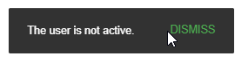
- A change has been made to the check if a user is active. A user is not active when:
- The user has no appointment
- The user's latest appointment has been terminated
- The user has been disabled
The message on the standard login and external login has been updated and will now display.
[](https://signature.signifyhr.co.za/uploads/images/gallery/2024-07/sANjbw63vlke1Ktj-image.png)
---
### SigniChat
#### Failed Group Chat Creation Makes Group Chat Creation Interface Persistent when Chat module is opened (TP#116201)
**Problem**
- When New Group Creation fails it persistently displays the Group Creation Screen when clicking on the Chat Icon.
**Solution**
- When the group creation fails, reset the display to show the chats and not the creation page
#### Sent Attachments do not Automatically Refresh the Chat (TP#116183)
**Problem**
- When Attachments are sent, the message does not refresh automatically on the other user's side.
- Manual Refresh is required to trigger the message sent (opening and closing chat again or sending another message will manually trigger).
**Solution**
- When Attachments are sent, the message refreshes automatically on the other user's side.
#### The SigniChat modal cuts off
**Problem**
- The modal cuts off at the top
**Solution**
- Gave SigniChat component a smaller fixed height
---
### All Services
#### Improve error messages (TP#113747)
**Problem**
- There are a lot of generic error messages across domains
**Solution**
- Handle domain exception with a specific code and the exception itself returns the key for the translation of the exception.
- When the code and key are available in the exception it should be used to display the error otherwise it shows the generic error.
---
### HR Processes
#### New Feature: Ability to cancel a submitted request (TP#116470)
**Problem**
- When submitting an HR Request, there is no ability to Cancel it
**Solution**
- When a request is submitted and the request is still in the **My Open Requests** section, this request should have the functionality to be cancelled
- When the **Cancel Request** button has been selected, a cancel confirmation should display where you must add the reason
- When the request has been cancelled, it moves to **Historical Request**
- Instead of submitting, it should show *cancelled* with the date and time
- **Translations** should be added for the cancel functionality
#### Search is applicable only to the 1st tab (TP#116448)
**Problem**
- When you are on the HR Processes tab, and you search, it seems it searches on exports which is the first tab
**Solution**
- Focus the global search on the current tab
---