
Objective-Setting Phase


When creating a performance agreement, it is important to understand the WHY. Why is it important to set objectives?
The answer is simple: to bring clarity. Having a clearly outlined goal makes it easier to achieve success, for managers and employees alike. For helpful tips on approaching the objective-setting phase, please visit the Before You Start page.
The following guide will help you through setting your objectives, and will assume you are using all of the following sections in a performance agreement:
- Primary Goals
- Perspectives (optional)
- Key Performance Areas
- Key Performance Indicators
- Key Performance Areas
- Perspectives (optional)
- Stretch Goals (optional)
- Perspectives (optional)
- Key Performance Areas
- Key Performance Indicators
- Key Performance Areas
- Perspectives (optional)
- Values and Behaviours (optional)
- Leadership Behaviours (optional)
- Key Competencies (optional)

Below is an example of a complete performance agreement that uses all available sections.
- It has been populated with perspectives, KPAs, KPIs, and assigned weights.
- The side menu provides an overview of the performance agreement and allows easy navigation between its sections.
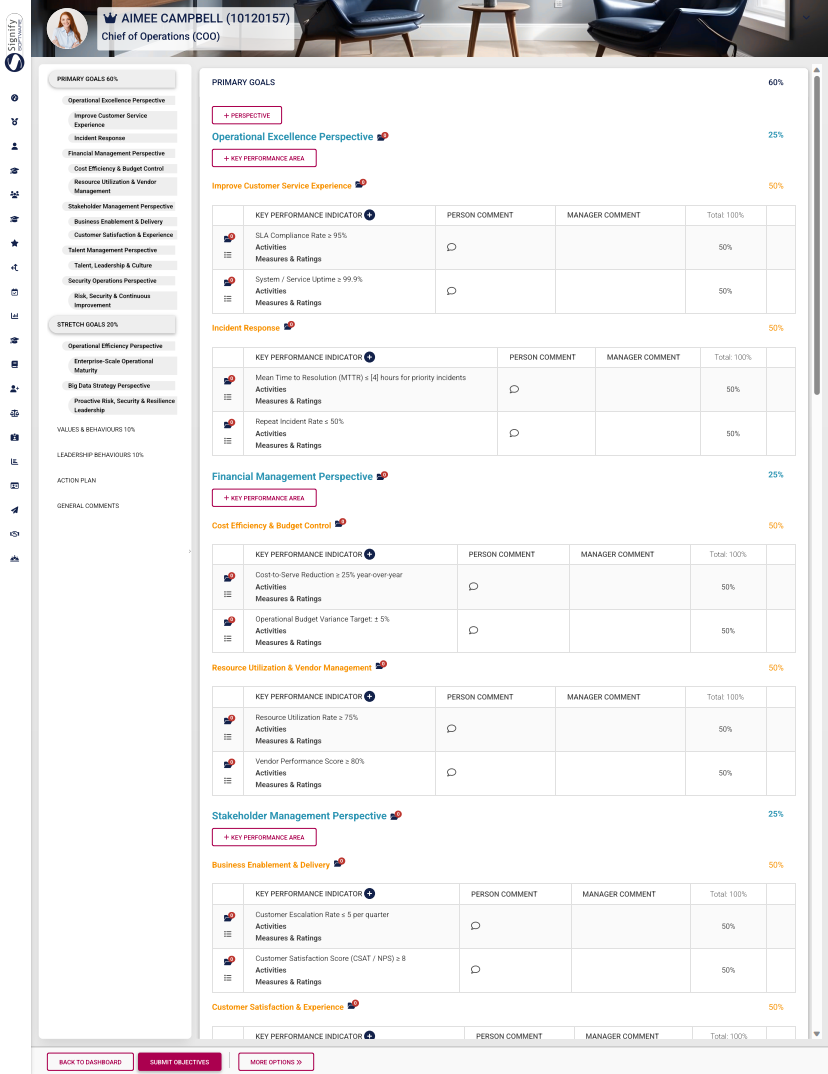
Based on your review setup, you may be using some (or all) of the aforementioned performance agreement sections. Not all sections are mandatory. If a section (such as Stretch Goals) or a feature (such as Perspectives) does not apply to your review setup, you are more than welcome to skip its tutorial and proceed to the next step.
For our example, the following review setup settings have been enabled:
The tutorial for each section of the performance agreement will include an overview flowchart of the process, followed by detailed steps showing you how to complete it. Expand the following collapsible blocks to learn more.
PRIMARY GOALS
Overview

- For this tutorial, we will assume you selected Create Blank when creating the performance agreement.
- The blank performance agreement will be populated with the sections that have been activated in the review setup's configuration. Please note, the red headings in the menu on the left show that information is missing, such as missing perspectives, KPAs, KPIs, or unbalanced weights. The weights of unbalanced sections will also flash red.
- Click +PERSPECTIVE to add a perspective.
- Select a perspective, which has been loaded to the Master Data Library.
- Assign a weight to the perspective, then click SAVE ADD NEW to continue adding more perspectives.
- Once you have finished adding all the perspectives, your agreement should look something like this:
STRETCH GOALS
Overview

VALUES AND BEHAVIOURS
The objectives in this section are automatically populated when the performance agreement is created.
Link master data values and behaviours to the performance agreement. Click here to find out how to update the Master Data Library.
LEADERSHIP BEHAVIOURS
The objectives in this section are automatically populated when the performance agreement is created.
Link master data leadership behaviours to the performance agreement. Click here to find out how to update the Master Data Library.
KEY COMPETENCIES
Link master data key competencies to the performance agreement. Click here to find out how to update the Master Data Library.

The objectives in this section are automatically populated when the performance agreement is created.
Link master data values and behaviours to the performance agreement. Click here to find out how to update the Master Data Library.