
Signify Payroll Connector for Sage
This document describes the integration process between Signify (V10) and SAGE 300 People with a specific focus on the API integration.
General business rules:
- In this case, SAGE is the source of the basic employee information.
- The integration job will be executed on the Signify V10 system and is usually scheduled to run during the night.
- Signify calls the SAGE APIs to obtain a bulk dataset with multiple fields and all employee records.
- If the expected record count of the dataset is expected to exceed 5,000, please liaise with a technical Signify consultant.
- Some of the fields in the dataset may be empty due to the fields not being populated in SAGE:
a. In such cases:
i.These fields can be maintained on the Signify system
ii. Left blank, as the client may not require it
b. If preferred, the client may choose to purchase additional modules in SAGE to maintain such fields in SAGE. It is, however, not a requirement as such fields can be maintained in Signify.
c. Example: If OFO codes are required, the Skills module in SAGE is required, alternatively, these values can be maintained on the job profile in Signify.
Process business rules:
The integration process architecture is depicted in the image below:
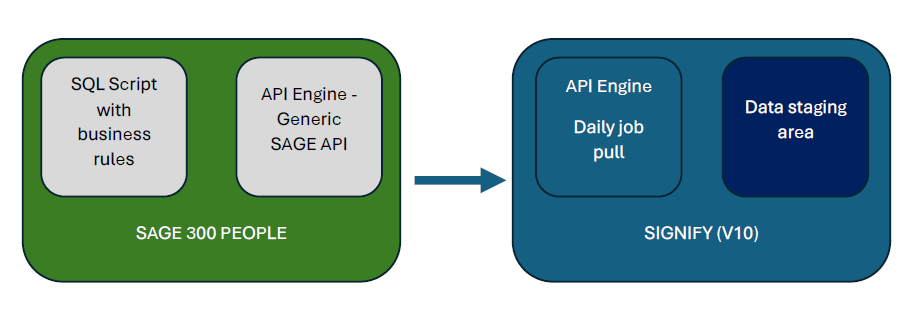
- The integration process that is executed by the Signify system calls an API on the SAGE server to retrieve a dataset with all the employee records from SAGE.
- This dataset includes active employee records, as well as employee records for employees who were terminated during the previous [TBD] months.
- Optional: An option to provide a parameter to only return records that were changed in the last [X] days will help to limit the size of data to be pulled during the API request. This option must, however, allow for all records to be pulled.
- This dataset is stored in a staging table in the Signify system, from which the data transformation is done:
- Employee number is used as the unique identifier and is used in the [EmployeeCode] and [Username] fields in Signify, where [Username] must be unique.
- If an employee number does not exist in Signify (in the [Username] field), a new record is created in Signify.
- If an employee number exists, the existing record is updated in Signify.
- If Job and Position codes are available from SAGE:
- If a job code and position code do not exist in Signify, a new job profile and linked position title are created in Signify.
- If Job and Position codes are NOT available from SAGE:
-
- If a job title and position title do not exist in Signify, a new job profile and linked position title are created in Signify.
- This may cause unused job profiles to remain in Signify and may have to be cleaned up manually.
- If an organisation unit does not exist in Signify, a new organisation unit is created in Signify.
5. For additional information regarding the SAGE 300 People APIs:
http://documenter.getpostman.com/view/7078460/UVRBn6LC#db6e0efe-8d5d-4e1b-b0e7-c6de98410295
Who to involve:
- A Signify technical consultant will ensure that the above process is implemented from a Signify point of view.
- A SAGE technical consultant (usually a SAGE channel partner) must configure the API on the SAGE hosting environment.
- SAGE clients can choose if the way to use their channel partners to configure the necessary API process.
-
Alternatively, Signify can connect the client or their channel partner with a SAGE technical consultant that Signify has partnered with on previous projects, and who can implement the process within a time effort of between 2 and 6 hours.
- The consultant will deploy a custom SQL script on the SAGE database.
- An SSL certificate must be purchased by the client and configured by the SAGE consultant.
- The SQL script is executed when the Generic SAGE API is called.
- The API is: http://{{HostName}}:{{APIPort}}/api/apibase/GenericGet/{{GenGetCodeAsSetupInPeople}}
- Below is the list of fields that are required and recommended. Fields with no comments are optional. To ensure complete information, even fields with no comment should be added if available in SAGE:
| Field Name | Field Type | Description | Required/Optional/ ESS Configured | Required / Recommended / Notes (If blank, optional) |
| externalId | Int | External Payroll Identity Id | Optional | Recommended: SAGE’s unique UserID for the employee |
| username | string | Username to allow the user to login | Required | Required – Usually the employee number |
| employeeCode | string | When empty it is set equal to username | ESS Configured | Required. Usually the employee number. If not provided, the username will be used. |
| name | string | Name of the user | ESS Configured | Recommended |
| surname | string | Surname of the user | ESS Configured | Recommended |
| emailAddress | string | Email for most notifications in the system e.g. Password reset | ESS Configured | Recommended as it can be used for communication and password resets |
| alternateEmailAddress | string | Email for reporting | ESS Configured | |
| idNumber | string | Id Number of the user | ESS Configured | Recommended, but can be blank if required by the client |
| passportNumber | string | ESS Configured | Recommended, but can be blank if |
|
| mobileNumber | string | Mobile |
ESS Configured | Recommended as it can be used for communication and password resets |
| workNumber | string | Work |
ESS Configured | |
| homeNumber | string | Home number preferably with country code | ESS Configured | |
| middleName | string | ESS Configured | ||
| initials | string | Initials of the user | ESS Configured | Recommended |
| title | string | Title of user | ESS Configured | Recommended |
| knownAs | string | The user is known as | ESS Configured | Recommended |
| homeLanguage | string | ESS Configured | ||
| gender | string | ESS Configured | ||
| race | string | ESS Configured | ||
| citizenship | string | ESS Configured | ||
| maritalStatus | string | ESS Configured | ||
| birthDay | string | Date of birth of the user | ESS Configured | |
| disability | string | A single disability for the user | ESS Configured | |
| residentialUnitNumber | string | Optional | ||
| residentialComplexName | string | Optional | ||
| residentialStreetNumber | string | Optional | ||
| residentialStreetName | string | Optional | ||
| residentialSuburbDistrict | string | Optional | ||
| residentialCityTown | string | Optional | ||
| residentialCountry | string | Required when any residential field is supplied | ||
| residentialProvince | string | Required when any residential field is supplied | ||
| residentialPostalCode | string | Optional | ||
| residentialAsPostal | string | Optional | ||
| postalUnitNumber | string | Optional | ||
| postalComplexName | string | Optional | ||
| postalStreetNumber | string | Optional | ||
| postalStreetName | string | Optional | ||
| postalSuburbDistrict | string | Optional | ||
| postalCityTown | string | Optional | ||
| postalCountry | string | Required when any postal field is supplied | ||
| postalProvince | string | Required when any postal field is supplied | ||
| postalCode | string | Optional | ||
| jobExternalId | int | The payroll job ID | Optional | |
| jobTitle | string | Name of the job | Optional | |
| jobCode | string | Code of the job | Optional | |
| occupationalCategory | string | Occupation Category of the job | Optional | |
| occupationalLevel | string | Occupational Level of the job within the category | Optional | |
| jobOfoCode | string | OFO code of the job | Optional | |
| jobGrade | string | Grade of the job | Optional | |
| gradingType | string | Grading used for the job | Optional | |
| positionExternalId | int | The payroll position Id | Optional | |
| positionTitle | string | Position Name | Optional | |
| positionCode | string | Position Code | Optional | |
| appointmentType | string | How the user is appointed in the position | Optional | |
| startDate | string | Start date in the position | Optional | |
| endDate | string | End date in the position, when empty, the user is not terminated | Optional | |
| reasonForTermination | string | The reason the user's employment has ended | Optional | |
| startDateInGroup | string | The start date in the group | Optional | |
| startDateInCompany | string | The start date in the company within the group | Optional | |
| orgLevel1_externalId | Int | Org unit Id on payroll | Optional | Recommended if available in SAGE |
| orgLevel1_name | string | Required | Required – can be hardcoded if not available in the source system | |
| orgLevel1_code | string | Unique code per ruleset for the org unit | Optional | Required |
| orgLevel1_workLocationName | string | Optional | Recommended if the client has this level in the org | |
| orgLevel2_externalId | Int | Org unit Id on payroll | Optional | Recommended if the client has this level in the org |
| orgLevel2_name | string | Optional | Recommended if the client has this level in the org | |
| orgLevel2_code | string | Unique code per ruleset for the org unit | Optional | Recommended if the client has this level in the org |
| orgLevel2_workLocationName | string | Optional | ||
| orgLevel3_externalId | Int | Org unit Id on payroll | Optional | Recommended if the client has this level in the org |
| orgLevel3_name | string | Optional | Recommended if the client has this level in org | |
| orgLevel3_code | string | Unique code per ruleset for org unit | Optional | Recommended if the client has this level in org |
| orgLevel3_workLocationName | string | Optional | ||
| orgLevel4_externalId | Int | Org unit Id on payroll | Optional | |
| orgLevel4_name | string | Optional | Recommended if client has this level in org | |
| orgLevel4_code | string | Unique code per ruleset for org unit | Optional | Recommended if client has this level in org |
| orgLevel4_workLocationName | string | Optional | ||
| orgLevel5_externalId | Int | Org unit Id on payroll | Optional | |
| orgLevel5_name | string | Optional | Recommended if the client has this level in the org | |
| orgLevel5_code | string | Unique code per ruleset for org unit | Optional | Recommended if the client has this level in the org |
| orgLevel5_workLocationName | string | Optional | ||
| orgLevel6_externalId | Int | Org unit Id on payroll | Optional | Recommended if the client has this level in the org |
| orgLevel6_name | string | Optional | Recommended if client has this level in org | |
| orgLevel6_code | string | Unique code per ruleset for the org unit | Optional | Recommended if client has this level in org |
| orgLevel6_workLocationName | string | Optional | ||
| orgLevel7_externalId | Int | Org unit Id on payroll | Optional | Recommended if the client has this level in the org |
| orgLevel7_name | string | Optional | Recommended if the client has this level in the org | |
| orgLevel7_code | string | Unique code per ruleset for the org unit | Optional | Recommended if the client has this level in the org |
| orgLevel7_workLocationName | string | Optional | ||
| orgLevel8_externalId | Int | Org unit |
Optional | Recommended if the client has this level in the org |
| orgLevel8_name | string | Optional | Recommended if the client has this level in the org | |
| orgLevel8_code | string | Unique code per ruleset for the org unit | Optional | Recommended if the client has this level in the org |
| orgLevel8_workLocationName | string | Optional | ||
| orgLevel9_externalId | Int | Org unit |
Optional | Recommended if the client has this level in the org |
| orgLevel9_name | string | Optional | Recommended if the client has this level in the org | |
| orgLevel9_code | string | Unique code per ruleset for the org unit | Optional | Recommended if the client has this level in the org |
| orgLevel9_workLocationName | string | Optional | ||
| lineManagerUsername | string | The username of the manager, existing in the system or part of the API body | Optional | |
| performanceManagerUsername | string | The username of the manager, existing in the system or part of the |
Optional | |
| departmentManagerUsername | string | The username of the manager, existing in the system or part of the |
Optional | |
| trainingManagerUsername | string | The username of the manager, existing in the system or part of the |
Optional | |
| pdpFirstApproverUsername | string | The username of the manager, existing in the system or part of the |
Optional | |
| pdpSecondApproverUsername | string | The username of the manager, existing in the system or part of the |
Optional | |
| leaveManagerUsername | string | The username of the manager, existing in the system or part of the |
Optional | |
| salaryReviewManagerUsername | string | The username of the manager, existing in the system or part of the |
Optional | |
| talentManagementManagerUsername | string | The username of the manager, existing in the system or part of the |
Optional | |
| secondaryReportingManagerUsername | string | The username of the manager, existing in the system or part of the |
Optional | |
| lineManagerOnceRemovedUsername | string | The username of the manager, existing in the system or part of the |
Optional | |
| workflowOriginatorUsername | string | The username of the manager, existing in the system or part of the |
Optional | |
| financeManagerUsername | string | The username of the manager, existing in the system or part of the |
Optional | |
| financeOfficerUsername | string | The username of the manager, existing in the system or part of the |
Optional | |
| hrOfficerUsername | string | The username of the manager, existing in the system or part of the |
Optional | |
| hrRecruitmentOfficerUsername | string | The username of the manager, existing in the system or part of the |
Optional | |
| businessUnitHrManagerUsername | string | The username of the manager, existing in the system or part of the |
Optional | |
| secondaryJobRequisitionApproverUsername | string | The username of the manager, existing in the system or part of the |
Optional | |
| leaveManagerAlternateApproverUsername | string | The username of the manager, existing in the system or part of the |
Optional |