
Version 9.1.239 (6 July 2026)
Performance Management
Resolve issue where unable to flag comments required on newly added section Rating Scale (#151807)
Problem
- When adding a new rating scale, you cannot flag that rating scale as Comment Required until the page reloads.
Solution
- Class used to indicate comment required toggle only added from server side; changed JS to add required class to relevant td after new rating scale has been added.
New setting to disable Check-Ins per Section (#148983)
Problem
- There is no setting to disable the check-ins for a section
Solution
- Add a setting per section to disable the check-ins
Add a "Save and Go to Next" Button on the KPI Ratings Screen (#144297)
Problem
- Users are currently required to click on each KPI individually to provide a rating and comments, then click “Save” before moving on to the next KPI.
- This process must be repeated for each KPI
Solution
- Introduce a “Save and Go to Next” button, which would automatically save the current KPI rating and open the next one in sequence, aiming to streamline the user experience by reducing the number of clicks required to complete their ratings
Add ratings, measures and activities character limit validations (#150981)
Problem
- When trying to import performance management templates, validate the length of the measures and ratings fields
- If the length exceeds 4000 characters, block the import
- The front-end currently blocks additional input at 2000 characters; increase the limit to 4000 characters, as we have for activities.
Solution
- The front end now allows up to 4000 characters for measures and ratings, as we had for activities
- Validation has been added to flag and block imports where the number of characters for activities, measures and ratings exceeds the 4000-character server limit
Add ratings & measures data mapping to PM contracts and templates (#149078)
Problem
- The measures and rating fields are not available when capturing KPI's and Key Competencies on Master Data
Solution
- Add the Measures and ratings fields on Master Data when capturing KPI's and Key Competencies
Report Builder
Fixed exported Excel files corrupting (#151760)
Problem
- ReportBuilder Excel exports were corrupt when reports had multiple end-user filters or empty ValueStrings. The export path also did not write the visible report filters into the workbook.
Solution
- Changed the anonymous ReportBuilder export to use a schema-preserving DataTable export path, normalised exported ValueStrings, and hardened OpenXML output for empty/columnless result sets. Added support to export user-facing filters to the report
Fix sub report not returning data (#151337)
Problem
- When opening raw data from a pivot/sub report cell, the request did not always include the same filter context that was used to build the visible report. This could cause the API to return no rows or the wrong rows.
Solution
- Updated the pivot/sub report raw-data request to send the active report filters along with the cell filter. This keeps the clicked cell data in sync with what is shown in the report table
Fix imported sub report not getting the correct pivot rows and columns (#151465)
Problem
- During import, new sub reports did not have real IDs yet, so pivot rows were all added to the first sub report.
Solution
- The import now adds pivot rows directly to the sub report that was just created, instead of using its temporary ID
Content Management
Ensure no unauthenticated requests to Next Cloud after credentials have been validated (#151765)
Problem
- File upload fails when the max allowed file size is bigger than the MaxSendMessageSize configured for the contentmanagement GRPC client in webmvc
Solution
- Remove this setting, so that file sizes are only validated against the max file upload size configured on the contentmanagement service
Add max file size setting on ruleset level (#151222)
Problem
- File size needs to be controlled per ruleset on V9
Solution
- Add a setting on Ruleset management for Max file size
- It is applicable and should be enforced for any place a file is uploaded in V9
- If it is not set on a ruleset, the default application-wide Max file limit should be enforced
Communication Portal
Resolved Audience link tables (#151527)
Problem
- Does not seem that all people in the system are available for selection under Specific People for Banners and System Messages
Solution
- All people are available for linking, and all people that have been linked are being displayed under the SPECIFIC PEOPLE target audience tab and under the SUMMARY tab
Resolved SMS body given error when not filled in (#151458 & #151457)
Problem
- Dynamic editors are being loaded with required fields, even if the toggle on sms is off; it throws a validation error unless you toggle it on and off
Solution
- Added a fix only to let JavaScript add the validators based on toggle state
When a system alert has already been saved and the user modifies the System Message, Email, or SMS content, prompt them to resend previously sent messages with the updated changes when saving (#151457)
Problem
- When a user changes something, no request to retrigger that system alert is given
Solution
- Add a new modal with a check to retrigger a system alert accordingly
Resolved Email attachments not being sent with (#151455)
Problem
- When email attachments are added, they are not sent to the Notification service to be able to send through
Solution
- Implemented a new addition on external notification to add a JSON object to data to then attach as needed
Resolved Deletion on System Alert (#151382)
Problem
- When the archive button is triggered no active styling indication it is because it is a checkbox; no styling
Solution
- Add toggle state between button classes
Resolved pencil item open (#151427)
Problem
- When a user clicks on the pencil, it needs to open in a new tab and not just trigger navigation
Solution
- Correction made to navigate to a new tab
Resolved dateTime picker 1st selection issue (#151381)
Problem
- The datetime input had a blur handler for manual typing, so when selecting a dateTime picker on the input, it opens the picker but has focus on the input. When selecting a value, it swaps focus to the picker but does not select a value
Solution
- Changed the wrapper to suppress that blur-sync while the user is interacting with the flatpickr calendar
Resolved duplicate system messages shown (#151380)
Problem
- When a user has been identified multiple times based on a specific person or People Group item, the query returns the user twice in this case, showing a system message for each indication
Solution
- Limit the distinct return of system messages
Resolved Active state on Archived button (#151382)
Problem
- When the archive button is triggered no active styling indication it is because it is a checkbox; no styling
Solution
- Add toggle state between button classes
Resolved System Alert not being able to delete (#151462)
Problem
- When deleting a system alert that has an audience defined or recipients, it fails to delete as that is not pulled with the entity to allow EF tracker to delete
Solution
- Added a change to include items so that EF Core can cascade the delete
API
Trigger V8 logout/session expiry on V9 logout (#149425)
Problem
- When a user is working on a V8 page and then logs out on V9 in a V10 system, the session on the V8 side persists
- This can lead to incorrect data being shown for clients where a device is shared, and a bookmarked deep link is used
Solution
- Add an endpoint in the V8 account controller, ExternalLogout
- Clear the V8 session
- Disconnect the SignalR hub
- Check other actions in ClearSession.aspx
- Use the endpoint when
- User clicks on logout in V9
- The session refreshes in /connect/authorize, logout when the session can no longer authenticate.
Master Data
Implement new Search-as-you-type logic to master data searching (#150446)
Problem
- Exact matches to search criteria are not on top of search results
Solution
- Add ordering
- First exact match
- The starts with
- Sub ordered by name
People Management
Add tooltip for 'None' profile summary option (#151211)
Problem
- No tooltip displayed on hover
Solution
- Add tooltip for 'None' profile summary option
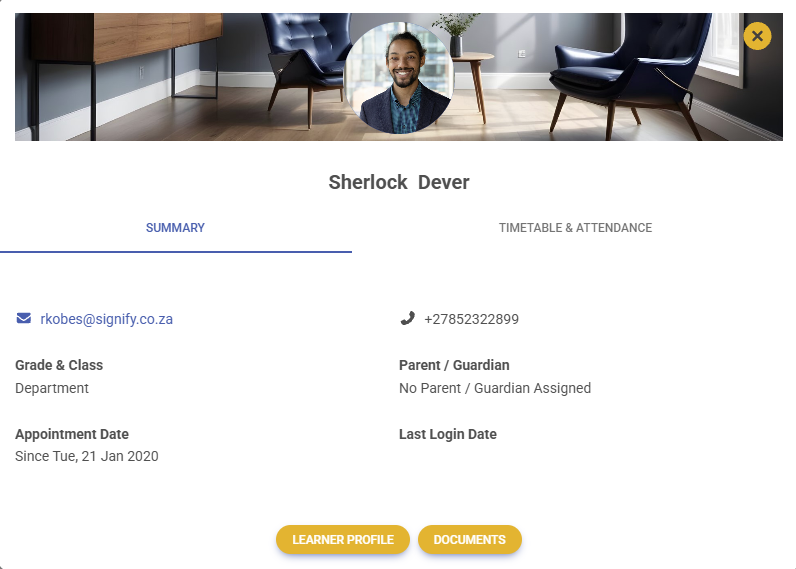
Implement educational preview and hide cursor when no profile summary selected (#144094)
- When Standard View is enabled, the View Summary tooltip is there
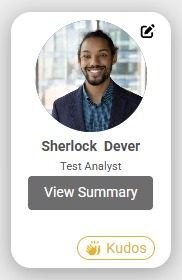
- When None is enabled, no View Summary tooltip is displayed on My Team, My Department, My Company or View/Edit People in People Management, Kudos Page, or when clicking on Colleagues (Team Insights - Span of Control)
- When None is enabled, the hand cursor is also disabled, and a normal mouse pointer is shown

- When an admin user clicks on Manage on a person’s tile in View/Edit People, the preview summary view modal is not displayed but instead navigates the administrator directly to the person’s profile
- When Educational view is enabled, the View Summary tooltip and hand cursor are displayed as well as the Educational Summary for the user's card
Identity and Authorisation
Correct redirect URL when incorrect ruleset theme key provided (#149473)
Problem
- When using an incorrect URL, the login page resets to the default theme if the provided theme key cannot be found.
- When then going to the forgot password / reset password page and trying to reset the password, the theme cookie has the invalid key, and the GetTheme call fails because the theme cannot be found, causing an error page to display.
Solution
- On the login page, when the default theme is fallen back to, update the return URL to use the default theme key and redirect to that URL to ensure the correct cookies are set.
Job Management
Request a job structure import on job and position copy (#151154)
Problem
- On copy of job and position, job structure import is not requested
Solution
- Add job structure import on copy of job and position
Implemented temp change to check for duplication during ruleset creation (#150918)
Problem
- During Ruleset creation, multiple integration events are kicked off, creating multiple items/data at the same time. During this, when job porfilers default org nodes and positions get created, likewise with the first system user, there is a default appointment also occuring doing the same checks. When it is being called, it is a race condition which ever saves first, the other fails
Solution
- Added a temp fix to catch a SQL duplication exception and either retry or call the get again to get the data, re-throw after the first retry attempt