
Version 9.1.245 (27 July 2026)
People Management
Correct permission checks on user profile pages (#152580)
Problem
- The permission checks on a user's profile aren't working correctly depending on whether the user is People Administrator / PG User or editing their own profile.
Solution
- Corrected the permissions to ensure correct users can action a profile when allowed.
- Scenario 1
- User -> Not people admin, no PG permissions, normal user. Cannot access other users' profiles
- Own Profile -> Page loads the Product Setup's ESS settings and applies those rules.
- Scenario 2
- User -> Not people admin, has PG permissions
- Can view profiles of users on PG -> Page loads the Product Setup's ESS settings -> ALSO uses PG permissions to determine sections available (View / Edit)
- Own Profile -> Page loads the Product Setup's ESS settings and applies those rules.
- Scenario 3
- User -> People Admin, WITHOUT Manage Own Data
- Can access other users' profiles -> Page loads the Product Setup's ADMIN settings
- OwnProfile -> Page loads the Product Setup's ESS settings and applies those rules.
- Scenario 4
- User -> People Admin, WITH Manage Own Data
- Can access other users' profiles -> Page loads the Product Setup's ADMIN settings
- Own Profile -> Page loads the Product Setup's ADMIN settings and applies those rules.
Add missing page mapper for Help Files (#152472)
Problem
- Page mapping missing for product roles
Solution
- Add page mapping
Last sync run times (#149383)
- Users can be created with usernames containing leading and trailing spaces (copy-paste issues), resulting in duplicate users, which can cause sync issues
Solution
- Ensure when users are created or edited, trim the username to ensure no leading or trailing spaces
Issue with Disabled toggle not being remembered + Type of Disability dropdown not opening (#151668)
- Issue with Disabled toggle not being remembered + Type of Disability dropdown not opening.
- Ensure that the dropdown values display and that when disabling, it clears the selected disabilities
Grid view not loading properly (#152084)
Problem
- Grid view sometimes doesn't load all the correct values in the columns (Appointment Date and Location in Org)
Solution
- Fixed logic that gets appointment date
Help Files: Unique Help Files Required for People Management (#152186)
Solution
- Correction made on event scheduling missing page mappings
- Added new pageTab to user guides and tours to make it specific to a page tab within a page, for example people management profile on Summary | Profile Tabs
Report Builder
Add updated response when adding filter from datasource not yet included on report (#152560)
Problem
- When adding (dragging) a data field to the filters from a datasource that has NOT yet been included on the report (at least one data field is added to the report), a "missing" error is shown, and the loading indicator is not removed from the filters
Solution
- Improved the error message returned to indicate why the field could not be added to the filters. Ensure that the loading indicator is correctly hidden when filter management fails.
Replace Highcharts with chart.js in V8 (#143430)
Problem
- Highcharts is outdated, and the renewal is too high
Solution
- Chart.js is already used in V8; replace Highcharts with chart.js
- First determine impact and provide more accurate effort before continuing with changes
Unable to drag filters onto the Filter pane when more than one data source is added to the Report (#151829)
Problem
- When adding filters after a subsequent data source has been expanded, the data field does not get added to the list of filters and JS console errors are displayed.
- Found that the event from the jsTree nodes was not correctly working after the initial node expansion and thus not triggering the filter canvas as a drop area and not registering the new item added.
Solution
- Changed how the dragged node is tracked and determined which node ID to add/remove on the start/end events.
- Also fixed up the user data source category/source role assignments which resulted in entity tracking conflicts.
- Also removed the Unit declarations on the request handlers to just return void.
Unable to Generate Curl file (#151656)
Problem
- Cannot export curl for subreport
- Subreport is also not restricted to Active People Group.
Solution
- Replicate functionality from Report view to Subreport view to allow choosing people group to run subreport for.
- Also replicated missing curl functionality.
- Report authorisation was also missing; added this.
Virtual Tours
Unable to view Learning Portal Virtual Tour (#152244)
Problem
- Virtual tours on AdditionalService pages could use the previous page’s product context, so the wrong tour was checked and nothing was displayed.
Solution
- Determine the product from the current AdditionalService URL first, using explicit menu-key mappings, before falling back to the previous page context.
User remains on top of the page when a new slide is opened, instead of being taken to the new slide (#152210)
Problem
- User remains on top of the page when a new slide is opened, instead of being taken to the new slide
Solution
- Ensure that when a new slide is added, the view scrolls down to the new slide instead of staying at the top of the view
Upward, Downward and To Top, To Bottom controls unresponsive if Tour has not been saved (#152209)
Problem
- Upward, Downward and To Top, To Bottom controls are unresponsive if the Tour has not been saved
Solution
User is taken to the top of the Virtual Tours modal when clicking on Editing tools on second slide (#152207)
Problem
- User is taken to the top of the Virtual Tours modal when clicking on Editing tools on the second slide when the modal scrolls.
Solution
- Ensure you are not taken to the top of the modal.
Pop-up from the Product Roles and Permissions overlaps the System Help box (#152593)
Problem
- Pop-up from the Product Roles and Permissions overlaps the System Help box.
Solution
- Ensure popovers/tooltips do not overlap by clearing them when opening the help modal.
Imports
Avoid updating PaySpace company frequency (#150845)
Problem
- PaySpace started rejecting updates for some existing employees because the push was trying to resend their company frequency.
- PaySpace only allows that value to be set when the employee is first created, so affected users could not be updated successfully.
Solution
- The push now keeps the employee's existing company frequency unchanged when checking whether an update is needed, and leaves that value out when updating an existing employee. New employees can still be created with the default frequency
Normalise address province and country values (#152287)
Problem
- Some employees fail to import into V9 and are skipped every day. The cause is inconsistent capturing of their home and postal address details; the province or country was entered with different spelling or casing than the official list (for example, "GAUTENG" or "gauteng " instead of "Gauteng"). Because the value does not match the standard list exactly, the import rejects those employees, so their details are never updated in V9.
Solution
- During the daily import, the province and country values are now automatically tidied up before the data is handed to V9, extra spaces are removed, and values that differ only in capitalisation are corrected to match the official master list for that client. Genuine spelling mistakes and blank values are left as-is, so nothing is silently guessed. This lets affected employees import successfully without anyone having to manually fix the source data each time.
Return success from CompleteImportAdhoc for untracked partial syncs (importId 0) (#152361)
Problem
- A background job that runs every few hours copies data from the new system (V9) into the older system (V8) - things like org structure, job structure, reporting lines, people groups, permissions and roles. Each time it runs, the copy itself works perfectly, but V8 then tries to send a "this import is finished" confirmation back to V9. For this particular scheduled sync, there is no import record to confirm, so V9 rejects the confirmation, and V8 records an error. The result is a steady stream of harmless-but-misleading "Internal Server Error" entries in the process log, roughly 48 a day per affected client, that make it look like imports are failing when they are actually succeeding. This creates noise that hides real problems, and wastes support time investigating non-issues.
Solution
- System now recognises when a completion message has no import to confirm and acknowledges it instead of raising an error. The data still syncs exactly as before; the only change is that the false errors stop being generated
Signify Scubed Integration (#151719)
Problem
- The notice period field type change is not backwards-compatible in the API.
Solution
- Introduce a new version (v2) of the Export Data gRPC API for job profiler appointment exports, while also making some adjustments to the v1 API and improving Swagger documentation handling. The main focus is on enabling a more flexible and extensible export endpoint, with improved data typing and service registration.
Performance Management
Fixing SQL parameter sniffing issue (#152528)
Problem
- The query was timing out due to SQL Server parameter sniffing, in which a cached execution plan was reused with parameter values it was not optimised for.
Solution
- Adding OPTION (RECOMPILE) forces SQL Server to generate an execution plan specific to the current parameters, resolving the performance issue.
Make the “Measurements” and “Rating” fields a mandatory requirement when employees complete their performance objectives. (#148411)
New Functionality
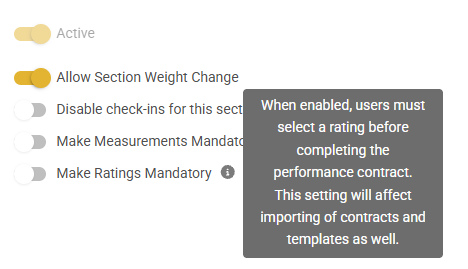
New toggles on Contract Section items:
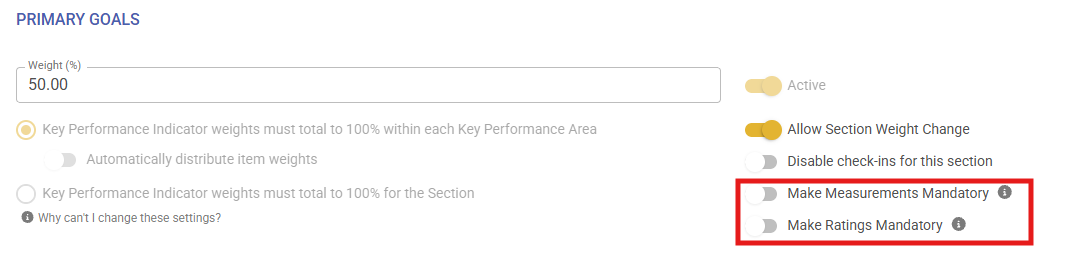
Make Measurements Mandatory (tooltip):
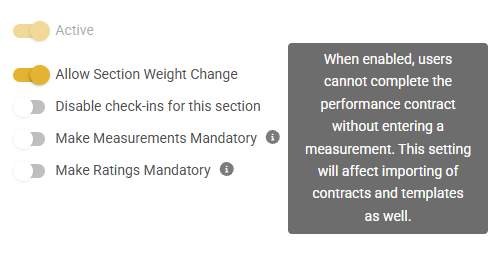
Make Ratings Mandatory (tooltip):
If the fields are marked as mandatory, the new KPI item can't be saved if nothing is filled in and shows a snack message stating that the field cannot be empty - Suggestion ticket loaded to change this -
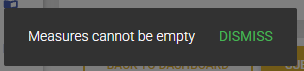
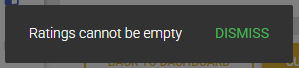


If the fields are marked as mandatory and nothing is filled in on a file Import, the file does not import and gives the following error (as expected):

Transition only triggered when moving from one section to the next (#151996)
Problem
- Improve transition when clicking 'Save and Go Next' on ratings and check-ins
Solution
- The loading indicator makes it much clearer that you have moved to the next KPI. It is now shown every time you click next
Getting error when trying to delete a linked document (URL) from the Performance Management > View Documents screen + Issue with error message translation (#151715)
Problem
- Error when trying to delete a linked document (URL)
Solution
Keep main buttons on one side of the modal (#152027)
-
Enabled
-
Cancel, Save & Save and go to next
-
-
Disabled
-
Edit Last Comment
-
Make this also an outlined button
-
-
-
Cancel
-
Edit Last Comment
-
Save
-
Save and Go to Next
Comma showing instead of Full Stop on EN-ZA (#151793)
Problem
- A comma is being displayed for the Weight of a Review Item on the page, but when trying to edit the item, a full stop is shown. The page should not show a comma
Solution
- Remove the full stop that is being displayed for the Weight of a Review Item on the page, and when trying to edit the item, a full stop is also shown
Performance management check-in | Displaying manager's comment in the person's comment column (#152177)
Problem
- The manager's comment is being displayed below the employee's comment in the "Person Comment" Section.
- It is not displaying in the "Manage comment" column.
- Resolved the issue where very long comments added by the manager were resulting in their check-in comments showing in the employee's column.
Data Warehouse
Updated Join for Data Sources for communication portal data sources (#152565)
Problem
- Currently, the JOINS are not working both ways for Communication portal data sources
Solution
- Updated the join for Communication portal data so that data sources can be selected in both ways
Updated pdmReviewYearPeopleGroupsSetup to do a full refresh with each run (#142737)
Problem
- The package does not update the pdmReviewYearPeopleGroupsSetup
Solution
- Updated pdmReviewYearPeopleGroupsSetup to do a full refresh with each run
- Updated insert staging script to only run at midnight
Change storage report to calculate data for all applications installed on Windsor (#151058)
Problem
- Currently, only MultiV8's storage is calculated
Solution
- Create a control script to cycle through all clients on Windsor
- And performance steps currently only performed on MultiV8
Notifications
Ensure the correct file size settings are used for notification templates (#152315)
Problem
- Mismatch between pages for max Notifications attachment size
Solution
- Ensure the correct file size settings are used for notification templates. Previously, it used the max file size setting for both individual files and for the total attachment size across all file uploads for the templates. Correct settings are used and displayed now
Email Notifications are not sent out a 2nd time if the Date Ranges and therefore triggers are reconfigured (#151109)
Problem
- The subscription expiry emails are not sent.
Solution
- Make small but important improvements to how notification data is handled and returned, focusing on ensuring correct data types and preventing null value issues when all subscription data is not populated for a tenant
Email Notifications: Unable to save template because of blank recipients (#151486)
- The event HrProcessSubmitterFinalApproval is not linked to a recipient
Solution
- Introduce a new HR notification recipient type for final approval submitters. The main changes add the
HrProcessSubmitterFinalApprovalrecipient code, seed data, and related database migration to support this new recipient type throughout the notification system.
Communication Portal
Fixed no chats portal size (#152554)
Problem
- When there are no discussions/system messages/chats on the communication portal, it defaults to a smaller size. On certain screen resolutions or zoom factors, the action buttons on the bottom of the modal are cut off
Solution
- Add min-height fit content to ensure that on these smaller screens or larger zoom settings, the Action buttons are still displayed
Job Management
Fixing appointment termination reason clear logic (#152386)
Problem
- When an appointment end date is cleared, the termination reason is removed on the screen but is not cleared when the changes are saved. This can result in an active appointment with no end date still displaying a termination reason.
Solution
- Updated the save logic to automatically clear the termination reason when the appointment end date is removed, ensuring data consistency.
Trigger materialise ruleset people groups after import (#152409)
Problem
- After a frontend import, no trigger is done to materialise the newly added users
Solution
- Trigger a materialise for the ruleset
Job Profiler errors on Live (#152112)
HR Processes
Fix current approval displaying as transparent (#151858)
Problem
- Current approval is transparent when the approver features twice in the request
Solution
- Ensure current approval is never transparent
Event Scheduling
As a person viewing the Book a Course on the LMS Portal, I want to see the configured version's calendar (#146214)
-
When the setting is set to use V9 Event Scheduling, show the Calendar of V9 instead of V8 Training Scheduling
-
Same functionality as on V9 to book myself on a course
-
Open in new tab
Additional scrollbars (#152216)
Problem
- Additional scrollbar on the external event calendar view as opposed to normal event scheduling view
Solution
- Update Syncfusion imports to render correctly
Dropdown menus not working on v9 Calendar (#152217)
- Child component's Collapse is never initialised and therefore does not work
- Manually initialise mdb-ui-kit Collapse
Content Management
No warning when max file size is exceeded in chat (#151789)
Problem
- No warning when max file size is exceeded in chat
Solution
- Ensure a warning message is displayed when the file upload size exceeds. Also, the exception handling middleware did not correctly return AJAX errors when the fetch API was used, causing the request to fail silently.
"Default" helper text not showing after removing the input from the field (#151794)
Problem
- "Default" helper text not showing after removing the input from the field
Solution
- Ensure default text always displays even when the value is filled in
Error when uploading files (#151765)
Problem
- File upload fails when the max allowed file size is bigger than the MaxSendMessageSize configured for the contentmanagement GRPC client in webmvc
Solution
- Remove this setting so that file sizes are only validated against the max file upload size configured on the contentmanagement service
Centralise WYSIWYG editor image upload location & functionality (#149657)
Problem
- When adding an image to a WYSIWYG editor (currently using SyncFusion RTE), without any additional configuration, the image is uploaded to BROWSER STORAGE and visible to the user for a limited time until the image gets removed.
Solution
- Centralise WYSIWYG editor image upload location & functionality
Dashboards
[Main Dashboard] Round Button Edges (#151957)
- Straight corners of buttons do not match the rest of the widget.
Direct Reports - Card Display (#151968)
Organisational Structure
Org Structure Bug (#152026)
Problem
- Error when attempting to select the positions that were displayed after the load more option was selected
Learning Management
Switching between classes stops the Marksheet Page Refresh (#151991)
Problem
- When a user switched between classes on a marksheet, the new marksheet could remain blank until the page was manually refreshed.
- This interrupted mark capturing and made the class switch appear unsuccessful.
Solution
- The class-switching flow has been updated to complete cleanly and display the selected class's marksheet without requiring a manual refresh.